1. Киришүү
This manual provides comprehensive instructions for the operation and maintenance of your ZEALOT P12 60W Portable Bluetooth Speaker. Please read this manual thoroughly before using the device to ensure proper function and to maximize your listening experience. Retain this manual for future reference.
2. Продукт бүтүп калдыview
2.1 Негизги өзгөчөлүктөрү
- 60W total audio output for clear and powerful sound.
- Integrated deep bass subwoofer for enhanced low frequencies.
- Жеңил ташуу үчүн портативдик жана жеңил дизайн.
- IPX5 суу өткөрбөө рейтинги, сыртта колдонууга ылайыктуу.
- 8000mAh built-in battery providing up to 28 hours of playtime.
- Multiple connectivity options: Bluetooth 5.3, TF card, AUX input, USB drive.
- EQ modes for customizable sound effects (Bass, Vocal, Normal).
2.2 Пакеттин мазмуну
- ZEALOT P12 Bluetooth Speaker
- Электр кабели
- Колдонуучунун Колдонмосу (бул документ)
2.3 Компонентти идентификациялоо

Сүрөт 1: Алдыңкы view of the ZEALOT P12 Bluetooth Speaker, showing the main grille and control panel.
2-сүрөт: Арткы view of the ZEALOT P12 Bluetooth Speaker, illustrating the protective flap covering the TF card slot, AUX input, DC5V charging port, and USB port.

Figure 3: Close-up of the control panel, highlighting the power, EQ, mode, play/pause, and volume buttons.
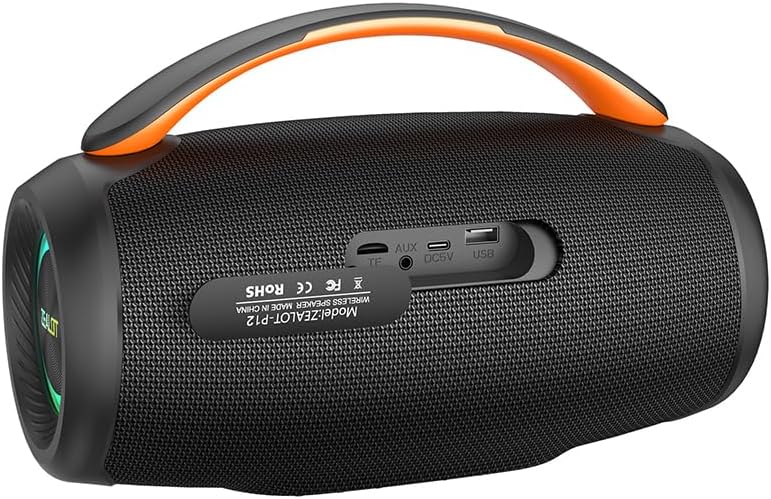
Figure 4: Diagram illustrating the internal acoustic components of the ZEALOT P12, including a 10W tweeter, 50W woofer, and two independent bass passive diaphragms for 360-degree sound.
The speaker features a top-mounted control panel with buttons for power, EQ mode selection, input mode switching (M), play/pause, and volume adjustment. The rear panel houses protected ports for charging, auxiliary input, TF card, and USB drive.
3. Орнотуу
3.1 Алгачкы заряддоо
- Биринчи колдонуудан мурун динамикти толук заряддаңыз.
- Locate the DC5V charging port on the rear of the speaker, typically under a protective flap.
- Connect the provided power cable to the speaker's charging port and a suitable USB power adapter (not included).
- Заряддоо индикаторунун жарыгы күйөт. Толук заряддалгандан кийин жарыктын түсү өзгөрүшү же моделине жараша өчүшү мүмкүн.
3.2 Күйгүзүү/өчүрүү
- Күйгүзүү үчүн: басып, кармап туруңуз Кубат баскычы (
 ) for approximately 3 seconds until you hear an audible prompt or see the indicator lights activate.
 - Өчүрүү үчүн: басып, кармап туруңуз Кубат баскычы () for approximately 3 seconds until the indicator lights turn off.
4. Иштөө нускамалары
4.1 Bluetooth жупташтыруу
- Динамик күйгүзүлүп, Bluetooth режиминде экенин текшериңиз. Болбосо, басыңыз Режим баскычы (M) to switch to Bluetooth mode. The Bluetooth indicator light will flash, indicating it is ready for pairing.
- On your smartphone, tablet, laptop, or other Bluetooth-enabled device, navigate to the Bluetooth settings.
- Издөө available devices. The speaker will appear as "ZEALOT P12".
- Select "ZEALOT P12" to connect. Once connected, the Bluetooth indicator light will become solid, and you may hear a confirmation tone.
- Эгер сырсөз суралса, "0000" киргизиңиз.
4.2 Аудио ойнотуу
- Ойнотуу/тындыруу: басыңыз Ойнотуу/тындыруу баскычы () to start or pause playback.
- Көлөмү: басыңыз "+" button көлөмүн көбөйтүү.
- Үнүн азайтуу: басыңыз "-" button үнүн азайтуу.
- Кийинки трек: басып, кармап туруңуз "+" button болжол менен 2 секунд.
- Мурунку трек: басып, кармап туруңуз "-" button болжол менен 2 секунд.
4.3 EQ режимдери
The ZEALOT P12 offers three distinct EQ sound effects to optimize your listening experience:
Figure 5: Illustration of the EQ button and its three modes: Bass, Vocal, and Normal.
- басыңыз EQ баскычы () жеткиликтүү режимдерди айланып өтүү үчүн:
- Бас: Enhances low-frequency sounds for a deeper, richer bass experience.
- Вокал: Optimizes mid-range frequencies for clearer vocals.
- Кадимки: салмактуу үн про камсыз кылатfile жалпы угуу үчүн ылайыктуу.
4.4 True Wireless Stereo (TWS) Pairing (Optional)
If you have two ZEALOT P12 speakers, you can pair them together for a stereo sound experience.
- Эки динамик тең күйгүзүлгөнүн жана эч кандай Bluetooth түзмөгүнө туташкан эмес экенин текшериңиз.
- Бир динамикте (бул негизги спикер болот) басып, кармап туруңуз Режим баскычы (M) for approximately 3 seconds. You will hear a prompt indicating TWS pairing mode.
- The primary speaker will automatically search for the secondary speaker. Once connected, you will hear a confirmation tone, and the indicator lights on both speakers will synchronize.
- Now, connect your Bluetooth device to the primary speaker as described in section 4.1. Audio will play in stereo through both speakers.
- TWSди ажыратуу үчүн басып, кармап туруңуз Режим баскычы (M) on either speaker for 3 seconds.
5. Байланыш
In addition to Bluetooth, the ZEALOT P12 supports several other audio input methods:
- TF картасын ойнотуу: Insert a TF (microSD) card containing MP3 audio filesти TF картанын уячасына киргизиңиз. Динамик автоматтык түрдө TF карта режимине которулуп, ойнотуу башталат.
- AUX киргизүү: Connect an audio device (e.g., MP3 player, PC) to the speaker's AUX port using a 3.5mm audio cable (not included). Press the Режим баскычы (M) AUX режимине өтүү үчүн.
- USB дискти ойнотуу: MP3 аудиосу бар USB флэш-дискти салыңыз files into the USB port. The speaker will automatically switch to USB mode and begin playback.
6. Заряддоо жана Батарея
The ZEALOT P12 is equipped with an 8000mAh rechargeable battery, providing extended playtime.
- Батареянын иштөө мөөнөтү: A full charge provides up to 28 hours of continuous music playback, depending on volume level and audio content.
- Заряддоо: Use the provided power cable and a standard USB power adapter (DC5V) to charge the speaker. The charging port is located on the rear panel.
- Төмөн батарея көрсөткүчү: When the battery level is low, the speaker may emit an audible warning or an indicator light may flash. Charge the speaker promptly to avoid interruption.
7. Техникалык тейлөө
7.1 Суу өткөрбөөчүлүк рейтинги (IPX5)
The ZEALOT P12 speaker has an IPX5 waterproof rating, meaning it is protected against low-pressure water jets from any direction. This makes it suitable for outdoor use and resistant to splashes, rain, and sweat.
- Маанилүү: IPX5 rating does not mean the speaker can be submerged in water. Do not immerse the speaker in water.
- Ensure the protective flap covering the charging and input ports on the rear is securely closed when using the speaker near water or in wet conditions.
7.2 Жалпы кам көрүү
- Динамикти жумшак, кургак чүпүрөк менен тазалаңыз. Абразивдүү тазалагычтарды же эриткичтерди колдонбоңуз.
- Avoid exposing the speaker to extreme temperatures, direct sunlight for prolonged periods, or high humidity.
- Колдонулбаганда динамикти салкын, кургак жерде сактаңыз.
- Динамикти өз алдынча бөлүктөргө бөлүүгө же оңдоого аракет кылбаңыз, анткени бул кепилдикти жокко чыгарат.
8. Кыйынчылыктарды
| Көйгөй | Мүмкүн себеп | Чечим |
|---|---|---|
| Динамик күйбөйт. | Батарея аз. | Динамикти толук заряддаңыз. |
| Үн жок. | Үнү өтө төмөн; киргизүү режими туура эмес; түзмөк туташкан эмес. | Increase volume; press 'M' button to select correct input mode; ensure Bluetooth device is paired or AUX/USB/TF card is properly inserted. |
| Bluetooth байланышы туруксуз же иштебей калды. | Speaker too far from device; interference; device's Bluetooth off. | Move speaker closer to device (within 10 meters); avoid obstacles; ensure Bluetooth is enabled on your device; try re-pairing. |
| TWS жупташтыруу ишке ашпай калды. | Башка түзмөктөргө туташкан динамиктер; туура эмес жупташтыруу процедурасы. | Ensure both speakers are disconnected from all Bluetooth devices before initiating TWS pairing. Follow TWS pairing instructions carefully. |
9. Техникалык шарттар

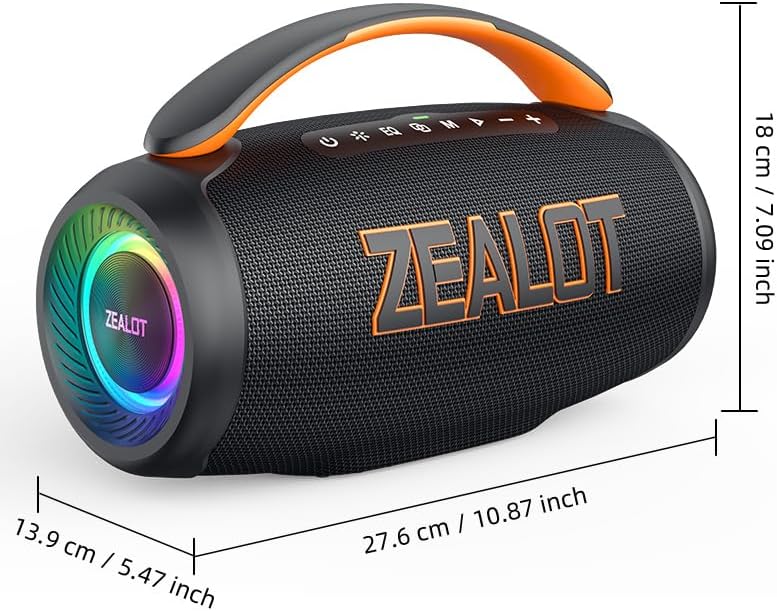
Figure 6: Dimensions of the ZEALOT P12 Bluetooth Speaker: 27.6 cm (10.87 inch) length, 13.9 cm (5.47 inch) width, 18 cm (7.09 inch) height.
| Өзгөчөлүк | Деталь |
|---|---|
| Модель аты | ЗИЛОТ P12 |
| Динамик түрү | Көчмө спикер |
| Байланыш технологиясы | Bluetooth 5.3, Auxiliary (3.5mm), TF Card Slot, USB Port |
| Аудио чыгаруу режими | Стерео |
| Динамиктин максималдуу чыгаруу күчү | 60 Ватт |
| Frequency Response | 20 Гц - 20 КГц |
| Батарея сыйымдуулугу | 8000mAh |
| Оюн убактысы | 28 саатка чейин |
| Суу өткөрбөйт рейтинги | IPX5 |
| Продукциянын өлчөмдөрү | 27.6D x 13.9W x 18H cm (10.87D x 5.47W x 7.09H inches) |
| Элемент Салмагы | 1.55 кг (1550 грамм) |
| Материал | Акрилонитрил бутадиен стирол (ABS) |
| Шайкеш түзмөктөр | Smartphone, Tablet, Laptop, PC, Television, Projector |
| Камтылган компоненттер | Электр кабели |
| Өндүрүүчү | ЗЕАЛОТ |
| Келип чыккан өлкө | Кытай |
10. Кепилдик жана колдоо
For warranty information and technical support, please refer to the warranty card included with your product or contact ZEALOT customer service directly. Contact details can typically be found on the manufacturer's official webсайтында же продуктунун таңгагында.
Кепилдик дооматтары үчүн сатып алганыңыздын далилин сактап коюңуз.


