Introduction
Thank you for choosing the DCHK Haribo HBT-03 Noise Cancelling Bluetooth Earphones. This manual provides essential information for the safe and efficient use of your new earphones. Please read it thoroughly before use and retain it for future reference.
Пакеттин мазмуну
Пакетте бардык буюмдар бар экенин текшериңиз:
- Wireless Earphones (Left and Right)
- LCD сенсордук экраны бар кубаттоочу кутуча
- Кулак жаздыкчалары (S, M, L өлчөмдөрү)
- USB заряддоо кабели
- Колдонуучунун Колдонмосу (бул документ)

Image: The package includes the wireless earphones, the charging case, three pairs of ear tips in sizes S (11.4mm), M (11.9mm), and L (13.0mm), and a USB charging cable.
Продукт бүттүview
The DCHK Haribo HBT-03 earphones feature a compact design with advanced audio capabilities.
- 13 мм динамикалык драйверлер: Deliver powerful bass and clear mid-high tones.
- Bluetooth 5.4: Зымсыз байланыштын туруктуу жана натыйжалуу иштешин камсыз кылат.
- Активдүү ызы-чууну жокко чыгаруу (ANC): Имерсивдүү угуу тажрыйбасы үчүн айланадагы ызы-чууларды азайтат.
- Көшүү үн режими: Аудио угуп жатканда айланаңызды угууга мүмкүнчүлүк берет.
- LCD Touch Screen Charging Case: Provides intuitive control over various functions.
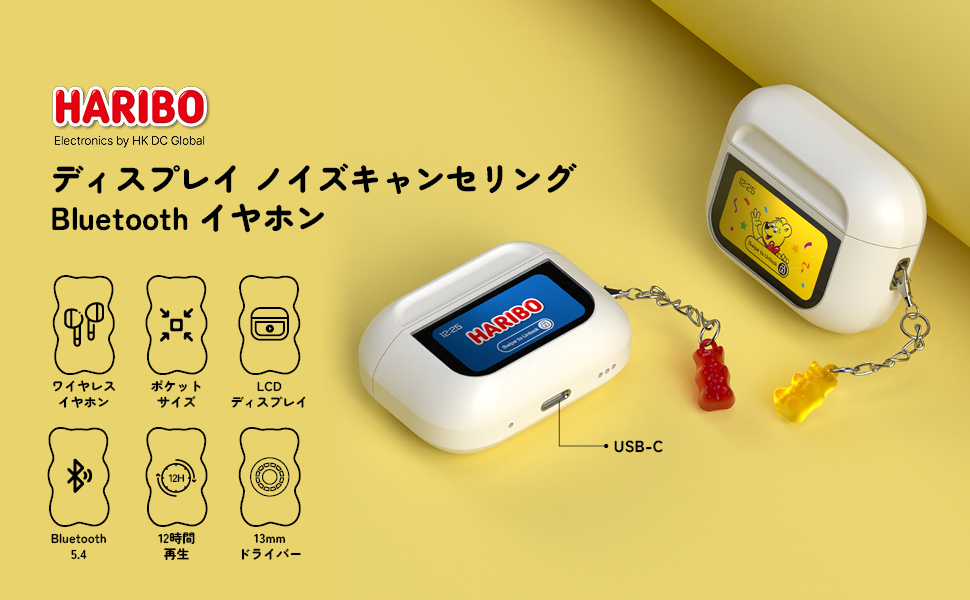
Image: An illustration of the Haribo HBT-03 earphones and their charging case, emphasizing key features such as wireless design, pocket-sized form factor, LCD display, Bluetooth 5.4 connectivity, up to 12 hours of playback, and 13mm dynamic drivers.
Жайгашуу
1. Баштапкы заряддоо
Биринчи колдонуудан мурун наушникти жана кубаттоочу кутучаны толук заряддаңыз.
- Кулакчындарды заряддоо кутусуна салыңыз.
- USB кубаттоо кабелин корпустагы кубаттоо портуна жана кубат булагына туташтырыңыз.
- The LCD screen on the case will display the charging status. A full charge takes approximately 1.5 hours for the case.

Image: This graphic illustrates the charging and playback times: 1.5 hours for a full charge of the case, 5 hours of playback for the earphones alone, and up to 12 hours of total playback when used with the charging case.
2. Bluetooth Жупташтыруу
- Заряддоо кутучасын ачыңыз. Кулакчындар автоматтык түрдө жупташтыруу режимине өтөт.
- Түзмөгүңүздө (смартфон, планшет ж.б.) Bluetooth иштетиңиз.
- Издөө жеткиликтүү Bluetooth түзмөктөрүн тандап, тизмеден "HBT-03" тандаңыз.
- Once connected, the LCD screen on the case may indicate successful pairing.
Эгер аппаратта Bluetooth иштетилген болсо, кулакчындар кутудан чыгарылганда акыркы жупташтырылган түзмөккө автоматтык түрдө кайра туташат.

Image: This image highlights the benefits of Bluetooth 5.4 connectivity, including an enhanced communication range of 9.7 meters, high-quality audio transmission, optimized power consumption, and excellent connection stability.
Иштөө нускамалары
Наушниктин сенсордук башкаруу элементтери
The earphones feature touch-sensitive areas for control. Specific functions may vary based on the number of taps or long presses.
- Ойнотуу/тындыруу: Наушникти бир жолу таптаңыз.
- Кийинки трек: Оң наушникти эки жолу таптаңыз.
- Мурунку трек: Сол наушникти эки жолу таптаңыз.
- Чалууга жооп берүү/аяктоо: Наушникти бир жолу таптаңыз.
- Чакырууну четке кагуу: Кулакчындардын бирин көпкө басып туруңуз.
- Үн Жардамчысын жандыруу: Наушникти үч жолу таптаңыз.
Charging Case LCD Touch Screen Functions
The full-color LCD touch screen on the charging case provides access to various settings and controls. Swipe left/right or tap icons to navigate.

Image: A comprehensive display of the various functions available on the charging case's LCD touch screen. These include battery level display, track control, volume adjustment, equalizer settings (Standard, Classic, Jazz, Rock, Pop), noise reduction/ambient sound mode switching, flashlight activation, screen lock, language selection, earphone locator, remote camera control, timer, power off, and factory reset options.
- Батарея деңгээлин көрсөтүү: Shows real-time battery status of both earphones and case.
- Музыканы ойнотууну көзөмөлдөө: Тректерди ойноо, тындыруу, өткөрүп жиберүү.
- Үндү тууралоо: Control audio volume directly from the case.
- EQ режимдери: Select from 5 preset equalizer modes (Standard, Classic, Jazz, Rock, Pop) to optimize sound for different genres.
- Ызы-чууну башкаруу режимдери: Switch between Active Noise Cancelling (ANC) and Ambient Sound Mode.
- Экран жарыктыгын тууралоо: Дисплейдин жарыктыгын өзгөртүңүз.
- Тилди алмаштыруу: Дисплей тилин өзгөртүңүз.
- Earphone Search: Helps locate misplaced earphones.
- Кол чырак: Кыналган фонарь функциясы.
- Таймер: Артка саноо таймерин коюңуз.
- Камераны алыстан башкаруу: Use the case to trigger your phone's camera shutter.
- Обои өзгөртүү: Экрандын фонун өзгөчөлөштүрүү.
Техникалык тейлөө
Тазалоо
- Наушниктерди жана заряддоо кутусун жумшак, кургак, түксүз чүпүрөк менен дайыма тазалап туруңуз.
- Кулагынын учтарын алып салып, жумшак самын жана суу менен тазалаңыз, анан кайра кийер алдында жакшылап кургатып алыңыз.
- Абразивдүү тазалагычтарды, спиртти же химиялык эриткичтерди колдонбоңуз.
Сактагыч
- Кулакчындарды коргоо жана кубаттап туруу үчүн колдонулбаган учурда кубаттоо кутучасында сактаңыз.
- Avoid storing in extreme temperatures, high humidity, or dusty environments.
Проблемаларды чечүү
| Көйгөй | Мүмкүн себеп | Чечим |
|---|---|---|
| Кулакчындар күйбөйт. | Батарея аз. | Charge the earphones and case fully. |
| Түзмөк менен жупташтыруу мүмкүн эмес. | Түзмөктө Bluetooth өчүк; кулакчындар жупташтыруу режиминде эмес; түзмөктөн өтө алыс. | Ensure Bluetooth is on. Place earphones in case, close, then open to re-enter pairing mode. Move closer to device. |
| Үн жок же үн сапаты начар. | Volume too low; ear tips not properly fitted; dirty ear tips/grilles; connection issue. | Adjust volume. Try different ear tip sizes. Clean ear tips and grilles. Reconnect Bluetooth. |
| Сенсордук башкаруу элементтери жооп бербей жатат. | Dirty touch sensor; temporary software glitch. | Clean the touch sensor area. Restart earphones by placing them in the case and taking them out. |
| Charging case LCD screen is blank. | Low battery on case. | Заряддоо кутучасын заряддаңыз. |
Техникалык шарттар
| Өзгөчөлүк | Деталь |
|---|---|
| Модель аты | HBT-03 |
| Бренд | DCHK |
| Байланыш технологиясы | Зымсыз (Bluetooth 5.4) |
| Айдоочунун өлчөмү | 13мм динамикалык драйвер |
| Noise Control | Активдүү ызы-чууну жокко чыгаруу |
| Frequency Response | 20 KHz (Upper limit, typical range 20Hz-20kHz) |
| Импеданс | 16 Ом |
| Башкаруу ыкмасы | Touch (Earphones & Case LCD) |
| Сууга туруктуулук деңгээли | IPX4 (Сууга туруктуу) |
| Кулакчын ойнотуу убактысы | 6-8 саат (бир заряд) |
| Жалпы ойнотуу убактысы (кеп менен) | 12 саатка чейин |
| Ишти заряддоо убактысы | Болжол менен 1.5 саат |
| Материал | Акрилонитрил бутадиен стирол (ABS) |
| Пакеттин өлчөмдөрү | 11.2 x 7.6 x 3.2 см |
| Салмагы | 100 г |
Кепилдик жана колдоо
For warranty information and customer support, please refer to the contact details provided with your purchase or visit the official DCHK webсайт. Кепилдик дооматтар үчүн сатып алганыңыздын далилин сактаңыз.


