Introduction
The Linkind Smart Solar Pathway Lights SP6 are advanced outdoor lighting solutions designed to enhance your yard, patio, or garden with customizable illumination. These lights feature in-app pattern switching, a wide range of color options, and dual charging capabilities for extended performance. They are built to withstand various weather conditions, providing reliable and decorative lighting year-round.

Image: Linkind Smart Solar Pathway Lights SP6 in a garden setting, showcasing vibrant color-changing effects and distinct light patterns on a pathway and surrounding grass.
Кутуда эмне бар
Сиздин пакетте бардык компоненттер бар экенин текшериңиз:
- 4 x Linkind Smart Solar Pathway Lights SP6 (Lamp)
- 8 x Plastic Rods (2 per light for adjustable height)
- 4 x Жер коюму
- 1 x User Manual
- 1 x Lens Kit (includes 5 lenses, 4 for use and 1 spare)

Сүрөт: жарылган view of the Linkind Smart Solar Pathway Lights SP6 components, including the lamp unit, plastic rods, ground stake, user manual, and interchangeable lenses, alongside the product packaging.
Жайгашуу
Ассамблея
- Attach the desired plastic rod(s) to the base of the lamp unit. You can use one or two rods to adjust the height of the light.
- Securely attach the ground stake to the bottom of the last plastic rod.
- Choose one of the five patterned lenses from the lens kit and insert it into the lens slot on the underside of the lamp unit. There are four lens slots, allowing for different light patterns.
- Press the assembled light firmly into the ground in your desired outdoor location. Ensure the solar panel on top is exposed to direct sunlight for optimal charging.

Image: A visual guide demonstrating the simple assembly of the pathway light, showing how the lamp, plastic rods, and ground stake connect, along with the interchangeable lenses.
Колдонмону жүктөп алуу жана туташуу
To unlock the full smart features of your Linkind Smart Solar Pathway Lights, download and connect them to the AiDot app.
- Download the AiDot App: Издөө "AiDot" in the Apple App Store (for iOS) or Google Play Store (for Android) and download the application.
- Sign In or Create Account: Open the AiDot app and either sign in to an existing account or create a new one.
- Bluetooth иштетүү: Смартфонуңузда Bluetooth иштетилгенин текшериңиз.
- Түзмөк кошуу: In the AiDot app, tap the "+" button, then select "Add Device" and choose "Nearby" to scan for your lights.
- Жарыкты иштетүү: Press the button on the SP6 light. The light will cycle between warm and white light, indicating it's ready for pairing.
- Байланышты ырастоо: Once detected, follow the in-app prompts to add the device. A confirmation message will appear upon successful connection.

Image: A step-by-step visual guide showing the process of downloading the AiDot app, signing in, enabling Bluetooth, and adding the Linkind Smart Solar Pathway Lights.
Иштөө нускамалары
Pattern Switching & Color Options
The SP6 lights offer 4 lens slots and 5 interchangeable lenses, allowing for diverse light patterns. Combined with 16 million RGBTW colors, you can create stunning visual displays. Use the AiDot app to easily swap patterns, change colors, and adjust brightness from 1% to 100%.

Image: Multiple Linkind Smart Solar Pathway Lights illuminating an outdoor area with different light patterns and a spectrum of colors, demonstrating their versatility.
Dual Charging & MPPT Technology
These lights feature both high-efficiency MPPT solar charging and a backup wired USB-C charging option. This dual charging capability ensures brighter and longer-lasting illumination, extending run times across all seasons, even during periods of low sunlight.

Image: A close-up illustration of the Linkind Smart Solar Pathway Light highlighting its solar panel for solar charging and a detailed inset showing the USB-C port for wired charging, emphasizing its dual power options.
Light Shows, Music Sync & Scenes
Create dynamic atmospheres with dazzling light effects, choose from over 43 preset scenes, or synchronize your lights to music. The color-changing landscape lights are ideal for setting the perfect mood for parties, holidays, or everyday ambiance.
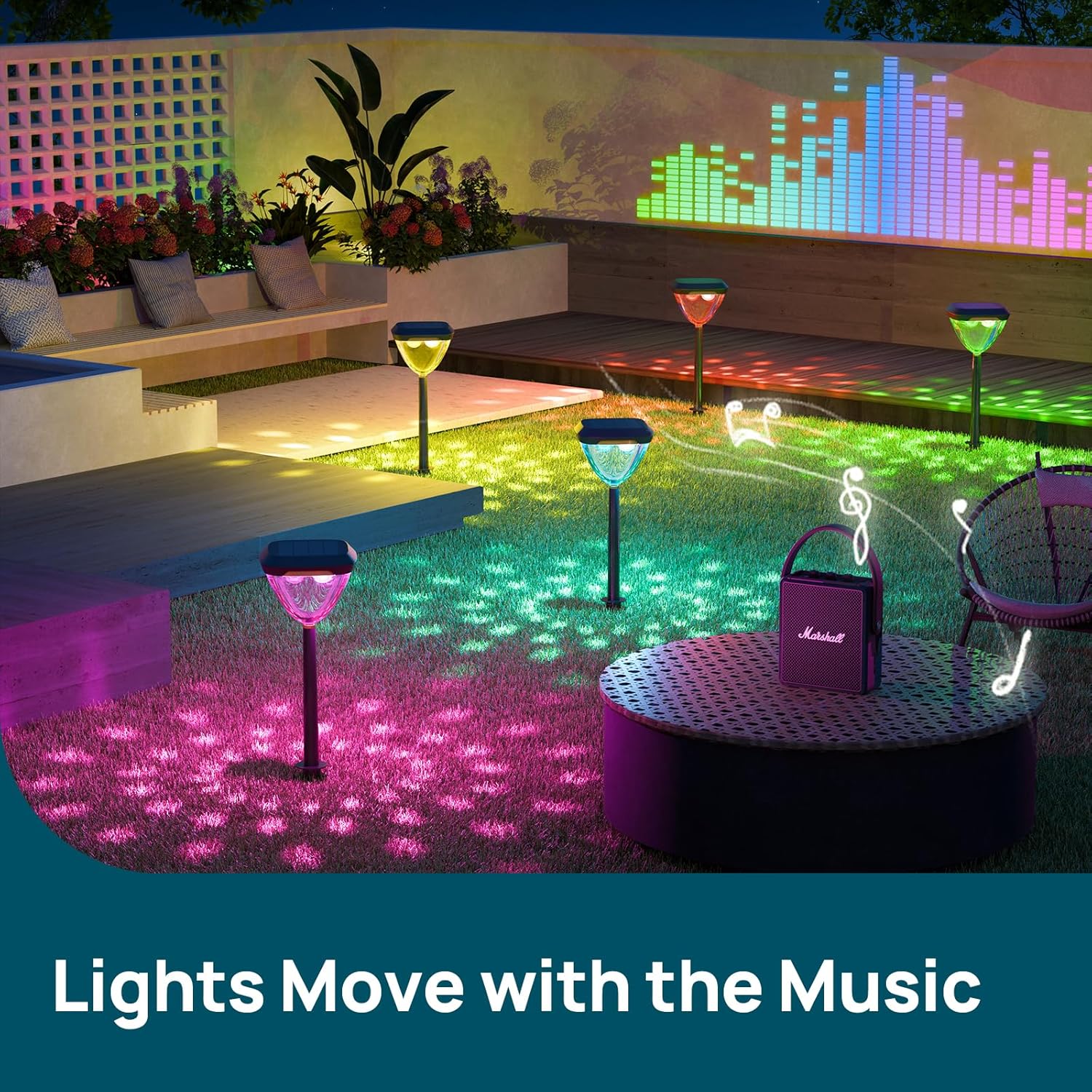
Image: Linkind Smart Solar Pathway Lights illuminating a patio area with vibrant colors, visually representing lights moving in sync with music, creating a festive atmosphere.
Schedule, Automate & Group Control
Manage your lighting effortlessly with the AiDot app. Set customized schedules for dusk-to-dawn lighting, automate specific behaviors, and control up to 8 groups of up to 32 lights each. This allows for flexible and comprehensive management of your outdoor lighting system.

Image: A split image illustrating the scheduling feature, showing the lights displaying colorful patterns at 7:00 PM and then switching to a standard white light at 7:00 AM, controlled via the app.

Сүрөт: үстүнкү view of a yard with multiple Linkind Smart Solar Pathway Lights, connected by dashed lines into distinct groups (Group 1, Group 2, Group 3), illustrating the group control functionality.
Техникалык тейлөө
The Linkind Smart Solar Pathway Lights are designed for durability and weather resistance. They are built with reinforced ABS housing, making them waterproof and capable of withstanding heat, cold, and wind. Regular maintenance is minimal:
- Periodically wipe the solar panel clean to ensure maximum sunlight absorption.
- Inspect the lights for any physical damage, especially after severe weather conditions.
- Ensure the ground stakes remain firmly in place to prevent the lights from falling.

Сүрөт: деталдуу view of the Linkind Smart Solar Pathway Light in a rainy garden, with callouts pointing to its durable ABS housing, polycarbonate lens, and long-life monocrystalline PET solar panel, emphasizing its waterproof, UV, heat, and frost resistant properties.
Проблемаларды чечүү
- Жарык күйбөйт:
- Ensure the solar panel is clean and receiving direct sunlight for at least 6-8 hours daily.
- Check if the light is fully charged. If not, use the USB-C wired charging option.
- Verify the light is not in an 'off' state via the app or manual button.
- Connectivity Issues with AiDot App:
- Ensure Bluetooth is enabled on your phone and the light is within range (up to 98ft unobstructed).
- Restart the AiDot app and try reconnecting.
- If issues persist, try resetting the light (refer to app instructions for specific reset procedures).
- Inconsistent Light Patterns/Colors:
- Check if the chosen lens is correctly seated in its slot.
- Verify app settings for patterns, colors, and scenes are correctly applied.
- Lights Not Grouping Correctly:
- Ensure all lights intended for a group are within Bluetooth range of each other or a Linkind BLE Mesh Hub if extended control is desired.
- Follow the group creation steps in the AiDot app carefully.
Техникалык шарттар
| Өзгөчөлүк | Спецификация |
|---|---|
| Бренд | Linkind |
| Модель аты | LSPL001-SP6-RGBTW-US-4 |
| Түс | Multicolor (16 Million RGBTW colors) |
| Материал | High-Impact ABS Plastic & 1.8W Monocrystalline Silicon PET Laminated Panel |
| Жарык булагы түрү | LED |
| Power Source | Solar Powered (with optional USB-C wired charging) |
| Тtage | 3.7 вольт |
| Connectivity Protocol | Bluetooth |
| Башкаруу түрү | App Control, Push Button |
| Сууга туруктуулук деңгээли | Суу өткөрбөйт |
| Продукциянын өлчөмдөрү | 13.7"L x 10"W x 6.9"H |
| Элемент Салмагы | 5.02 pounds (for 4 pack) |
| Батареялар | 4 C батарейкалар талап кылынат (кошулган) |
| Түс температурасы | 2700K-6500K (Ак түстү жөндөөгө болот) |
Кепилдик жана колдоо
Linkind provides comprehensive support for its products:
- Кепилдик: Linkind offers a 45-day full refund policy and a 12-month after-sale warranty.
- Шартсыз алмаштыруу: 12-months unconditional replacement.
- Lifetime Coverage: Lifetime service & technical support.
- Кардарларды колдоо: For any further questions or assistance, please contact Linkind customer service. 24/7 customer response is available. Live customer support is available Monday - Friday, 9 AM - 5 PM PST.
Image: A graphic summarizing Linkind's customer support offerings, including 12-month unconditional replacement, lifetime service & technical support, and live customer support hours.
For more information or to explore other Linkind products, visit the official Linkind Store.


