1. Киришүү
This instruction manual provides essential information for the safe and efficient operation, maintenance, and troubleshooting of your 3i P10 Ultra Robot Vacuum and Mop Combo. Please read this manual thoroughly before using the product and retain it for future reference.
2. Коопсуздук маалыматы
Өрт, электр шок же жаракат алуу коркунучун азайтуу үчүн электр шаймандарын колдонууда ар дайым негизги коопсуздук чараларын сактаңыз. Бул шайман тиричиликте гана колдонуу үчүн.
- Балдарга роботту башкарууга уруксат бербеңиз. Робот иштеп жатканда балдарды жана үй жаныбарларын көзөмөлдөңүз.
- кубаттуулукту камсыз кылыңызtage кубаттоочу доктогу баалоо этикеткасына дал келет.
- Роботту нымдуу беттерде же суу токтоп турган жерлерде колдонбоңуз.
- Remove loose cables, small objects, and fragile items from the cleaning path before operation.
- Do not use the robot to pick up large or sharp objects, flammable materials, or liquids.
- Only use manufacturer-specified accessories and replacement parts.
- Электр зымы бузулган болсо, коркунучтарды болтурбоо үчүн аны өндүрүүчү же квалификациялуу тейлөө агенти алмаштырышы керек.
3. Продукт бүтүп калдыview
3.1 Камтылган компоненттер
Пакет төмөнкү нерселерди камтыйт:
- 1 x робот вакуум
- 1 х базалык станция
- 2 х швабра
- 2 x каптал щеткалары
- 1 x 800 мл тазалоочу эритме
- 1 x ажыратылуучу база
- 1 х Кубат кабели
- 1 x User Manual
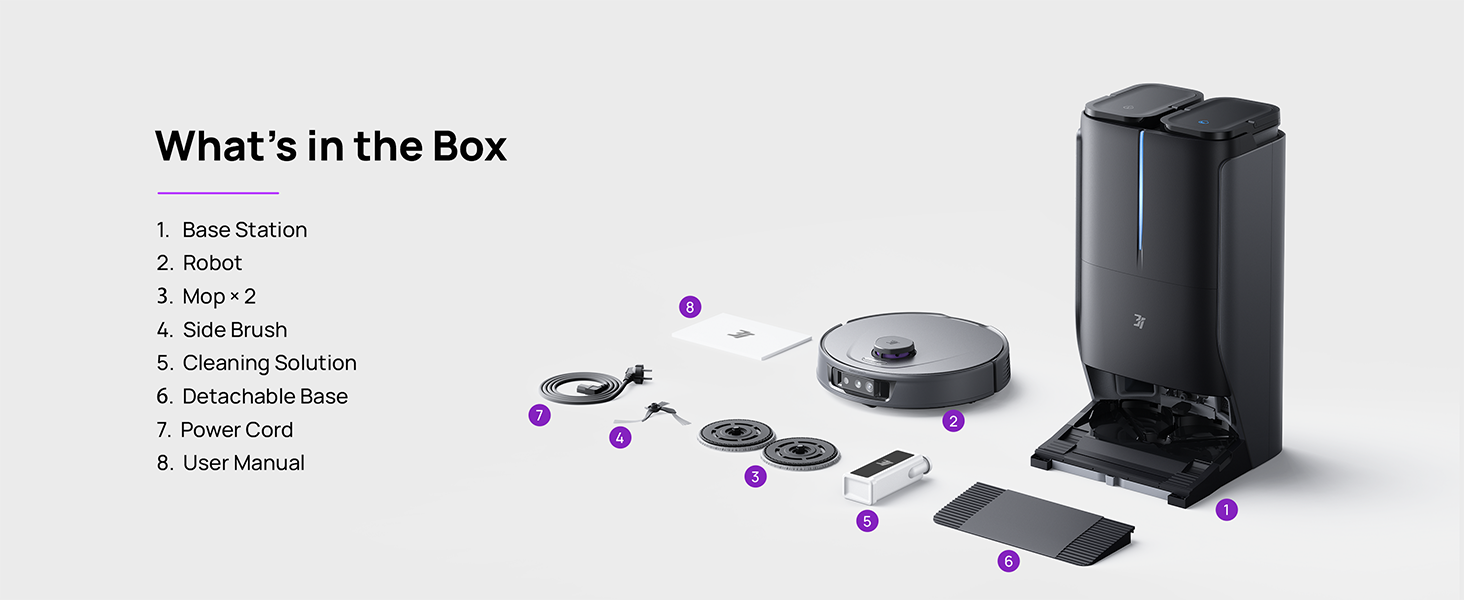
Figure 3.1: Contents of the 3i P10 Ultra package.
3.2 Робот чаң соргучтун өзгөчөлүктөрү
- UltraReach швабра: The auto-extending mop system cleans edges and corners thoroughly. Dual mops spin at 220 RPM for effective stain removal.
- 18,000 Pa Suction: Provides powerful suction for deep cleaning on various floor types, including carpets and hard floors. Features smart carpet detection to boost suction and lift mops.
- Баары бир жерде автоматташтырылган станция: Offers automatic hot-water mop washing, hot air drying, solution adding, and hands-free dust collection for up to 70 days.
- Өркүндөтүлгөн навигация: Utilizes LiDAR for 3D mapping, dual 3D structured light, and an AI camera for obstacle avoidance, threshold crossing, and collision resistance.
- Жасалма интеллект менен иштеген кирди сканерлөө: Identifies over 100 household objects and messes, adapting cleaning methods for optimal results, even in low light conditions.
- Hair Management: Equipped with anti-tangle brushes and a TangleCut blade to prevent hair from wrapping around components.
- Smart Route Planning: Learns home layouts for efficient cleaning routes. Supports scheduled cleaning, no-go zones, and app control. Compatible with Alexa and Google Assistant.
- Wi-Fi туташуусу: Supports both 2.4G and 5G Wi-Fi networks.

3.2-сүрөт: Жогорку view of the 3i P10 Ultra Robot Vacuum.

Figure 3.3: The 3i P10 Ultra Base Station.
4. Орнотуу
4.1 Пакеттен чыгаруу жана жайгаштыруу
- Бардык компоненттерди таңгактан кылдаттык менен алып салыңыз.
- Choose a suitable location for the base station. Ensure it is placed against a wall, on a hard, level surface, with at least 0.5 meters (1.6 feet) of clear space on both sides and 1.5 meters (4.9 feet) in front. Avoid areas with direct sunlight or strong Wi-Fi interference.
- Connect the power cord to the base station and plug it into a power outlet.
4.2 Робот даярдоо
- Install the side brushes by pressing them into their slots until they click.
- Attach the mop pads to the mop holders on the robot.
- Place the robot onto the base station to charge. Ensure the charging contacts align. The robot will announce its charging status.
4.3 Колдонмону орнотуу жана туташуу
- Download the 3i app from your mobile device's app store (iOS or Android).
- Open the app and follow the on-screen instructions to create an account and add your 3i P10 Ultra robot.
- Ensure your phone is connected to a 2.4GHz or 5GHz Wi-Fi network during the pairing process.
5. Иштөө нускамалары
5.1 Initial Cleaning and Mapping
For the first use, allow the robot to complete a full cleaning cycle to create a map of your home. This map is crucial for advanced features.

Figure 5.1: Precision 3D Mapping in the 3i App.
5.2 Тазалоо циклин баштоо
- Робот аркылуу: Тазалоону баштоо же тындыруу үчүн роботтогу кубат баскычын бир жолу басыңыз.
- Колдонмо аркылуу: Open the 3i app, select the desired cleaning mode (Vacuum, Mop, Vac & Mop, AI Auto, Custom), and tap 'Start'.
- Үн башкаруу аркылуу: Use compatible voice assistants (Alexa, Google Assistant) with commands like "Hey Google, start vacuuming."

Figure 5.2: Using voice control to operate the 3i P10 Ultra.
5.3 Колдонмонун өзгөчөлүктөрү
The 3i app provides extensive control and customization options:
- Тазалоо Орнотуулары: Schedule cleaning, select rooms, set no-go zones, customize carpet cleaning.
- Карта орнотуулары: View 3D maps, quick mapping, multi-floor maps, edit rooms and furniture.
- Station Settings: Customize dust collection, mop washing, auto-drying, and TangleCut.
- Башка орнотуулар: Do Not Disturb mode, Smart Route Planning, Pet Recognition, Child Lock.
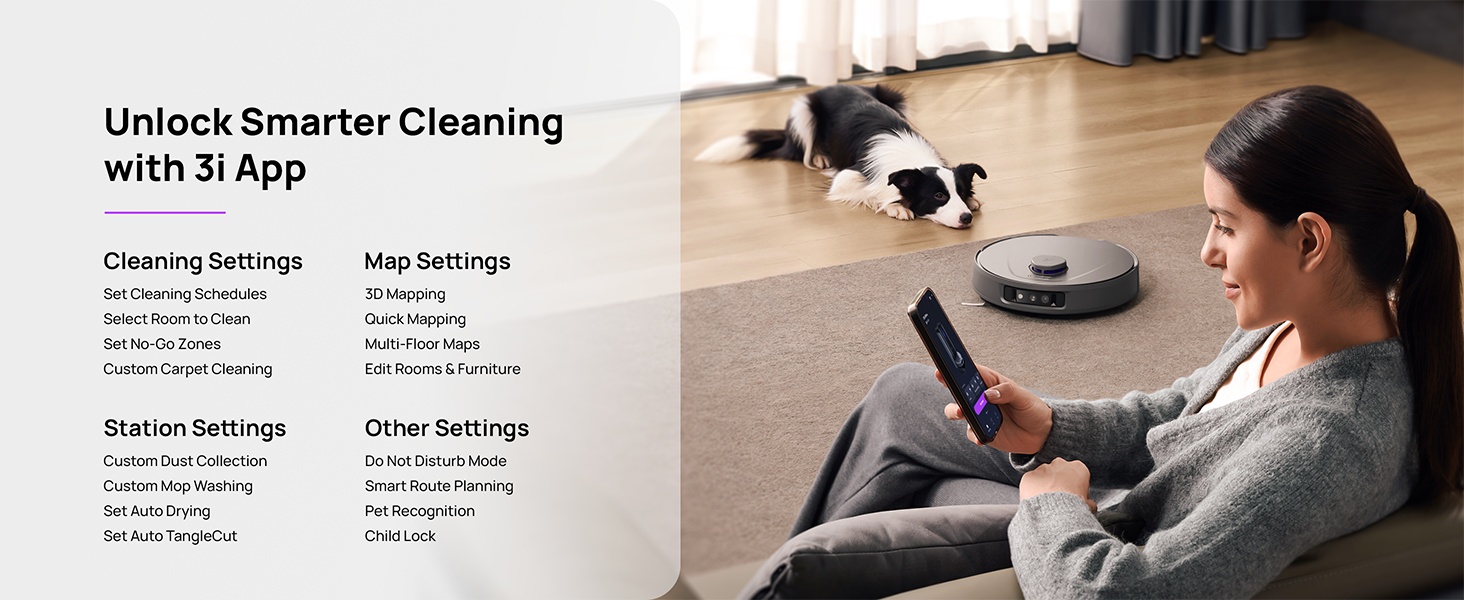
Figure 5.3: The 3i App interface for smart cleaning.
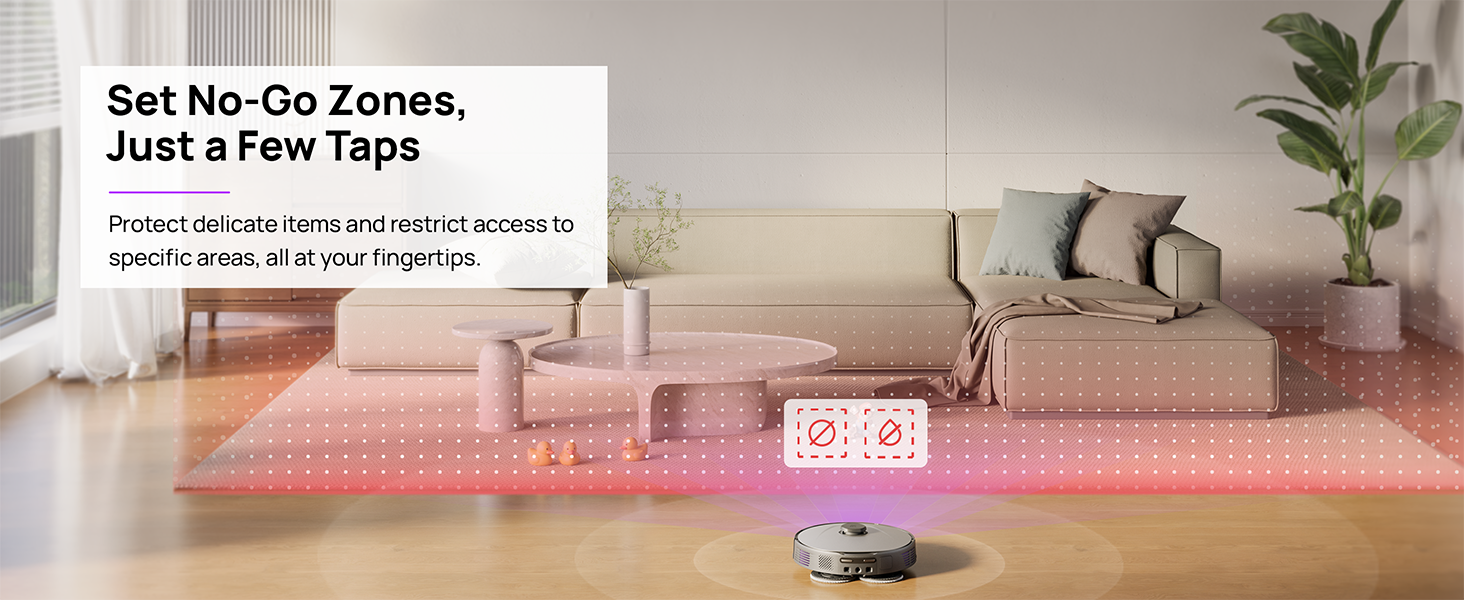
Figure 5.4: Setting No-Go Zones in the 3i App.
6. Техникалык тейлөө
Regular maintenance ensures optimal performance and extends the lifespan of your 3i P10 Ultra.
6.1 Базалык станцияны тейлөө
- Таштанды челекти бошотуу: The base station automatically empties the robot's dustbin into a 3L bag. Replace the dust bag approximately every 70 days, or as indicated by the app.
- Швабра менен жуу жана кургатуу: The base station automatically washes mop pads with 140°F / 60°C hot water and dries them with hot air (131°F / 55°C) after each cleaning cycle. Ensure the clean and dirty water tanks are properly installed.
- Water Tank Refilling: The extra-large 4L clean water tank automatically refills the robot. Refill the clean water tank as needed. The base station also collects dirty water into a separate wastewater tank. Empty the wastewater tank regularly.
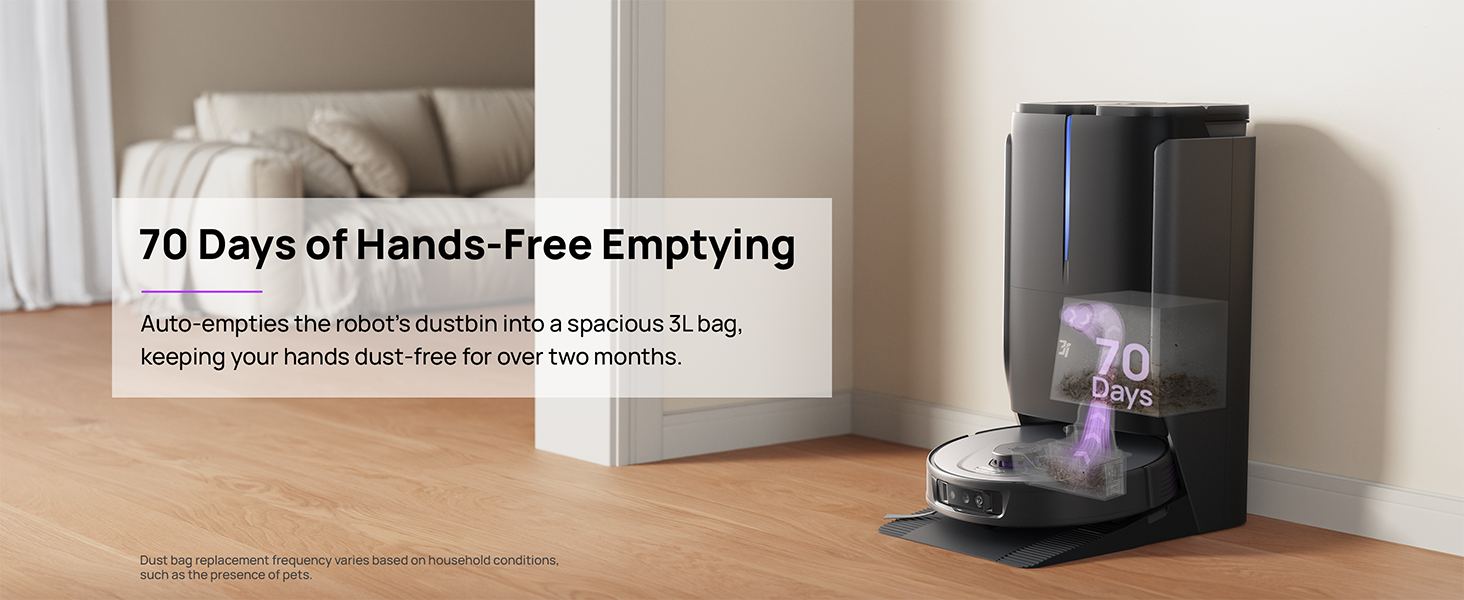
Figure 6.1: Automatic dustbin emptying at the base station.
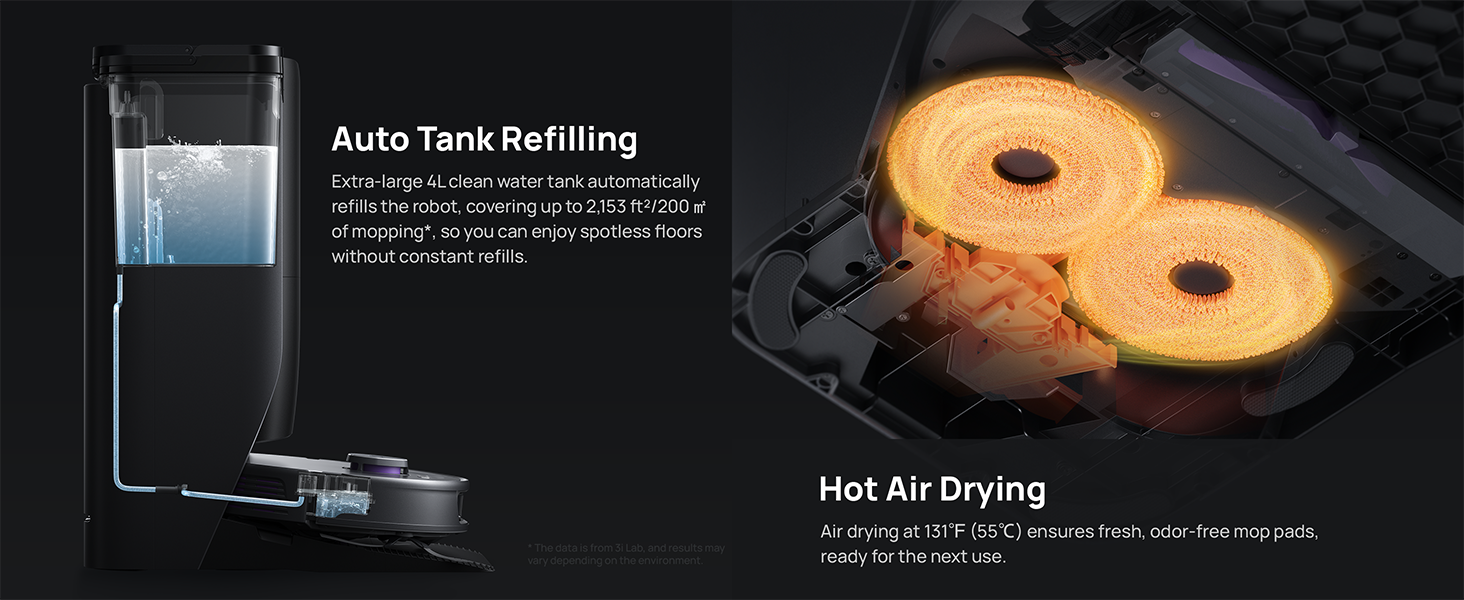
Figure 6.2: Auto tank refilling and hot air drying process.
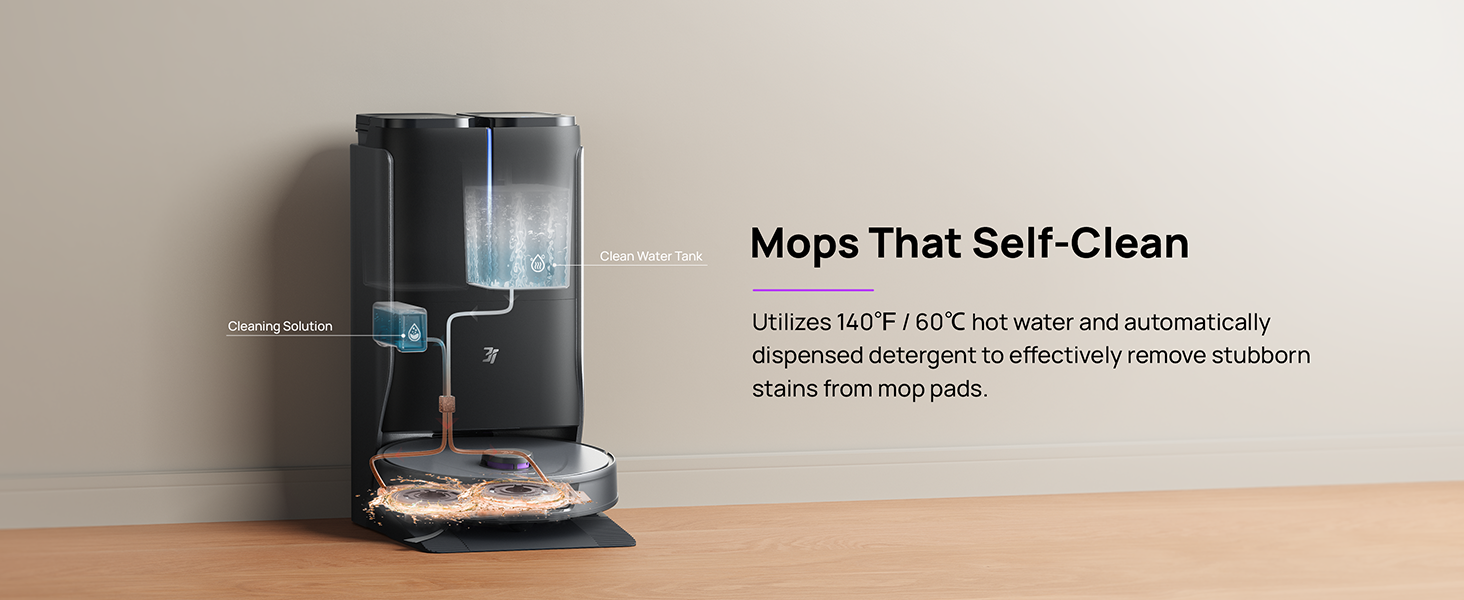
Figure 6.3: Mop self-cleaning function.
6.2 Робот компоненттерин тейлөө
- Негизги щетка: Regularly check the main brush for tangled hair or debris. Use the cleaning tool provided to remove any obstructions. The TangleCut blade helps prevent excessive tangling.
- Каптал щеткалар: Inspect side brushes for wear or damage. Clean them periodically and replace if necessary.
- Моп төшөктөрү: Although self-cleaned, inspect mop pads for excessive wear or stubborn stains. Replace them when their cleaning effectiveness diminishes.
- Чыпка: The filter is washable. Remove and rinse it under running water. Allow it to air dry completely before reinstalling.
- Сенсорлор: Wipe all sensors (LDS, anti-drop, wall-following, charging contacts) with a clean, dry cloth to ensure proper function.
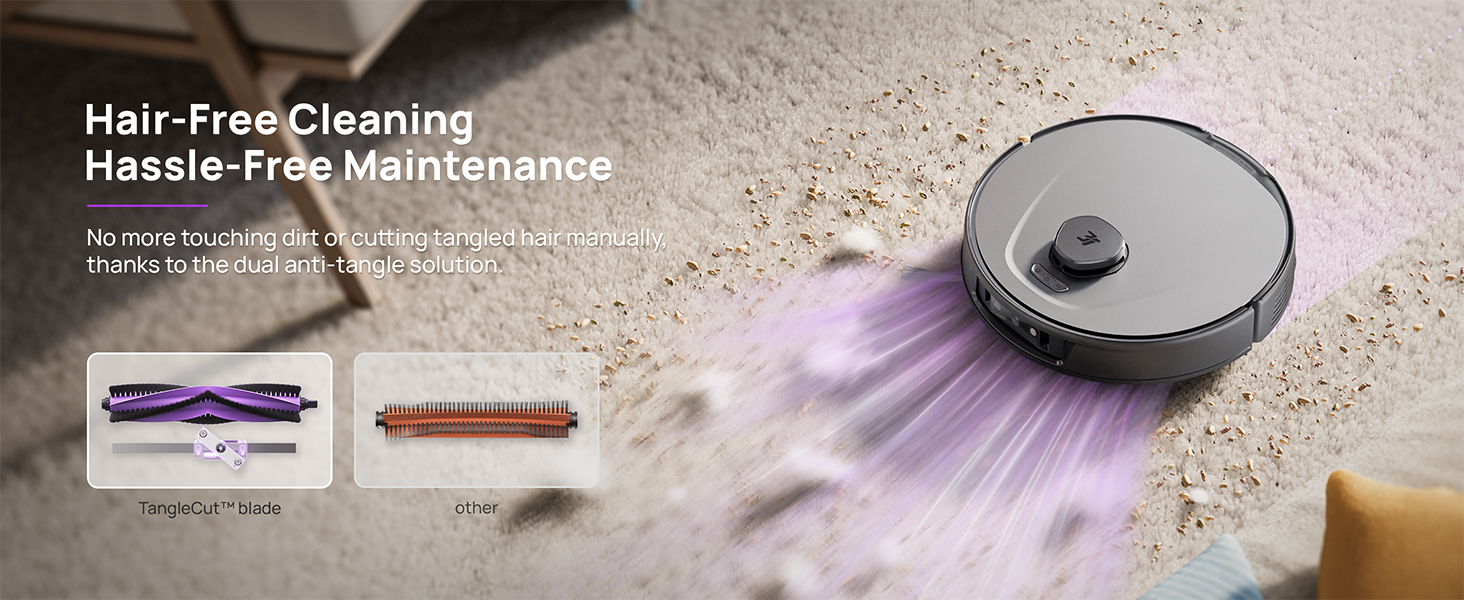
Figure 6.4: Hair-free cleaning with anti-tangle design.
7. Кыйынчылыктарды
If you encounter issues with your 3i P10 Ultra, refer to the following common problems and solutions:
| Көйгөй | Мүмкүн себеп | Чечим |
|---|---|---|
| Робот күйбөйт. | Батареянын аздыгы; Кубат баскычы туура басылган жок. | Place robot on charging dock; Press and hold power button for 3 seconds. |
| Робот кубаттагычты таба албайт. | Dock is obstructed or too far; Poor Wi-Fi signal. | Ensure dock is in an open area; Check Wi-Fi connection. |
| Тазалоо натыйжалуулугу начар. | Dustbin full; Brushes tangled; Filter clogged; Mop pads dirty. | Empty dustbin; Clean brushes; Clean/replace filter; Clean/replace mop pads. |
| Робот бат-баттан тыгылып калат. | Полдогу тоскоолдуктар; Сенсорлор кир. | Clear floor of obstacles; Clean all sensors. |
| Колдонмого туташуу маселелери. | Туура эмес Wi-Fi сырсөзү; Роутердеги көйгөйлөр; Робот оффлайн режиминде. | Verify Wi-Fi password; Restart router; Restart robot; Re-pair device in app. |
For further assistance, please refer to the 3i app's help section or contact customer support.
8. Техникалык шарттар
| Өзгөчөлүк | Деталь |
|---|---|
| Бренд | 3i |
| Модель аты | 3i P10 Ultra Robot Vacuum |
| Продукциянын өлчөмдөрү (робот) | 13.78"L x 13.78"W x 3.94"H |
| Продукциянын өлчөмдөрү (станция) | 12.2"L x 18.43"W x 23.39"H |
| Элемент Салмагы | 37.3 фунт |
| Батареянын иштөө мөөнөтү | 180 мүнөт |
| Чыпка түрү | Жууга болот |
| Surface Recommendation | Carpet, Marble, Wood, Tile |
| Соруу күчү | 18,000 Па |
| Навигация системасы | LDS LiDAR, Dual 3D Structured Light, AI Camera |
| Wi-Fi колдоо | 2.4G жана 5G |

Figure 8.1: Dimensions of the 3i P10 Ultra Robot and Base Station.
9. Кепилдик жана колдоо
For warranty information, please refer to the warranty card included with your product or visit the official 3i website. For technical support, troubleshooting beyond this manual, or to inquire about replacement parts, please contact 3i customer service through the contact information provided on their official website or within the 3i app.