1. Киришүү
The ZWO Seestar S30 is an all-in-one smart digital telescope designed for astronomy enthusiasts and casual stargazers. This compact and portable device integrates a telescope and camera, offering automated star-finding, tracking, and imaging capabilities through a dedicated mobile application. It is suitable for observing and capturing images of celestial objects, landscapes, and solar system bodies.
2. Кутуда эмне бар
Пакетте бардык компоненттер бар экенин текшериңиз:
- Seestar S30 Smart Digital Telescope Unit
- Штатив
- Type-C Cable (for charging and data transfer)
- Protective Suitcase
- Quick колдонмо
- Seestar S30 Safety Guidelines
- Seestar Astronomy-themed Stickers (for personalization)
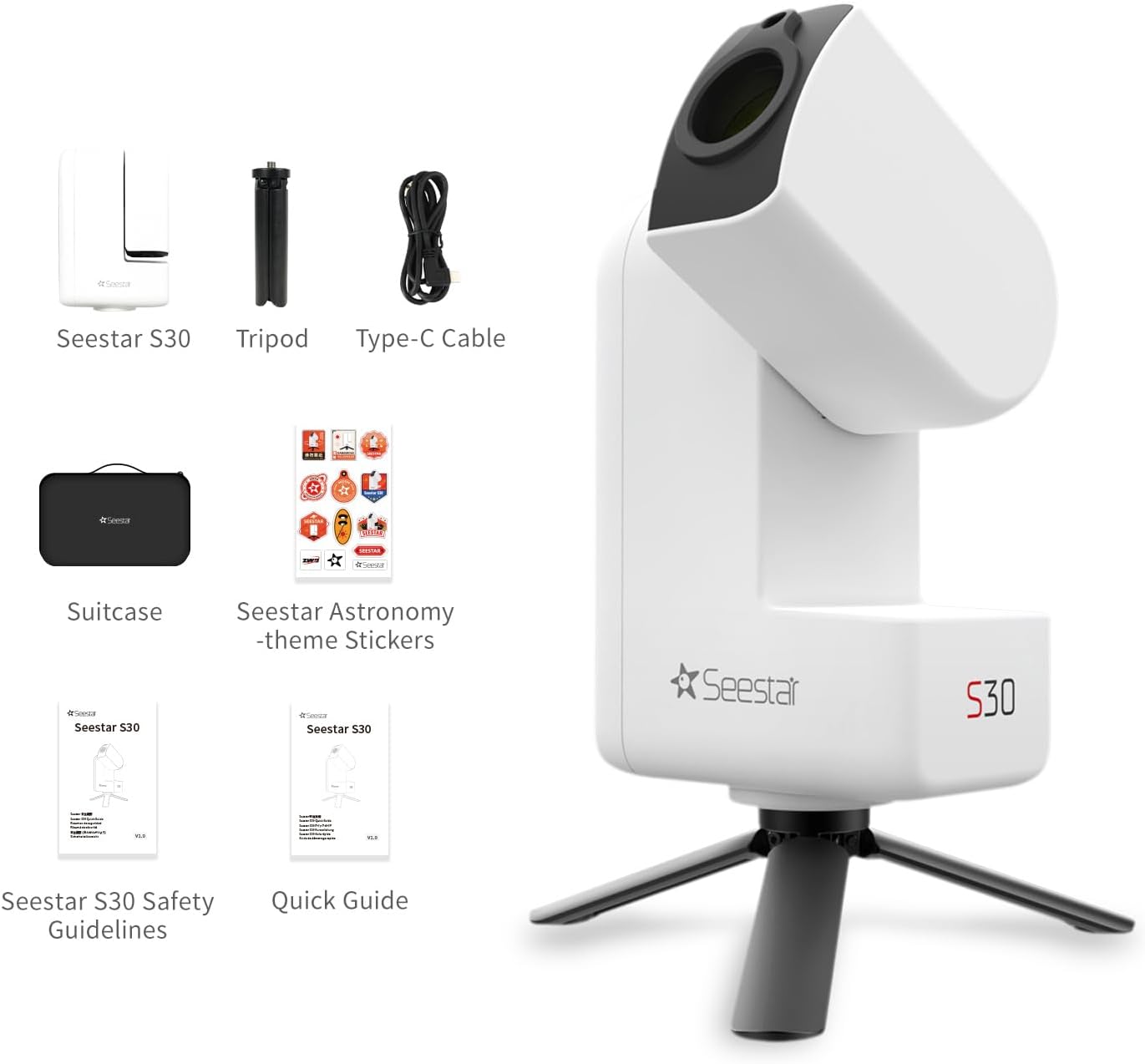
Figure 2.1: Package contents of the ZWO Seestar S30.
3. Продукт бүтүп калдыview
3.1. Негизги өзгөчөлүктөрү
- Ультра портативдик дизайн: Weighing approximately 3.6 lbs (1.65 kg), the Seestar S30 is designed for easy transport.
- Автоматташтырылган операция: Features automatic star-finding, precision tracking, and one-tap shooting via the Seestar App.
- Кош линзалар системасы: Equipped with both a telephoto lens for detailed astronomical and distant object imaging, and a wide-angle lens for capturing landscapes and nightscapes, aiding in object location.
- Ар тараптуу атуу режимдери: Includes Stargazing Mode for deep-sky objects, Scenery Mode for terrestrial subjects, and Solar System Mode for the Moon and Sun.
- Integrated Filters: Features a light pollution filter for nebulae imaging in urban areas, a UV/IR cut filter for broadband targets like galaxies and star clusters, and an automatic dark frame filter for noise reduction.
- Advanced Tracking Modes: Supports EQ Mode for accurate equatorial tracking, Plan Mode for scheduling multiple targets, and Mosaic Mode for stitching larger fields of view.
- Акылдуу ызы-чууну азайтуу: Automatic post-processing reduces noise while preserving image details, even in light-polluted environments.
- Узак мөөнөттүү батарея: Provides up to 6 hours of operation on a full charge, or 4 hours in video mode.

Figure 3.1: ашыкview of Seestar S30 key features.

Figure 3.2: Dual-lens system and camera sensor details.
3.2. Компоненттер
The Seestar S30 unit consists of the main telescope body, an integrated camera, and a base for tripod mounting. It features a power button and indicator lights on the side for operational status and battery level.

Сүрөт 3.3: Алдыңкы view of the Seestar S30 unit.
4. Орнотуу
4.1. Баштапкы заряддоо
Before first use, fully charge the Seestar S30 using the provided Type-C cable and a compatible USB power adapter (not included). The indicator lights will show charging status.
4.2. Attaching to Tripod
- Unfold the legs of the included tripod.
- Align the mounting screw on the tripod with the threaded hole at the base of the Seestar S30 unit.
- Securely fasten the Seestar S30 to the tripod by turning the tripod's mounting knob clockwise until snug. Do not overtighten.
4.3. Колдонмону орнотуу
Download the official Seestar App from your device's app store (iOS or Android). Ensure your smartphone or tablet meets the minimum system requirements for optimal performance.
4.4. Баштапкы байланыш
- Power on the Seestar S30 by pressing and holding the power button until the indicator lights illuminate.
- Enable Bluetooth and Wi-Fi on your smartphone or tablet.
- Open the Seestar App and follow the on-screen instructions to connect to your Seestar S30 device. The app will guide you through the initial calibration and setup process.
5. Иштөө нускамалары
5.1. Күйгүзүү / Өчүрүү
- Күйгүзүү: Press and hold the power button on the Seestar S30 unit for approximately 3 seconds until the indicator lights activate.
- Өчүрүү: Индикатор жарыктары өчкөнгө чейин кубат баскычын болжол менен 3 секунд басып туруңуз.
5.2. App Control and Star-Finding
The Seestar App is the primary interface for controlling the S30. It provides automatic star-finding, precision tracking, and one-tap shooting. Once connected, the app will display a sky map and allow you to select targets.

Figure 5.1: Seestar App interface for object selection.
5.3. Атуу режимдери
The Seestar S30 offers three distinct shooting modes:
- Stargazing Mode: Designed for capturing deep-sky objects such as galaxies, nebulae, and star clusters.
- Сценарий режими: Used for photographing terrestrial objects, including landscapes, cityscapes, and wildlife.
- Solar System Mode: Optimized for imaging the Moon and the Sun (with appropriate solar filter, not included, for safe solar observation).

Figure 5.2: ашыкview of available shooting modes.
5.4. Integrated Filters
The Seestar S30 incorporates three types of filters for various imaging conditions:
- Light Pollution Filter: A dual-band pass filter that allows light primarily from nebulae to pass through, enabling astrophotography even in light-polluted urban environments.
- UV/IR Cut Filter: Best utilized for broadband targets like galaxies and star clusters, blocking unwanted ultraviolet and infrared light.
- Dark Frame Filter: Automatically applied by the S30 to reduce noise in captured images.
5.5. Advanced Modes
- EQ режими: Utilizes an equatorial mount setup for more accurate tracking of objects in the night sky, reducing field rotation and allowing for longer exposure times. This mode requires the dedicated Seestar TH10 mount (sold separately).
- Plan Mode: Allows users to select multiple targets, define imaging parameters for each, and schedule their capture sequence automatically.
- Mosaic Mode: Automatically stitches together images from adjacent areas of the sky, enabling the capture of larger fields of view, similar to panoramic photography.

Figure 5.3: Seestar S30 equatorial mode capabilities.
5.6. Smart Noise Reduction and Post-Processing
The Seestar S30 features one-tap image creation with smart noise reduction, preserving target details even in areas with significant light pollution. The app also allows for fine-tuning image styles and instant sharing.
6. Техникалык тейлөө
- Тазалоо: Use a soft, lint-free cloth to gently clean the exterior of the Seestar S30. For optical surfaces, use specialized lens cleaning solutions and cloths to avoid scratches.
- Сактагыч: Store the Seestar S30 in its protective suitcase in a cool, dry place away from direct sunlight and extreme temperatures when not in use.
- Батареяга кам көрүү: To prolong battery life, avoid fully discharging the device frequently. Charge the battery periodically if the device is stored for extended periods.
7. Кыйынчылыктарды
If you encounter issues with your Seestar S30, consider the following general troubleshooting steps:
- Туташуу маселелери: Ensure Bluetooth and Wi-Fi are enabled on your mobile device. Restart both the Seestar S30 and the app. Verify that the Seestar S30 is within range of your mobile device.
- Кубат маселеси: Check the battery level. If the device does not power on, ensure it is fully charged.
- Колдонмонун иштеши: Ensure the Seestar App is updated to the latest version. Clear the app's cache or reinstall if persistent issues occur.
- Сүрөттүн сапаты: Ensure optical surfaces are clean. Check for excessive light pollution in your observation area.
For more detailed troubleshooting or persistent issues, refer to the official ZWO support resources or contact customer service.
8. Техникалык шарттар
| Өзгөчөлүк | Спецификация |
|---|---|
| Продукциянын өлчөмдөрү | 3.1 x 5.5 x 8.3 дюйм (7.9 x 14 x 21.1 см) |
| Элемент Салмагы | 3.64 фунт (1.65 кг) |
| Модель аты | Seestar S30 |
| Оптикалык түтүктүн узундугу | 150 миллиметр |
| Объективдүү линзанын диаметри | 30 миллиметр |
| Eye Piece Lens Description | No eye piece (digital viewing via app) |
| Телескоптун сүрөттөлүшү | Alt-azimuth with auto GoTo and tracking |
| Фокус түрү | Auto Focus, Manual Focus |
| Батареялар | 1 Lithium Ion battery required (integrated) |
| Шайкеш түзмөктөр | Смартфон, Планшет |
| Өндүрүүчү | ZWO |

Figure 8.1: Seestar S30 dimensions compared to S50.
9. Кепилдик жана колдоо
For information regarding product warranty, please refer to the warranty card included with your Seestar S30 or visit the official ZWO website. For technical support, software updates, and additional resources, please visit the ZWO support page or contact their customer service department directly.
ZWO расмий Webсайт: www.zwoastro.com


