1. Киришүү
The GEEKOM IT15 Mini PC is a high-performance, ultra-compact computing solution designed for a wide range of applications, from business and video editing to gaming. It features the advanced 15th Generation Intel Core Ultra 9 285H processor, offering exceptional AI processing capabilities and integrated graphics. This manual provides essential information for setting up, operating, maintaining, and troubleshooting your GEEKOM IT15 Mini PC to ensure optimal performance and longevity.
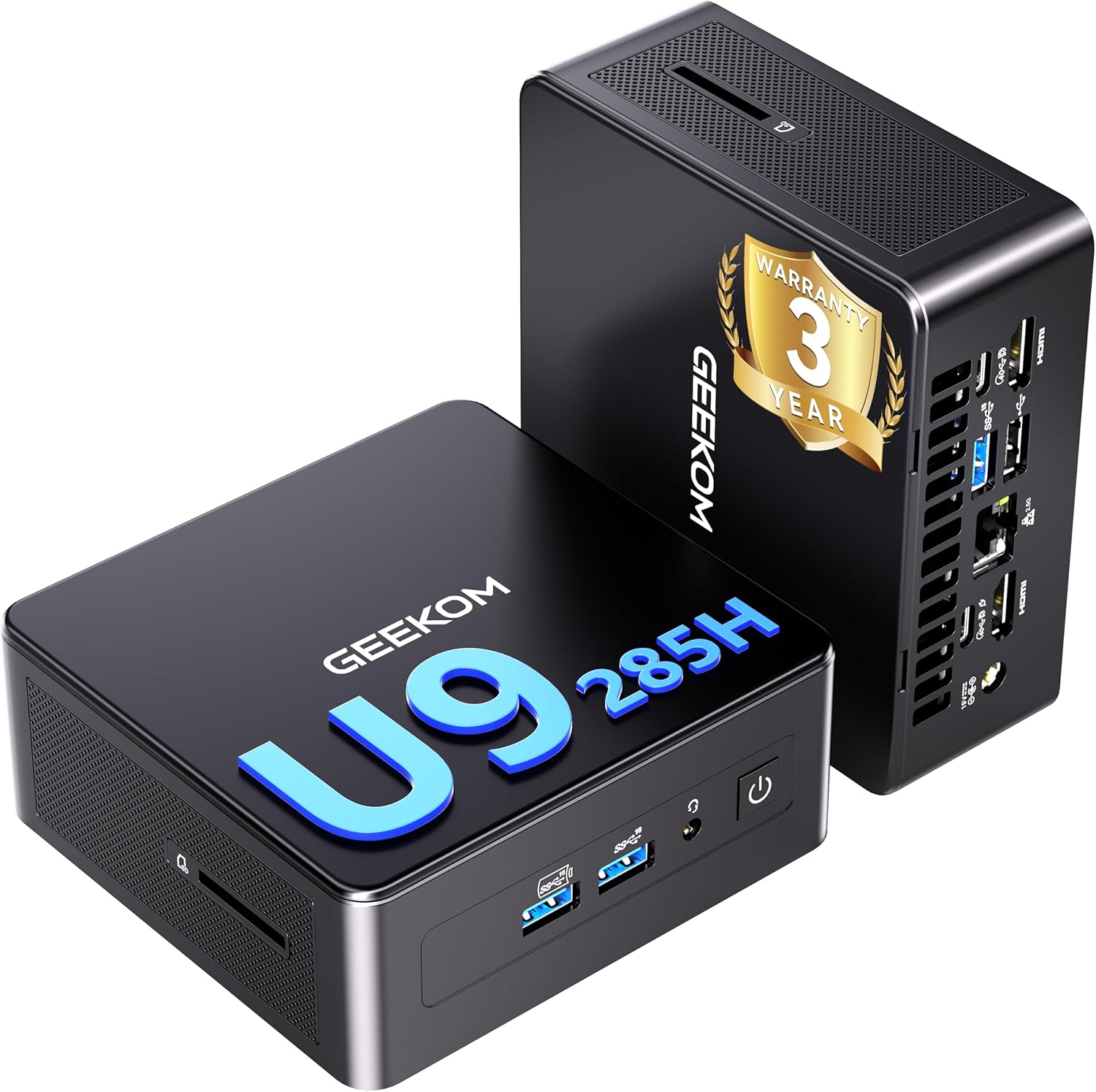
Figure 1: GEEKOM IT15 Mini PC, showcasing its sleek, compact design and the prominent 3-year warranty badge, indicating product reliability.
Негизги өзгөчөлүктөрү:
- Күчтүү процессор: Equipped with the 15th Gen Intel Core Ultra 9 285H processor, featuring 16 cores, 16 threads, 24MB cache, and a maximum turbo frequency of 5.40GHz.
- Advanced AI Performance: Integrated NPU with 13 TOPS (Int8) peak speed and a total AI performance of 99 TOPS, accelerating tasks like 4K rendering and AI-driven photo editing.
- Интегралдык графика: Features the Intel Arc 140T GPU with 8 Xe cores, providing enhanced graphics performance for creative work and light gaming.
- Expandable Memory & Storage: Comes with 32GB DDR5 RAM (expandable up to 128GB) and 2TB PCIe 4.0 NVMe SSD (expandable up to 12TB with additional M.2 SATA SSD and 2.5-inch SATA HDD slots).
- Ар тараптуу байланыш: Includes two USB4.0 ports (40Gbps data transfer, up to 100W Power Delivery), Wi-Fi 7, Bluetooth 5.4, HDMI 2.0, and 2.5G LAN.
- Compact Design & Efficient Cooling: Ultra-compact form factor (112x117x46mm) with an advanced IceBlast cooling system for stable and quiet operation.
- Алдын ала орнотулган OS: Ships with Windows 11 Pro, ready for immediate use.
2. Орнотуу колдонмосу
Follow these steps to set up your GEEKOM IT15 Mini PC.
2.1 Таңгактан чыгаруу жана алгачкы текшерүү
- Бардык компоненттерди таңгактан кылдаттык менен алып салыңыз.
- Verify that all included accessories are present: GEEKOM IT15 Mini PC, VESA mount, HDMI adapter, power adapter, and user manual.
- Inspect the Mini PC for any visible damage. If damage is found, contact customer support immediately.
2.2 Перифериялык түзүлүштөрдү туташтыруу
Connect your display, keyboard, mouse, and other peripherals to the appropriate ports.

Сүрөт 2: An overview of the GEEKOM IT15's comprehensive port selection, detailing the front ports for easy access and the rear ports for robust connectivity, including multiple USB types, HDMI, LAN, and power input.
- Дисплей: Connect your monitor(s) using the HDMI 2.0 ports or USB4.0 ports. The IT15 supports up to 8K quad display output.
- Баскычтоп жана чычкан: Connect your USB keyboard and mouse to the available USB 3.2 Gen 2 Type-A ports or USB 2.0 Type-A ports. Alternatively, use Bluetooth 5.4 for wireless peripherals.
- Тармак: For a wired connection, connect an Ethernet cable to the 2.5G RJ45 LAN port. For wireless, the device supports Wi-Fi 7.
- Аудио: Use the 3.5mm headset jack on the front for headphones or speakers.
- Күч: Connect the power adapter to the DC input port on the rear and plug it into a power outlet.
2.3 Алгачкы жүктөө
- Mini PCтин алдыңкы бетиндеги кубат баскычын басыңыз.
- The system will boot into Windows 11 Pro. Follow the on-screen instructions to complete the initial setup, including language, region, and network configuration.
- It is recommended to check for and install any available Windows updates after the initial setup.
3. Иштөө нускамалары
Understand the various operating modes and connectivity options of your GEEKOM IT15.
3.1 Иштөө режимдери
The GEEKOM IT15 offers three adjustable modes to suit different usage scenarios:

Figure 3: The GEEKOM IT15 offers three distinct operating modes—Quiet, Normal, and Performance—which can be selected via the BIOS setup to optimize the PC for various tasks and user preferences.
- Тынч режим: Optimizes for minimal fan noise, suitable for light tasks and quiet environments.
- Normal Mode (Default): Balances performance and noise, ideal for everyday computing.
- Аткаруу режими: Maximizes CPU and GPU performance for demanding applications like gaming or video editing.
To switch modes, press F7 during boot-up to enter BIOS setup, then navigate to the 'BIOS SETUP' menu and select your desired mode.
3.2 Зымсыз байланыш
The IT15 features advanced wireless technologies for fast and stable connections.

Figure 4: This visual emphasizes the advanced wireless capabilities of the GEEKOM IT15, featuring Wi-Fi 7 for ultra-fast internet and Bluetooth 5.4 for stable peripheral connections, enabling a clutter-free workspace.
- Wi-Fi 7: Enjoy ultra-fast wireless speeds up to 5.8Gbps and 75% lower latency, perfect for 8K streaming and cloud gaming. Supports 2.4GHz, 5GHz, and 6GHz bands simultaneously for enhanced stability.
- Bluetooth 5.4: Provides stable, low-power connections for wireless peripherals. Supports simultaneous connection of up to three audio devices with less than 0.05 seconds of audio latency.
3.3 Multi-Display Support
Expand your workspace with multiple monitors.

Figure 5: A demonstration of the GEEKOM IT15's impressive multi-display support, showing it connected to several monitors for an expansive workspace, capable of driving up to 8K resolution across four displays.
The GEEKOM IT15 supports up to four displays with 8K resolution output, utilizing its two USB4.0 ports and two HDMI 2.0 ports. This is ideal for multitasking, professional design, and immersive entertainment.
4. Техникалык тейлөө
Үзгүлтүксүз техникалык тейлөө сиздин мини-компьютериңиздин узак мөөнөттүү иштешин жана оптималдуу иштешин камсыз кылууга жардам берет.
4.1 Муздатуу системасы
The IT15 features an advanced IceBlast cooling system with a large silent fan and an all-copper heatsink. This system is designed to maintain stable temperatures even under heavy loads.

Figure 6: A detailed exploded diagram showcasing the internal architecture of the GEEKOM IT15, emphasizing its robust all-metal frame, efficient IceBlast cooling system with a copper heatsink, and various component slots for easy access and maintenance.
- Түзмөктүн айланасында абанын туура айлануусун камсыз кылыңыз. Желдетүүчү тешиктерди жаппаңыз.
- Periodically clean dust from the exterior vents using compressed air. Do not open the casing unless performing an upgrade.
4.2 Эстутумду жана сактагычты жаңыртуу
The GEEKOM IT15 is designed for easy upgrades to enhance its capabilities.

7-сүрөт: жарылган view of the Mini PC's interior, illustrating the extensive expansion capabilities for memory and storage, including DDR5 RAM, NVMe SSD, SATA SSD, and a 2.5-inch HDD slot, allowing users to customize their system.
- RAM: The device comes with 32GB DDR5 RAM and can be expanded up to 128GB using DDR5 262PIN 5600MHz SODIMM modules.
- SSD: It includes a 2TB PCIe 4.0 NVMe SSD. Additional storage can be added via an M.2 2242 SATA SSD slot (up to 4TB) and a 2.5-inch SATA HDD slot (up to 4TB).
- To perform upgrades, ensure the device is powered off and unplugged. Refer to the detailed instructions in the full user manual for safe installation.
5. Кыйынчылыктарды
This section addresses common issues you might encounter with your GEEKOM IT15 Mini PC.
5.1 Электр энергиясы маселелери
- Кубат жок: Кубат адаптери Mini PCке да, иштеп жаткан розеткага да бекем туташтырылганын текшериңиз. Зарыл болсо, башка розетканы колдонуп көрүңүз.
- Түзмөк күйбөй жатат: Press and hold the power button for 5-10 seconds. If it still doesn't turn on, disconnect all peripherals and try again.
5.2 Дисплей маселелери
- Дисплей чыгышы жок: Verify that the HDMI or USB4.0 cables are securely connected to both the Mini PC and the monitor. Ensure the monitor is powered on and set to the correct input source. Try a different cable or monitor if possible.
5.3 Байланыш маселелери
- Unstable Bluetooth Connection: Some users have reported intermittent Bluetooth stability. Ensure your Bluetooth devices are within range and fully charged. Try updating your Bluetooth drivers from the GEEKOM support website. If issues persist, consider using a wired connection for critical peripherals.
- Wi-Fi туташуу көйгөйлөрү: Ensure your Wi-Fi router is working correctly. Check that the Wi-Fi drivers are up to date. Try restarting both the Mini PC and your router.
5.4 Ишти аткаруу маселелери
- Жай аткаруу: Check the operating mode (refer to Section 3.1). Ensure the system is not overheating; clean vents if necessary. Close unnecessary applications. Consider upgrading RAM or SSD if performance remains consistently low for your tasks.
- Желдетүүчү ызы-чуу: While the IceBlast system is designed to be quiet, fan noise may increase under heavy load. If noise is excessive during light use, ensure vents are clear and consider switching to Quiet Mode.
6. Техникалык шарттар
Detailed technical specifications for the GEEKOM IT15 Mini PC.
| Өзгөчөлүк | Спецификация |
|---|---|
| Процессор | Intel Core Ultra 9 285H (15th Gen) |
| CPU ылдамдыгы | 5.4 ГГц чейин |
| Кэш өлчөмү | 24 MB |
| Графикалык процессор | Intel Arc 140T GPU (интеграцияланган) |
| Эстутум (RAM) | 32 ГБ DDR5 (128 ГБ чейин кеңейтүүгө болот) |
| Сактагыч | 2 TB PCIe 4.0 NVMe SSD (Expandable up to 12 TB with additional M.2 SATA SSD and 2.5-inch SATA HDD) |
| Операция системасы | Windows 11 Pro |
| Зымсыз байланыш | Wi-Fi 7, Bluetooth 5.4 |
| Зымдуу туташуу | 2.5G RJ45 LAN |
| USB порттору | 2 x USB4.0 (40Gbps, 100W PD input, 15W PD output), 3 x USB 3.2 Gen 2 Type-A, 2 x USB 2.0 Type-A |
| Video Output | 2 x HDMI 2.0, 2 x USB4.0 (supports up to 8K quad display) |
| Аудио | 3.5 мм гарнитура уясы |
| Өлчөмдөрү (L x W x Y) | 11.5 x 11.1 x 4.55 cm (Product Size) |
| Салмагы | Approx. 650g (Device), 1.72 kg (Package) |
| Камтылган аксессуарлар | GEEKOM IT15, VESA mount, HDMI adapter, Power adapter, Manual |
7. Кепилдик жана колдоо
GEEKOM is committed to providing high-quality products and excellent customer service.
7.1 Продукциянын кепилдиги
The GEEKOM IT15 Mini PC comes with an industry-leading 3 жылдык кепилдик. This warranty covers free exchanges and maintenance for the specified period. This commitment reflects GEEKOM's confidence in the quality and durability of its products.
7.2 Кардарларды колдоо
For any questions, technical assistance, or warranty claims, please contact GEEKOM customer service. Our professional support team is available to assist you.
- Электрондук почта колдоо: You can reach our support team by sending an email to service@geekom.jp. We aim to respond as quickly as possible.
- Онлайн колдоо: Visit the official GEEKOM website or your purchase platform (e.g., Amazon) for chat support and to find seller information.
Please have your product model and purchase details ready when contacting support to facilitate a quicker resolution.


