1. Продукт бүтүп калдыview
The roborock Q10 S5+ is an advanced robot vacuum and mop designed to provide comprehensive floor cleaning with minimal user intervention. This model features powerful suction, intelligent navigation, and a convenient self-emptying station, ensuring a clean home environment for extended periods.

Figure 1: The roborock Q10 S5+ robot vacuum, its self-emptying station, and a pack of disposable dust bags.
Негизги өзгөчөлүктөрү:
- 7 Weeks of Hands-Free Cleaning: The large 2.7L dust bag in the self-emptying station allows for up to 7 weeks of maintenance-free cleaning, ideal for busy households and pet owners.
- 10 000 Па HyperForce соргуч: Experience powerful suction that effortlessly lifts embedded pet hair, crumbs, and debris from various floor types, including carpets and hard floors.
- Кош чаташууга каршы система: Equipped with a JawScrapers Comb main brush and a specialized anti-tangle side brush, this system minimizes hair tangling, reducing the need for frequent manual cleaning of the brushes.
- VibraRise 2.0 Mopping System: Tackle stubborn stains with ease using the advanced mopping system, which provides effective and thorough wet cleaning.
- Anti-Leakage Dust Bags: The disposable dust bags are designed to prevent dust leakage, ensuring that collected dirt remains securely inside the bag and is not released back into the air.
- Easy Dust Bag Replacement: Featuring a push-pull handle design, the dust bags can be easily removed and replaced without direct contact with the collected dust.
2. Продукциянын компоненттери
Before setup, ensure all components are present in the packaging:
- roborock Q10 S5+ Robot Vacuum
- Self-Emptying Station (Auto-Empty Dock)
- 6-Pack Disposable Dust Bags
- Power Cable for Dock
- 1 x Mop Head
- 1 x Тазалоо чечими
- Колдонуучунун Колдонмосу (бул документ)
Note: Additional accessories may be included depending on the specific package.
3. Орнотуу колдонмосу
3.1 Пакеттен чыгаруу
- Бардык компоненттерди таңгактан кылдаттык менен алып салыңыз.
- Remove any protective films or packing materials from the robot and the self-emptying station.
3.2 Positioning the Self-Emptying Station
- Place the self-emptying station on a hard, level surface against a wall.
- Ensure there is at least 0.5 meters (1.6 feet) of clear space on both sides and 1.5 meters (4.9 feet) in front of the station for optimal robot docking.
- Avoid placing the station in direct sunlight or near heat sources.
- Connect the power cable to the station and plug it into a wall outlet.
3.3 Алгачкы заряддоо
- Place the robot vacuum onto the self-emptying station. Ensure the charging contacts on the robot align with those on the station.
- The robot will automatically begin charging. The indicator light on the robot will show charging status.
- For first-time use, fully charge the robot before its initial cleaning cycle. This typically takes several hours.
3.4 App Connection (Recommended)
- Download the "roborock" app from your mobile device's app store (iOS App Store or Google Play Store).
- Open the app and follow the on-screen instructions to create an account and add your roborock Q10 S5+ device.
- The app provides advanced features such as remote control, cleaning schedules, no-go zones, and cleaning history.
4. Иштөө нускамалары
4.1 Тазалоо циклин баштоо
- Робот баскычы аркылуу: Press the Power/Clean button on the robot once to start a full cleaning cycle. Press again to pause.
- Колдонмо аркылуу: Open the roborock app, select your device, and tap "Clean" to start. You can also select specific rooms or zones to clean.
4.2 Чыпкалоо функциясы
- Fill the water tank with clean water. You may add the provided cleaning solution as per instructions.
- Attach the mop cloth to the mop head and slide the mop module into the robot until it clicks into place.
- The robot will automatically switch to mopping mode when the mop module is detected.
- The VibraRise 2.0 system allows the mop to lift automatically when detecting carpets, preventing wetting.
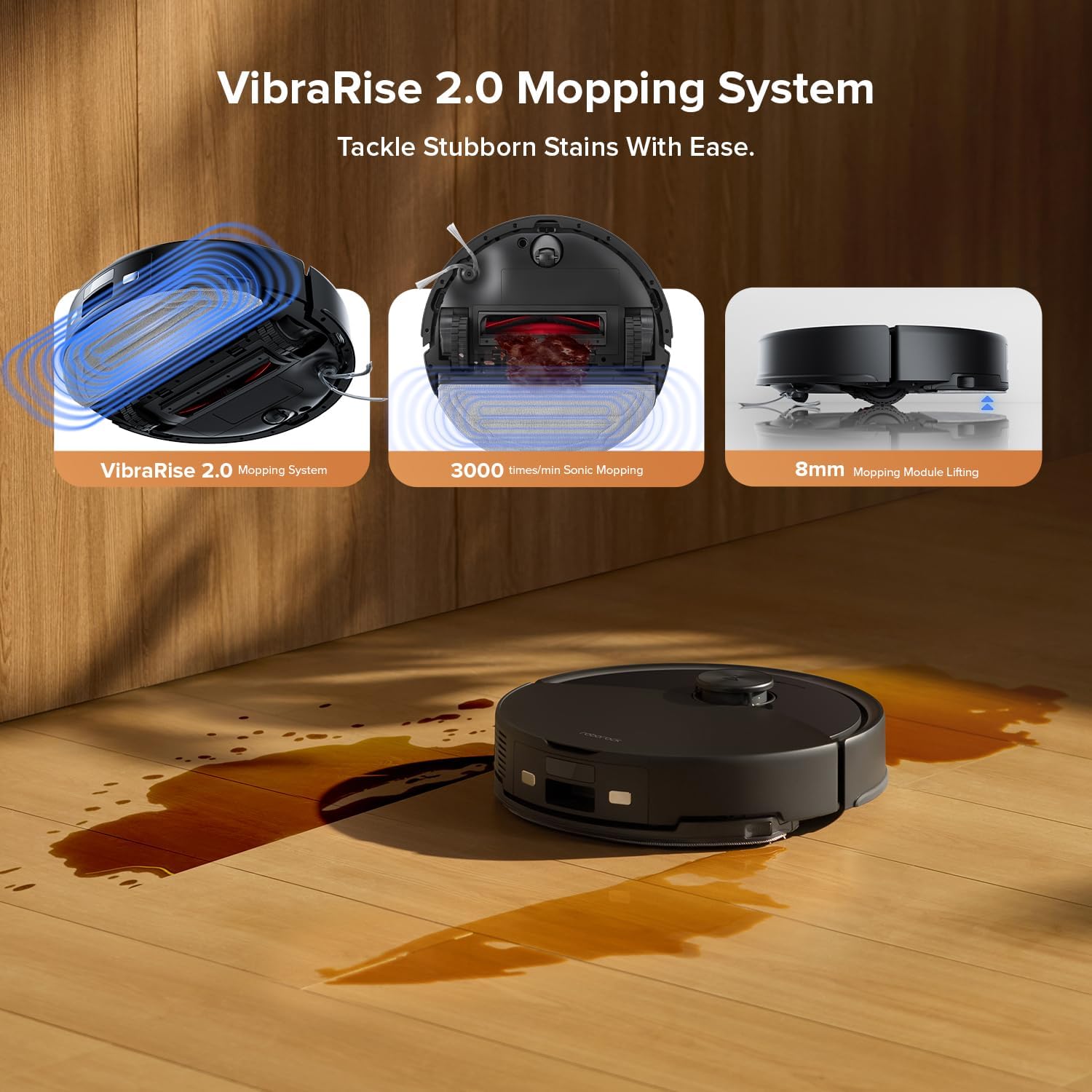
Figure 2: The VibraRise 2.0 Mopping System, illustrating its sonic mopping action and 8mm mopping module lifting capability.
4.3 Suction Power and Anti-Tangle System
The Q10 S5+ features 10,000 Pa HyperForce suction for deep cleaning. The Dual Anti-Tangle System, with its JawScrapers Comb main brush and specialized side brush, is designed to minimize hair tangling, ensuring consistent performance.

Figure 3: Visual representation of the 10,000 Pa HyperForce Suction effectively picking up various debris like long hair, crumbs, pet food pellets, and coffee grounds.

Figure 4: Comparison illustrating the effectiveness of the Dual Anti-Tangle Design, showing minimal hair tangling on the roborock side brush compared to a conventional brush.
5. Техникалык тейлөө
Үзгүлтүксүз техникалык тейлөө оптималдуу иштешин камсыздайт жана робот чаң соргучуңуздун иштөө мөөнөтүн узартат.
5.1 Replacing the Disposable Dust Bag
- The 2.7L dust bag in the self-emptying station provides up to 7 weeks of hands-free cleaning.
- When the dust bag is full, the app will notify you, or the indicator on the station may light up.
- To replace: Open the lid of the self-emptying station. Pull the full dust bag upwards using its handle. The bag's opening will automatically seal to prevent dust leakage.
- Dispose of the full bag and insert a new roborock disposable dust bag into the slot. Push down until it is securely in place.
- It is recommended to replace the dust bag every 1-2 months for optimal performance.

Figure 5: A single roborock disposable dust bag, designed for easy and hygienic replacement.

Figure 6: Key features of the roborock disposable dust bag, highlighting its tight sealing, hot press edge, and sturdy fabric construction for effective dust containment.
5.2 тазалоо щеткасы
- Негизги щетка: Turn the robot over. Press the release tabs to remove the main brush cover. Lift out the main brush. Use the cleaning tool (if provided) to remove tangled hair and debris. Reinstall the brush and cover.
- Каптал щетка: Use a screwdriver to remove the screw holding the side brush. Remove any tangled hair or debris. Reattach the side brush.
5.3 Чыпкаларды тазалоо
- Роботтун үстүнкү капкагын ачып, таштанды челекти чыгарыңыз.
- Remove the filter assembly (Cloth and Foam filters). Tap the filter against a trash can to remove dust.
- Rinse the filter under running water if necessary (check manual for specific filter type instructions). Allow to air dry completely before reinstalling.
5.4 Сенсорлорду жана заряддоо контакттарын тазалоо
- Wipe all sensors (cliff sensors, wall sensor) on the robot and the charging contacts on both the robot and the station with a soft, dry cloth.
5.5 Тазалоочу суу багы жана швабра
- Ар бир тазалоо сессиясынан кийин резервуардагы калган сууну бошотуңуз.
- Remove the mop pad and rinse it thoroughly. Allow it to air dry completely before reattaching or storing.
6. Кыйынчылыктарды
If you encounter issues with your roborock Q10 S5+, refer to the following common solutions:
| Көйгөй | Мүмкүн себеп | Чечим |
|---|---|---|
| Робот күйбөйт жана заряддалбайт. | Battery low; charging contacts dirty; power cable disconnected. | Ensure robot is properly docked. Clean charging contacts. Check power cable connection to station and outlet. |
| Робот бат-баттан тыгылып калат. | Obstacles in path; cliff sensors dirty; robot stuck on high pile carpet. | Clear obstacles. Clean cliff sensors. Use no-go zones in the app for problematic areas. |
| Начар соргуч аткаруу. | таштанды челек толгон; фильтр бүтөлгөн; негизги щетка чаташкан. | Replace dust bag. Clean or replace filters. Clean main brush and side brush. |
| Шыпыруу натыйжалуу эмес. | Water tank empty; mop pad dirty or dry; water flow setting too low. | Refill water tank. Clean or replace mop pad. Adjust water flow in the app. |
| Робот Wi-Fi/Колдонмого туташа албайт. | Туура эмес Wi-Fi сырсөзү; роутер көйгөйлөр; робот роутерден өтө алыс. | Ensure correct Wi-Fi password. Restart router. Move robot closer to router during setup. |
For more detailed troubleshooting, refer to the roborock app's help section or the official roborock support webсайт.
7. Продукттун спецификациялары
| Өзгөчөлүк | Деталь |
|---|---|
| Бренд | roborock |
| Модель аты | S5+ |
| Түс | Кара |
| Камтылган компоненттер | 1 x Mop Head, 1 x Cleaning Solution |
| Чыпка түрү | Кездеме, Пено |
| Power Source | Батарея менен иштейт |
| Башкаруу ыкмасы | Тийип, Колдонмону башкаруу |
| Форма фактору | Тегерек |
| ASIN | B0F8W48LBB |
| Таштанды челектин сыйымдуулугу (робот) | 500мл |
| Суу резервуарынын сыйымдуулугу | 200мл |
| Максималдуу Runtime | 150 мүнөт |
| Maximum Vacuuming Area | 1,937 чарчы метр |
| Өзүн-өзү бошотуучу чаң баштыктарынын сыйымдуулугу | 2.7L (up to 7 weeks of cleaning) |

Figure 7: ашыкview of the robot vacuum's capacities, including dustbin, water tank, runtime, and maximum cleaning area.
8. Кепилдик жана колдоо
roborock products typically come with a limited warranty. Please refer to the warranty card included in your product packaging or visit the official roborock webСиздин аймакка тиешелүү деталдуу кепилдик шарттары жана шарттары үчүн сайт.
Кардарларды колдоо:
For technical assistance, troubleshooting not covered in this manual, or warranty claims, please contact roborock customer support through their official website or the roborock app. Have your product model (S5+) and ASIN (B0F8W48LBB) ready when contacting support.
Официалдуу Webсайт: https://us.roborock.com/ (же тиешелүү аймактык сайт)


