1. Киришүү
This manual provides instructions for the safe and effective operation of your SJCAM C300 Pocket Travel Action Camera. Please read this manual thoroughly before using the device and retain it for future reference.
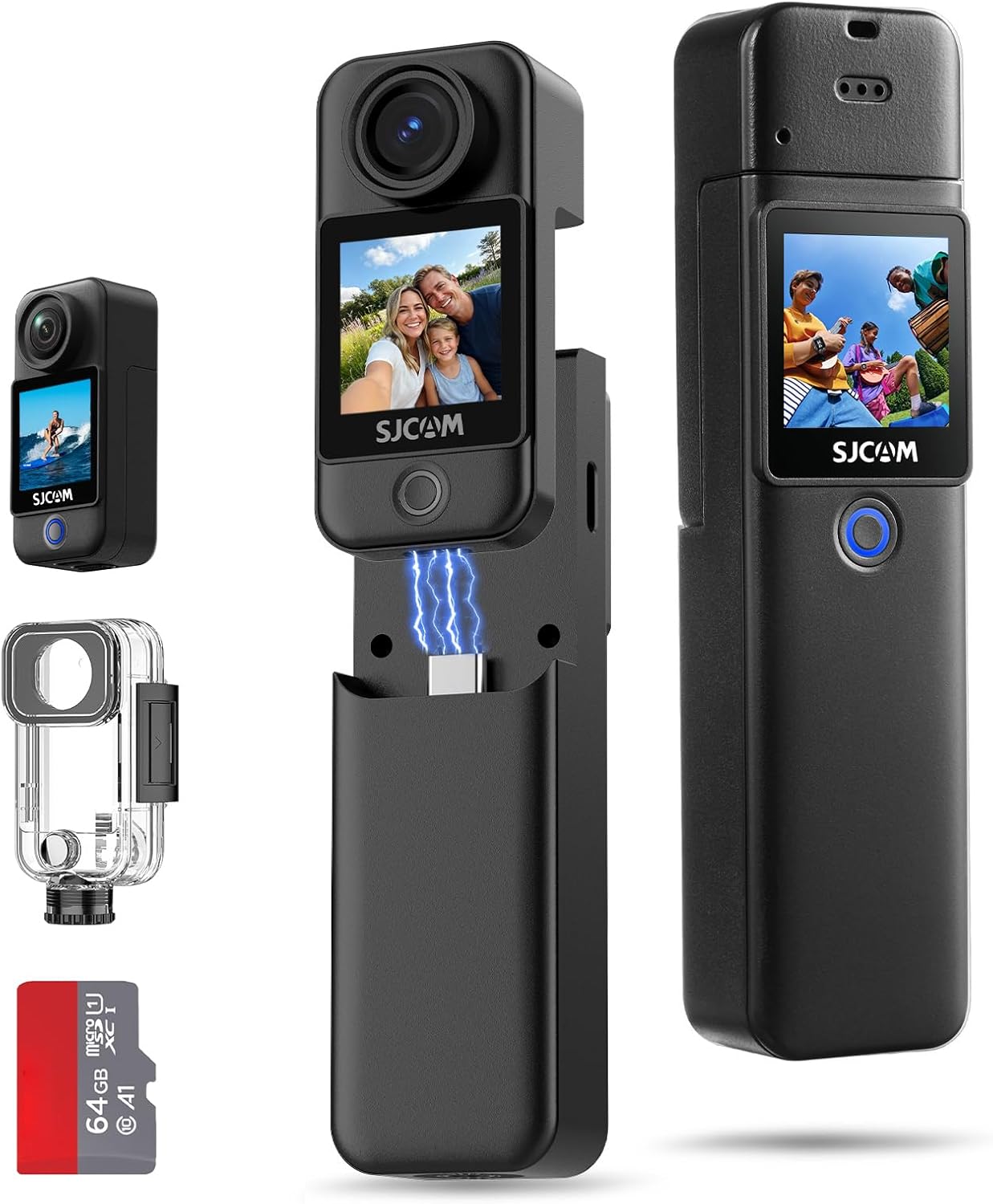
Image: The SJCAM C300 camera shown with its detachable battery handle, waterproof housing, and a 64GB microSD card.
2. Продукт бүтүп калдыview
2.1 Компоненттер
- Камера бирдиги: Main body with lens, front and rear touchscreens.
- Батарея туткасы: Detachable unit providing extended power and grip.
- Суу өткөрбөй турган кап: 30 метрге чейин суу астында колдонуу үчүн коргоону камсыз кылат.
- MicroSD картасынын уячасы: For storage of recorded media.
- USB Type-C порту: For charging, data transfer, and webкамера функциясы.
2.2 Башкаруу каражаттары жана көрсөткүчтөр
- Кубат / режим баскычы: Powers the device on/off and switches between modes.
- Жалюзи/жаздыруу баскычы: Initiates photo capture or video recording.
- Сенсордук экрандар: Front and rear screens for preview, ойнотуу жана менюну багыттоо.
- Индикатор жарыктары: Display power status, charging status, and recording status.

Сүрөт: An overview of the SJCAM C300's key features, including 4K/30fps video, 1.33" dual touchscreens, 6-axis gyro stabilization, and 7-hour battery life.
3. Орнотуу
3.1 Батареяны заряддоо
The C300 camera utilizes a dual-battery design. Ensure both the camera unit and the battery handle are charged before use. Connect the camera to a USB power source using the provided USB Type-C cable. The indicator light will show charging status and turn off when fully charged.
3.2 MicroSD картасын салуу
A MicroSD card (up to 128GB, Class 10 or higher recommended) is required for storing photos and videos. Locate the MicroSD card slot on the camera unit. Insert the card with the contacts facing the correct direction until it clicks into place. To remove, gently press the card until it springs out.
3.3 Камераны чогултуу
- Attaching Battery Handle: Align the camera unit with the battery handle and slide it into place until securely connected.
- Using the Waterproof Case: For underwater activities, place the camera unit inside the waterproof case and ensure all latches are securely closed. Test the case for leaks without the camera before first use.
- Монтаждык аксессуарлар: Utilize the various included brackets and mounts (e.g., helmet base, flat bottom bracket) to attach the camera to desired surfaces or gear.
4. Негизги операция
4.1 Күйгүзүү/өчүрүү
- Күйгүзүү: Экран жарыктанганга чейин Күйгүзүү/Режим баскычын бир нече секунд басып туруңуз.
- Өчүрүү: Экран өчкөнгө чейин Күйгүзүү/Режим баскычын бир нече секунд басып туруңуз.
4.2 Видеону жаздыруу
- Камераны күйгүзүңүз.
- Күйгүзүү/Режим баскычын же сенсордук экранды колдонуп, видео режимин тандаңыз.
- Press the Shutter/Record button to start recording. A red indicator light will flash.
- Press the Shutter/Record button again to stop recording. The indicator light will stop flashing.
4.3 Сүрөт тартуу
- Камераны күйгүзүңүз.
- Select photo mode using the Power/Mode button or touchscreen.
- Экранды колдонуп кадрга түшүрүңүз.
- Press the Shutter/Record button to capture a photo.
4.4 Менюларды башкаруу
The C300 features dual 1.33-inch touchscreens for intuitive navigation. Swipe left/right or up/down on the screen to access different modes and settings. Tap on icons to select options and adjust parameters such as resolution, frame rate, and exposure.

Image: A user demonstrating the front and rear 1.33" HD dual touchscreens of the SJCAM C300 camera.
5. Өркүндөтүлгөн функциялар
5.1 6-Axis Gyro Stabilization
The integrated 6-axis gyroscope actively counteracts motion, providing continuously smooth and stable footage. This feature is designed to reduce image shake during dynamic activities.

Image: A visual comparison illustrating the effect of stabilization on footage, showing a dog running with and without stabilization.
5.2 5G WiFi Connectivity
Connect the C300 to your smartphone via 5G WiFi for fast file transfers and remote control through the dedicated SJCAM app. This allows for quick sharing of high-resolution videos and photos.
5.3 8X Digital Zoom
The camera supports 8X digital zoom, allowing you to magnify subjects for closer shots. This feature is accessible through the camera's touchscreen interface.
5.4 F2.0 Large Aperture and Low Light Performance
The F2.0 large aperture enhances brightness and clarity in low-light conditions, improving image quality in dimly lit environments.

Image: Two individuals using the SJCAM C300 for a selfie, illustrating the F2.0 large aperture for enhanced brightness.
5.5 Special Shooting Modes
The C300 offers various shooting modes to enhance your creative possibilities:
- 8X Slow Motion: Captures fast-paced action in slow motion.
- Алдын ала жаздыруу: Records a short period of video before the shutter button is pressed.
- Burst Сүрөт: Бир нече сүрөттү тез арада тартат.
- Убакыттын өтүшү: Убакыттын өтүшү менен бир катар сүрөттөрдү тартып, убакыттын өтүшү менен видеону түзөт.
- Delay-Record: Starts recording after a set delay.
- Унаа режими: Functions as a dashcam, automatically recording when the vehicle starts.

Image: A collage demonstrating different shooting modes available on the SJCAM C300, including slow motion, pre-record, burst photo, time lapse, delay-record, and car mode.
5.6 4K Wi-Fi Live Streaming & Webcam
The C300 supports 4K Wi-Fi live streaming, allowing you to broadcast your content directly. It can also function as a webcam when connected to a computer, providing smooth and stable video for online meetings or streaming.

Image: Illustrations of the SJCAM C300 being used for 4K Wi-Fi live streaming with a smartphone and as a webкамера ноутбукка туташтырылган.
5.7 Versatile Type-C Port
The Type-C port offers three operational modes when connected to a computer:
- USB Flash Drive: Access stored fileтүздөн-түз с.
- ЖК камерасы: Use the camera as a webкамера
- Төлөө гана: For battery charging without data transfer.

Image: The SJCAM C300 connected via its Type-C port, displaying menu options for Mass Storage, PC Camera, and Charge Only.
6. Суу өткөрбөй колдонуу
The SJCAM C300 is waterproof up to 30 meters (100 feet) when enclosed in its IP68-rated waterproof housing. Ensure the housing is properly sealed before any underwater use. This allows for capturing footage during diving, swimming, and other water sports.

Image: An individual using the SJCAM C300 in its waterproof housing while diving underwater, demonstrating its capability for capturing aquatic scenes.
7. Техникалык тейлөө
- Линзаны жумшак, түксүз чүпүрөк менен таза кармаңыз.
- Камераны узак убакыт бою өтө жогорку температурага же түз күн нуруна дуушар кылбаңыз.
- After using the waterproof case in saltwater, rinse it with fresh water and allow it to air dry.
- Камераны жана кошумча жабдууларды кургак, салкын жерде сактаңыз.
8. Кыйынчылыктарды
8.1 Камера күйбөй жатат
- Батарея толугу менен заряддалганын текшериңиз.
- Check if the battery handle is securely attached.
8.2 Жазуу маселелери
- Verify that a MicroSD card is inserted and has sufficient free space.
- MicroSD картасы туура форматталганын текшериңиз (FAT32 же exFAT).
- Use a high-speed MicroSD card (Class 10 or UHS-I/UHS-3 recommended) for 4K recording.
8.3 Сүрөттүн/видеонун сапатынын начардыгы
- Камера линзасын тазалаңыз.
- Жетиштүү жарыктандыруу шарттарын камсыз кылыңыз.
- Check camera settings for resolution and stabilization.
9. Техникалык шарттар
| Өзгөчөлүк | Деталь |
|---|---|
| Video Resolution | 4K чейин |
| Сүрөттүн резолюциясы | 20MP |
| талаасы View (FOV) | 154° кең |
| Турукташтыруу | 6-Axis Gyro Stabilization |
| Экрандар | Dual 1.33-inch Touchscreens |
| Батареянын иштөө мөөнөтү | Up to 7 hours (420 minutes) with dual batteries |
| Суу өткөрбөйт | 30 meters (100 feet) with waterproof housing |
| Байланыш | 5G WiFi, USB Type-C |
| Сактагыч | MicroSD Card (up to 128GB, not included unless specified) |
| Диафрагма | F2.0 Чоң диафрагма |
| Weight (Camera Unit) | Болжол менен 1.94 унция |
| Weight (with Battery Handle) | Болжол менен 3.77 унция |
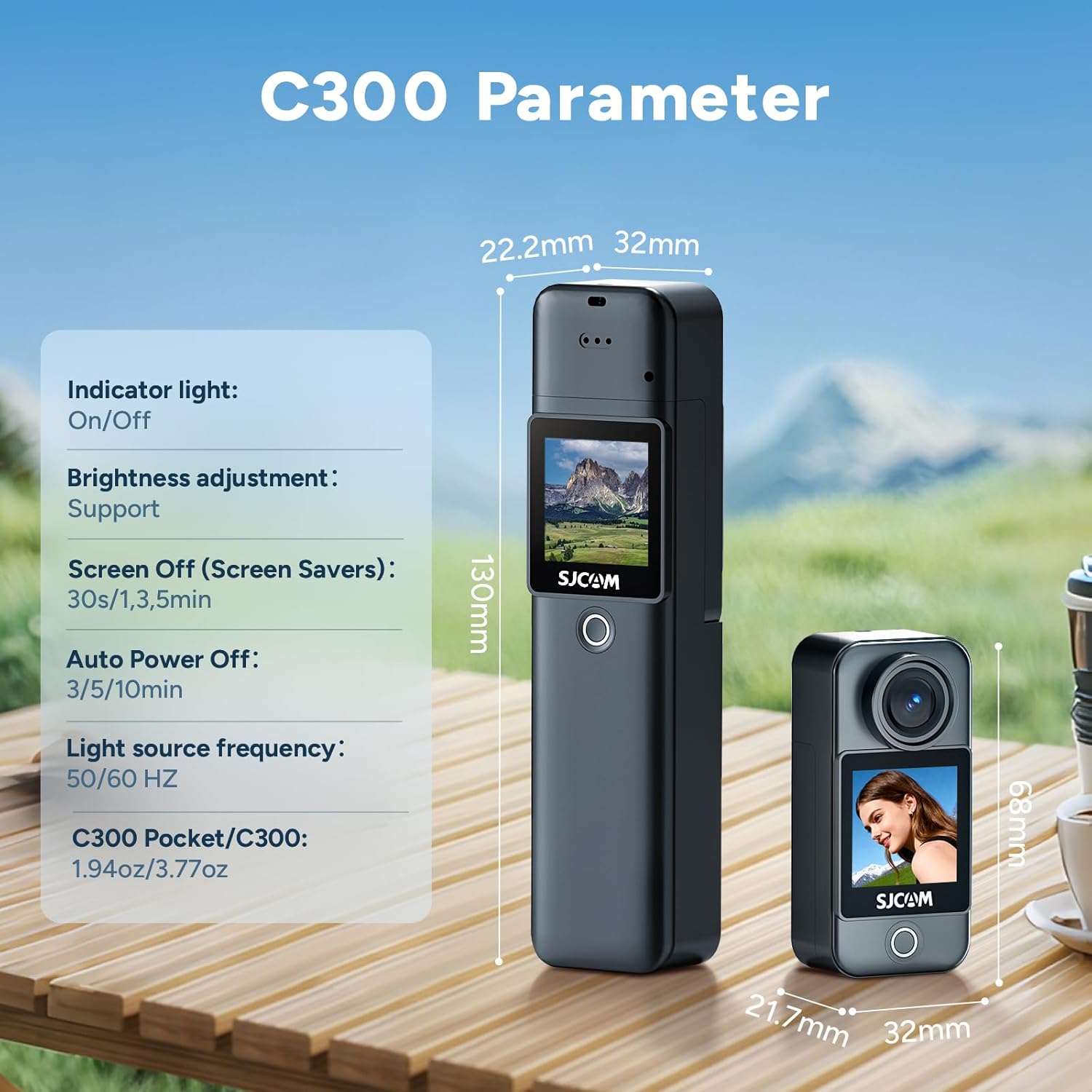
Image: A diagram illustrating the physical dimensions and some internal parameters of the SJCAM C300 camera.
10. Кутуда эмне бар
The standard package for the SJCAM C300 includes the following items:
- C300 Camera Unit (x1)
- Battery Handle (x1)
- Frame Mount (x1)
- Waterproof Case (x1)
- USB кабели (x1)
- Lanyard (x1)
- кашаа (x1)
- Back Clip (x1)
- Flat Bottom Bracket (x1)
- Helmet Base (x2)
- Micro SD Card (64GB) (x1)
- Wiping Cloth (x1)

Image: A visual representation of all items included in the SJCAM C300 product package.
11. Кепилдик жана колдоо
SJCAM products are covered by a manufacturer's warranty. For specific warranty terms, technical support, or service inquiries, please refer to the official SJCAM webсайтка же түздөн-түз кардарларды колдоо менен байланышыңыз. Кепилдик дооматтар үчүн сатып алганыңыздын далилин сактаңыз.


