Introduction
The Marshall Kilburn III is a premium portable Bluetooth speaker designed to deliver exceptional audio quality with a classic aesthetic. It features 360° True Stereophonic sound, robust dust and water resistance, and an extended battery life, making it suitable for various environments. This manual provides detailed instructions for setting up, operating, maintaining, and troubleshooting your Kilburn III speaker.
Кутуда эмне бар
- Marshall Kilburn III Speaker
- USB-C - USB-C кубаттоо кабели
- Quick Start Guide
- Юридикалык жана коопсуздук маалыматы
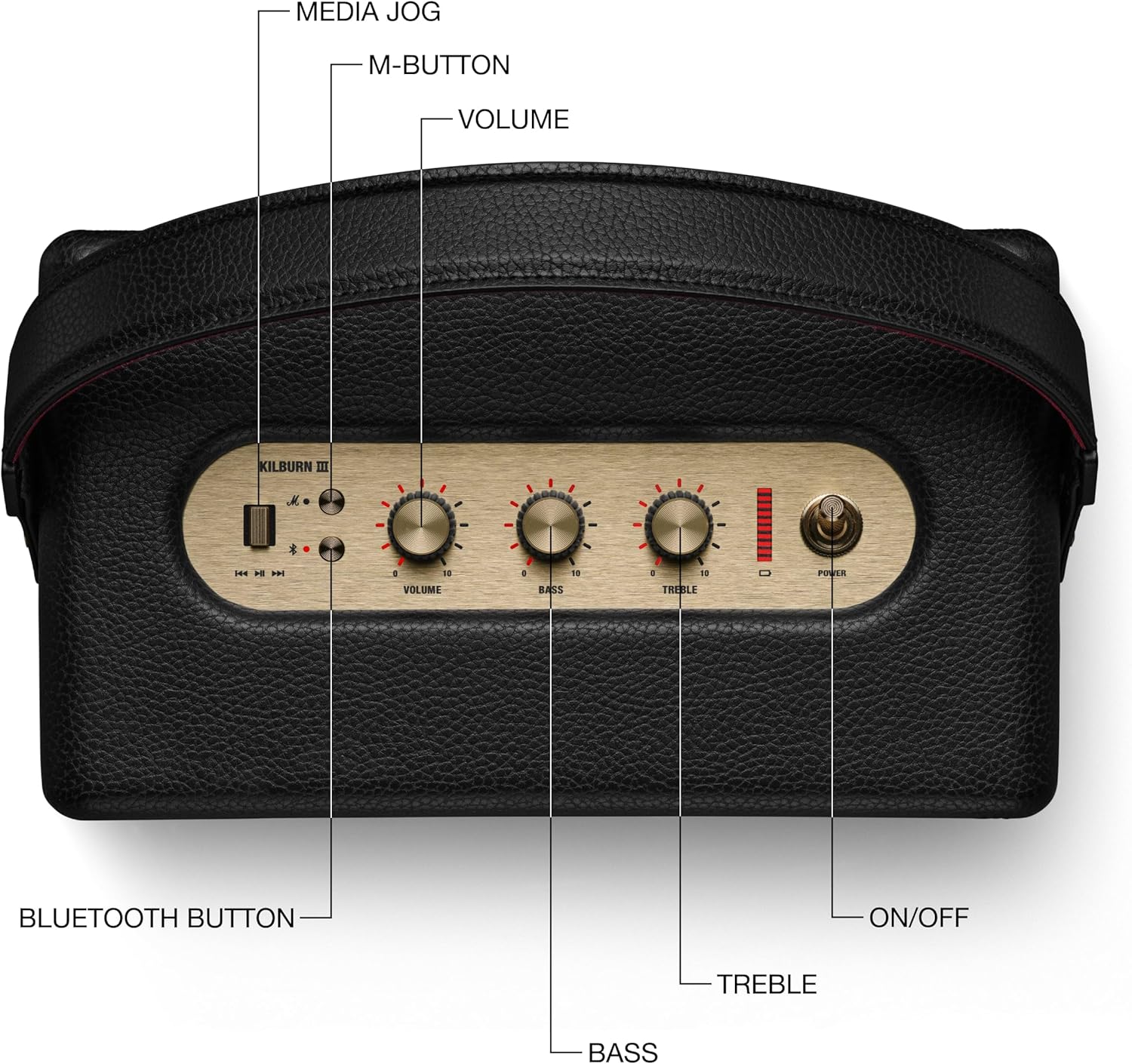
Figure 1: Included components with the Marshall Kilburn III speaker.
Продукт бүттүview
The Kilburn III features intuitive controls and a durable design. Familiarize yourself with the main components and controls:

Figure 2: Top panel controls of the Kilburn III speaker.
- Үн баскычы: Жалпы үн чыгаруу деңгээлин тууралайт.
- Басс баскычы: Төмөн жыштыктагы аудио чыгышын көзөмөлдөйт.
- Үч ыргытуу баскычы: Жогорку жыштыктагы аудио чыгышын көзөмөлдөйт.
- Кубат которгучу: Toggles the speaker on/off.
- Bluetooth баскычы: Bluetooth жупташтыруу режимин баштайт.
- M-Button: Allows switching between custom EQ modes (configurable via the Marshall app).
- Батарея көрсөткүчү: LED bar indicating remaining battery life.

Figure 3: Rear panel connections of the Kilburn III speaker.
- USB-C Power Input/Output: Used for charging the speaker and for using the speaker as a power bank to charge other devices.
- AUX 3.5 мм киргизүү: For connecting audio devices via a 3.5mm audio cable.
Жайгашуу
Спикерди заряддоо
Before first use, fully charge the Kilburn III speaker. Use the included USB-C to USB-C charging cable.
- Connect one end of the USB-C cable to the USB-C port on the rear of the speaker.
- Connect the other end of the USB-C cable to a compatible USB power adapter (not included) or a USB-C power source.
- The battery indicator LEDs on the top panel will illuminate to show charging progress. All LEDs will be solid when fully charged.

Figure 4: Charging the Kilburn III speaker via USB-C.
Bluetooth Жупташтыруу
To connect your audio device to the Kilburn III via Bluetooth:
- Динамик күйгүчө кубат которгучун алдыга тартыңыз.
- Push and hold the Bluetooth button on the top panel until the LED turns to a slow pulse, indicating pairing mode.
- On your audio device (smartphone, tablet, laptop), open the Bluetooth settings.
- Select "Kilburn III" from the list of available devices.
- Once connected, the Bluetooth LED on the speaker will turn solid.

Figure 5: Marshall Kilburn III ready for Bluetooth pairing.
Иштөө нускамалары
Негизги ойнотуу
- Ensure the speaker is powered on and connected via Bluetooth or AUX.
- Туташкан түзмөгүңүздөн аудио ойнотууну баштаңыз.
- Adjust the Volume knob on the speaker to your desired listening level.

Figure 6: Adjusting the volume on the Kilburn III.
Үндү тууралоо
Customize your audio experience using the dedicated Bass and Treble knobs:
- бургула Бас баскычы clockwise to increase bass, or counter-clockwise to decrease it.
- бургула Требл баскычы clockwise to increase treble, or counter-clockwise to decrease it.
Using the M-Button (Custom Modes)
The M-button allows you to cycle through pre-set or custom equalizer modes. To configure these modes, you may need to use the official Marshall app (if available for this model).
- басыңыз M-баскычы to switch between available sound modes.
Тышкы түзмөктөрдү кубаттоо (Power Bank функциясы)
The Kilburn III can act as a power bank to charge your mobile devices:
- Connect your device's USB-C charging cable to the USB-C port on the rear of the Kilburn III.
- Динамик түзмөгүңүздү кубаттай баштайт. Бул функцияны колдонуу динамиктин ойнотуу убактысын кыскартаарын эске алыңыз.
Техникалык тейлөө
To ensure the longevity and optimal performance of your Marshall Kilburn III speaker, follow these maintenance guidelines:
- Тазалоо: Use a soft, dry cloth to wipe the speaker's surfaces. Do not use abrasive cleaners, alcohol, or chemical solvents.
- Суу жана чаңга туруктуулугу: The speaker is IP54 rated, meaning it is resistant to dust and water splashes from any direction. However, it is not waterproof and should not be submerged in water. Ensure all ports are dry before charging.
- Сактагыч: Динамикти түз күн нурунан жана өтө температурадан алыс салкын, кургак жерде сактаңыз.
- Батареяга кам көрүү: Батареянын иштөө мөөнөтүн оптималдаштыруу үчүн, батареяны тез-тез толук зарядсыздандырбаңыз. Көпкө чейин колдонулбаса дагы, динамикти үзгүлтүксүз кубаттап туруңуз.
Проблемаларды чечүү
If you encounter issues with your Kilburn III, try the following solutions:
| Көйгөй | Мүмкүн чечим |
|---|---|
| Динамик күйбөйт. | Батарея заряддалганын текшериңиз. Динамикти USB-C кабели аркылуу кубат булагына туташтырыңыз. |
| Bluetooth аркылуу жупташтыруу мүмкүн эмес. |
|
| Үн жок же үнү төмөн. |
|
| Үндүн бузулушу. |
|
| Батарея бат эле түгөнөт. |
|
Техникалык шарттар
| Өзгөчөлүк | Деталь |
|---|---|
| Модель аты | Kilburn III |
| Динамик түрү | Көчмө спикер |
| Түс | Кара жана жез |
| Продукциянын өлчөмдөрү | 10.75"D x 5.91"W x 6.65"H |
| Элемент Салмагы | 6.17 фунт |
| Батареянын иштөө мөөнөтү | 50 саат |
| Заряддоо убактысы | 3 саат |
| Зымсыз байланыш технологиясы | Bluetooth |
| Bluetooth диапазону | 33 Фут |
| Сууга туруктуулук деңгээли | Water Resistant (IP54 rated) |
| Динамиктин максималдуу чыгаруу күчү | 36 Ватт |
| Аудио чыгаруу режими | Стерео |
| Башкаруу ыкмасы | Touch (Knobs) |
| Power Source | Батарея менен иштейт |
Кепилдик жана колдоо
The Marshall Kilburn III comes with a Limited Warranty. For detailed warranty information, please refer to the "Legal and Safety Information" document included in your product packaging.
For further assistance, technical support, or to purchase replacement parts, please visit the official Marshall webсайтка же кардарларды тейлөөгө кайрылыңыз. Сиз ошондой эле кайрыла аласыз Колдонуучунун колдонмосу (PDF) кошумча маалымат үчүн.


