1. Продукт бүтүп калдыview
The Milwaukee M18 Bluetooth Jobsite Radio is designed for durability and high-quality audio performance in demanding work environments. It features dual 3.5-inch woofers and two high-range tweeters for balanced sound. Bluetooth 5.0 connectivity allows for wireless audio streaming up to 120 feet. The radio includes AM/FM capabilities with 18 programmable presets and customizable equalizer settings for bass and treble.
Power is supplied by any Milwaukee M18 battery or the included AC adapter, offering up to 13 hours of runtime at maximum volume with an M18 XC5.0 battery. Its robust design provides water, dust, and impact resistance. A USB-C 3.0A port is integrated for charging personal devices.
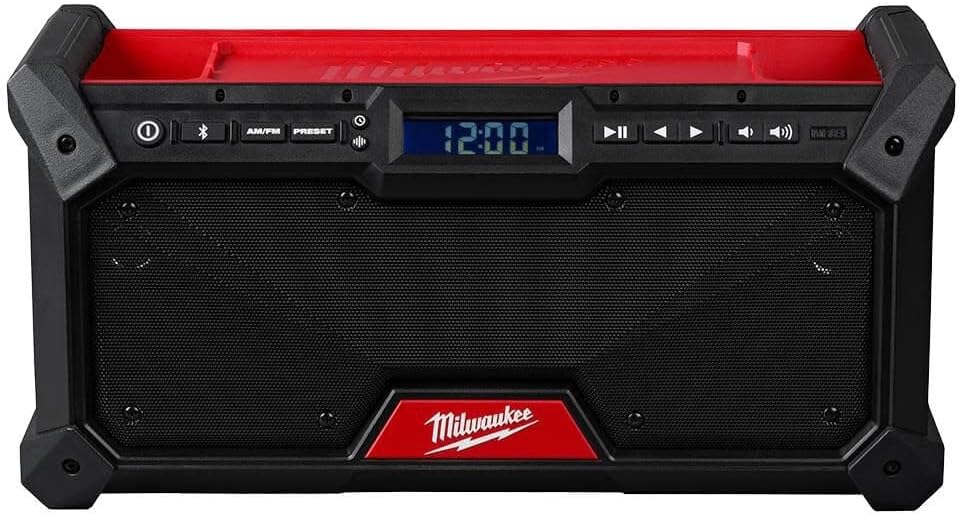
Фронт view of the Milwaukee M18 Bluetooth Jobsite Radio, showcasing the dual speakers, central digital display, and control panel for power, Bluetooth, AM/FM, presets, playback, and volume adjustments.
2. Коопсуздук нускамалары
Коопсуз эксплуатацияны камсыз кылуу жана зыян келтирбөө үчүн төмөнкү коопсуздук эрежелерин сактаңыз:
- Read all instructions thoroughly before operating the radio.
- Use only Milwaukee M18 batteries and chargers specified for this product.
- Радиону жамгырга же нымдуу шарттарга тийгизбеңиз.
- Do not disassemble the radio. Refer all servicing to qualified service personnel.
- Ensure proper ventilation around the radio. Do not block any ventilation openings.
- Keep the radio away from heat sources such as radiators, heat registers, stoves, or other apparatus that produce heat.
- Кургак чүпүрөк менен гана тазалаңыз.
3. Орнотуу
3.1 Кубат булагына туташуу
- Using an M18 Battery: Open the battery compartment cover and insert a charged Milwaukee M18 battery until it clicks into place. Close the cover securely.
- AC адаптерин колдонуу: Connect the provided AC adapter to the radio's power input port and then plug the adapter into a standard electrical outlet.
3.2 Антеннаны тууралоо
For optimal AM/FM radio reception, extend the flexible antenna fully and adjust its position as needed.
4. Иштөө нускамалары
4.1 Күйгүзүү/өчүрүү
басыңыз Күч button (marked with a circle and vertical line) located on the control panel to turn the radio on or off.
4.2 Mode Selection (AM/FM/Bluetooth)
басыңыз AM/FM button to cycle between AM and FM radio bands. Press the Bluetooth button (marked with the Bluetooth symbol) to activate Bluetooth mode.
4.3 Bluetooth жупташтыруу
- басыңыз Bluetooth button. The Bluetooth indicator on the display will flash, indicating pairing mode.
- On your mobile device, enable Bluetooth and search for available devices. Select "Milwaukee Radio" from the list.
- Once successfully paired, the Bluetooth indicator on the radio's display will glow solid.
4.4 Radio Tuning and Presets
- тюнинг: In AM or FM mode, use the Күүлөө (right arrow) and Тыңдаңыз (left arrow) buttons to manually adjust the frequency.
- Алдын ала орнотууларды сактоо: Каалаган станцияга которуңуз. басып, кармап туруңуз Алдын ала коюлган button until the preset number flashes on the display. Use the Tune Up/Down buttons to select a preset number (1-18). Press the Алдын ала коюлган станцияны сактоо үчүн кайра басыңыз.
- Алдын ала орнотууларды эстөө: баскычын кыскача басыңыз Алдын ала коюлган баскычын жана андан кийин колдонуңуз Tune Up/Down buttons to cycle through and select a saved preset station.
4.5 Үндү башкаруу
Adjust the audio output level using the Үндү көтөрүү (speaker icon with two waves) and Үндү төмөндөтүү (speaker icon with one wave) buttons.
4.6 Эквалайзердин жөндөөлөрү
басыңыз EQ button (if available, or refer to the display menu) to access and adjust bass and treble levels to your preference.
4.7 USB-C Device Charging
Connect a compatible personal electronic device to the USB-C 3.0A port on the radio to charge it. The radio must be powered on for charging functionality.
5. Техникалык тейлөө
5.1 Тазалоо
Радионун сыртын жумшак, гamp кездеме. Абразивдүү тазалагычтарды, эриткичтерди же катуу химиялык заттарды колдонбоңуз, анткени алар финишке же ички компоненттерге зыян келтириши мүмкүн.
5.2 Сактоо
When not in use, store the radio in a dry, protected area away from extreme temperatures. If storing for extended periods, remove the M18 battery.
6. Кыйынчылыктарды
- Кубат жок: Ensure the M18 battery is charged and properly inserted, or that the AC adapter is securely connected to both the radio and a working power outlet.
- Үн жок: Check the volume level. Ensure the correct audio source (AM, FM, or Bluetooth) is selected.
- Радио кабыл алуу начар: Fully extend and adjust the antenna. Try repositioning the radio to a different location to improve signal strength.
- Bluetooth туташуу маселелери: Confirm the radio is in Bluetooth pairing mode (flashing indicator). Ensure Bluetooth is enabled on your device and it is within the 120 ft range. Try unpairing and re-pairing the device.
7. Техникалык шарттар
| Өзгөчөлүк | Деталь |
|---|---|
| Бренд | Милуоки |
| Модель номери | 2952-20 |
| Продукциянын өлчөмдөрү | 14"L x 6"W x 6"H |
| Байланыш технологиясы | Bluetooth 5.0 |
| Power Source | M18 Battery or AC Adapter |
| Радио топтору колдоого алынат | AM/FM |
| Өзгөчөлүктөр | Dust Resistant, Portable, Built-In AM Antenna, USB-C 3.0A Charging |
| Max Runtime | Up to 13 hours (with M18 XC5.0 battery at max volume) |
8. Кепилдик жана колдоо
For detailed warranty information, product registration, or technical support, please refer to the official Milwaukee website or contact Milwaukee customer service directly. Keep your purchase receipt for warranty claims.


