1. Киришүү
Thank you for choosing the Camtro M6 Outdoor Security Camera. This battery-powered wireless camera is designed to provide reliable outdoor surveillance with features such as 1080p video resolution, color night vision, two-way audio, and smart AI motion detection. This manual provides essential information for setting up, operating, and maintaining your camera to ensure optimal performance.
2. Пакеттин мазмуну
Пакетиңизде бардык буюмдар бар экенин текшериңиз:
- Camtro M6 Outdoor Security Camera
- Instruction Manual
- Монтаждоо бурамалар
3. Продукт бүтүп калдыview
Familiarize yourself with the components of your Camtro M6 camera.

3.1-сүрөт: Фронт view of the Camtro M6 Outdoor Security Camera, showing the lens, light, and motion sensor.
The Camtro M6 features a durable, weather-resistant design suitable for outdoor use. Key components include:
- Камера линзасы: Captures 1080p high-definition video.
- Infrared LED / Spotlight: Provides illumination for night vision and color night vision.
- Кыймыл сенсору: Detects movement for smart alerts.
- Микрофон: эки тараптуу аудио байланыш үчүн.
- Баяндамачы: Эки тараптуу аудио байланыш жана эскертүүлөр үчүн.
- Монтаждык база: Дубалдарга же башка беттерге коопсуз орнотуу үчүн.

3.2-сүрөт: Бүттүview of Camtro M6 features including AI Human Detection, Color Night Vision, Two-way Talk, and Cloud Storage.
4. Орнотуу
Follow these steps to set up your Camtro M6 camera:
- Камераны заряддоо: Before initial use, fully charge the camera battery using the provided charging cable. A full charge ensures optimal battery life.
- Колдонмону жүктөп алыңыз: Издөө the official Camtro security camera app on your smartphone's app store (iOS or Android) and install it.
- Каттоо эсебин түзүү: Колдонмону ачып, жаңы колдонуучу каттоо эсебин түзүү үчүн экрандагы нускамаларды аткарыңыз.
- Түзмөк кошуу: In the app, select the option to add a new device. Follow the prompts to connect your camera to your 2.4GHz Wi-Fi тармагы. Ensure your phone is connected to a 2.4GHz network during setup. 5GHz Wi-Fi is not supported.
- Камераны орнотуу: Choose a suitable outdoor location for mounting. Use the included mounting screws to securely attach the camera to a wall or other stable surface. Ensure the camera has a clear field of view жана Wi-Fi сигналыңыздын чегинде.
5. Иштөө нускамалары
Once set up, you can access and control your camera through the mobile app.
5.1 Live View
Колдонмону ачып, камераңызды тандаңыз view the live feed. This allows you to monitor your property in real-time from anywhere.
5.2 Эки тараптуу аудио

5.1-сүрөт: Illustration of the two-way audio function, allowing communication through the camera.
Түз эфирде микрофон сүрөтчөсүн басыңыз view to enable two-way audio. You can speak through your phone, and your voice will be projected through the camera's speaker. Similarly, you can hear audio from the camera's location.
5.3 Smart AI Motion Detection

5.2-сүрөт: The camera's AI Human Detection feature distinguishing between human movement and other objects.
The camera features AI-powered motion detection that can distinguish between humans, animals, and other moving objects. This reduces false alarms. You will receive push notifications on your smartphone when motion is detected. Adjust sensitivity settings within the app.
5.4 Түстүү түнкү көрүү
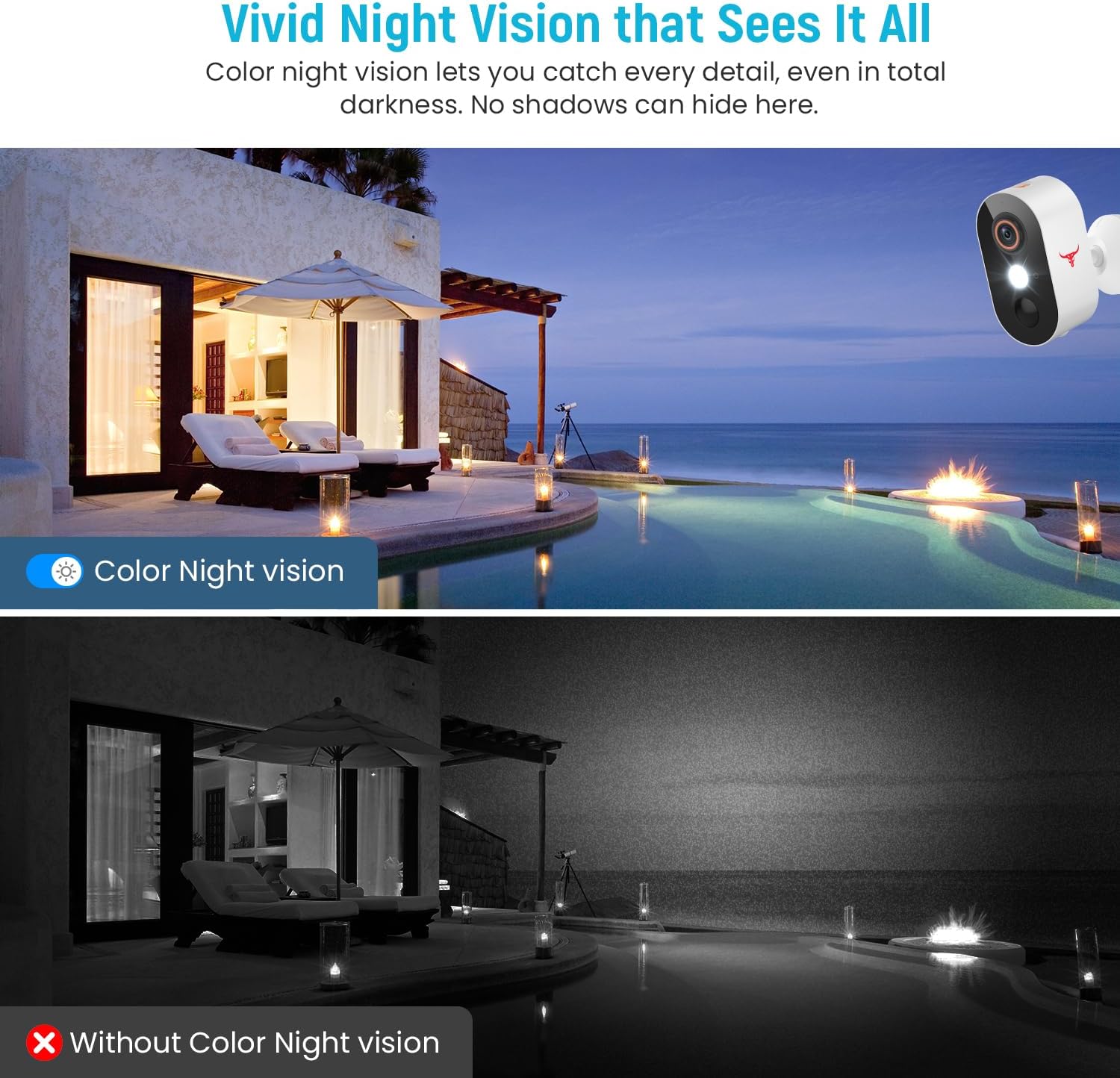
5.3-сүрөт: Comparison of color night vision and standard black and white night vision.
The Camtro M6 provides vivid color night vision, allowing you to see details in low-light conditions. The camera automatically switches to night vision mode when ambient light is insufficient.
5.5 Булуттагы сактагыч

5.4-сүрөт: Visual representation of cloud storage for recorded video events.
The camera supports cloud storage for recording and reviewing video events. A subscription is required to access recorded footage. Please refer to the app for subscription options and details.
6. Техникалык тейлөө
Үзгүлтүксүз техникалык тейлөө камераңыздын узак мөөнөттүү иштешин жана оптималдуу иштешин камсыз кылат.
- Батареяны заряддоо: The camera is battery-powered. Monitor the battery level in the app and recharge the camera as needed. Battery life can vary based on usage and environmental factors.
- Тазалоо: Мезгил-мезгили менен камеранын линзасын жана корпусун жумшак, гamp чаңды жана калдыктарды тазалоо үчүн кездеме. Катуу химиялык заттарды колдонбоңуз.
- Программалык камсыздоонун жаңыртуулары: Keep the camera's firmware updated through the app to access new features and improvements.

6.1-сүрөт: The Camtro M6 camera demonstrating its weather resistance against shine, rain, snow, and dust.
The camera is designed to withstand various weather conditions, operating effectively in temperatures ranging from 14°F to 140°F.
7. Кыйынчылыктарды
If you encounter issues with your Camtro M6 camera, refer to the following common problems and solutions:
| Көйгөй | Мүмкүн себеп | Чечим |
|---|---|---|
| Камера Wi-Fi'га туташпай жатат | Incorrect Wi-Fi password, 5GHz Wi-Fi network, weak signal | Ensure correct 2.4GHz Wi-Fi password. Confirm your router is broadcasting a 2.4GHz network. Move camera closer to the router. |
| Видеонун сапаты начар | Weak Wi-Fi signal, dirty lens | Improve Wi-Fi signal strength. Clean the camera lens. |
| Кыймылды аныктоо иштебей жатат же өтө көп жалган сигналдар | Incorrect sensitivity settings, camera placement | Adjust motion detection sensitivity in the app. Ensure camera is positioned to avoid unnecessary triggers (e.g., swaying branches). |
| Батарея бат эле түгөнөт | Frequent motion events, continuous live view, low temperature | Reduce motion detection sensitivity. Limit continuous live viewing. Ensure camera is fully charged. |
| Two-way audio unclear | Weak Wi-Fi signal, microphone/speaker obstruction | Check Wi-Fi connection. Ensure microphone and speaker are clear of obstructions. |
8. Техникалык шарттар
Detailed technical specifications for the Camtro M6 Outdoor Security Camera:
- Модел: M6
- Ички/тышкы колдонуу: Сыртта
- Шайкеш түзмөктөр: Смартфон (iOS, Android)
- Кубат булагы: Батарея менен иштейт
- Туташуу протоколу: Wi-Fi (2.4 ГГц гана)
- Монтаж түрү: Дубалга орнотуу
- Видео тартуу токтому: 1080p
- Элементтин өлчөмдөрү (L x W x Y): 2.8 x 1.7 x 3.4 дюйм
- Элемент Салмагы: 6.6 унция (0.41 фунт)
- Батареялар: 2 стандарттуу эмес батарея (кошулган)
- Видео тартуу форматы: MP4
- Өзгөчө өзгөчөлүгү: Motion Sensor, Color Night Vision, 2-Way Audio
- Продукт үчүн сунушталган колдонуулар: Тышкы коопсуздук
9. Кепилдик жана колдоо
For warranty information and technical support, please refer to the contact details provided with your purchase or visit the official Camtro website. Our customer service team is available to assist with any questions or issues you may encounter.


