Маанилүү коопсуздук нускамалары
Бул продуктуну колдонуудан мурун бардык коопсуздук көрсөтмөлөрүн окуп чыгып, түшүнүп алыңыз. Келечекте колдонуу үчүн бул колдонмону сактап коюңуз.
- Вентиляция: Адекваттуу вентиляцияны камсыз кылыңыз. Эч кандай желдетүүчү тешиктерди жаап албаңыз.
- Суу жана ным: Бул шайманды жамгырга же нымга тийгизбеңиз. Ваза сыяктуу суюктуктар толтурулган нерселерди аппараттын үстүнө койбоңуз.
- Жылуулук булактары: Радиаторлор, жылуулук регистрлери, мештер же башка аппараттар (анын ичинде) сыяктуу жылуулук булактарынын жанына орнотпоңуз ampкөтөргүчтөр) жылуулукту пайда кылуучу.
- Кубат булактары: Use only power supplies specified by the manufacturer. Ensure the power cord is protected from being walked on or pinched.
- Тазалоо: Кургак чүпүрөк менен гана тазалаңыз.
- Тейлөө: Бул продуктту өзүңүз тейлөөгө аракет кылбаңыз. Бардык тейлөөнү квалификациялуу тейлөө кызматкерлерине тапшырыңыз.
Пакеттин мазмуну
Төмөндө тизмеленген нерселердин баары пакетиңизге камтылганын текшериңиз:
- Kuephom CD-X2A Boombox
- AC Power Cord
- Колдонуучунун колдонмосу (бул документ)
- Алыстан башкаруу
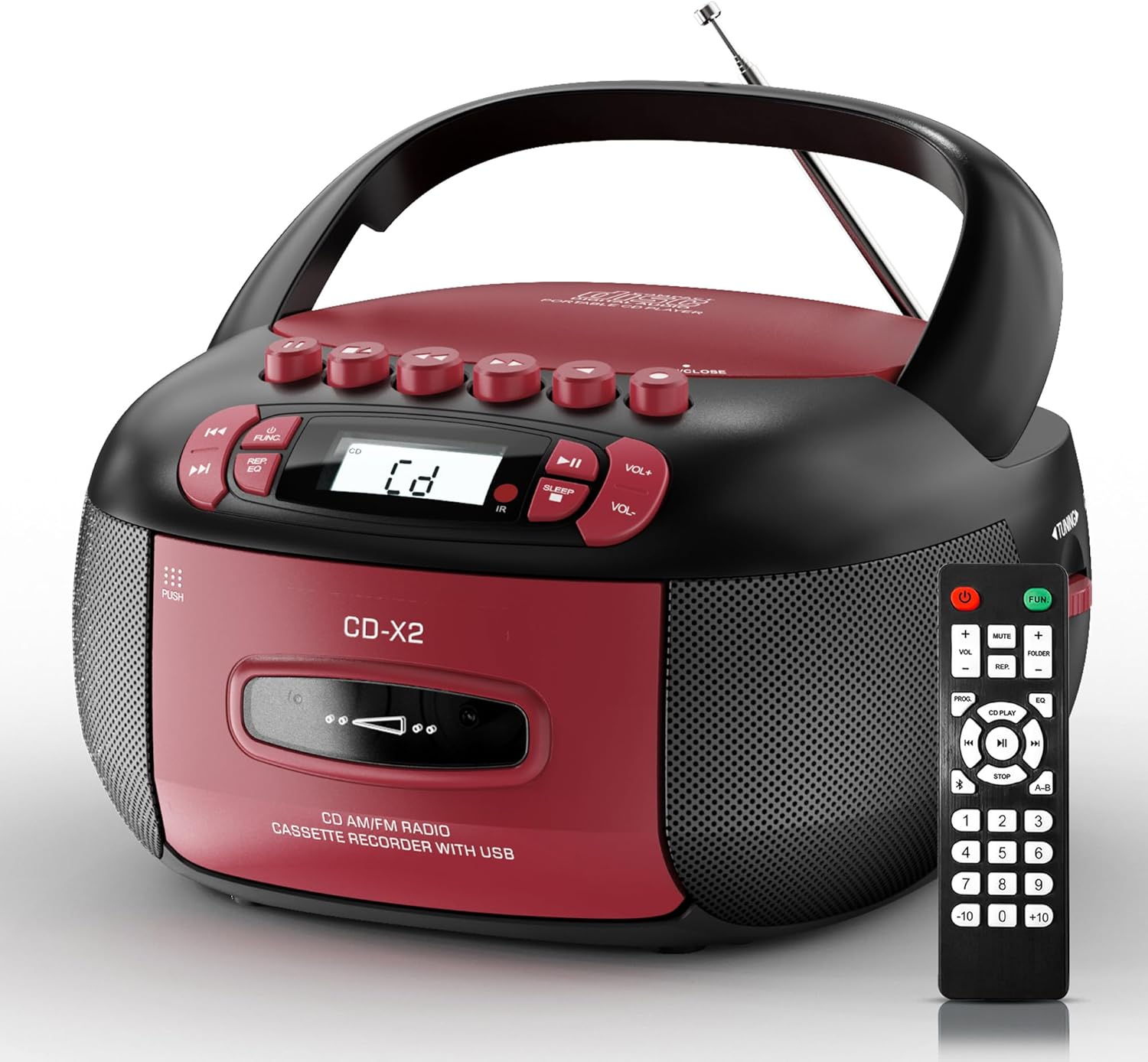
Image: The Kuephom CD-X2A Boombox with its included remote control, showcasing its compact design and red/black color scheme.
Продукт бүттүview
Familiarize yourself with the various components and controls of your Kuephom CD-X2A Boombox.
Алдыңкы панелдин башкаруу элементтери
- Кубат/Функция баскычы: Press and hold to power on/off. Press to cycle through modes (CD, USB, Bluetooth, Radio, AUX, Tape).
- Үн +/- баскычтары: Ойнотуу үнүн тууралаңыз.
- Ойнотуу/тындыруу баскычы: Start or pause playback for CD, USB, Bluetooth, or Tape.
- Токтотуу баскычы: Ойнотууну токтотуу.
- Өткөрүп жиберүү/Издөө баскычтары: Navigate between tracks on CD/USB or fast forward/rewind on tape.
- EQ баскычы: Эквалайзер алдын ала орнотууларды тандаңыз.
- Уйку таймеринин баскычы: Уйку таймерин коюңуз.
Каптал панелдин башкаруу элементтери
- Тунинг баскычы: Manually tune AM/FM radio stations.
- Гарнитура уячасы: Жеке угуу үчүн гарнитураны туташтырыңыз.
- AUX-кирүү порту: Тышкы аудио түзмөктөрдү туташтыруу.
- USB порт: Insert USB drives for MP3/WMA playback.
Жогорку панелдин өзгөчөлүктөрү
- CD бөлүмү: Top-loading compartment for CDs.
- Кассета бөлүмү: Front-loading compartment for cassette tapes.
- Телескопиялык антенна: Extend for improved radio reception.

Image: The boombox highlighting its multiple functions including CD/MP3, Bluetooth, Type I/II tape, USB, FM/AM Radios, Sleep timer, Remote, Phone jack, AUX, and Tape recording.

Сүрөт: Жакын план views of the boombox's phone jack, top-loading CD player, telescopic antenna, and tape play/record buttons.
Жайгашуу
Бумбоксту кубаттоо
AC Power
- Connect the supplied AC power cord to the AC IN jack on the back of the boombox.
- Plug the other end of the power cord into a standard AC wall outlet (120V~60Hz).
Батареянын күчү
- Open the battery compartment cover located on the bottom of the boombox.
- Insert 6 x 'C' size batteries (not included), ensuring correct polarity (+/-).
- Батарея уясынын капкагын бекем жабыңыз.
- When operating on battery power, disconnect the AC power cord.

Image: The boombox demonstrating both AC power connection and the use of 6 C-size batteries for portable operation.
Алыстан башкаруу
- Insert 2 x 'AAA' batteries (not included) into the remote control, observing polarity.
- Point the remote control towards the boombox's IR sensor for optimal operation.

Image: An individual comfortably operating the boombox using the remote control from a distance.
Иштөө нускамалары
Жалпы операция
- Күйгүзүү/өчүрүү: Press and hold the Power/Function button to turn the unit on or off.
- Функция тандоо: Press the Power/Function button repeatedly to switch between CD, USB, Bluetooth, Radio (AM/FM), AUX, and Tape modes.
CD ойнотуу
- CD бөлүктүн капкагын ачыңыз.
- Place a CD (CD, CD-R, MP3, WMA compatible) onto the spindle with the label side facing up.
- CD бөлүктүн капкагын жабыңыз.
- Press the Power/Function button to select 'CD' mode.
- Ойнотууну баштоо үчүн Play/Pause баскычын басыңыз.
- Use the Skip/Search buttons to navigate tracks.
- Press the Repeat button to repeat a single track, folder, or all tracks.
- Press the Program button to program a custom playback sequence.

Image: The boombox's display showing 'CD' mode, with icons indicating compatibility with CD, CD-R, CD-RW, WMA, and MP3 formats, along with single cycle, repeat folder, repeat all, random play, and play in order options.
Кассетаны ойнотуу жана жаздыруу
- Press the 'OPEN/CLOSE' button on the cassette compartment to open it.
- кассетаны салыңыз.
- Кассеталык бөлүмдү жабыңыз.
- Press the Power/Function button to select 'TAPE' mode.
- Ойнотуп баштоо үчүн Play баскычын басыңыз.
- Use the Fast Forward/Rewind buttons to navigate the tape.
- Жаздыруу: In TAPE mode, select the desired source (CD, Bluetooth, USB, or AM/FM radio). Press the Record button to begin recording onto the cassette. The unit features an auto-stop function when the tape reaches its end.

Image: A hand inserting a cassette tape into the boombox's front-loading compartment, with controls for tape operation visible.
AM/FM радиосу
- Press the Power/Function button to select 'RADIO' mode. Press again to switch between AM and FM bands.
- FM жакшыраак кабыл алуу үчүн телескопиялык антеннаны узартыңыз. AM үчүн, эң жакшы кабыл алуу үчүн түзмөктү айландырыңыз.
- Use the Tuning knob on the side to manually tune to your desired station. The frequency will be displayed on the screen.

Image: A man relaxing on a couch with the boombox, which displays various FM/AM radio frequencies, indicating good reception.
Bluetooth байланышы
- Press the Power/Function button to select 'BT' (Bluetooth) mode. The display will show 'BT' and flash, indicating it's in pairing mode.
- On your mobile device, enable Bluetooth and search for 'CD-X2A'.
- Select 'CD-X2A' to pair. Once paired, the 'BT' indicator will stop flashing.
- Эми сиз түзмөгүңүздөн аудиону зымсыз түрдө бумбокско агылта аласыз.

Image: A woman in a living room wirelessly streaming audio from her smartphone to the boombox via Bluetooth 5.1, indicating a stable connection.
USB ойнотуу
- Insert a USB flash drive into the USB port on the side of the boombox.
- Press the Power/Function button to select 'USB' mode.
- The boombox will automatically detect and play compatible MP3/WMA files.
- Use the Play/Pause, Stop, and Skip/Search buttons to control playback.
AUX киргизүү
- Connect an external audio device (e.g., smartphone, MP3 player) to the AUX-in port using a 3.5mm audio cable (not included).
- Press the Power/Function button to select 'AUX' mode.
- Түздөн-түз туташкан тышкы түзмөгүңүздөн ойнотууну башкарыңыз.
Уйку таймери
- While the unit is playing, press the Sleep Timer button.
- Repeatedly press the button to cycle through available sleep timer durations (e.g., 15, 30, 60, 90 minutes).
- The unit will automatically power off after the selected time.

Image: A man sleeping in bed with the boombox on his nightstand, illustrating the sleep timer feature which allows the device to turn off automatically.
Техникалык тейлөө
- Тазалоо: Бумбокстун сыртын тазалоо үчүн жумшак, кургак чүпүрөктү колдонуңуз. Абразивдүү тазалоочу каражаттарды же эриткичтерди колдонбоңуз.
- CD Care: CDлерди четинен кармаңыз. Кир компакт-дисктерди ортосунан сыртка карай сүртүп, жумшак, түксүз чүпүрөк менен тазалаңыз.
- Кассетага кам көрүү: Keep cassette tapes away from direct sunlight and heat. Periodically clean the tape heads with a specialized cassette head cleaner.
- Сактагыч: When not in use for extended periods, disconnect the power cord and remove batteries. Store the unit in a cool, dry place.
Проблемаларды чечүү
Эгер көйгөйлөргө туш болсоңуз, жалпы көйгөйлөр жана чечүү жолдору үчүн төмөнкү таблицага кайрылыңыз.
| Көйгөй | Мүмкүн себеп | Чечим |
|---|---|---|
| Күч жок | AC шнуру туташтырылган эмес; Батареялар түгөндү же туура эмес киргизилген. | Check AC connection; Replace or correctly insert batteries. |
| Үн жок | Үнү өтө төмөн; Туура эмес функция режими тандалып алынган; Кулакчындар туташтырылган. | Increase volume; Select correct mode; Disconnect headphones. |
| CD ойнотулбай жатат же ойнотулбай жатат | CD dirty or scratched; CD inserted incorrectly; Incompatible CD format. | Clean or replace CD; Insert CD correctly; Ensure CD is compatible (CD, CD-R, MP3, WMA). |
| Радио статикалык/начар кабыл алуу | Антенна узартылбаган/жайгашкан эмес; Алсыз сигнал. | Extend and adjust telescopic antenna; Try repositioning the unit. |
| Bluetooth жупташкан жок | Boombox жупташтыруу режиминде эмес; Түзмөктүн Bluetooth'у өчүк; Түзмөк өтө алыс. | Ensure boombox is in 'BT' mode and flashing; Enable Bluetooth on device; Move device closer. |
| Кассета ойнотулбай/жазылбай жатат | Tape inserted incorrectly; Tape heads dirty; Auto-stop engaged. | Insert tape correctly; Clean tape heads; Check tape end. |
Техникалык шарттар
| Өзгөчөлүк | Деталь |
|---|---|
| Модель номери | CD-X2A |
| Продукциянын өлчөмдөрү (L x W x Y) | 8.39 x 4.8 x 8.54 дюйм |
| Элемент Салмагы | 3.45 фунт |
| Power Source | AC 120V~60Hz or 6 x 'C' size batteries |
| Байланыш технологиясы | Көмөкчү, Bluetooth, USB |
| Динамик түрү | Stereo (2W+2W output) |
| Колдоого алынган диск форматтары | CD, CD-R, MP3, WMA |
| Supported Tape Types | Type I/II Cassette |
| Radio Bands | AM/FM |
| Өзгөчөлүктөр | Tape Recording, Sleep Timer, Earphone Jack, Remote Control |
Кепилдик жана колдоо
Kuephom products are designed for reliability and performance. This product comes with a standard manufacturer's warranty against defects in materials and workmanship under normal use.
For warranty claims, technical assistance, or any questions regarding your Kuephom CD-X2A Boombox, please contact Kuephom customer support. Refer to the contact information provided with your purchase documentation or visit the official Kuephom webколдоо чоо-жайы үчүн сайт.
We are committed to providing lifetime service support and 7/24 customer assistance for our products.


