1. Коопсуздук боюнча маанилүү маалымат
Please read this manual thoroughly before operating the Proscenic F20A Cordless Wet Dry Vacuum Cleaner. Keep these instructions for future reference.
- Колдонуудан мурун шайман толук жыйналганын текшериңиз.
- Кубаттоо үчүн берилген кубат адаптерин гана колдонуңуз.
- Негизги блокту сууга салбаңыз.
- Чачты, кенен кийимдерди, манжаларды жана дененин бардык бөлүктөрүн тешиктерден жана кыймылдуу бөлүктөрдөн алыс кармаңыз.
- Тез күйүүчү же тез күйүүчү суюктуктарды, же күйүп жаткан же түтүн чыгарып жаткан нерселерди чогултуу үчүн колдонбоңуз.
- Always turn off the appliance before performing any maintenance or cleaning.
2. Продукт бүтүп калдыview жана компоненттер
Familiarize yourself with the components of your Proscenic F20A vacuum cleaner.
2.1-сүрөт: Камтылган компоненттер
This image displays all items included in the package: the main unit (with floor brush, roller brush, sponge), battery, handle, charging base, power adapter, cleaning brush, user manual, and after-sales service card.
2.1 Main Components:
- Негизги блок: Contains the motor, dirty water tank, and clean water tank.
- туткасы: Ergonomic handle with control buttons.
- Пол щетка башчысы: Equipped with a roller brush for cleaning.
- Таза суу багы (1л): Таза суу жана тазалоо үчүн.
- Кир суу багы (1л): Кир сууларды жана таштандыларды чогултат.
- Заряддоо базасы: For charging, storage, and self-cleaning.
- Кубаттуу адаптер: Батареяны заряддоо үчүн.
- Тазалоочу щетка: Компоненттерди кол менен тазалоо үчүн.
3. Орнотуу
3.1 Ассамблея
- Туткасын негизги блокко ал ордуна чыкылдаган үн чыкканга чейин киргизиңиз.
- Ensure the clean and dirty water tanks are correctly seated.
3.2 Алгачкы заряддоо
Биринчи жолу колдонуудан мурун, чаң соргучту толугу менен заряддаңыз.
- Негизги блокту заряддоочу негизге коюңуз.
- Connect the power adapter to the charging base and a power outlet.
- The LED display will indicate charging status. A full charge takes approximately 4-5 hours.
3.3 Таза суу резервуарын толтуруу
- Негизги блоктон таза суу сактагычты алып салыңыз.
- Open the tank cap and fill with clean water. You may add a small amount of non-foaming cleaning solution suitable for wet dry vacuums. Do not exceed the MAX fill line.
- Капкагын бекем жаап, резервуарды негизги блокко кайра салыңыз.
4. Иштөө нускамалары
4.1 Күйгүзүү/өчүрүү
Press the power button on the handle to turn the appliance on or off.
4.2 Режимди тандоо
The Proscenic F20A offers three cleaning modes:
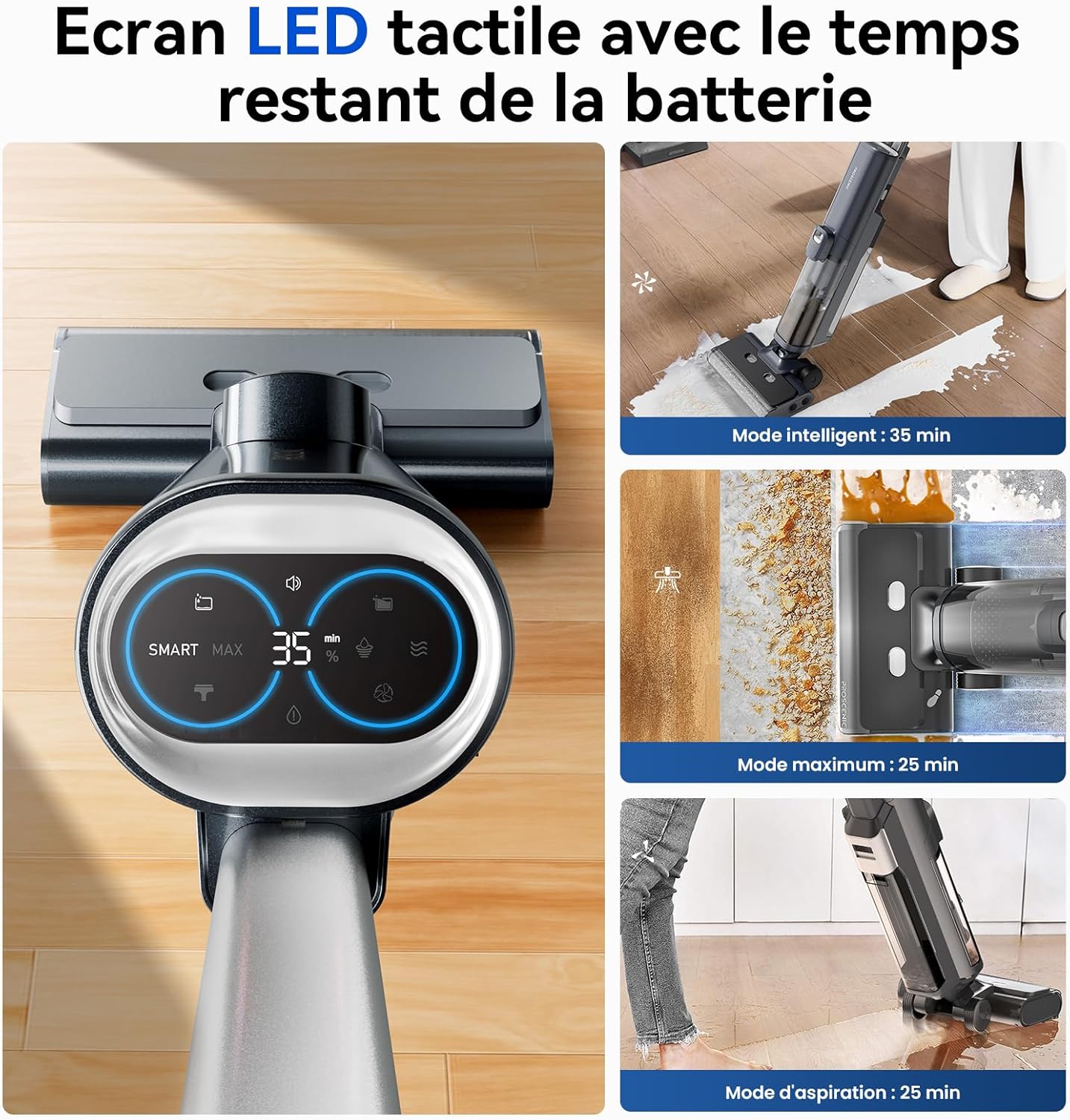
Figure 4.1: LED Display and Modes
The LED screen provides real-time information on battery life, current cleaning mode, and maintenance alerts. Touch the screen to switch between modes.
- Smart Mode: For general cleaning tasks. The vacuum automatically adjusts suction power and water volume based on detected dirt levels. (Approx. 35 minutes runtime)
- Макс режими: Provides maximum suction and water for stubborn stains and heavily soiled areas. (Approx. 25 minutes runtime)
- Вакуум режими: Designed for vacuuming liquids only, without dispensing water. (Approx. 25 minutes runtime)
Switch between modes by touching the corresponding icon on the LED display.
4.3 Self-Propulsion
The vacuum cleaner features a self-propulsion system, making it easier to maneuver across floors. Guide the unit gently; it will assist in forward movement.

Figure 4.2: Self-Propelled Cleaning
The self-propulsion system reduces effort during cleaning, allowing for easy movement across various floor types.
4.4 Тазалоо
The specialized brush head is designed to clean close to edges and baseboards, reaching within 0.7 cm for thorough cleaning.

Figure 4.3: Edge Cleaning Capability
The vacuum's design allows for effective cleaning along walls and into corners, minimizing uncleaned areas.
4.5 Үн менен башкаруу
The vacuum provides helpful voice prompts for operational status, battery alerts, and maintenance reminders. You can adjust or disable voice prompts via the settings.
5. Техникалык тейлөө
Regular maintenance ensures optimal performance and extends the lifespan of your Proscenic F20A.
5.1 Автоматтык түрдө өзүн-өзү тазалоо
Ар бир колдонуудан кийин өзүн-өзү тазалоо циклин иштетүү сунушталат:
- Place the vacuum cleaner on its charging base.
- Таза суу сактагычта жетиштүү таза суунун бар экенине ынаныңыз.
- Press the self-cleaning button (usually indicated on the handle or LED screen).
- The vacuum will automatically clean the roller brush and internal air ducts.
- After self-cleaning, the system will initiate cold air drying to prevent odors and bacterial growth.

Figure 5.1: Self-Cleaning and Air Drying
The vacuum automatically cleans its roller brush and dries it with cold air when placed on the charging base and the self-clean function is activated.
5.2 Кир суу куюлган бактын ичин бошотуу жана тазалоо
The vacuum will alert you when the dirty water tank is full. Empty and clean it after each use or when prompted.
- Кир суу резервуарын негизги блоктон чыгарыңыз.
- Open the tank and dispose of the dirty water and solid debris. The solid-liquid separation filter makes this process hygienic.
- Rinse the tank and filter thoroughly with clean water.
- Ensure all parts are dry before reassembling and reinserting the tank.
Figure 5.2: Solid-Liquid Separation
The dirty water tank features a filter to separate solid debris from liquids, simplifying disposal and cleaning.
5.3 Ролик щеткасын тейлөө
Periodically inspect and manually clean the roller brush for tangled hair or debris not removed by the self-cleaning function.
- Turn off the vacuum and remove the brush cover.
- Ролик щеткасын алып салыңыз.
- Use the provided cleaning brush to remove any hair or debris.
- Rinse the roller brush under running water if necessary and allow it to air dry completely before reinstallation.
5.4 HEPA Filter Cleaning
The HEPA filter should be cleaned regularly to maintain suction performance. Rinse it with water and allow it to air dry completely before reinstallation. Do not use the vacuum without a dry filter.
6. Кыйынчылыктарды
Жалпы маселелер жана алардын чечимдери үчүн бул бөлүмдү караңыз.
| Көйгөй | Мүмкүн себеп | Чечим |
|---|---|---|
| Вакуум күйбөйт. | Батарея аз же түгөнүп калган. | Чаң соргучту толук заряддаңыз. |
| Начар соргуч аткаруу. | Dirty water tank is full; roller brush is clogged; HEPA filter is dirty. | Empty and clean the dirty water tank. Clean the roller brush. Clean or replace the HEPA filter. |
| Water streaks on floor. | Roller brush is too wet or dirty. | Run the self-cleaning cycle. Manually clean the roller brush if necessary. |
| Voice prompts are too loud/quiet or in wrong language. | Voice settings need adjustment. | Refer to the LED display or user interface for voice setting adjustments. |
| Vacuum stops working when upright. | Safety feature activated. | This is a normal safety feature. Tilt the vacuum back to resume operation. |
Эгер көйгөй чечилбесе, кардарларды колдоо менен байланышыңыз.
7. Техникалык шарттар
| Өзгөчөлүк | Деталь |
|---|---|
| Бренд | Proscenic |
| Модель номери | F20A |
| Түс | Galaxy Grey |
| Өлчөмдөрү (L x W x Y) | 30 x 35 x 100 см |
| Элемент Салмагы | 8.32 кг |
| Таза суу резервуарынын кубаттуулугу | 1 литр |
| Кир суу резервуарынын сыйымдуулугу | 1 литр |
| Ылдамдыктын саны | 3 (Smart, Max, Vacuum) |
| Ызы-чуу деңгээли | 62 дБ |
| Runtime | 35 мүнөткө чейин |
| Күч | 300 Ватт |
| Тtage | 28.8 вольт |
| Чыпка түрү | HEPA чыпкасы |
| Surface Recommendation | Hard floors (concrete, wood, ceramic tiles) |
| Өзгөчөлүктөр | 3-in-1 (Vacuum, Mop, Wash), Self-cleaning, Self-propulsion, LED Display, Voice Guidance, Solid/Liquid Waste Separation, Cordless. |
8. Кепилдик жана колдоо
For warranty information and customer support, please refer to the "After-sales card" included in your package or visit the official Proscenic webсайт. Сатып алганыңыздын далили катары сатып алуу дүмүрчөгүңүздү сактаңыз.
Proscenic Official Webсайт: www.proscenic.com


