1. Продукт бүтүп калдыview
The Ulefone Armor Mini 20 is a robust 4G rugged smartphone designed for durability and performance in challenging environments. It features a compact design, a powerful MediaTek Helio G99 processor, advanced camera systems, and a long-lasting battery. This manual provides essential information for setting up, operating, maintaining, and troubleshooting your device.

Image: Ulefone Armor Mini 20 Rugged Phone with its accompanying Armor Case.

Сүрөт: An overview of the Ulefone Armor Mini 20's key features, including its compact size, camera specifications, battery capacity, processor, and rugged certifications.
2. Пакеттин мазмуну
Пакетте бардык буюмдар бар экенин текшериңиз:
- Ulefone Armor Mini 20 4G Rugged Phone
- Armor Case Kit
- USB кабели
- Power Adapter (33W Fast Charge compatible)
- SIM чыгаруучу курал
- Колдонуучунун Колдонмосу (бул документ)
- Кепилдик картасы

Image: Components of the Ulefone Armor Case, designed for enhanced protection and portability.
3. Орнотуу
3.1. SIM картаны жана MicroSD картаны орнотуу
- Телефондун капталындагы SIM карта салгычын табыңыз.
- SIM чыгаруучу куралды лотоктун жанындагы кичинекей тешикке салып, лоток чыгып кеткиче акырын түртүңүз.
- Place your Nano-SIM card(s) and/or MicroSD card (up to 2TB) into the designated slots on the tray, ensuring correct orientation.
- Лотокту телефонго түзмөктүн корпусу менен тегиз болгонго чейин этияттык менен кайра салыңыз.
3.2. Баштапкы заряддоо
Before first use, fully charge your Ulefone Armor Mini 20. Use the provided 33W fast charger and USB cable for optimal charging speed.
- USB кабелин телефондун заряддоо портуна туташтырыңыз.
- USB кабелинин экинчи учун кубат адаптерине туташтырыңыз.
- Кубат адаптерин розеткага сайыңыз.
- Экранда заряддоо индикатору пайда болот.
The device also supports 15W wireless charging.
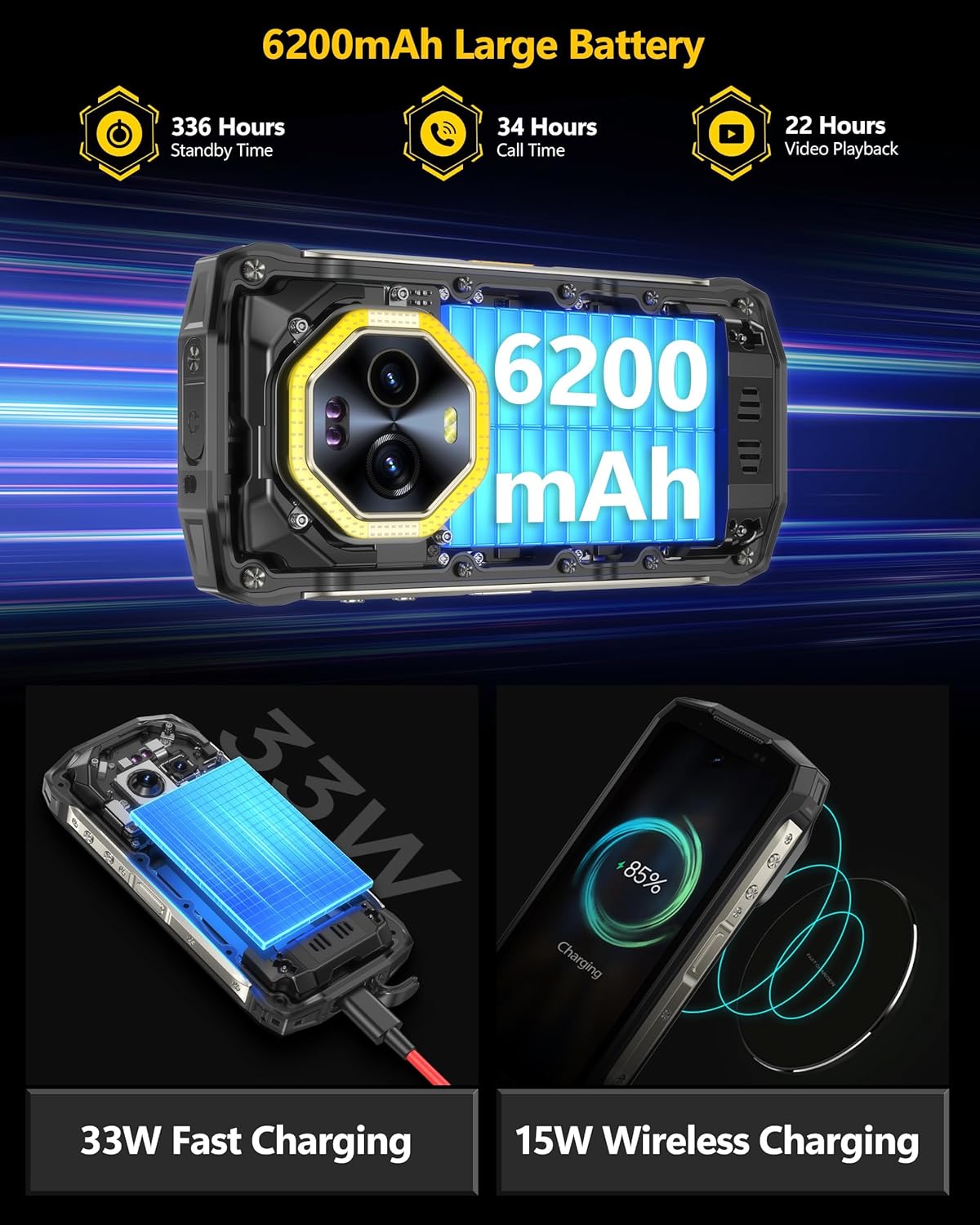
Image: Illustration of the Ulefone Armor Mini 20's 33W fast charging via cable and 15W wireless charging capabilities.
3.3. Attaching the Armor Case
The included Armor Case provides enhanced protection. Follow these steps to attach it:
- Align the phone with the case, ensuring all ports and buttons are correctly positioned.
- Gently press the phone into the case until it is securely seated.
- The case kit allows for secure mounting to various gear, providing shockproof and accidental drop protection.
4. Иштөө нускамалары
4.1. Күйгүзүү/өчүрүү жана кайра иштетүү
- Күйгүзүү: Ulefone логотиби пайда болгонго чейин Кубат баскычын басып, кармап туруңуз.
- Өчүрүү: Кубат баскычын басып, кармап туруңуз, андан кийин параметрлерден "Өчүрүү" дегенди тандаңыз.
- Кайра баштоо: Кубат баскычын басып, кармап туруңуз, андан кийин параметрлерден "Кайра баштоо" тандаңыз.
4.2. Дисплей жана навигация
The Armor Mini 20 features a 4.7-inch HD+ Corning Gorilla Glass Victus display.
- Тийүү жаңсоолору: Use tap, swipe, pinch-to-zoom for navigation and interaction.
- Бир кол менен иштөө: The compact size (5.25 x 2.49 x 0.98 inches) allows for comfortable one-handed use.

Image: Visual representation of the Ulefone Armor Mini 20's 4.7-inch HD+ display, dimensions, and examples of one-handed usage.
4.3. Камераны колдонуу
Аппарат ар тараптуу камера системасы менен жабдылган:
- 64MP түнкү көрүү камерасы: Utilizes OMNVISION'S OV64B sensor with two infrared LEDs and Ulefone NightElf Ultra 3.0 algorithm for clear images in low-light conditions.
- 50MP Негизги камера: Features a 1/1.31" ultra-large Samsung ISOCELL GN1 sensor for high-resolution photos.
- 32 МП селфи камерасы: Samsung GD1 Sensor with a 5P lens for clear self-portraits.
To access the camera, tap the Camera app icon on the home screen or app drawer. Select desired modes (Photo, Video, Night Vision, Portrait, etc.) and tap the shutter button to capture.
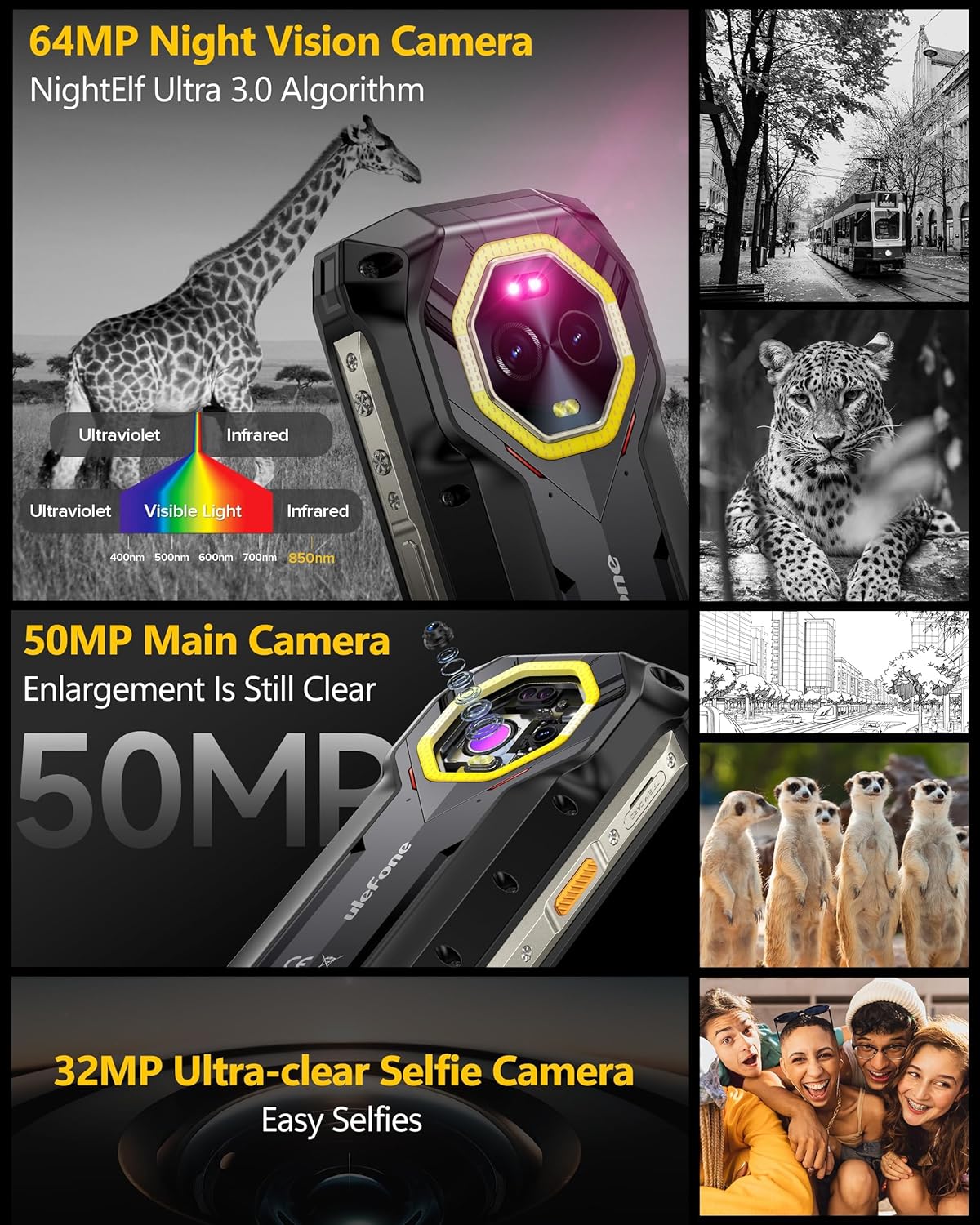
Сүрөт: деталдуу view of the Ulefone Armor Mini 20's 64MP Night Vision, 50MP Main, and 32MP Selfie camera capabilities, including infrared and visible light spectrums.
4.4. Versatile LED Light and Emergency Warning Light
The device includes a powerful LED light for various uses and an emergency warning light function.
- Versatile LED Light: Can be used for camping, hiking, cycling, and general emergency lighting. Access via quick settings or a dedicated app.
- Шашылыш эскертүү жарыгы: Provides blue and red flashing lights for signaling or warning.

Image: Demonstrates the versatile LED light for outdoor activities and the emergency warning light, alongside the phone's IP68/IP69K and MIL-STD-810H rugged certifications.
4.5. Android 14 өзгөчөлүктөрү
The Ulefone Armor Mini 20 runs on Android 14, offering enhanced personalization, protection, and accessibility features.
- Купуялык башкаруу панели: Monitor and manage app permissions, including location access.
- Персоналдаштыруу: Customize themes, icons, and widgets.
- Коопсуздук: Utilize Face Unlock and Fingerprint ID for secure access.

Image: Screenshots illustrating new features in Android 14 on the Ulefone Armor Mini 20, such as privacy controls, Google Lens integration, and screen time management.
5. Техникалык тейлөө жана кам көрүү
To ensure the longevity and optimal performance of your Ulefone Armor Mini 20, follow these maintenance guidelines:
- Тазалоо: Экранды жана корпусту тазалоо үчүн жумшак, мамыксыз чүпүрөктү колдонуңуз. Абразивдүү тазалоочу каражаттарды же эриткичтерди колдонбоңуз.
- Суу жана чаңга туруктуулугу: The phone is IP68/IP69K rated for water and dust resistance and MIL-STD-810H certified for ruggedness. Ensure all port covers are securely closed before exposure to water or dust.
- Температура: Operate the device within recommended temperature ranges. The sub-zero solid-state battery is designed to function in extreme cold down to -20 degrees Celsius.
- Сактагыч: Аппаратты колдонбогондо салкын, кургак жерде сактаңыз.
- Программалык камсыздоо жаңыртуулары: Оптималдуу аткарууну жана коопсуздукту камсыз кылуу үчүн программалык камсыздоо жаңыртууларын дайыма текшерип, орнотуп алыңыз.
6. Кыйынчылыктарды
| Көйгөй | Мүмкүн себеп | Чечим |
|---|---|---|
| Телефон күйбөйт | Аз батарея; Программанын бузулушу | Телефонду жок дегенде 30 мүнөт кубаттаңыз. Күйгүзүү үчүн "Күтүү" баскычын 10-15 секунд басып туруңуз. |
| Wi-Fi'га туташпай жатат | Туура эмес сырсөз; Роутер көйгөйү; Телефондогу Wi-Fi өчүрүлгөн | Verify Wi-Fi password. Restart router. Toggle Wi-Fi off and on in phone settings. |
| Колдонмолор жай же бузулуп жатат | Too many apps running; Low storage; App bug | Close background apps. Clear app cache. Free up storage. Update or reinstall the app. |
| Камера сапаты начар | Кир линза; Жарык аз шарттар; Туура эмес жөндөөлөр | Clean the camera lens with a soft cloth. Use Night Vision mode in low light. Adjust camera settings. |
| Батарея бат эле түгөнөт | Жогорку экран жарыктыгы; Фондук колдонмолор; Тармак маселелери | Reduce screen brightness. Close unnecessary background apps. Enable power saving mode. |
7. Техникалык шарттар
| Өзгөчөлүк | Деталь |
|---|---|
| Модел | Ulefone Armor Mini 20 |
| Процессор | MediaTek Helio G99, 2.2GHz 8-core CPU, 6nm Soc |
| RAM | 8GB (up to 8GB virtual RAM, total 16GB) |
| Ички сактагыч | 256 ГБ |
| Кеңейтүүчү сактагыч | TF card up to 2TB |
| Дисплей | 4.7" HD+ Corning Gorilla Glass Victus, 720 x 1600 Resolution, 373 PPI, 700 nits Max Brightness, 90Hz Refresh Rate |
| Башкы камера | 50MP Samsung ISOCELL GN1 (1/1.31", F/1.95 aperture) |
| Түнкү көрүнүш камерасы | 64MP OMNVISION OV64B with two infrared LEDs |
| Алдыңкы камера | 32MP Samsung GD1 Sensor, 5P lens, 80.4° FOV |
| Батарея сыйымдуулугу | 6200mAh (Sub-zero solid-state battery) |
| Заряддоо | 33W Fast Charge, 15W Wireless Charging, Reverse Charging |
| Операция системасы | Android 14 |
| Туруктуу | IP68/IP69K Waterproof & Dustproof, MIL-STD-810H Certified Drop Resistance (up to 2M) |
| Өлчөмдөр | 5.25 x 2.49 x 0.98 дюйм (133.3 x 63.3 x 24.9 мм) |
| Салмагы | 10.6 унция (болжол менен 300 г) |

Image: Details on the MediaTek Helio G99 processor, RAM, and ROM configurations of the Ulefone Armor Mini 20.
8. Кепилдик жана колдоо
Ulefone provides a standard warranty for the Armor Mini 20. Please refer to the warranty card included in your package for specific terms and conditions.
For technical support, troubleshooting assistance, or warranty claims, please contact Ulefone customer service through their official webсайтына же түзмөктү сатып алган сатуучуга кайрылыңыз.
Кепилдик үчүн сатып алуу дүмүрчөгүн сатып алуунун далили катары сактаңыз.


