1. Киришүү
This manual provides essential information for the installation, operation, and maintenance of your maxsun GeForce RTX 3050 6GB Graphics Card. Designed for optimal performance in gaming PCs, including mini and small form factor (SFF) systems, this graphics card leverages the NVIDIA Ampere architecture to deliver enhanced visual experiences. Please read this manual thoroughly before installation and use.

Image 1.1: maxsun GeForce RTX 3050 SLP Graphics Card.
2. Коопсуздук маалыматы
- Компоненттерди орнотуудан же алып салуудан мурун ар дайым компьютериңизден электр кубатын ажыратыңыз.
- Wear an anti-static wrist strap or frequently touch a grounded metal object to prevent electrostatic discharge (ESD) damage to the graphics card and other components.
- Сезимтал компоненттерге тийбеш үчүн графикалык картаны четинен кармаңыз.
- Ашыкча ысып кетүүдөн сактануу үчүн компьютериңиздин ичинде туура желдетүүнү камсыз кылыңыз.
- Keep the graphics card away from moisture and extreme temperatures.
3. Пакеттин мазмуну
Пакетте бардык буюмдар бар экенин текшериңиз:
- 1x maxsun GeForce RTX 3050 6GB Graphics Card
- 1x Standard Height I/O Bracket (pre-installed or separate)
- 1x Low Profile I/O Bracket (for SFF systems)

Image 3.1: The maxsun GeForce RTX 3050 graphics card and its retail packaging.
4. Продукт бүтүп калдыview
The maxsun GeForce RTX 3050 is a compact graphics card designed for performance and compatibility with various PC builds, including small form factor cases. It features a single fan cooling solution and multiple display outputs.
4.1 Негизги өзгөчөлүктөрү
- NVIDIA Ampere Architecture: Provides advanced graphics performance.
- NVIDIA DLSS: AI-powered rendering for increased frame rates with uncompromised image quality.
- 6 ГБ GDDR6 эстутум: High-speed memory for demanding applications and games.
- Төмөн Проfile Дизайн: Compact dimensions (6.65 x 2.71 inches) suitable for Mini-ITX and SFF PC cases.
- PCI Express 4.0 x8 Interface: Ensures high bandwidth connectivity.
- Чыгууларды көрсөтүү: Includes HDMI 2.1 and DisplayPort 1.4a, supporting up to 8K resolution and multi-monitor setups.
4.2 Card Layout and Ports

Сүрөт 4.1: Жогорку view of the graphics card, showing the single cooling fan.

Image 4.2: The standard and low-profile I/O brackets, illustrating the display output options (HDMI and DisplayPort).
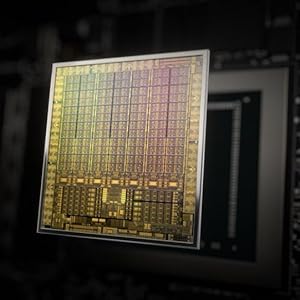
Image 4.3: Diagram illustrating the NVIDIA Ampere GPU architecture, which powers the RTX 3050.
5. Орнотуу жана орнотуу
Follow these steps to install your maxsun GeForce RTX 3050 graphics card into your computer system.
5.1 Системаны даярдоо
- Power down your computer completely and unplug the power cable from the wall outlet.
- Open your computer case. Refer to your computer's manual for specific instructions on how to open the case.
- Сиздин энелик платадан жеткиликтүү PCI Express x16 уячасын табыңыз.
- Remove any existing graphics card or the metal slot cover from the PCI Express slot.
5.2 Installing the Graphics Card
- If your PC case requires a low-profile bracket, carefully remove the pre-installed standard bracket from the graphics card and attach the included low-profile кашаа.
- Align the graphics card with the PCI Express x16 slot.
- Gently but firmly press the card straight down into the slot until it is fully seated. You should hear a click as the retention clip engages.
- Secure the graphics card to the PC case with the screw(s) from the slot cover.

Image 5.1: Diagram showing the process of inserting a graphics card into a PCI Express slot within a computer case.
5.3 Дисплейлерди туташтыруу
- Connect your monitor(s) to the DisplayPort or HDMI outputs on the graphics card.
- Компьютериңиздин корпусун жаап, электр кабелин кайра туташтырыңыз.
- Компьютериңизди күйгүзүңүз.
6. Иштөө нускамалары
6.1 Драйверди орнотуу
After physical installation, you must install the appropriate drivers for your graphics card to function correctly and achieve optimal performance.
- Boot your computer. The operating system may detect new hardware and install a basic driver, or display a low-resolution image.
- Расмий NVIDIAга барыңыз webсайт (www.nvidia.com/drivers) to download the latest drivers for the GeForce RTX 3050.
- Драйверди орнотууну аяктоо үчүн экрандагы нускамаларды аткарыңыз. Системаны кайра иштетүү талап кылынышы мүмкүн.

Image 6.1: Icon representing the download and installation of graphics drivers.
6.2 Көп мониторду орнотуу
The maxsun RTX 3050 supports multiple displays. Once drivers are installed, you can configure your display settings through your operating system's display settings or the NVIDIA Control Panel.

Image 6.2: Illustration of a multi-monitor setup connected via DisplayPort and HDMI outputs.
7. Техникалык тейлөө
Proper maintenance ensures the longevity and performance of your graphics card.
- Чаңды тазалоо: Periodically clean dust from the fan and heatsink using compressed air. Ensure the fan is held stationary during cleaning to prevent damage.
- Температура мониторинги: Use monitoring software to keep track of your GPU temperatures, especially during heavy loads. Ensure temperatures remain within safe operating limits.
- Драйвер жаңыртуулары: Regularly update your graphics drivers from the NVIDIA website to benefit from performance improvements and bug fixes.
8. Кыйынчылыктарды
Эгер графикалык картаңызда көйгөйлөргө туш болсоңуз, төмөнкү жалпы көйгөйлөрдү чечүү кадамдарын караңыз:
- Дисплей чыгышы жок:
- Монитор кабели графикалык картага да, мониторго да бекем туташтырылганын текшериңиз.
- Verify that the graphics card is fully seated in the PCI Express slot.
- Мониторуңуз туура киргизүү булагына коюлганын текшериңиз.
- Мүмкүн болсо, башка дисплей кабели же монитор менен сынап көрүңүз.
- Драйверди орнотуу маселелери:
- Uninstall any previous graphics drivers using a utility like Display Driver Uninstaller (DDU) in Safe Mode, then attempt a fresh installation of the latest NVIDIA drivers.
- Иштөө тутумуңуз жаңыртылганын текшериңиз.
- Ашыкча ысып кетүү/желдеткичтин катуу үнү:
- Clean dust from the graphics card fan and heatsink.
- Ensure adequate airflow within your PC case. Consider adding or improving case fans.
- Monitor GPU temperatures during load. If temperatures are consistently high, reduce graphics settings in games or applications.
- Системанын туруксуздугу/бузуулар:
- Энергия менен камсыздоо блогуңуз (PSU) минималдуу ватка жооп берерин текшериңизtage requirements for your system, including the new graphics card.
- Check for any conflicts with other hardware components.
- Run system diagnostics to identify other potential hardware issues.
9. Техникалык шарттар
Detailed technical specifications for the maxsun GeForce RTX 3050 6GB Graphics Card:
| Өзгөчөлүк | Спецификация |
|---|---|
| Графикалык сопроцессор | NVIDIA GeForce RTX 3050 |
| Графикалык RAM өлчөмү | 6 ГБ GDDR6 |
| Memory Interface | 96-бит |
| Memory Clock Speed | 14000 МГц |
| GPU Core Clock | 1042 МГц |
| Boost Clock Speed | 1470 МГц |
| Видео чыгаруу интерфейси | 1x HDMI 2.1, 1x DisplayPort 1.4a |
| PCI Express | PCI-E X8 4.0 |
| Продукциянын өлчөмдөрү | 6.65 x 2.71 x 0.04 inches (16.9 x 6.9 cm) |
| Элемент Салмагы | 8.5 унция |
| Өндүрүүчү | MAXSUN |
| Модель номери | RTX 3050 |

Сүрөт 9.1: Арткы view of the product packaging, detailing key features and specifications.
10. Кепилдик жана колдоо
10.1 Чектелген Кепилдик
The maxsun GeForce RTX 3050 Graphics Card comes with a 3 жылдык Чектелген Кепилдик. This warranty covers defects in materials and workmanship under normal use. For specific terms and conditions, please refer to the warranty information provided with your product or contact maxsun customer support.
10.2 Кардарларды колдоо
For technical assistance, warranty claims, or general inquiries, please contact maxsun customer support through their official webсайт же продукт документациясында көрсөтүлгөн байланыш маалыматы.


