1. Киришүү
This manual provides essential information for the proper setup, operation, and maintenance of your Ulefone Armor 29 Ultra 5G rugged smartphone. Please read this guide thoroughly before using your device to ensure optimal performance and longevity.
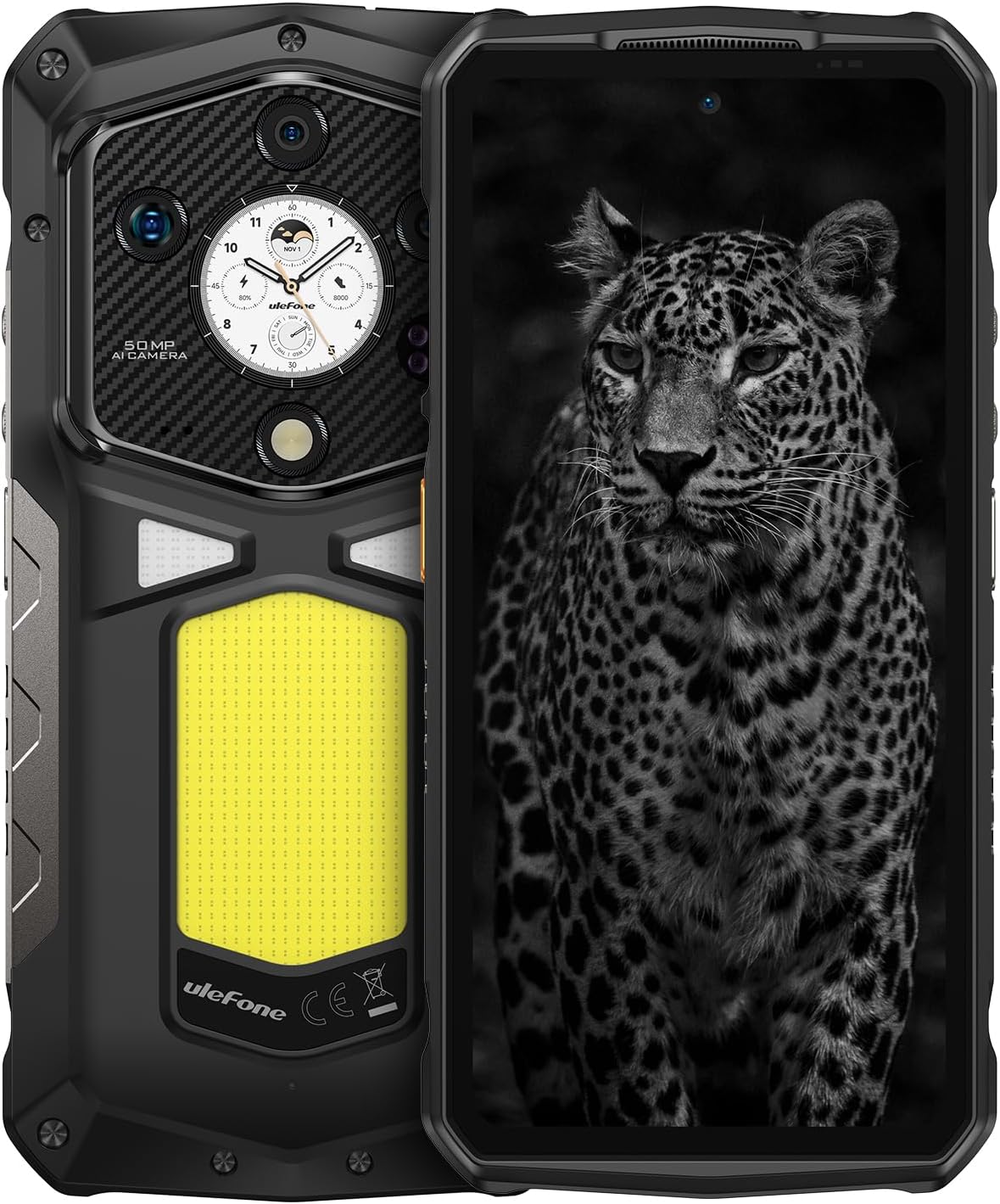
Сүрөт 1.1: Алдыңкы жана арткы view of the Ulefone Armor 29 Ultra 5G smartphone.
2. Орнотуу
2.1 Кутунун мазмуну
Пакетте бардык буюмдар бар экенин текшериңиз:
- Ulefone Armor 29 Ultra 5G Smartphone
- AC Power Charger (100~240V)
- Type-C to Type-C Data Cable (100cm)
- Экран коргоочу (алдын ала колдонулган же өзүнчө)
- SIM лоток чыгаруучу
- Lanyard

Image 2.1: Contents included in the Ulefone Armor 29 Ultra retail box.
2.2 SIM картаны орнотуу
- Аппараттын капталындагы SIM карта салгычын табыңыз.
- SIM лоток чыгаруучу куралды лотоктун жанындагы кичинекей тешикке киргизип, лоток чыгып кеткенче бекем басыңыз.
- Place your Nano-SIM card(s) and/or microSD card into the designated slots on the tray. Ensure correct orientation.
- Лотокту телефонго түзмөктүн корпусу менен тегиз болгонго чейин этияттык менен кайра салыңыз.
2.3 Баштапкы күйгүзүү
Press and hold the Power button (located on the right side of the phone) until the Ulefone logo appears. Follow the on-screen instructions to complete the initial setup, including language selection, Wi-Fi connection, and Google account setup.
3. Иштөө нускамалары
3.1 Аткаруу жана сактоо
The Armor 29 Ultra is powered by the MediaTek Dimensity 9300+ processor, offering robust performance. It features up to 32GB RAM (16GB physical + 16GB virtual) and 1TB internal storage, expandable up to 2TB via microSD card.
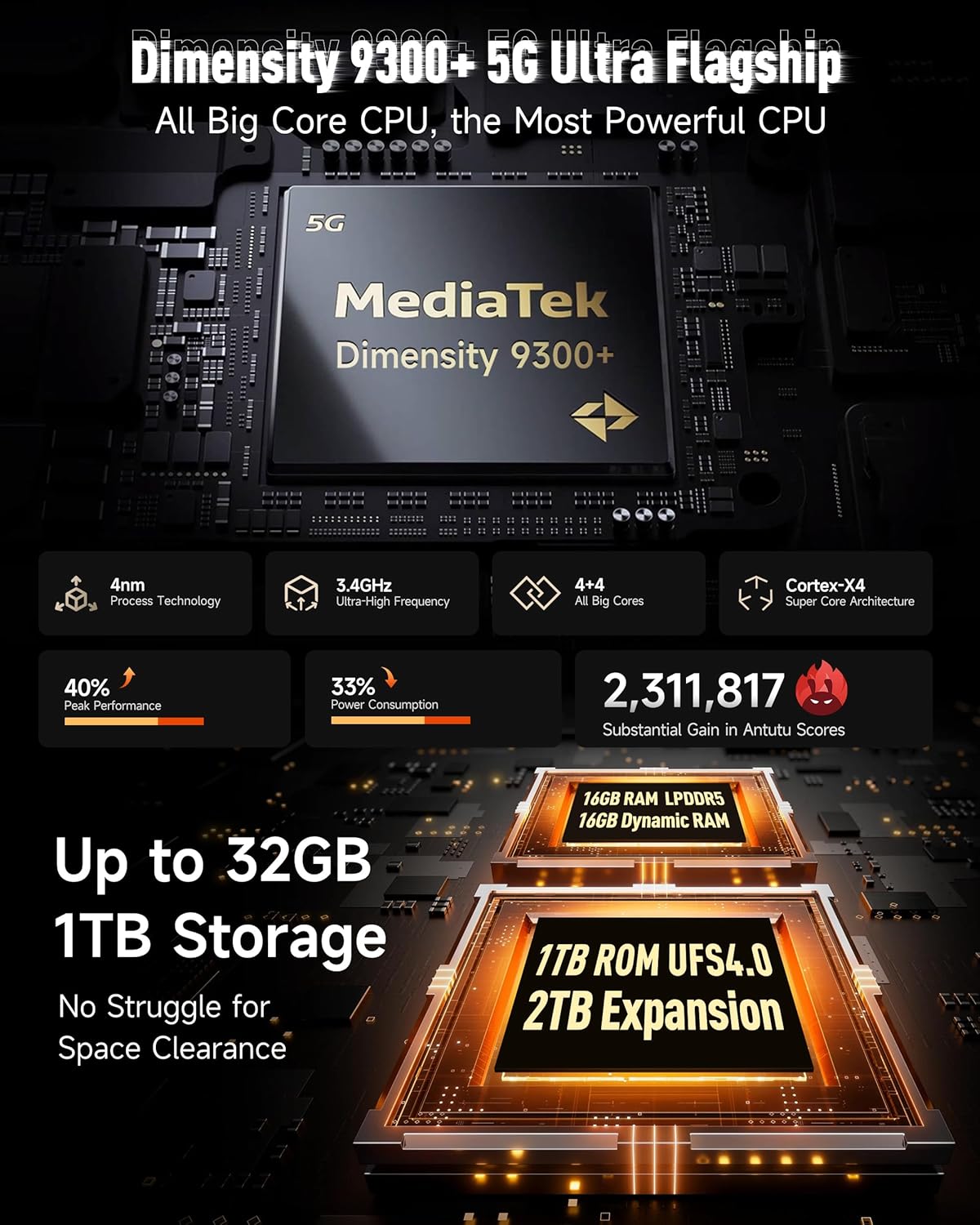
Сүрөт 3.1: Бүттүview of the Dimensity 9300+ processor and memory configuration.
3.2 Dual AMOLED Display
The device features a 6.67-inch flexible AMOLED main display with a 120Hz refresh rate and up to 2200 nits peak brightness. A 1.04-inch flexible AMOLED sub-display on the rear provides quick access to notifications, music controls, and selfie previews.

Image 3.2: Details of the 6.67-inch main AMOLED display and the 1.04-inch sub-display.
3.3 Камера тутуму
The Armor 29 Ultra is equipped with a versatile camera system:
- 50MP Негизги камера: 1-inch Sony IMX989 sensor, capable of 8K video recording.
- 64MP түнкү көрүү камерасы: OMNIVISION OV64B sensor with 4 infrared LEDs for enhanced low-light visibility.
- 50MP Ultra-wide Macro Lens: Samsung JN1 sensor with a 117.3° field of view.
- 50MP алдыңкы камера: Жогорку чечилиштеги селфилер жана видео чалуулар үчүн.

Сүрөт 3.3: Бүттүview of the triple rear camera setup and front camera.
3.4 Батарея жана заряддоо
The device features a 21200mAh battery. It supports 120W flash charging, allowing for a 20% charge in approximately 10 minutes. Additionally, it offers 10W reverse charging to power other devices.

Image 3.4: Details on the 21200mAh battery capacity and 120W fast charging capabilities.
3.5 LED Light and Warning Lights
The Armor 29 Ultra includes a powerful 1000-lumen LED camping light with 570 LEDs and a 5-watt output. It also features red and blue warning lights for emergency situations, which can operate in constant or flashing modes with selectable alarm sounds.

Image 3.5: Illustration of the 1000-lumen LED light and emergency warning lights.
3.6 Бекемдик жана туруктуулук
The phone is designed to meet MIL-STD 810G standards and boasts IP68 and IP69K ratings, providing protection against water, dust, dirt, sand, humidity, and salt mist. The display is protected by Corning Gorilla Glass 5.

Image 3.6: Visual representation of the phone's IP68/IP69K and MIL-STD-810H durability ratings.
3.7 Байланыш
The Armor 29 Ultra supports global 5G networks with dual SIM dual standby. It features Wi-Fi 7, Bluetooth 5.4, NFC, Infrared, USB 3.2 Gen 2, and comprehensive GPS (GPS + GLONASS + Beidou + Galileo).

Image 3.7: Information on 5G network support and Wi-Fi 7 capabilities.
3.8 uSmart кеңейтүү туташтыргычы
The device includes a uSmart Expansion Connector for compatibility with various external accessories, enhancing its functionality for specialized tasks.

Image 3.8: The uSmart Expansion Connector and examples of compatible accessories.
3.9 Android 15 жана жасалма интеллекттин өзгөчөлүктөрү
The Armor 29 Ultra runs on Android 15, offering the latest features and security updates. It integrates an AI engine for enhanced computations and supports third-party AI applications.

Image 3.9: Visual representation of the Android 15 operating system interface.
4. Техникалык тейлөө
4.1 Жалпы кам көрүү
- Телефонду узак убакыт бою өтө жогорку температурага же күндүн түз тийген нурларына дуушар кылбаңыз.
- Do not attempt to disassemble the device, as this will void the warranty and may cause damage.
- Keep the charging port and other openings free from dust and debris.
4.2 Тазалоо
To clean the device, use a soft, lint-free cloth. For stubborn dirt, a slightly damp cloth with mild soap can be used, ensuring all ports are securely closed. Avoid using harsh chemicals or abrasive materials.
4.3 Программалык камсыздоо жаңыртуулары
Оптималдуу иштөөнү, коопсуздукту жана жаңы функцияларга жетүүнү камсыз кылуу үчүн программалык камсыздоонун жаңыртууларын үзгүлтүксүз текшерип жана орнотуп туруңуз. Орнотуулар > Система > Системаны жаңыртуу жеткиликтүү жаңыртууларды текшерүү үчүн.
5. Кыйынчылыктарды
5.1 Түзмөк күйбөй жатат
- Батарея заряддалганын текшериңиз. Телефонду заряддагычка туташтырыңыз жана кайра күйгүзүү аракетинен мурун бир нече мүнөт күтүңүз.
- Мажбурлап өчүрүп күйгүзүү үчүн Кубат баскычын жок дегенде 10-15 секунд басып туруңуз.
5.2 Заряддоо маселелери
- Verify that the charging cable and adapter are securely connected and undamaged.
- Башка шайкеш келген кубаттагычты жана кабелди колдонуп көрүңүз.
- Clean the charging port gently with a dry, soft brush to remove any debris.
5.3 Тармакка туташуу көйгөйлөрү
- SIM карта туура салынганын жана иштетилгенин текшериңиз.
- Телефонду кайра күйгүзүңүз.
- барыңыз Орнотуулар > Тармак жана интернет > Мобилдик тармак and ensure mobile data is enabled and the correct network type is selected.
- Тармак жөндөөлөрүн баштапкы абалга келтирүү: Орнотуулар > Система > Параметрлерди кайра орнотуу > Wi-Fi, мобилдик жана Bluetooth.
5.4 Camera Malfunction
- Clear the cache and data of the Camera app: Settings > Apps > See all apps > Camera > Storage & cache > Clear cache / Clear storage.
- Телефонду кайра күйгүзүңүз.
- Камеранын линзаларында физикалык тоскоолдуктар жок экенин текшериңиз.
6. Техникалык шарттар
| Өзгөчөлүк | Спецификация |
|---|---|
| Продукциянын өлчөмдөрү | 6.98 x 3.37 x 1.32 дюйм |
| Элемент Салмагы | 2.66 фунт (688 г) |
| Элемент моделинин номери | arm29u |
| Операция системасы | Android 15 |
| CPU ылдамдыгы | 3.4 GHz (Dimensity 9300+) |
| RAM эстутум орнотулган өлчөмү | 32 ГБ (16 ГБ физикалык + 16 ГБ виртуалдык) |
| Эстутум сактоо сыйымдуулугу | 1024 GB (1TB), expandable up to 2TB |
| Туруктуу экран дисплей өлчөмү | 6.67 Inches (Main AMOLED) |
| Sub-Display Size | 1.04 дюйм (AMOLED) |
| Жаңыртуу ылдамдыгы | 120 Hz (Main Display) |
| Резолюция | 8K (Scanner Resolution, likely referring to video recording capability) |
| Башкы камера | 50MP (Sony IMX989, f/1.9) |
| Түнкү көрүнүш камерасы | 64MP (OV64B, f/1.79) with 4 IR LEDs |
| Ultrawide/Macro Camera | 50MP (Samsung JN1, f/2.2, 117.3° FOV) |
| Алдыңкы камера | 50MP |
| Батарея сыйымдуулугу | 21200 миллионamp Саат |
| Заряддоо | 120W Flash Charging, 10W Reverse Charging |
| Connectivity Technologies | Bluetooth 5.4, Infrared, NFC, USB 3.2 Gen 2, Wi-Fi 7, 5G |
| GPS | GPS, ГЛОНАСС, Бейду, Галилео |
| Өзгөчөлүктөр | Always On Display, Dual Screen, Fast Charging, Rugged Body, Water Resistant, 1000LM LED Light, Custom Key, uSmart Expansion Connector |
| Аудио Jack | 3.5 мм |
| Зымсыз оператор | Кулпусу ачылган |
7. Кепилдик жана колдоо
7.1 Кепилдик маалыматы
Ulefone provides a 12-month manufacturer warranty service in the US for the Armor 29 Ultra. This warranty covers manufacturing defects under normal use. Please retain your proof of purchase for warranty claims.
7.2 Кардарларды колдоо
For any questions, technical assistance, or warranty inquiries regarding your Ulefone Armor 29 Ultra, please contact Ulefone customer support. Refer to the contact information provided in your product packaging or visit the official Ulefone webколдоо чоо-жайы үчүн сайт.


