1. Киришүү
This manual provides essential information for the safe and efficient operation of your SANSUI ES-G24C1L 24-inch curved gaming monitor. Please read this manual thoroughly before using the product and retain it for future reference.

Сүрөт: алдыңкы view of the SANSUI 24-inch curved gaming monitor highlighting its key specifications.
Негизги өзгөчөлүктөрү:
- 24-inch 1500R Curved VA Display
- Full HD (1920x1080P) Resolution
- 160 Гц Жаңылоо ылдамдыгы
- 1ms MPRT Response Time
- AMD FreeSync Compatibility
- HDR колдоо
- 110% sRGB түстөр гаммасы
- Multiple Connectivity: HDMI 2.0, DisplayPort 1.4
- VESA Mount Compatible (75x75mm)
2. Коопсуздук маалыматы
Монитордун бузулушун алдын алуу жана колдонуучунун коопсуздугун камсыз кылуу үчүн төмөнкү коопсуздук чараларын сактаңыз:
- Do not expose the monitor to rain or moisture to avoid fire or electric shock hazards.
- Мониторду ачпаңыз casinг. Ичинде колдонуучу тейлей турган бөлүктөр жок. Бардык тейлөөлөрдү квалификациялуу кызматкерлерге тапшырыңыз.
- Монитор кулап калбаш үчүн аны туруктуу, тегиз бетке коюңуз.
- Туура желдетүүнү камсыз кылыңыз. Вентиляция тешиктерин жаап албаңыз.
- Use only the power adapter and cables provided or specified by the manufacturer.
- Чагылган бороондо же көпкө колдонулбаганда мониторду электр розеткасынан ажыратыңыз.
3. Пакеттин мазмуну
Пакетте бардык буюмдар бар экенин текшериңиз:
- SANSUI ES-G24C1L 24-inch Curved Gaming Monitor
- Монитор стенд (негизги жана моюн)
- Кубаттуу адаптер
- HDMI кабели
- User Manual
- Стендди чогултуу үчүн бурамалар
4. Орнотуу нускамалары
4.1 Стендди чогултуу
- Экранды коргоп, мониторду таңгагынан кылдаттык менен чыгарып алыңыз.
- Берилген бурамалар аркылуу стенд мойнуна монитор панелине бекитиңиз.
- Тирөөчтүн негизин тирөөчтүн моюнуна туташтырып, калган бурамалар менен бекитиңиз.
- Чогулган мониторду туруктуу, жалпак бетке коюңуз.
Alternatively, the monitor supports VESA 75x75mm mounting for compatible wall mounts or monitor arms. Ensure the VESA mount is rated for the monitor's weight (approximately 7.68 lbs).

Image: Illustrated guide for stand assembly and product dimensions.
4.2 Туташтыруучу кабельдер
Кандайдыр бир туташуулардан мурун монитор менен компьютериңиз өчүк экенин текшериңиз.
- Кубат туташуу: Connect the power adapter to the monitor's DC IN port, then plug the adapter into a power outlet.
- Видео туташуу: Connect one end of the HDMI cable (or DisplayPort cable, not included) to your computer's graphics card output and the other end to the corresponding HDMI 2.0 or DP 1.4 port on the monitor.
- Аудио чыгаруу: If desired, connect external speakers or headphones to the monitor's 3.5mm Audio Jack.
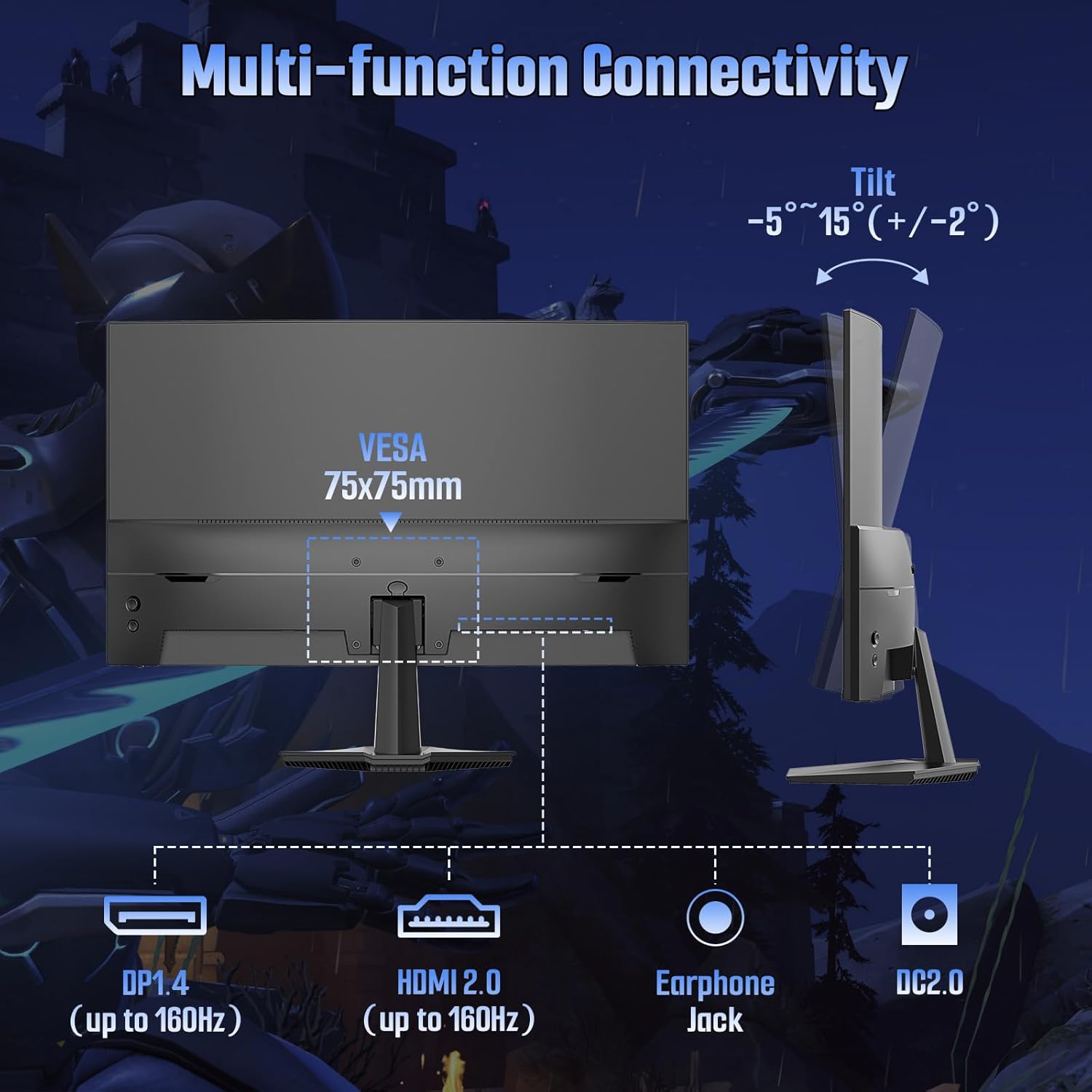
Сүрөт: Арткы view of the monitor detailing port locations and tilt adjustment capability.
5. Иштөө нускамалары
5.1 Күйгүзүү/өчүрүү
Аны күйгүзүү же өчүрүү үчүн монитордо жайгашкан кубат баскычын басыңыз. Монитор активдүү болгондо кубат индикаторунун жарыгы күйөт.
5.2 Экрандагы дисплей (OSD) менюсу
Use the control buttons on the monitor to navigate and adjust settings within the OSD menu. Common OSD menu options include:
- Сүрөт жөндөөлөрү: Brightness, Contrast, Color Temperature, Sharpness, HDR.
- Түс жөндөөлөрү: Adjust color gamut, gamma, and individual RGB levels.
- Киргизүүнү тандоо: HDMI жана DisplayPort киргизүүлөрүнүн ортосунда кол менен которулуңуз.
- Аудио: Adjust volume for the audio jack output.
- OSD Орнотуулары: Language, OSD Transparency, OSD Timeout.
- Оюн функциялары: FreeSync, MPRT, Crosshair, Game Timer, Black Level.
5.3 Оюн функциялары
The ES-G24C1L monitor includes several features designed to enhance your gaming experience:
- 160Hz жаңыртуу ылдамдыгы: Жылмакай кыймылды жана кирүү кечиктирүүсүн азайтат.
- 1ms MPRT (Moving Picture Response Time): Minimizes motion blur for clearer fast-paced scenes.
- FreeSync: Synchronizes the monitor's refresh rate with your AMD graphics card to eliminate screen tearing and stuttering. Enable this feature in the OSD menu and your graphics card settings.

Image: Visual demonstration of FreeSync technology reducing screen tearing.
- Black Level Adjustment: Оюндардын караңгы жерлеринде көрүнүүнү жакшыртат.
- Кроссшер: Displays an on-screen crosshair for improved aiming in first-person shooter games.
- Game Timer: An on-screen timer for tracking in-game events.
- Бир нече оюн режимдери: Pre-calibrated display settings for various game genres (FPS, RTS, MOVIE, STANDARD).
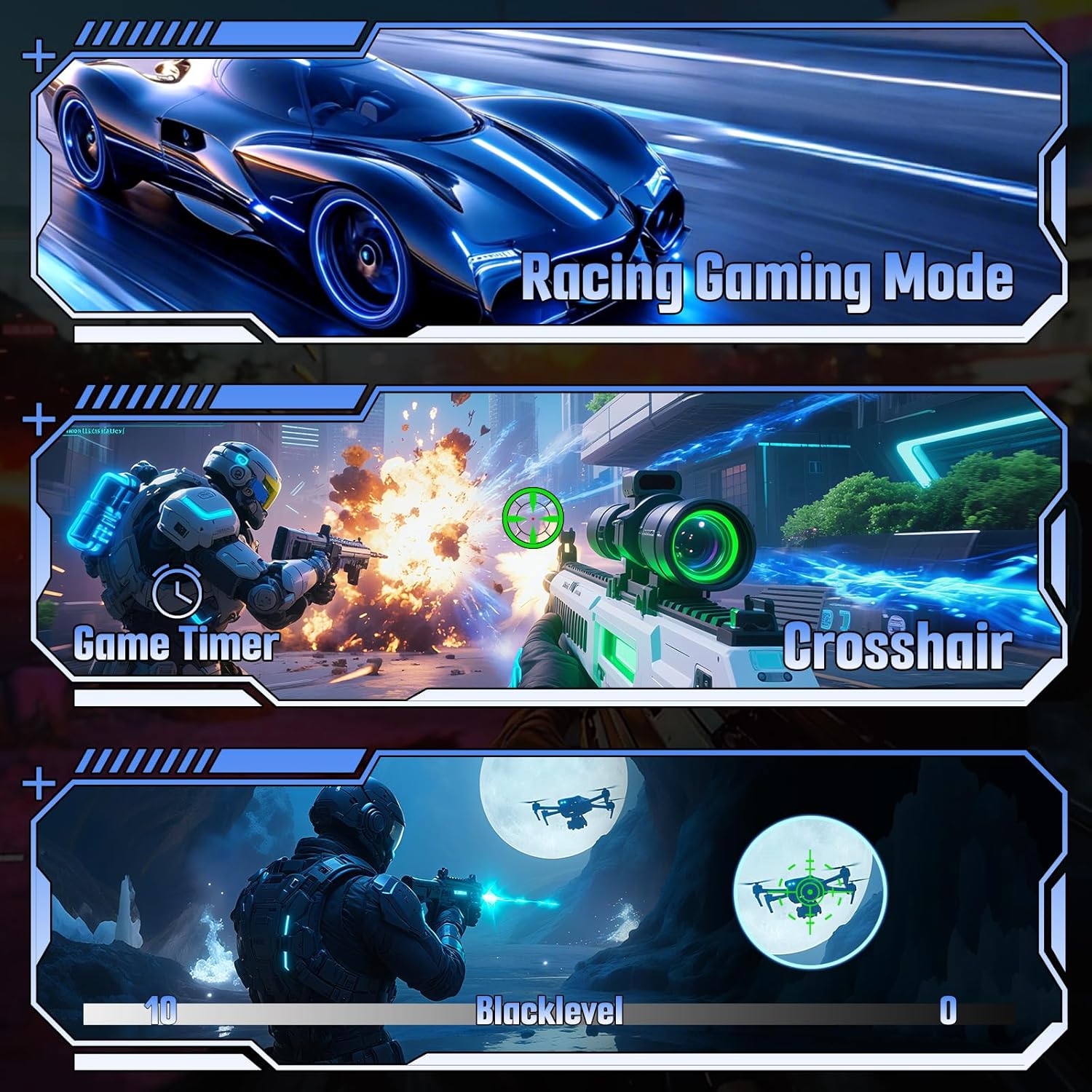
Сүрөт: Мисamples of various gaming features including game modes, timer, crosshair, and black level.
6. Техникалык шарттар
| Өзгөчөлүк | Спецификация |
|---|---|
| Модель номери | ES-G24C1L |
| Screen Size | 24 дюйм |
| Ийрилик | 1500R |
| Панел түрү | VA |
| Резолюция | 1920 x 1080 (FHD) |
| Жаңыртуу ылдамдыгы | 160Hz |
| Жооп убактысы | 1 мс MPRT |
| Жарыктык | 300 нит |
| Контраст катышы | 3000:1 |
| Түс гаммасы | 110% sRGB |
| Display Colors | 16.7 миллион (8-бит) |
| HDR колдоо | Ооба |
| Adaptive Sync | FreeSync |
| Байланыш | 1x HDMI 2.0, 1x DisplayPort 1.4, 1x Audio Jack |
| VESA тоосу | 75x75мм |
| Тилтти тууралоо | -5° to 15° (+/-2°) |
| Продукциянын өлчөмдөрү (стенд менен) | 4.69 x 23.78 x 15.55 дюйм |
| Элемент Салмагы | 7.68 фунт |

Сүрөт: бүттүview of the monitor's technical specifications and gaming enhancements.
7. Кыйынчылыктарды
Эгерде сиз мониторуңузда көйгөйлөргө туш болсоңуз, төмөнкү жалпы көйгөйлөрдү чечүү кадамдарын караңыз:
- Кубат жок: Ensure the power cable is securely connected to both the monitor and the power outlet. Verify the power adapter is functioning.
- Сигнал жок: Check that the video cable (HDMI/DP) is firmly connected to both the monitor and your computer. Ensure the correct input source is selected in the monitor's OSD menu. Try restarting your computer.
- Жаркылдаган экран: Check the video cable for damage. Ensure your graphics card drivers are up to date. Disable or enable FreeSync in the OSD menu and graphics card settings to see if it resolves the issue.
- Туура эмес чечим/жаңылоо ылдамдыгы: Adjust the display settings in your computer's operating system to the recommended resolution (1920x1080) and refresh rate (160Hz).
- Сүрөттүн сапаты маселелери: Adjust brightness, contrast, and color settings in the OSD menu. Ensure HDR is enabled or disabled as desired in both the monitor OSD and your operating system settings.
8. Техникалык тейлөө
Proper care will extend the life of your monitor:
- Экранды тазалоо: Экранды жумшак, түксүз чүпүрөк менен акырын сүртүңүз. өжөр белгилери үчүн, жеңил гampчүпүрөккө суу же атайын экран тазалоочу каражат. Суюктукту экранга түз чачпаңыз.
- Тазалоо Casing: Мониторду сүртүү үчүн жумшак, кургак чүпүрөктү колдонуңуз casinг. Абразивдүү тазалагычтардан алыс болуңуз.
- Вентиляция: Ашыкча ысып кетүүнүн алдын алуу үчүн желдетүү тешиктерин чаңдан жана тоскоолдуктардан тазалаңыз.
- Сактагыч: When storing the monitor for extended periods, place it in a cool, dry environment and protect it from dust.
9. Кепилдик жана колдоо
Your SANSUI ES-G24C1L monitor is backed by a warranty that includes:
- Money-back guarantee and free replacement within 30 days from the order date.
- Өмүр бою техникалык колдоо.
For technical assistance or warranty claims, please contact SANSUI customer support. Refer to the contact information provided with your purchase or visit the official SANSUI webсайт.


