1. Киришүү
Thank you for choosing the Klarus E5 Plus Ultra-Slim Dual Switch Triple-Light EDC Flashlight. This manual provides detailed instructions for the safe and efficient operation, maintenance, and troubleshooting of your new device. Please read this manual thoroughly before use and retain it for future reference.
2. Продукт бүтүп калдыview
The Klarus E5 Plus is a compact and versatile everyday carry (EDC) flashlight featuring three distinct light sources and a dual-switch design for intuitive control. Its ultra-slim profile, magnetic base, and pocket clip offer multiple hands-free lighting options.

Figure 1: Klarus E5 Plus Flashlight with key features highlighted.
3. Пакеттин мазмуну
- Klarus E5 Plus Flashlight
- USB-C заряддоо кабели
- Колдонуучунун Колдонмосу (бул документ)

Figure 2: Contents included in the Klarus E5 Plus package.
4. Техникалык шарттар
| Өзгөчөлүк | Деталь |
|---|---|
| Модел | E5 PLUS |
| Max Output | 650 Lumens (Side COB) |
| Жарык булактары | Front (White), Side (Warm White, Red) |
| Өлчөмдөр | 4.45"L x 0.98"W x 0.31"H (113мм x 25мм x 8мм) |
| Салмагы | 1.26 унция (39g) |
| Батарея | Камтылган 500mAh литий-ион |
| Заряддоо порту | USB-C |
| Заряддоо убактысы | Болжол менен 1.5 саат |
| Max Runtime | 12.5 саатка чейин (төмөнкү режим) |
| Суу каршылык | IPX4 (чачууга каршы) |
| Материал | Aluminum Alloy (6061) |
| Өзгөчөлүктөр | Dual Switch, Magnetic Base, Pocket Clip, Flicker-Free Dimming |

Figure 3: Physical dimensions and weight comparison.
5. Орнотуу: Батареяны кубаттоо
The Klarus E5 Plus features a built-in rechargeable lithium-ion battery. Before first use, fully charge the device.
- Locate the USB-C charging port on the side of the flashlight, protected by a silicone cover.
- Gently lift the silicone cover to expose the USB-C port.
- Connect the provided USB-C cable to the flashlight and plug the other end into a compatible USB power source (e.g., computer, wall adapter).
- During charging, the indicator light on the flashlight will illuminate red.
- Once fully charged (approximately 1.5 hours), the indicator light will turn blue.
- Disconnect the charging cable and securely close the silicone cover to maintain IPX4 water resistance.

Figure 4: Charging the Klarus E5 Plus via USB-C.
6. Иштөө нускамалары
The E5 Plus features two distinct switches for controlling its multiple light sources.
6.1. Head Light (Front White Light) Operation
- Күйгүзүү/өчүрүү: басып, кармап туруңуз Баштын жарыгы (upper button) for 0.5 seconds.
- Жарыктыкты өзгөртүү: With the head light on, single-click the Баштын жарыгы to cycle through brightness modes (Low, High).
- Режимдин эс тутуму: The head light will remember the last used brightness mode when turned off and on again.
6.2. Side Light (Warm White & Red Light) Operation
- Күйгүзүү/өчүрүү: басып, кармап туруңуз Капталдагы жарык которгучу (lower button) for 0.5 seconds.
- Change Brightness (Warm White): With the warm white side light on, single-click the Капталдагы жарык которгучу to cycle through brightness modes (Low, Medium, High, Turbo).
- Toggle Red Light: With the warm white side light on, double-click the Капталдагы жарык которгучу to switch to Red Constant-On mode. Double-click again to return to warm white.
- Red Strobe: From Red Constant-On mode, single-click the Капталдагы жарык которгучу to activate Red Strobe mode. Single-click again to return to Red Constant-On.
- Режимдин эс тутуму: The warm white side light will remember the last used brightness mode. Red light modes do not have memory and will default to Red Constant-On when reactivated.

Figure 5: Dual switch operation for the Klarus E5 Plus.
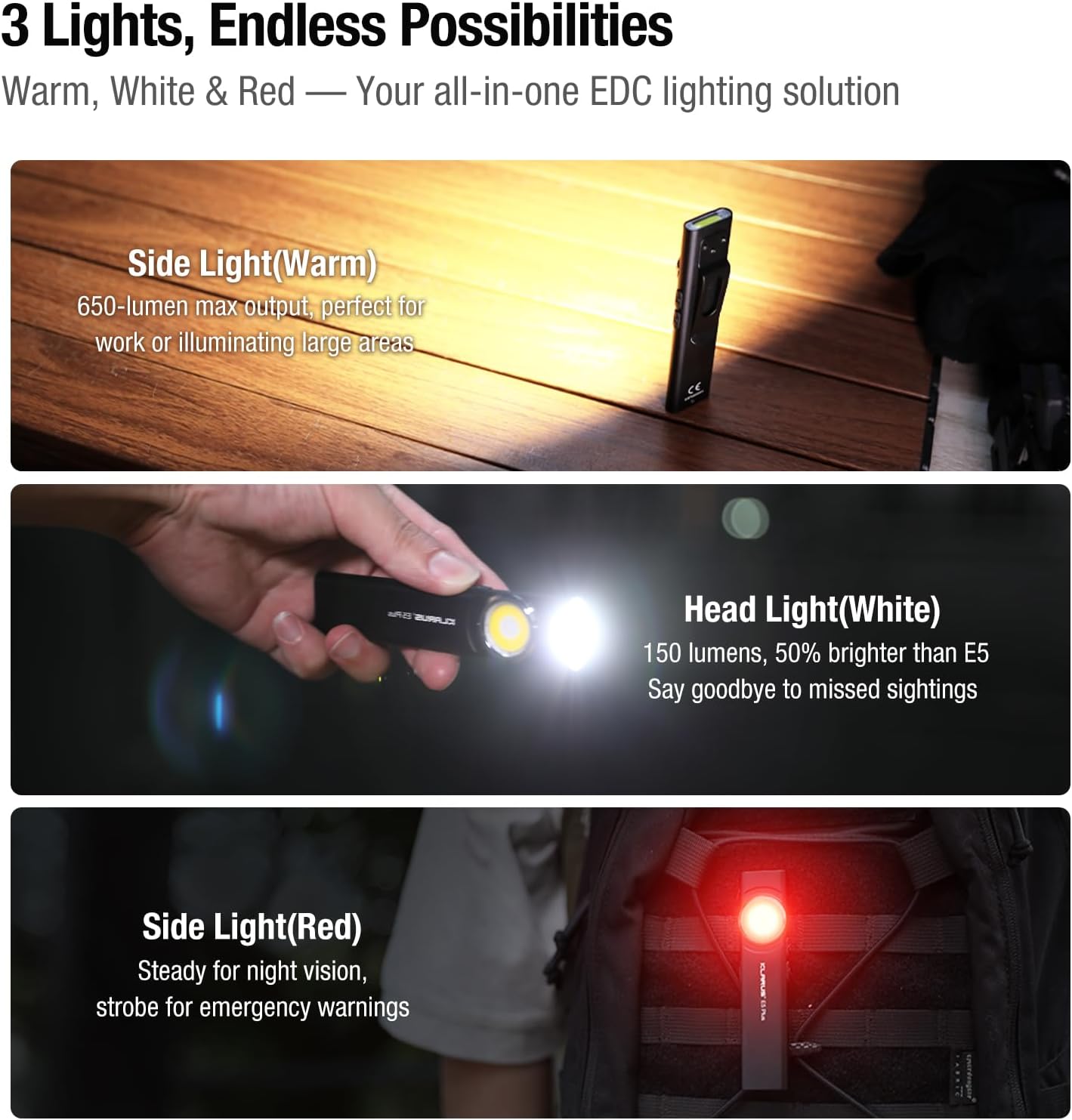
Figure 6: Three light sources and their applications.

Figure 7: Hands-free usage with magnetic base and clip.
7. Техникалык тейлөө
- Тазалоо: Кол чырактын корпусун жумшак менен сүртүңүз, гamp кездеме. Абразивдүү тазалагычтардан же эриткичтерден качыңыз.
- Заряддоо: Recharge the battery regularly to maintain optimal performance, especially if stored for extended periods.
- Сактагыч: Кол чыракты салкын, кургак жерде күндүн тике тийген нурунан жана экстремалдык температурадан алыс сактаңыз.
- Суу каршылык: Ensure the USB-C port's silicone cover is securely closed to maintain IPX4 water resistance.
8. Кыйынчылыктарды
| Көйгөй | Мүмкүн себеп | Чечим |
|---|---|---|
| Кол чырак күйбөйт. | Low battery or lockout mode activated. | Charge the battery. Ensure no buttons are accidentally pressed during storage. |
| Жарыктын чыгышы күңүрт. | Low battery or incorrect mode selected. | Charge the battery. Cycle through brightness modes to select a higher setting. |
| Заряддоо көрсөткүчү иштебей жатат. | Loose connection or faulty cable/charger. | Ensure USB-C cable is securely connected. Try a different USB-C cable or power source. |
9. Расмий продукт Videos
The following videos provide additional visual guidance and demonstrations of the Klarus E5 Plus flashlight's features and operation.
Klarus E5 Plus - Ultra-Slim Dual Switch Triple-Light EDC Flashlight
Видео 1: Бүттүview of the Klarus E5 Plus, highlighting its ultra-slim design, dual switch, and triple-light functionality. This video demonstrates the product's key features and versatility.
10. Кепилдик жана колдоо
Klarus products are manufactured to high-quality standards. For warranty information, technical support, or service inquiries, please refer to the official Klarus webсайтына кириңиз же ыйгарым укуктуу дилериңизге кайрылыңыз. Кепилдик боюнча дооматтар үчүн сатып алганыңызды тастыктаган документти сактап коюңуз.
Өндүрүүчү: КЛАРУС