1. Киришүү
Сатып алганыңыз үчүн рахматasing the SIMREX RC Helicopter Model Z16. This manual provides essential information for safe operation, setup, and maintenance of your new remote control helicopter. Please read it thoroughly before use and retain it for future reference.
Коопсуздук маалыматы
WARNING: Choking Hazard - Small Parts. Not for children under 3 years.
For optimal safety, this helicopter should only be played indoors, or in an open and windless outdoor environment with an appropriate remote control distance. It features anti-jamming and low-voltagкоопсуздукту жогорулатуу үчүн электрондук коргоо.
2. Пакеттин мазмуну
Төмөндө тизмеленген нерселердин баары пакетиңизде бар экенин текшериңиз:
- Remote Control Helicopter (with built-in battery) x 1
- 2.4GHz Remote Control x 1
- Rechargeable Modular Batteries x 2
- USB кубаттоо кабели x 1
- Spare Trail Blade x 2
- Продукт боюнча колдонмо x 1

Image: The SIMREX RC Helicopter, its remote control, two modular batteries, a USB charging cable, and spare blades are displayed on a flat surface.
3. Продукт бүтүп калдыview
The SIMREX RC Helicopter Model Z16 is designed for ease of use and stable flight, making it suitable for beginners. Key features include:
- One Key Take-Off/Landing: Simplifies initial flight and landing procedures.
- Бийиктикти кармоо: Maintains a stable hovering height automatically.
- 2 ылдамдык: Offers both slow and fast flight modes for varying skill levels.
- Gyroscope Technology: Provides enhanced stability and control.
- 2.4GHz Алыстан башкаруу системасы: Ensures stable signal and prevents interference.

Image: A SIMREX RC Helicopter in flight, with a child and an adult observing, highlighting its remote control capabilities.
4. Орнотуу
4.1 Тик учактын батареясын кубаттоо
- Ensure the helicopter is powered OFF.
- Connect the USB charging cable to the helicopter's charging port.
- USB кабелинин экинчи учун USB кубат адаптерине (кошулмада жок) же компьютердин USB портуна сайыңыз.
- The indicator light on the USB cable will illuminate during charging and turn off when fully charged.
- A full charge typically takes approximately 60-90 minutes and provides up to 15 minutes of flight time per battery. Two batteries are included for extended play.

Image: A SIMREX RC Helicopter connected to a laptop via a USB cable for charging, illustrating the charging process.
4.2 Алыстан башкаруу пульту үчүн батареяларды орнотуу
- Пульттун артындагы батарея бөлүкчөсүн ачыңыз.
- Insert 2 AA batteries (included) into the compartment, ensuring correct polarity.
- Батарея отсегин бекем жабыңыз.
5. Иштөө нускамалары
5.1 Pairing the Helicopter with the Remote Control
- Ensure both the helicopter and the remote control are fully charged.
- Тик учакты тегиз, түз жерге коюңуз.
- Turn on the helicopter's power switch. The helicopter's lights will flash.
- Алыстан башкаруу пультунун кубат которгучун күйгүзүңүз. Алыстан башкаруу пультунун индикатор жарыгы күйүп-өчүп турат.
- Push the left joystick (throttle) all the way up, then all the way down. The remote control will beep, and the helicopter's lights will become solid, indicating successful pairing.
5.2 Учууну башкаруунун негизги каражаттары
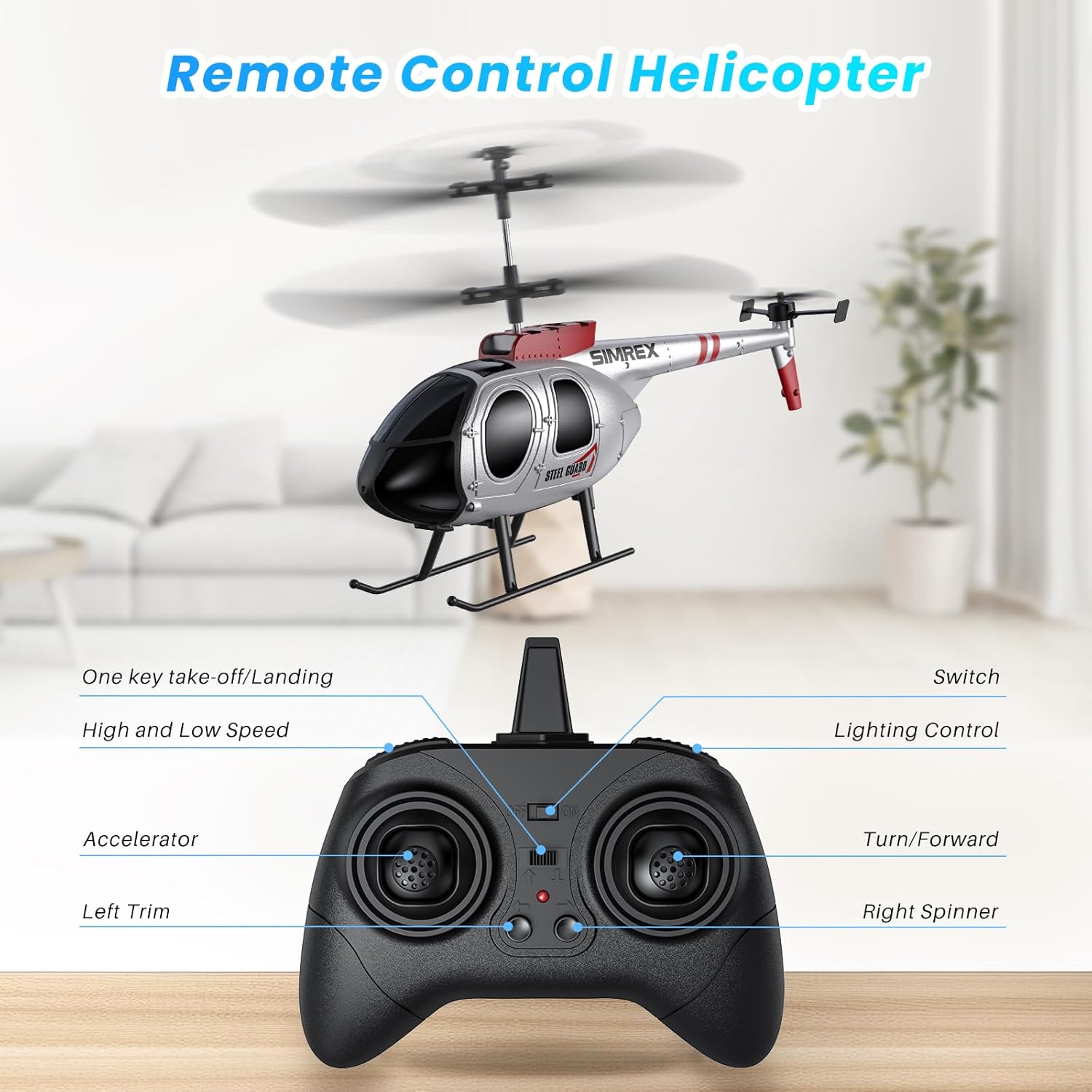
Image: A detailed diagram of the remote control, labeling the accelerator, left trim, one-key take-off/landing, high/low speed, lighting control, and turn/forward/right spinner functions.
- One Key Take-Off/Landing: Press the dedicated button for automatic take-off or landing.
- Бийиктикти кармоо: The helicopter will automatically maintain its current altitude after take-off, allowing for easier control.
- Дроссель (сол жактагы джойстик): Өйдө көтөрүлүү үчүн түртүңүз, ылдый түшүү үчүн ылдый тартыңыз.
- Багыттоо башкаруусу (оң жактагы джойстик): Push forward to fly forward, pull back to fly backward, push left to turn left, push right to turn right.
- Ылдамдык режимдери: Use the speed button to switch between low and high-speed settings. Low speed is recommended for beginners.
- Трим башкаруу: If the helicopter drifts, use the trim buttons on the remote to adjust its stability.

Image: A SIMREX RC Helicopter hovering steadily indoors, illustrating its altitude hold feature.
5.3 Учуу чөйрөсү
This helicopter is primarily designed for indoor use. When flying outdoors, choose a calm, windless environment to ensure stable flight and prevent loss of control.
6. Техникалык тейлөө
- Clean the helicopter with a soft, dry cloth after each use.
- Inspect propellers for any damage before and after each flight. Replace damaged blades using the provided spare parts.
- Store the helicopter and remote control in a cool, dry place away from direct sunlight.
- Remove batteries from the remote control if not used for an extended period.
7. Кыйынчылыктарды
| Көйгөй | Мүмкүн себеп | Чечим |
|---|---|---|
| Тик учак пультка жооп бербейт. | Not paired; low battery on helicopter or remote. | Re-pair the devices (Section 5.1); charge helicopter battery; replace remote batteries. |
| Учуу учурунда тик учак кулап түштү. | Needs trim adjustment; windy conditions. | Use trim buttons on remote; fly in a calm environment. |
| Кыска учуу убактысы. | Батарея толук заряддалган эмес; эски батарея. | Ensure full charge; consider replacing battery if performance degrades significantly. |
8. Техникалык шарттар
- Модель номери: Z16
- Продукциянын өлчөмдөрү: 9.6 x 5.3 x 1.77 дюйм
- Элемент Салмагы: 8 унция
- Сунушталган жаш: 14 жаш жана андан жогору
- Тик учактын батареясы: Built-in rechargeable (2 included)
- Алыстан башкаруу батареялары: 2 AA батарейка (кошулган)
- Учуу убактысы: Батарея үчүн 15 мүнөткө чейин
- Заряддоо убактысы: 60-90 мүнөт
9. Расмий продукт Videos
Product Presentation Video
Video: An official product presentation showcasing the SIMREX RC Helicopter's features and flight capabilities.
Remote Control Helicopter for Kids (Preview)
Видео: Кыскача алдын ала маалыматview video demonstrating the SIMREX RC Helicopter in action, suitable for children.
10. Кепилдик жана колдоо
For warranty information and customer support, please refer to the contact details provided in the packaging or visit the official SIMREX webсайт.


