1. Киришүү
Thank you for choosing the MCHOSE Mix 87 Magnetic Switch Gaming Keyboard. This manual provides detailed instructions for setting up, operating, and maintaining your keyboard to ensure optimal performance. The Mix 87 is designed for competitive gaming, featuring Hall Effect magnetic switches with rapid trigger technology and adjustable actuation.
2. Пакеттин мазмуну
Пакетиңизде бардык буюмдар бар экенин текшериңиз:
- MCHOSE Mix 87 Gaming Keyboard
- USB-C Cable
- Баскыч капкагын тарткыч
- Extra Switches (2 pieces)
- Колдонуучунун Колдонмосу (бул документ)
3. Продукт бүтүп калдыview
The MCHOSE Mix 87 is a Tenkeyless (TKL) keyboard featuring 87 keys, Hall Effect magnetic switches, and a dedicated volume knob. Its design prioritizes speed, precision, and customization for an enhanced gaming experience.

Сүрөт 3.1: Жогорку view of the MCHOSE Mix 87 Gaming Keyboard, showcasing its 87-key layout, dedicated function keys, and volume knob. The keyboard features RGB backlighting visible through the translucent keycaps.
Негизги өзгөчөлүктөрү:
- Холл эффектинин магниттик өчүргүчтөрү: Offers adjustable actuation points from 0.01mm to 3.4mm.
- Rapid Trigger (RT) Mode: Allows keys to react instantly upon release, enhancing responsiveness.
- 8000 Гц добуш берүү жыштыгы: Minimizes input latency for competitive gaming.
- RGB жарыктандыруу: Customizable 16 million color options with various effects.
- Dedicated Volume Knob: For convenient audio control.
- Прокладканы орнотуу түзүлүшү: Provides a comfortable typing feel and acoustic profile.

Сүрөт 3.2: Close-up of the MCHOSE Mix 87 keyboard highlighting its magnetic switch technology. The image emphasizes the 0.001mm precision and 0.08ms event-level delay, crucial for high-performance gaming.
4. Орнотуу
4.1 Баскычтопту туташтыруу
- Locate the USB-C port on the back of your MCHOSE Mix 87 keyboard.
- Берилген USB-C кабелинин бир учун клавиатурага туташтырыңыз.
- USB-C кабелинин экинчи учун компьютериңиздеги жеткиликтүү USB портуна туташтырыңыз.
- Баскычтоп сиздин операциялык тутумуңуз тарабынан автоматтык түрдө таанылат.
4.2 Системанын шайкештиги
The MCHOSE Mix 87 keyboard is compatible with the following operating systems:
- Windows
- macOS
- iOS
- Android
5. Иштөө нускамалары
5.1 Негизги ачкыч функциялары
The MCHOSE Mix 87 features a standard 87-key TKL layout. All keys function as labeled. Use the Fn key in combination with other keys for secondary functions, typically indicated by icons or alternative labels on the keycaps.
5.2 Volume Knob Operation
The dedicated knob located in the upper right corner of the keyboard controls audio output.
- Солго буруңуз: Үнүн азайтуу.
- Оңго айлантуу: Үнүн жогорулатуу.
- Төмөн басыңыз: Аудиону үнсүз кылуу/үнсүз кылуу.
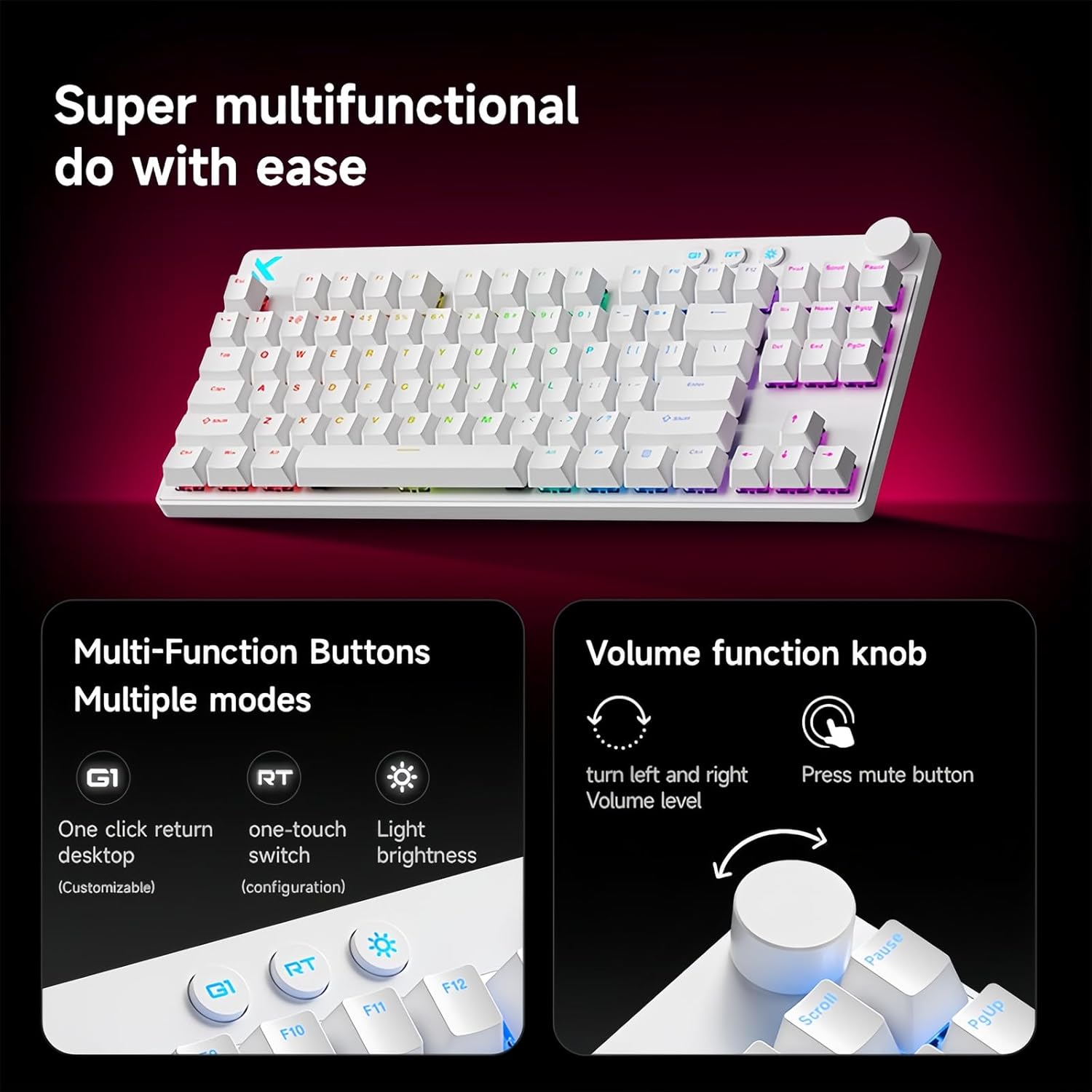
Сүрөт 5.1: Illustration of the multi-function buttons (G1, RT, Light) and the volume knob on the MCHOSE Mix 87 keyboard. The image details the functions of the knob for volume adjustment and muting, and the customizable nature of the G1 button.
5.3 Көп функциялуу баскычтар
Above the numeric row, there are three dedicated buttons:
- G1 Button: Customizable function, typically set to return to desktop.
- RT Button: Toggles or adjusts Rapid Trigger mode.
- Жарык баскычы: Adjusts RGB lighting brightness or cycles through lighting modes.
5.4 Rapid Trigger (RT) Mode and Adjustable Actuation
The Mix 87 features Hall Effect magnetic switches that allow for precise control over actuation and de-actuation points.
- Жөнгө салынуучу кыймылдаткыч: The trigger point can be set from 0.01mm to 3.4mm, allowing you to customize key sensitivity. This is configured via the web айдоочу.
- Тез триггер (RT): This mode allows a key to register a new press as soon as it begins to move upwards, without needing to return to its reset point. This significantly reduces input delay for repeated key presses. The RT Smart Mode offers 1-15 adjustable levels for fine-tuning responsiveness.
- Өркүндөтүлгөн функциялар: Supports SOCD (Simultaneous Opposite Cardinal Directions), DKS (Dynamic Keystrokes), MT (Macro Toggle), and TGL (Toggle) functions for advanced control.

Сүрөт 5.2: Visual representation of the MCHOSE Mix 87's performance capabilities, including 0.001mm precision, 256K ultra-high scanning rate, 0.08ms ultra-low latency, and 8K ultra-high polling rate. It also highlights the magnetic axis Algorithm 3.0, 15-level adjustable RT Smart mode, and ADC Direct Link for WASD keys.
5.5 RGB арткы жарыктандыруу
The keyboard features 16 million color RGB backlighting with various effects. Use the dedicated Light button or the software driver to customize lighting:
- Cycle through preset lighting effects.
- Жарыктуулук деңгээлин тууралаңыз.
- Customize individual key lighting.
- Enable music rhythm synchronization.
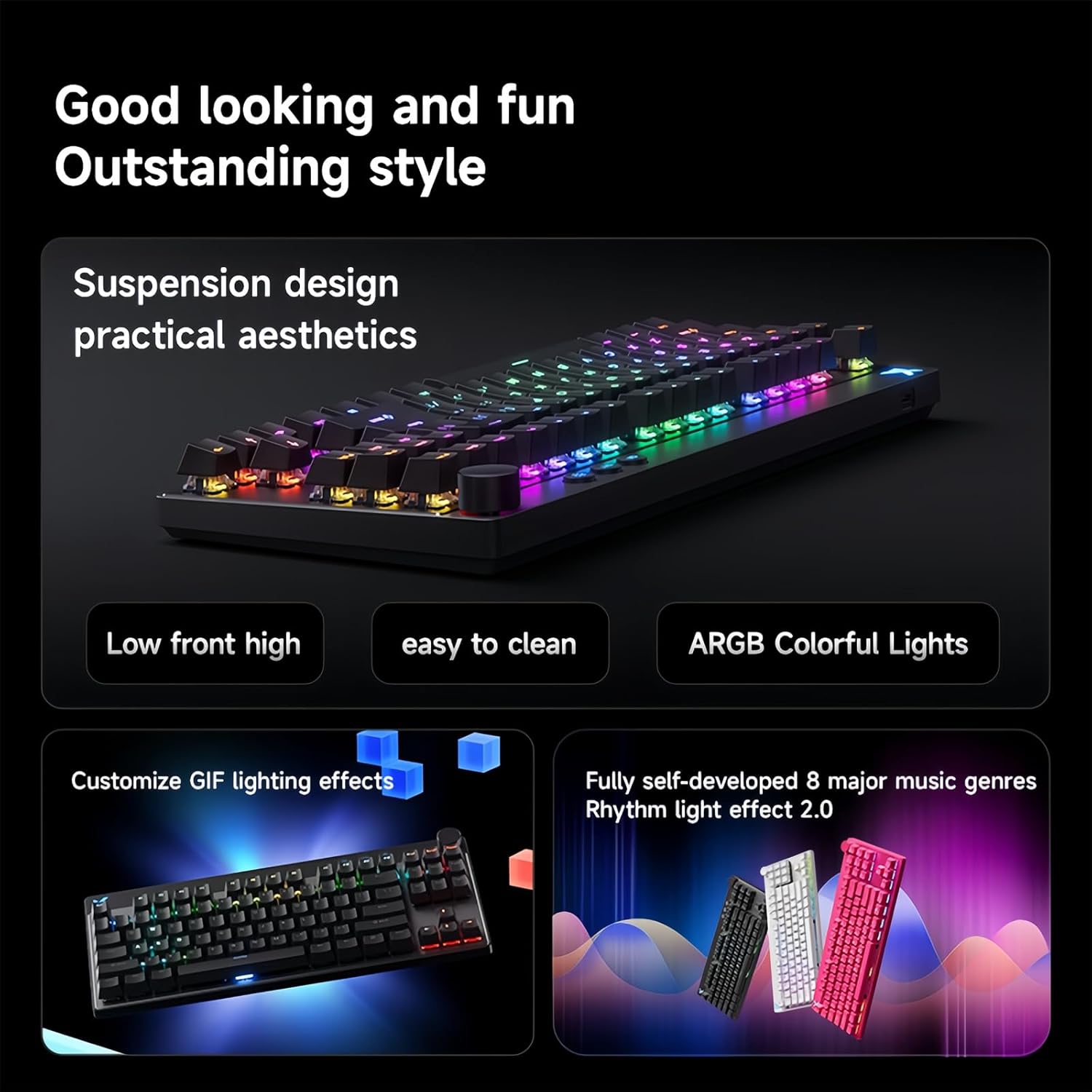
Сүрөт 5.3: The MCHOSE Mix 87 keyboard showcasing its suspension design and ARGB colorful lighting. The image highlights the aesthetic appeal and practical features like easy cleaning and customizable GIF lighting effects, along with music rhythm light effects.
6. Software Driver
The MCHOSE Mix 87 supports a customizable web-based driver, eliminating the need for software downloads and installations. This driver provides access to advanced settings and customization options.
6.1 Кирүү Web Айдоочу
кирүү үчүн web driver, open your web browser and navigate to one of the following URLs:
- Official MCHOSE Web Айдоочу: https://www.mchose.com.cn
- Alternative M HUB Client Driver: https://www.maicong.cn
The web driver allows you to:
- Adjust key actuation points.
- Configure Rapid Trigger (RT) levels.
- RGB жарык эффекттерин жана түстөрүн өзгөчөлөштүрүү.
- Program macros and reassign key functions.
- Микропрограмманы жаңыртуу (эгер бар болсо).

Сүрөт 6.1: Screenshot illustrating the MCHOSE web-based driver interface. This driver allows users to customize keyboard settings without installing dedicated software, offering cross-platform compatibility.
7. Техникалык тейлөө
7.1 Баскычтопту тазалоо
To maintain the appearance and functionality of your keyboard:
- Тазалоодон мурун клавиатураны компьютерден ажыратыңыз.
- Бир аз жумшак, түксүз кездемени колдонуңуз dampачкыч капкактарын жана шассиди сүртүү үчүн суу же жумшак тазалоо эритмеси менен жабыңыз.
- For dust and debris between keycaps, use compressed air or the provided keycap puller to remove keycaps and clean underneath.
- Avoid using harsh chemicals, abrasives, or solvents, as these can damage the keyboard's finish.
7.2 Сактоо
Колдонулбай турган учурда, клавиатураны кургак, салкын жерде, күндүн түз нурунан жана өтө жогорку температурадан алыс сактаңыз.
8. Кыйынчылыктарды
8.1 Баскычтоп жооп бербейт
- USB-C кабели клавиатурага жана компьютерге бекем туташып турганын текшериңиз.
- Баскычтопту компьютериңиздин башка USB портуна туташтырууга аракет кылыңыз.
- Системага тиешелүү маселелерди жокко чыгаруу үчүн баскычтопту башка компьютерде сынап көрүңүз.
- Компьютериңизди өчүрүп күйгүзүңүз.
8.2 RGB Lighting Not Working or Incorrect
- Check the brightness settings using the dedicated Light button or the web айдоочу.
- Ensure no software conflicts are present (e.g., other RGB control software).
- Reset the keyboard settings via the web driver if customization issues persist.
8.3 Actuation Issues or Inconsistent Key Presses
- Verify your actuation point settings in the web айдоочу.
- Ensure Rapid Trigger (RT) mode is configured to your preference.
- Clean around the affected switch to remove any debris.
- If an extra switch is available, consider replacing the problematic switch.
9. Техникалык шарттар
| Модель аты | Mix 87 Keyboard |
| Туташуу түрү | USB-C зымдуу |
| Ачкычтардын саны | 87 keys (TKL Layout) |
| Которуу түрү | Hall Effect Magnetic Switches (Apollo) |
| Жөнгө салынуучу кыймылдаткыч | 0.01 мм - 3.4 мм |
| Rapid Trigger (RT) Mode | Supported, 1-15 Level Adjustable |
| Добуш берүү көрсөткүчү | 8K Гц |
| Скандоо ылдамдыгы | 256K |
| Кечигип калуу | 0.08ms |
| Арткы жарык | 16 Million Color RGB |
| Структура | Прокладка орнотуу |
| Клавиатура материалы | Тунук |
| Продукциянын өлчөмдөрү | 14.1 x 6 x 1.4 дюйм (35.8 x 15.2 x 3.6 см) |
| Элемент Салмагы | 2 фунт (0.91 кг) |
| Системанын шайкештиги | Windows, macOS, iOS, Android |
10. Кепилдик жана колдоо
For warranty information and technical support, please refer to the official MCHOSE webсайтка же сатуучуга кайрылыңыз. Кепилдик дооматтар үчүн сатып алганыңыздын далилин сактаңыз.


