1. Киришүү
The Varstrom VD618 is a 3.5-inch color LCD display designed specifically for e-bikes equipped with BAFANG CAN BUS mid-motors. It provides essential riding data, control over assistance levels, and diagnostic information to enhance your e-biking experience. This display features a 5-pin male triangular connector and is not compatible with BAFANG UART protocol motors.
Key functionalities include speed display (max, average, current), odometer, trip distance, battery level indication, PAS level adjustment (0-6 levels), and error code display. The unit is designed for durability with an IP66 waterproof rating and includes a convenient USB-C charging port.
2. Продукт бүтүп калдыview жана өзгөчөлүктөрү
The VD618 display offers a comprehensive suite of features for an intuitive and informed ride:
- CAN Protocol Compatibility: Exclusively designed for Bafang CAN BUS mid-motors (BBS01B, BBS02B, BBS03 series, M200/M625/M325/M225/M400). Not compatible with UART protocol motors.
- Суу өткөрбөйт дизайн: IP66-rated for durability in various weather conditions.
- USB-C заряддоо порту: Conveniently charge smartphones and other devices.
- Clear Readout Screen: Bright, high-definition 3.5-inch LCD display, visible in sunlight.
- Комплекстүү маалыматты көрсөтүү: Battery level (percentagэ/томtage), odometer, speed (switchable between miles and kilometers), error codes, 0-6 PAS levels, adjustable brightness, auto shut-off, speed limit, adjustable wheel size, and light-sensing auto functions.
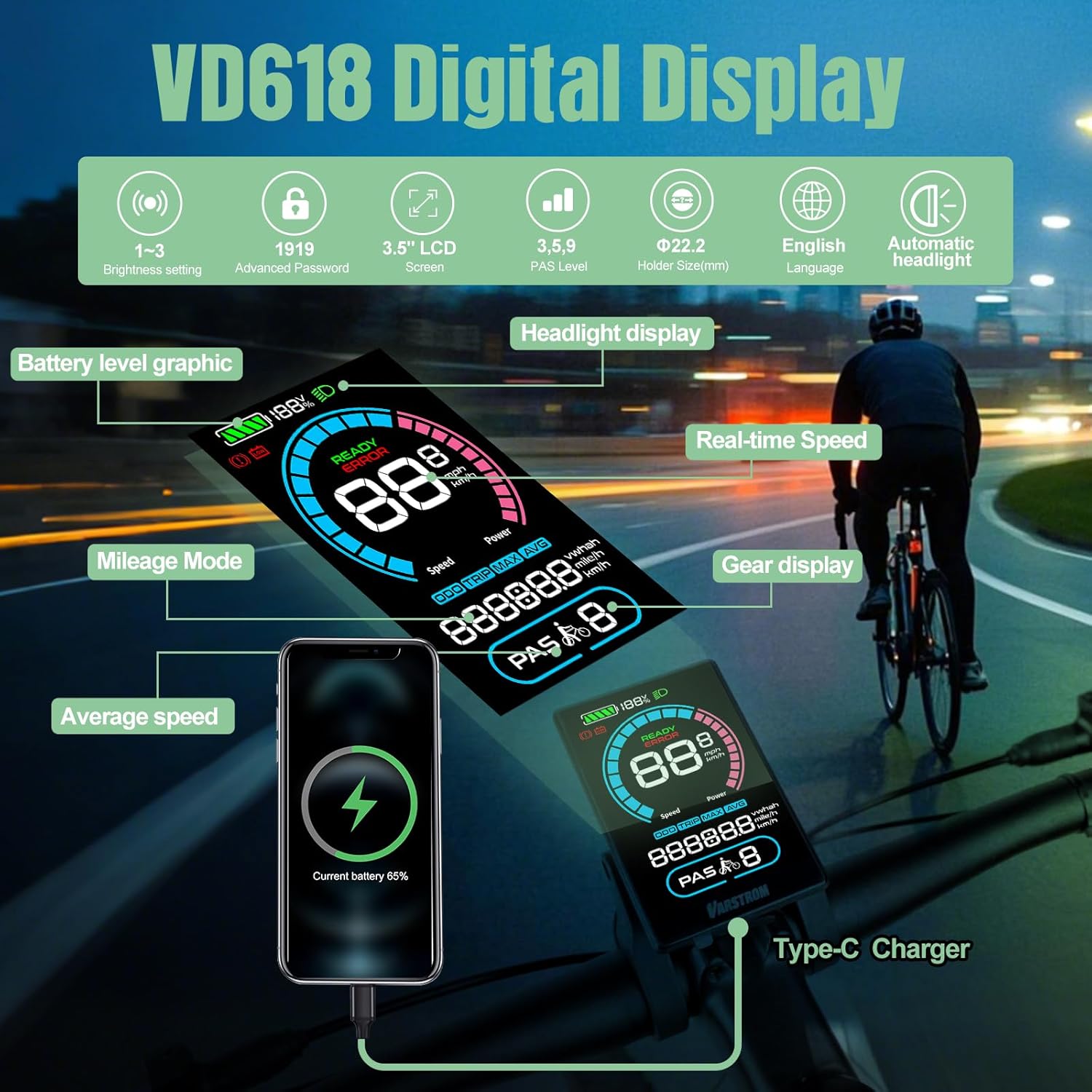
Figure 2.1: ашыкview of VD618 Digital Display features, including battery level graphic, headlight display, real-time speed, mileage mode, gear display, average speed, and Type-C charger.
3. Орнотуу жана орнотуу
3.1 Дисплейди орнотуу
The VD618 display is designed to be mounted on your e-bike's handlebars. Ensure the mounting bracket is securely fastened to a suitable position that allows for clear visibility and easy access to the control buttons. The display holder supports diameters of Ø31.8mm, Ø25.4mm, and Ø22.2mm.
3.2 Дисплейди туташтыруу
The VD618 display connects to your e-bike's motor system via a 5-pin male triangular connector. Carefully align the connector from the display with the corresponding female connector on your e-bike's wiring harness. Ensure a firm and secure connection to prevent disconnections during riding.

Figure 3.1: The VD618 display unit with its integrated control panel.

Figure 3.2: Detail of the 5-pin male triangular connector from the display end.
3.3 Шайкештикти текшерүү
It is crucial to verify that your e-bike's motor uses the CAN BUS protocol. The VD618 display is гана туура келет with BAFANG CAN Series Motors (e.g., M620 MMG510.750.C, M225 MM G341.250.C, M625 MM G321.1000.C). It is туура келбейт with BAFANG UART protocol motors, BAFANG Wheel Hub Motors, or other brand motors.

Figure 3.3: Display Connector Compatibility. Ensure your motor uses the CAN Protocol with a 5-pin male triangular connector.
4. Иштөө нускамалары
4.1 Күйгүзүү/өчүрүү
- To power on the display, press and hold the power button (usually marked with a power symbol) on the control panel.
- To power off the display, press and hold the power button again until the screen turns off. The display also features an auto shut-off function after a period of inactivity.
4.2 Display Functions and Navigation
The VD618 display provides various real-time riding data. Use the control buttons (+, -, i) to navigate through different screens and adjust settings.
- Ылдамдык көрсөтүү: Shows current speed, maximum speed, and average speed. Units can be switched between kilometers per hour (km/h) and miles per hour (mph).
- PAS деңгээли: Adjust the pedal assist level from 0 to 6 using the '+' and '-' buttons. Level 0 provides no assistance, while Level 6 provides maximum assistance.
- Батарея деңгээли: Indicates the remaining battery charge in percentage жана тtage.
- Одометр (ODO): Displays the total distance traveled by the e-bike.
- Сапардын аралыгы (TRIP): Shows the distance traveled during the current ride. This can typically be reset.
- Ката коддору: If an issue is detected, the display will show an error code. Refer to the troubleshooting section or contact support for specific code meanings.
- Фараны башкаруу: Press the headlight button (if available on your control panel) to turn the e-bike's headlight on or off. The display also supports light-sensing auto functions for the headlight.
4.3 Settings Adjustment
Access the settings menu to customize display parameters such as brightness, wheel size, and speed limit. Consult the detailed instructions provided with your e-bike kit for specific menu navigation and parameter adjustments. The display supports 1-3 levels of brightness setting.
4.4 USB-C заряддоо порту
The VD618 display is equipped with a USB-C port for charging external devices like smartphones. Simply connect your device to the USB-C port on the display using a compatible cable.
5. Техникалык тейлөө
Proper maintenance ensures the longevity and optimal performance of your VD618 display.
- Тазалоо: Дисплейдин экранын жана корпусун жумшак менен сүртүңүз, damp кездеме. Абразивдүү тазалоочу каражаттарды, эриткичтерди же катуу химиялык заттарды колдонбоңуз, анткени алар экранга жеasing.
- Суу таасири: While the display is IP66 waterproof, avoid submerging it in water or exposing it to high-pressure water jets. Dry any moisture promptly.
- Сактагыч: When not in use for extended periods, store the e-bike and display in a cool, dry place, away from direct sunlight and extreme temperatures.
- Туташтыргычка кам көрүү: Keep the 5-pin connector clean and free of dirt or debris. Ensure it is dry before connecting.

Figure 5.1: The VD618 display is IP66 waterproof, designed to withstand various weather conditions.
6. Кыйынчылыктарды
If you encounter issues with your VD618 display, refer to the table below for common problems and solutions.
| Көйгөй | Мүмкүн себеп | Чечим |
|---|---|---|
| Дисплей күйбөйт | Loose connection, low battery, power button issue | Check all cable connections, especially the 5-pin connector. Ensure e-bike battery is charged. Press and hold power button firmly. |
| Incorrect speed or distance reading | Incorrect wheel size setting, loose speed sensor | Access display settings to verify and adjust the wheel size. Check if the speed sensor is properly installed and aligned. |
| Дисплей ката кодун көрсөтөт | System malfunction, sensor error, motor issue | Note the error code. Consult your e-bike motor manual or contact Varstrom customer support with the specific code for diagnosis. |
| USB-C кубаттоо иштебей жатат | Cable issue, device incompatibility, display off | Try a different USB-C cable. Ensure the display is powered on. Some devices may draw too much power or be incompatible. |
| Display screen is dim or unreadable | Brightness setting, direct sunlight | Adjust the brightness setting in the display menu. Move to a shaded area if direct sunlight is too strong. |
If the problem persists after attempting these solutions, please contact Varstrom customer support for further assistance.
7. Техникалык шарттар
Detailed specifications for the Varstrom VD618 E-Bike Display:
| Өзгөчөлүк | Спецификация |
|---|---|
| Модел | VD618-CAN Display |
| Дисплей өлчөмү | 3.5 inch LCD Color Screen |
| Байланыш протоколу | АВТОБУС БОЛОТ |
| Туташтыргыч түрү | 5PIN Male Triangular |
| PAS деңгээли | 0-6 деңгээли |
| Тtage Шайкештик | 24V/36V/48V/52V |
| Суу өткөрбөйт рейтинги | IP66 |
| Жарыктыкты жөндөө | 1-3 деңгээли |
| Заряддоо порту | C түрүндөгү USB |
| Light-sensitive Auto Function | Ооба |
| Ылдамдыктын чеги | 0-100km/h (Adjustable) |
| Display Holder Diameter | Ø31.8mm/Ø25.4mm/Ø22.2mm |
| Advanced Password | 1919 (for advanced settings) |

Figure 7.1: VD618 Product Specification Diagram with dimensions and technical details.
8. Кепилдик жана колдоо
Varstrom provides a warranty for the VD618 E-Bike Display. The product is covered by a 30-day return policy and a 365-day repair or replacement warranty from the date of purchase. This warranty covers manufacturing defects and malfunctions under normal use.
For technical support, warranty claims, or any inquiries regarding your VD618 display, please contact Varstrom customer service through the retailer where you purchased the product or visit the official Varstrom webбайланыш маалыматы үчүн сайт.


