1. Киришүү
The NIIMBOT M3 Label Maker Machine is a 3-inch Bluetooth thermal transfer sticker printer designed for various labeling needs. It offers high-definition printing and compatibility with both mobile devices and personal computers, making it suitable for office, small business, and organizational tasks.

Image: The NIIMBOT M3 Label Maker, shown with a roll of 50x30mm labels and several printed labels, including one with a product code 'PORK0001'.
2. Кутуда эмне бар
Сиздин пакетте төмөнкү компоненттердин бардыгы камтылганын текшериңиз:
- 1 × NIIMBOT M3 Label Maker
- 1 × Type-C кабели
- 1 × Roll Label Tape/50×30mm (pre-installed inside the machine)
- 1 × Black Ribbon
- 1 × Кол

Сүрөт: жарылган view of the NIIMBOT M3 package contents, showing the label maker, Type-C cable, a roll of label tape, a black ribbon, and the user manual.
3. Орнотуу нускамалары
3.1. App Download and Connection (Mobile)
- Download the 'NIIMBOT APP' from your device's app store. You can find the download page бул жерде.
- Мобилдик түзмөгүңүздө Bluetooth иштетилгенин текшериңиз.
- Open the NIIMBOT APP and connect to the M3 printer via Bluetooth. The app supports simultaneous connection of up to 10 mobile phones (3 iOS + 7 Android).
3.2. PC Connection
The M3 label printer supports connection to a computer via Bluetooth or a data cable (Type-C cable included). Driver installation may be required for PC connection.

Image: The NIIMBOT M3 Label Maker connected to a laptop via USB cable and a smartphone via Bluetooth, demonstrating multi-device connectivity.
3.3. Loading Label Paper and Ribbon
- Этикетка жасоочунун капкагын ачыңыз.
- Place the label paper roll into the designated slot.
- Adjust the ribbon into its correct position.

Image: A visual guide illustrating the steps to download the app, connect via Bluetooth, load label paper, adjust the ribbon, edit content, and print using the NIIMBOT M3.
4. Иштөө нускамалары
4.1. Белгилерди түзүү жана түзөтүү
The NIIMBOT APP provides a comprehensive interface for label creation:
- Калыптар: Access multiple pre-designed templates.
- Элементтер: Add texts, icons (1600+), tables, logos, barcodes, QR codes, images, and time stamps.
- Өркүндөтүлгөн өзгөчөлүктөр: Insert data from Excel, use scan functions, and voice recognition (Voice RECG).
- Ыңгайлаштыруу: Utilize over 60 fonts and 190+ borders to personalize your labels.

Image: A screenshot of the NIIMBOT App interface, highlighting the extensive options for fonts, icons, borders, and templates available for label design.
4.2. Этикеткаларды басып чыгаруу
After designing your label in the app, initiate the printing process. The M3 supports batch printing for multiple identical or different commodity labels, enhancing efficiency.
5. Тиркемелер
The NIIMBOT M3 Label Maker is versatile and can be used across various environments and for diverse purposes:
- Кеңсени уюштуруу: Белгилөө files, folders, and office supplies.
- Чакан бизнес: Pricing products, creating address labels, and inventory management.
- Үйдө колдонуу: Organizing storage, labeling food containers, and personal items.
- Атайын колдонуулар: Medical laboratory sample identification, outdoor plant marking, cable storage, essential oil bottle labeling, and jewelry tags.

Image: A collage demonstrating the wide range of applications for the label maker, including essential oil bottles, potted plants, office documents, small business pricing, medical samples, and industrial equipment labeling.

Image: The NIIMBOT M3 Label Maker being used outdoors to create cable labels, highlighting its portability and utility for outdoor applications.
6. Продукциянын өзгөчөлүктөрү жана технологиясы
6.1. Upgraded Printing Width
The M3 label maker is compatible with label widths ranging from 20mm to 78mm (approximately 0.79 inches to 3.07 inches), accommodating a variety of label sizes for different applications. Please note that it does not support 4x6 inch shipping labels.

Сүрөт: жакын план view of the NIIMBOT M3's label compartment, illustrating the adjustable printing width from 20mm to 78mm, with examples of jewelry tags, switch labels, address labels, and equipment markings.
6.2. High-Definition Printing and Thermal Transfer Technology
The M3 features 300 DPI (dots per inch) high-definition printing, ensuring clear and crisp output for QR codes, barcodes, and small fonts. It utilizes thermal transfer technology, which offers several advantages over traditional thermal labels:
- Узактыгы: Labels can be stored for longer periods.
- Каршылык: Waterproof, oil-proof, alcohol-proof, wear-resistant, and scratch-resistant.
- Температурага сабырдуулук: Withstands both high and low temperatures.
- Натыйжалуулугу: Features automatic paper rewind for labels less than 30mm and adaptive printing density.

Image: A comparison graphic highlighting the superior durability of thermal transfer labels (high/low temperature resistant, waterproof, oilproof, scratch-resistant for 8-10 years) against standard thermal labels.

Image: The NIIMBOT M3 Label Maker illustrating its high-definition 300 DPI printing capability, showing a clear label output compared to a lower resolution example.
6.3. Color Ribbon Support
The M3 supports printing with various color ribbons, allowing for customized label designs. Intelligent recognition of consumables helps optimize printing and reduce waste.
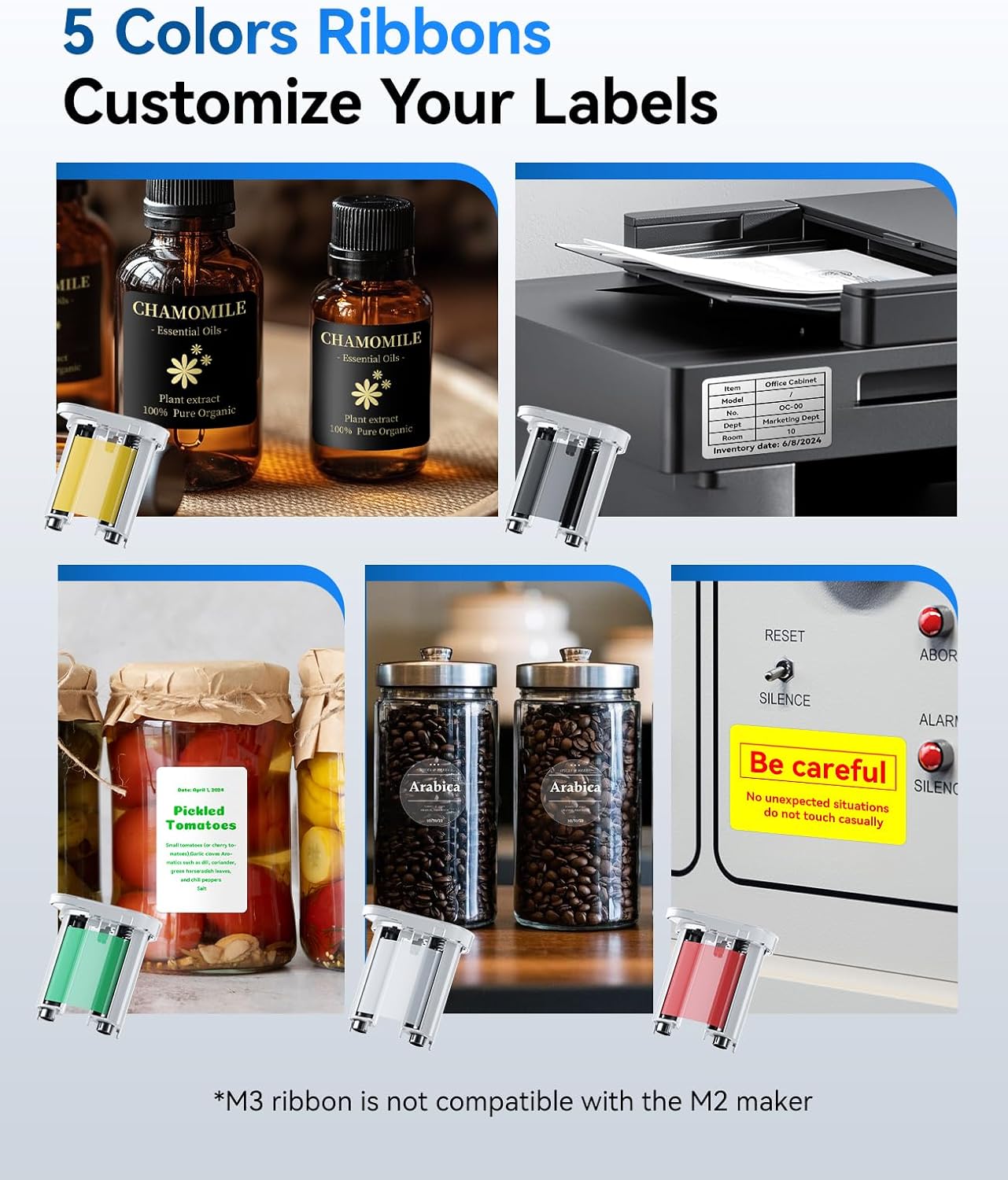
Image: The NIIMBOT M3 Label Maker displayed with various color ribbons (yellow, black, green, white, red), demonstrating the ability to customize labels with different ribbon colors for essential oils, pickled tomatoes, coffee beans, and warning signs.
7. Техникалык тейлөө
To ensure optimal performance and longevity of your NIIMBOT M3 Label Maker, follow these general maintenance guidelines:
- Тазалоо: Regularly clean the print head and the interior of the label maker with a soft, lint-free cloth. Avoid using abrasive cleaners or solvents.
- Сактагыч: Аппаратты түз күн нурунан жана экстремалдык температурадан алыс салкын, кургак жерде сактаңыз.
- Батареяга кам көрүү: If the device will not be used for an extended period, ensure it is partially charged (around 50%) before storage and recharge it periodically to maintain battery health.
- Сарпталуучу материалдар: Use only genuine NIIMBOT label tapes and ribbons to prevent damage and ensure print quality.
8. Кыйынчылыктарды
If you encounter issues with your NIIMBOT M3 Label Maker, consider the following common troubleshooting steps:
- Кубат жок: Ensure the device is charged. Connect it to a power source using the provided Type-C cable.
- Туташуу маселелери: Verify Bluetooth is enabled on your mobile device or that the USB cable is securely connected to your PC. Restart the label maker and your device.
- Начар басып чыгаруу сапаты: Check if the label paper and ribbon are correctly installed. Clean the print head if necessary. Ensure you are using high-quality NIIMBOT consumables.
- Label Jam: Open the cover and carefully remove any jammed label paper or ribbon. Ensure the paper path is clear before re-inserting consumables.
- Колдонмо жооп бербей жатат: Close and reopen the NIIMBOT APP. If the issue persists, reinstall the app.
For further assistance, refer to the official NIIMBOT support resources or contact customer service.
9. Техникалык шарттар
| Өзгөчөлүк | Деталь |
|---|---|
| Модель аты | M3 Label Maker |
| Бренд | NIIMBOT |
| Байланыш технологиясы | Bluetooth |
| Басма технологиясы | Жылуулук берүү |
| Принтердин чыгышы | Color (via ribbon) |
| Өзгөчө өзгөчөлүк | 300dpi Clear Printing, Color Printing, Easy to Use, Support Mobile and PC, Rechargeable |
| Макс басып чыгаруу ылдамдыгы монохромдуу | 40 промилле |
| Шайкеш түзмөктөр | Smartphones (iOS, Android), PC |
| Максималдуу киргизүү барагынын сыйымдуулугу | 1 |
| Максималдуу медиа өлчөмү | 3 дюйм (78мм) |
| Продукциянын өлчөмдөрү | 7.79 x 5 x 3.03 дюйм (19.79 x 12.7 x 7.7 см) |
| Элемент Салмагы | 0.317 унция (9 грамм) |
| Батареялар | 1 литий-иондук батарейка талап кылынат (кошулган) |
| Түс | Ак |
10. Кепилдик жана колдоо
NIIMBOT products typically come with a manufacturer's warranty. Please refer to the warranty card included in your package or visit the official NIIMBOT webдеталдуу кепилдик шарттары жана шарттары үчүн сайт.
For technical support, product inquiries, or assistance with troubleshooting, please contact NIIMBOT customer service through their official channels. Contact information can usually be found in the product manual or on the manufacturer's webсайт.


