1. Киришүү
This manual provides detailed instructions for the safe and effective use of your KAIWEETS HT118E Digital Multimeter and KET12 Multimeter Test Lead Set. Please read this manual thoroughly before operation and retain it for future reference. The HT118E is a True RMS (TRMS) digital multimeter with 20000 counts, offering high resolution and auto-ranging capabilities for various electrical measurements. The KET12 test lead set provides versatile and safe connections for testing.

Image: An electrician performing measurements on an electrical panel using the KAIWEETS HT118E Digital Multimeter, demonstrating its application in professional settings.
2. Коопсуздук маалыматы
ЭСКЕРТҮҮ: Электр тогуна урунуудан же жеке жаракат алуудан сактануу үчүн, бул продуктуну колдонуудан мурун бардык коопсуздук маалыматын окуп чыгып, түшүнүңүз.
- Өлчөөлөрдү жүргүзүүдөн мурун ар дайым мультиметр туура функцияга жана диапазонго коюлганын текшериңиз.
- Эгерде мультиметр бузулгандай көрүнсө же сыноо өткөргүчтөрү бузулган болсо, аны колдонбоңуз.
- Verify the multimeter's operation by measuring a known voltage же колдонуудан мурун ток.
- Adhere to the maximum input values marked on the multimeter.
- Том менен иштөөдө этият болуңузtag30V AC RMS, 42V пик же 60V DC жогору. Бул томtagшок коркунучун жаратат.
- Always connect the common (COM) test lead first and disconnect it last.
- The HT118E is safety rated CAT III 1000V & CAT IV 600V. Ensure your application falls within these safety ratings.
- The KET12 test leads are double insulated and rated for 10A current.
3. Продукт бүтүп калдыview
The KAIWEETS HT118E Digital Multimeter is designed for accurate and reliable electrical measurements. The KET12 Test Lead Set complements the multimeter with versatile and safe connection options.
3.1. HT118E Digital Multimeter Features
- 20000 Counts Display for higher resolution.
- True RMS (TRMS) for accurate AC measurements.
- Auto-Ranging for simplified operation.
- Функциялар: AC/DC Voltage, AC/DC Current, Resistance, Temperature, Capacitance, Frequency, Duty-cycle, Diodes, Continuity, NCV (Non-Contact Voltage), Live Wire Detection.
- Backlight and Flashlight for dimly lit environments.
- Min/Max recording, Data Hold, Auto Power-Off.
- Integrated kickstand and pen slot.

Сүрөт: комплекстүү view of the KAIWEETS HT118E Digital Multimeter alongside the KET12 Test Lead Set, showcasing all included components.
3.2. KET12 Test Lead Set Features
- Soft silicone double-insulated wires for durability and flexibility.
- Universal compatibility with various multimeters and clamp метр.
- Interchangeable connectors: crocodile clips, needle probes, mini-hooks, and SMD tweezers.
- Safety rated CAT III 1000V & CAT IV 600V, 10A current.
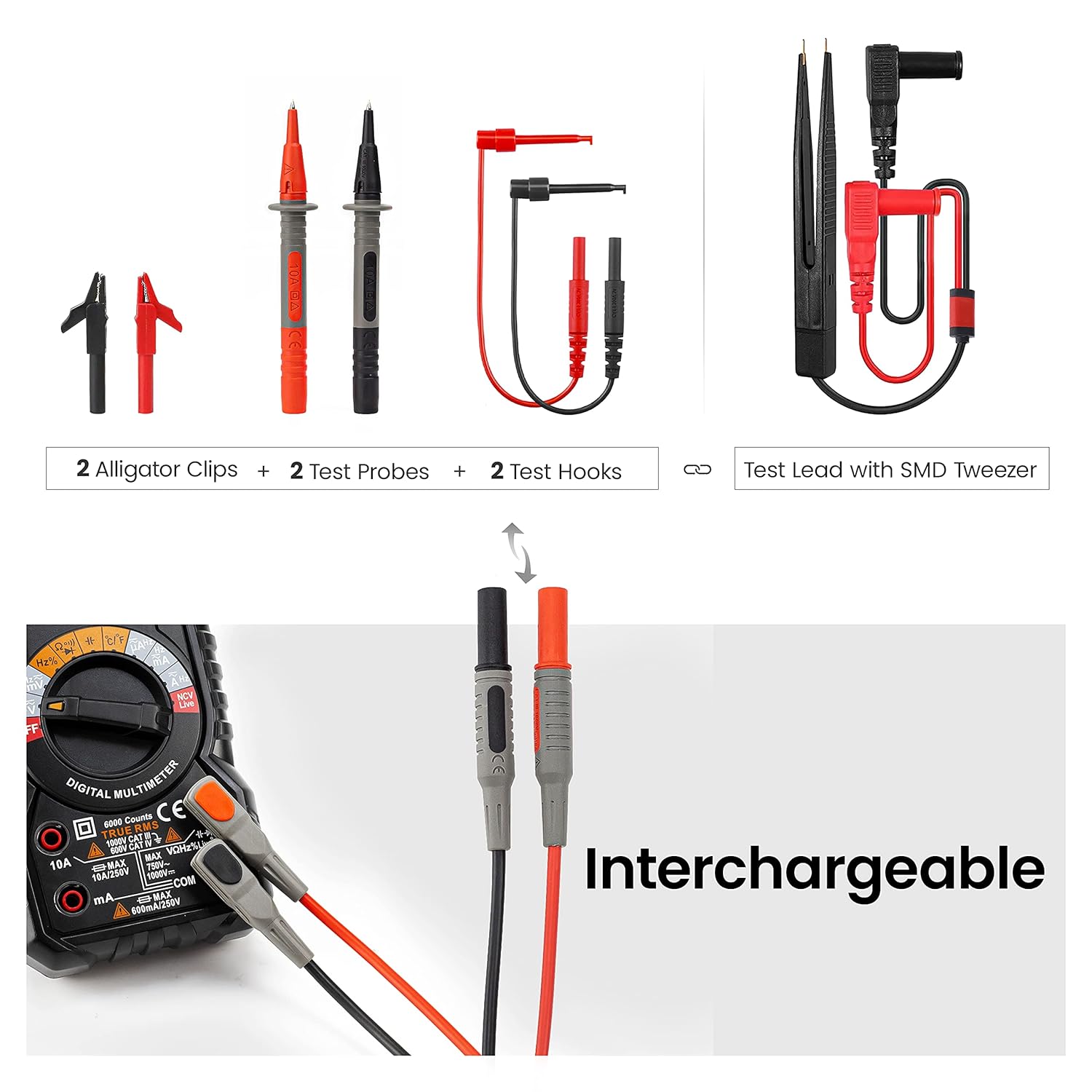
Image: Close-up of the KET12 Test Lead Set demonstrating the interchangeable nature of the test probes, allowing for different connection types.

Image: A visual representation of the flexible and durable insulated wires of the KET12 Test Lead Set, highlighting their quality and safety features.
4. Орнотуу
4.1. Батареяны орнотуу
- Мультиметр өчүрүлгөнүн текшериңиз.
- Мультиметрдин артындагы батарея бөлүкчөсүнүн капкагын табыңыз.
- Кармап туруучу бурам(дарды) бурап, капкакты алып салыңыз.
- Insert the required batteries (typically AA or 9V, refer to the battery compartment label) observing correct polarity.
- Батарея уясынын капкагын ордуна коюңуз жана аны бурама(лар) менен бекитиңиз.
4.2. Сыноо линияларын туташтыруу
- Identify the common (COM) input jack (black).
- Көлөмдү аныктооtage/resistance/diode/capacitance input jack (red, usually marked VΩHz).
- Identify the current input jacks (red, usually marked 10A and mA).
- Insert the black test lead into the COM jack.
- Insert the red test lead into the appropriate jack for your measurement (e.g., VΩHz for voltage, resistance, etc., or 10A/mA for current).
- Attach the desired interchangeable connector (e.g., needle probe, alligator clip) to the test leads.
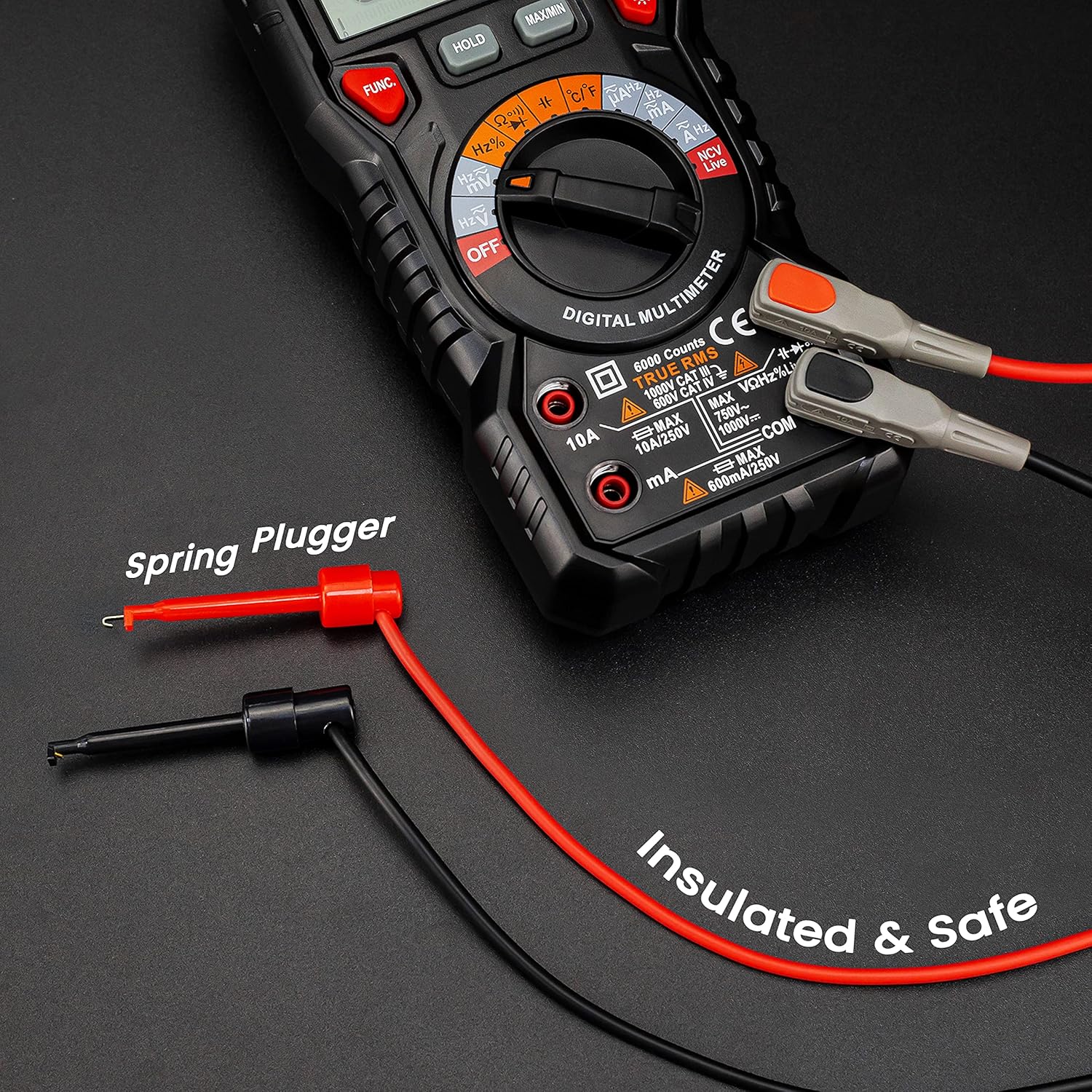
Image: The KAIWEETS HT118E Multimeter with test leads securely connected, illustrating the spring plugger design for safe and insulated connections.
5. Иштөө нускамалары
The HT118E features auto-ranging for most functions, simplifying operation. Select the desired function using the rotary dial.

Image: The KAIWEETS HT118E Digital Multimeter showcasing its multi-function display, indicating its capability to measure various electrical parameters.
5.1. Өлчөө AC/DC Voltage
- Айлануучу циферблатты буруңуз V~ (AC томtagд) же V- (DC Voltagд) кызмат орду.
- Сыноо өткөргүчтөрүн текшерилип жаткан схемага же компонентке параллелдүү туташтырыңыз.
- Томду окуңузtage value on the display. If voltage is >80V, the orange backlight illuminates.

Сүрөт: Эки мурдагыamples demonstrating the KAIWEETS HT118E measuring AC/DC Voltage in a wall outlet and a car battery, and AC/DC Current in a circuit, with the orange backlight indicating high voltagе/ток.
5.2. AC/DC токту өлчөө
- Айлануучу циферблатты буруңуз A~ (AC Current) же A- (DC Current) абалы.
- Маанилүү: Connect the multimeter in series with the circuit. Ensure the red lead is in the appropriate current jack (10A or mA).
- Read the current value on the display. If current is >1A, the orange backlight illuminates.
5.3. Каршылыкты өлчөө (Ω)
- Айлануучу циферблатты буруңуз Ω позиция.
- Каршылыкты өлчөөдөн мурун чынжырдын токтун өчүрүлгөнүн текшериңиз.
- Компонент боюнча сыноо өткөргүчтөрүн туташтырыңыз.
- Каршылык маанисин окуңуз.
5.4. Үзгүлтүксүздүк тести
- Айлануучу циферблатты буруңуз Ω жана баскычын басыңыз FUNC button to select continuity mode (indicated by a buzzer symbol).
- Сынамык өткөргүчтөрдү чынжыр же компонент боюнча туташтырыңыз.
- Үзгүлтүксүз бип үн үзгүлтүксүздүктү (төмөн каршылыкты) билдирет.
5.5. Диод сыноо
- Айлануучу циферблатты буруңуз Ω жана баскычын басыңыз FUNC button to select diode mode (indicated by a diode symbol).
- Кызыл өткөргүчтү анодго, караны диоддун катодуна туташтырыңыз.
- Дисплей алдыга томду көрсөтөтtagд тамчы. Линдерди тескери бургула; ачык райондук окуу жакшы диодду көрсөтөт.
5.6. Контактсыз томtage (NCV) аныктоо
- Айлануучу циферблатты буруңуз NCV позиция.
- Move the top of the multimeter near the conductor.
- The display will indicate "----L" for low voltage or "----H" for high voltage, accompanied by an audible alarm and flashing LED.

Image: The KAIWEETS HT118E Multimeter demonstrating its Non-Contact Voltage (NCV) detection feature, showing distinct display indications for low and high voltagд болушу.
5.7. Live Wire Detection
- Айлануучу циферблатты буруңуз Live позиция.
- Use the red test lead to touch the suspected live wire.
- An audible alarm and flashing LED indicate a live wire.
5.8. Other Functions (Capacitance, Frequency, Temperature, Duty Cycle)
For these functions, turn the rotary dial to the corresponding position and use the FUNC button if necessary to cycle through sub-functions. Connect the test leads appropriately to the component or circuit.
For temperature measurement, use the included K-type thermocouple probe, ensuring correct polarity.

Сүрөт: деталдуу view of the sensitive SMD tweezer, part of the KET12 Test Lead Set, designed for precise measurements on small surface-mount components.
6. Техникалык тейлөө
6.1. Тазалоо
- Ишти жарнама менен сүртүңүзamp кездеме жана жумшак жуугуч. Абразивдерди же эриткичтерди колдонбоңуз.
- Ensure the multimeter is completely dry before use.
6.2. Батареяны алмаштыруу
When the low battery indicator appears on the display, replace the batteries as described in the "Battery Installation" section (4.1).
6.3. Сактагычты алмаштыруу
Учурдагы өлчөө функциясы иштебей калса, сактагычты алмаштыруу керек болушу мүмкүн. Туура сактагычтын түрү жана рейтинги үчүн мүнөздөмөлөрдү караңыз. Сақтандыргычты алмаштыруу квалификациялуу кызматкерлер тарабынан гана жүргүзүлүшү керек.
6.4. Сактоо
If the multimeter is not used for an extended period, remove the batteries to prevent leakage and store the device in a cool, dry place.
7. Кыйынчылыктарды
| Көйгөй | Мүмкүн себеп | Чечим |
|---|---|---|
| Дисплей жок же күңүрт дисплей | Батареялардын заряды аз же батарея туура эмес орнотулган. | Туура полярдуулукту камсыз кылуу менен батарейкаларды алмаштырыңыз. |
| Туура эмес окуулар | Incorrect function/range selected; damaged test leads; poor contact. | Verify function/range; check test leads for damage; ensure good contact. |
| Учурдагы өлчөө иштебей жатат | Күйгүзүүчү. | Replace the fuse (refer to fuse replacement section). |
| "OL" же "OVER" көрсөтүлөт | Өлчөө тандалган диапазондон же киргизүүнүн максималдуу маанисинен ашып кетти. | Select a higher range (if not auto-ranging) or ensure measurement is within device limits. |
8. Техникалык шарттар
8.1. KAIWEETS HT118E Digital Multimeter
- Дисплей: 20000 саны
- Чыныгы RMS: Ооба
- Автоматтык диапазон: Ооба
- Коопсуздук рейтинги: CAT III 1000V, CAT IV 600V
- Функциялары: AC/DC Voltage, AC/DC Current, Resistance, Capacitance, Frequency, Duty Cycle, Temperature, Diode, Continuity, NCV, Live
- Өзгөчөлүктөр: Backlight, Flashlight, Min/Max, Data Hold, Auto Power-Off, Kickstand, Pen Slot
8.2. KAIWEETS KET12 Multimeter Test Lead Set
- Материал: Soft Silicone, Double Insulated
- Учурдагы рейтинг: 10A
- Коопсуздук рейтинги: CAT III 1000V, CAT IV 600V
- Зым узундугу: 48 дюйм (болжол менен 122 см)
- Туташтыргычтар: Crocodile Clips, Needle Probes, Mini-Hooks, SMD Tweezers
9. Кепилдик жана колдоо
KAIWEETS products are designed for reliability and performance. For warranty information, technical support, or service inquiries, please refer to the official KAIWEETS webсайтка кайрылыңыз же жергиликтүү дистрибьютериңиз менен байланышыңыз. Кепилдик дооматтары үчүн сатып алганыңыздын далилин сактап коюңуз.
Кошумча жардам алуу үчүн, баш багыңыз KAIWEETS Store on Amazon.


