Introduction
This manual provides detailed instructions for the safe and effective use of your Oraimo SpaceBuds Neo+ OTW-323P True Wireless Earbuds. Please read this manual thoroughly before use and retain it for future reference.
Негизги өзгөчөлүктөрү
- Активдүү ызы-чууну жокко чыгаруу (ANC): Enjoy a quieter, more immersive listening experience by reducing ambient noise for music, travel, or work.
- Bluetooth 5.4 Stable Connection: Latest wireless technology for fast pairing, reliable connectivity, and low latency.
- Sound360 Spatial Audio: Proprietary spatial sound technology expands the sound field for rich, immersive audio.
- Up to 30 Hours Total Playtime: Around 5 hours per charge with ANC off + 25 hours from the case — keeps you powered throughout the day.
- ENC Calls & IPX4 Waterproof: Dual noise-reducing mics for clearer voice calls and protection against splashing water.
Пакеттин мазмуну
- Oraimo SpaceBuds Neo+ OTW-323P Earbuds (Left and Right)
- Заряддоо кутусу
- USB-C заряддоо кабели
- Наушниктер (ар кандай өлчөмдөгү)
- User Manual
Продукт бүттүview
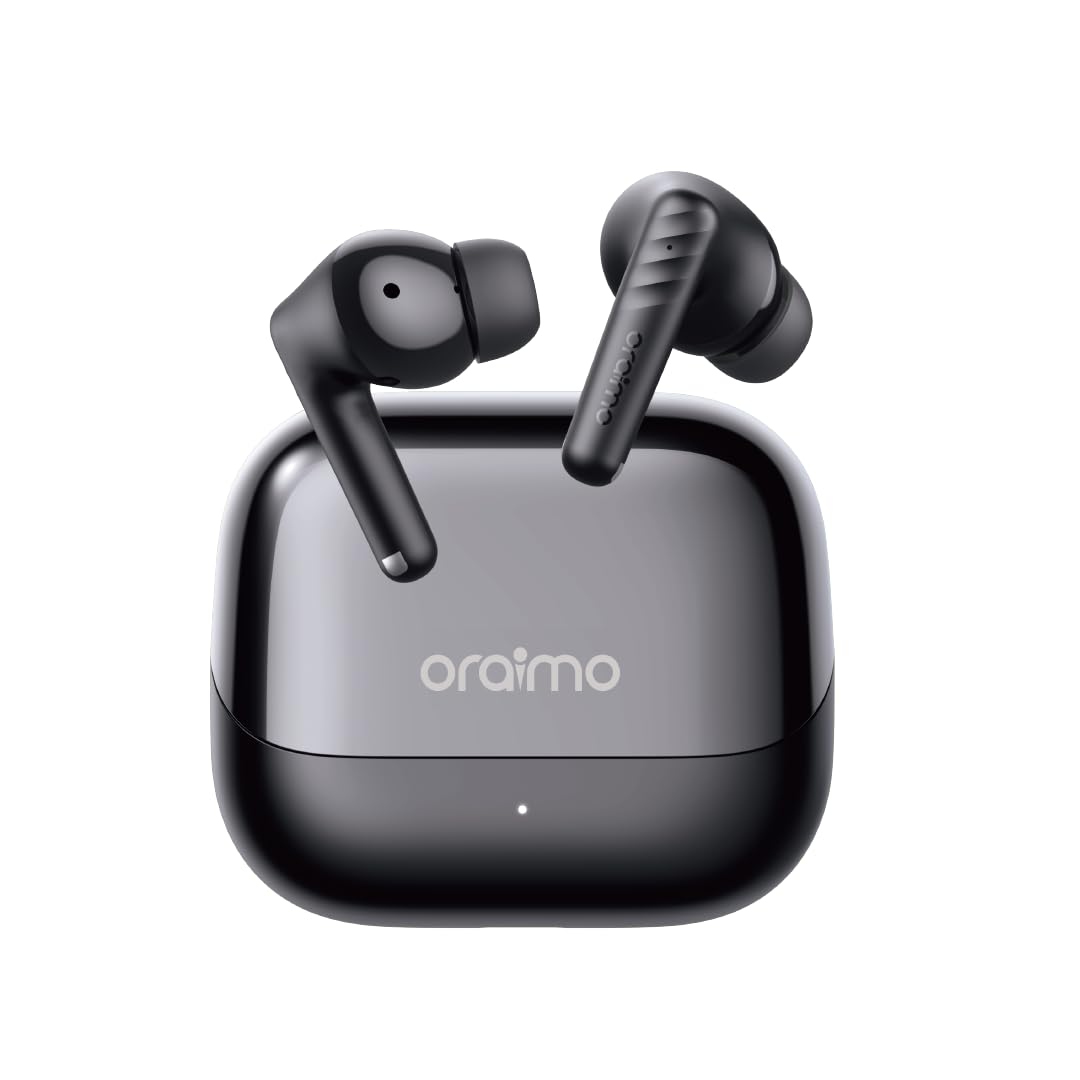
This image displays the Oraimo SpaceBuds Neo+ OTW-323P earbuds resting inside their charging case. The case is black with the 'oraimo' logo on the lid, and a small LED indicator is visible on the front.
Кулакчындар
- Сенсордук башкаруу аймагы: Ойнотууну, чалууларды жана режимдерди башкаруу үчүн.
- Микрофон: Чалуулар жана үн жардамчысы үчүн.
- Наушник: Ыңгайлуу отурууну жана үн изоляциясын камсыз кылат.
- Заряддоо байланыштары: Корпустун ичинде заряддоо үчүн.
Заряддоо кутусу
- USB-C заряддоо порту: Ишти заряддоо үчүн.
- LED көрсөткүчү: Заряддоо абалын жана батареянын деңгээлин көрсөтөт.
- Заряддоо байланыштары: Кулакчындарды заряддоо үчүн.
Жайгашуу
Кулакчындарды жана кутуну кубаттоо
- Берилген USB-C кубаттоо кабелин корпустагы кубаттоо портуна жана кубат булагына туташтырыңыз.
- The LED indicator on the case will show the charging status. A full charge typically takes approximately 2 hours.
- Place the earbuds into the charging case. Ensure the charging contacts align. The earbuds will begin charging automatically.
Баштапкы жупташтыруу
- Заряддоо кутучасын ачыңыз. Кулакчындар автоматтык түрдө жупташтыруу режимине өтөт, бул кулакчындарда жарк эткен LED менен көрсөтүлөт.
- Түзмөгүңүздө (смартфон, планшет ж.б.) Bluetooth иштетиңиз жана жеткиликтүү түзмөктөрдү издеңиз.
- Select "Oraimo SpaceBuds Neo+" from the list of detected devices to connect.
- Once connected, the earbud LEDs will turn off, and you will hear a confirmation tone.
Иштөө нускамалары
Күйгүзүү/өчүрүү
- Күйгүзүү: Заряддоо кутучасын ачсаңыз, кулакчындар автоматтык түрдө күйөт.
- Өчүрүү: Кулакчындарды кайра заряддоо кутусуна салып, капкагын жабыңыз. Алар автоматтык түрдө өчүрүлөт.
Touch Controls
| Функция | Сол кулакчын | Оң кулак |
|---|---|---|
| Ойнотуу/Тыныгуу | Бир таптоо | Бир таптоо |
| Кийинки трек | Эки жолу таптаңыз | Жок |
| Мурунку трек | Жок | Эки жолу таптаңыз |
| Чалууга жооп берүү/аяктоо | Бир таптоо | Бир таптоо |
| Чакырууну четке кагуу | 2сек басып кармап туруңуз | 2сек басып кармап туруңуз |
| Үн жардамчысын жандырыңыз | Үч жолу таптоо | Үч жолу таптоо |
| ANC/Айкындуулук режими | 2сек басып кармап туруңуз | 2сек басып кармап туруңуз |
Активдүү Шумду Жоюу (ANC)
The Oraimo SpaceBuds Neo+ feature Active Noise Cancellation to reduce ambient noise. You can cycle through ANC On, Transparency Mode, and ANC Off by pressing and holding the touch control area on either earbud for 2 seconds. Transparency Mode allows you to hear your surroundings while still enjoying your audio.

This image shows an individual wearing the Oraimo SpaceBuds Neo+ earbuds while on a bus, actively using a smartphone. The visual emphasizes the earbuds' capability for clear calls even in noisy environments, thanks to 2-mic call noise cancellation.
Sound360 Spatial Audio
Experience an expanded soundstage with Sound360 Spatial Audio, providing a more immersive audio experience with deeper bass and broader stereo effects. This feature is automatically enabled when supported content is played.
Төмөнкү кечигүү оюн режими
For an optimized gaming experience, activate Low-Latency Game Mode to minimize audio delay and ensure perfect synchronization between audio and video. Refer to the Oraimo Sound App for specific activation methods.
Oraimo Sound App
Download the Oraimo Sound App from your device's app store to unlock additional features and customization options, including advanced sound profiles, equalizer settings, and control personalization.
IPX4 сууга туруктуулугу
The earbuds are rated IPX4 water resistant, meaning they are protected against splashing water from any direction. This makes them suitable for workouts and light rain, but they are not designed for submersion in water.

This image features the Oraimo SpaceBuds Neo+ earbuds surrounded by water droplets, highlighting their IPX4 water resistance. This rating ensures protection against splashing water from any direction.
Батареянын иштөө мөөнөтү жана заряддоо
The Oraimo SpaceBuds Neo+ provide approximately 5 hours of playtime on a single charge with ANC off. The charging case extends the total playtime to up to 30 hours, allowing for multiple recharges on the go.

This image shows the open charging case of the Oraimo SpaceBuds Neo+ earbuds, with a prominent '30H' graphic in the background, signifying the extended total playtime provided by the earbuds and their charging case.
Техникалык тейлөө
- Тазалоо: Regularly clean the earbuds, eartips, and charging contacts with a soft, dry, lint-free cloth. Avoid using abrasive materials or harsh chemicals.
- Сактагыч: Колдонулбаганда, кулакчындарды коргоо жана кубатталган бойдон калуу үчүн аларды кубаттоо кутучасына сактап коюңуз.
- Экстремалдуу шарттарды болтурбоо: Do not expose the earbuds or charging case to extreme temperatures, humidity, or direct sunlight for extended periods.
- Суу таасири: While IPX4 rated, avoid intentional submersion or exposure to high-pressure water jets. Dry thoroughly if exposed to moisture.
Проблемаларды чечүү
Жалпы маселелер жана чечимдер
- Кулакчындар жупташкан жок:
- Ensure the charging case is open and the earbuds are in pairing mode.
- Түзмөгүңүздө Bluetooth иштетилгенин текшериңиз.
- Make sure the earbuds are sufficiently charged.
- Try resetting the earbuds (refer to the Oraimo Sound App or manufacturer's webконкреттүү калыбына келтирүү нускамалары үчүн сайт).
- Бир гана кулакчын иштейт:
- Эки кулакчынды тең кубаттоочу кутуга кайра салып, капкагын жаап, бир нече секунд күтүп, андан кийин кайра ачыңыз.
- If the issue persists, try re-pairing the earbuds with your device.
- Заряддоо маселелери:
- Clean the charging contacts on both the earbuds and the charging case with a dry cotton swab.
- Ensure the USB-C charging cable is securely connected to both the case and the power source.
- Check the charging case's battery level.
- Көлөмү төмөн же үн сапаты начар:
- Туташкан түзмөгүңүздөгү үндү тууралаңыз.
- Ensure the eartips provide a proper seal in your ear. Try different sizes if necessary.
- Кулакчын торчосунан бардык калдыктарды тазалаңыз.
- Active Noise Cancellation (ANC) not effective:
- Ensure the earbuds are properly seated in your ears to create a good seal.
- Verify that ANC mode is activated.
Техникалык шарттар
| Өзгөчөлүк | Деталь |
|---|---|
| Модель аты | OTW-323P |
| Bluetooth версиясы | 5.4 |
| Noise Control | Активдүү ызы-чууну жокко чыгаруу |
| Ойнотуу убактысы (наушник) | Approx. 5 hours (ANC off) |
| Жалпы ойноо убактысы (Кеп менен) | 30 саатка чейин |
| Батареяны заряддоо убактысы | 2 саат |
| Суу каршылык | IPX4 |
| Башкаруу ыкмасы | тийүү |
| Материал | Пластик, резина, силикон |
| Элемент Салмагы | 100 грамм |
| Шайкеш түзмөктөр | Telephones, Tablets, Laptops, Desktops, Smart Speaker |
Кепилдик жана колдоо
For warranty information or technical support, please refer to the official Oraimo webсайтка же кардарларды тейлөөгө кайрылыңыз. Кепилдик дооматтар үчүн сатып алуу дүмүрчөгүңүздү сактаңыз.
Өндүрүүчү: Oraimo


