1. Киришүү
Thank you for choosing the DEPSTECH DS650-DL Dual-Lens Articulating Industrial Endoscope. This device is designed for detailed visual inspection in hard-to-reach areas, featuring a dual-lens system with 210° bidirectional rotation, a 4.5-inch IPS monitor, and 1080P high-definition imaging. It is an essential tool for home maintenance, vehicle inspection, and machinery checks.
Please read this manual thoroughly before use to ensure proper operation and to maximize the product's lifespan.
2. Коопсуздук маалыматы
- Эндоскопту тез күйүүчү же жарылуучу газдар бар чөйрөдө колдонбоңуз.
- The probe is IP67 waterproof, but the main unit is not. Avoid exposing the main unit to water or excessive moisture.
- Аппаратты ажыратууга же өзгөртүүгө аракет кылбаңыз. Бул кепилдикти жокко чыгарат жана зыян келтириши мүмкүн.
- Аппаратты балдар жетпеген жерде сактаңыз.
- LED жарыктарынын түздөн-түз көзүнө тийбеңиз.
- The device features overheat protection. If the temperature exceeds 70°C, a warning will display. If it exceeds 80°C, the device will automatically shut down to prevent damage. Allow the device to cool down before resuming operation.
3. Пакеттин мазмуну
Пакетти ачканда бардык буюмдар бар экенин жана жакшы абалда экендигин текшериңиз.
- DEPSTECH DS650-DL Endoscope Unit
- Сактоочу куту
- User Manual
- C түрүндөгү кубаттоочу кабель
- 32GB Memory Card (pre-installed or included separately)

Image: Contents of the DEPSTECH DS650-DL package.
4. Орнотуу
4.1 Аппаратты заряддоо
Before first use, fully charge the endoscope unit. Connect the provided Type-C charging cable to the charging port on the device and to a suitable USB power adapter (not included).
4.2 Эстутум картасын салуу
If the 32GB memory card is not pre-installed, locate the TF card slot on the side of the monitor unit. Insert the memory card with the contacts facing down until it clicks into place.
4.3 Күйгүзүү/өчүрүү
Press and hold the power button (usually located near the monitor) for a few seconds to turn the device on or off. The IPS monitor will display the startup screen.
5. Операция
5.1 Башкаруу элементтерин түшүнүү

Сүрөт: бүттүview of the endoscope controls and ports.
- OK/Confirm Button: Менюлардагы тандоолорду ырастайт.
- Up/Zoom In Button: Navigates up in menus or zooms in on the image.
- Down/Zoom Out Button: Navigates down in menus or zooms out on the image.
- 180° Rotation Button: Rotates the real-time image on the screen by 180 degrees.
- Lens Switch Button: Toggles between front camera, side camera, and dual-view режими.
- Сүрөт/Видео баскычы: Сүрөткө тартуу үчүн кыска басыңыз, видео жаздырууну баштоо/токтотуу үчүн көпкө басыңыз.
- Power Button/LED Adjustment: Short press to adjust LED brightness (3 levels), long press to power on/off.
- Articulating Angle Dial: Controls the 210° bidirectional rotation of the probe tip.
- TF карта уячасы: Эстутум картасын салуу үчүн.
- Тип-C Port: Заряддоо жана маалыматтарды өткөрүү үчүн.
- Калыбына келтирүү баскычы: Resets the device (use a pin to press).
5.2 Using the Dual-Lens and Articulation
The DS650-DL features both a front camera and a side camera, allowing for a wider inspection range. The probe tip can be articulated up to 210° in two directions for comprehensive viewing.
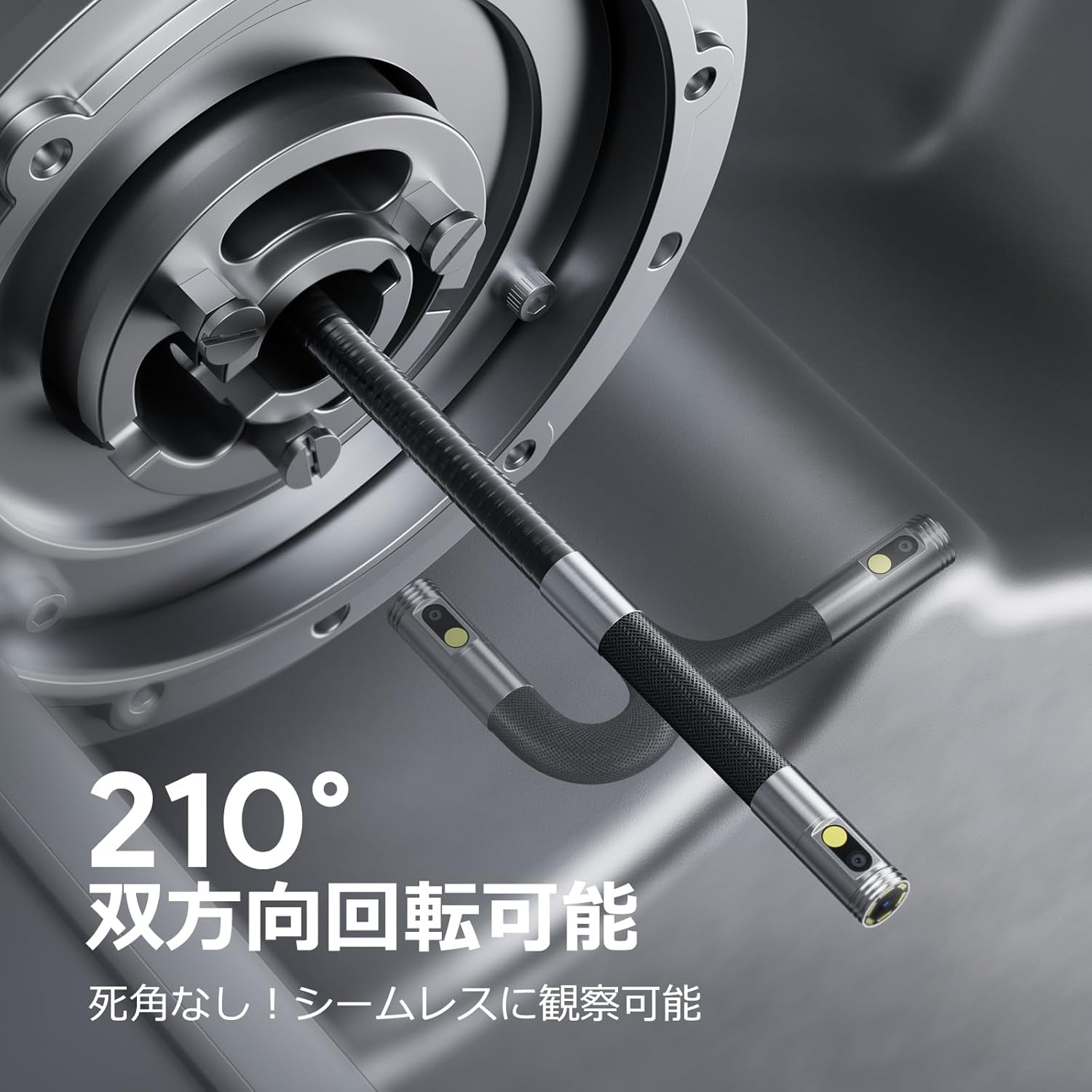
Image: Endoscope probe demonstrating 210° bidirectional articulation.
- колдонуу Линзаны которуу баскычы to cycle between the front camera, side camera, or a split-screen dual-view режими.
- айлантыңыз Articulating Angle Dial to precisely adjust the direction of the probe tip. This allows you to navigate around obstacles and view areas from multiple angles without repositioning the entire cable.
5.3 Сүрөттөрдү жана видеолорду тартуу
The device supports capturing both still images and video recordings directly to the inserted 32GB memory card.

Image: Monitor display showing photo and video capture features.
- Сүрөткө тартуу үчүн: баскычын кыска басыңыз Сүрөт/Видео баскычы.
- Видео жаздыруу үчүн: көпкө басыңыз Сүрөт/Видео баскычы жаздырууну баштоо үчүн. Жаздырууну токтотуу үчүн кайра көпкө басыңыз.
- Басып алынган files are saved to the 32GB memory card. You can store approximately 10,000 images or 50 videos.
5.4 LED жарыктыгын жөндөө
The probe is equipped with high-brightness LED lights to illuminate dark inspection areas. Short press the Power Button/LED Adjustment button to cycle through 3 levels of LED brightness.

Image: IP67 waterproof probe with adjustable LED illumination.
5.5 Маалыматтарды өткөрүү
You can transfer captured images and videos to a computer via the Type-C cable or by directly accessing the memory card.

Image: High-speed data transfer from endoscope to PC.
6. Техникалык тейлөө
- Пробду тазалоо: After use, especially in dirty or wet environments, gently wipe the probe with a soft, damp cloth. Ensure no debris remains on the camera lenses.
- Мониторду тазалоо: Use a soft, dry cloth to clean the IPS monitor. Avoid abrasive cleaners or solvents.
- Сактагыч: Store the endoscope in its provided storage case in a cool, dry place, away from direct sunlight and extreme temperatures. This prevents damage from improper storage and moisture.
- Батареяга кам көрүү: Батареянын иштөө мөөнөтүн узартуу үчүн, аппаратты бат-баттан толук кубаттап турбаңыз. Узак мөөнөткө колдонулбаса да, аны үзгүлтүксүз заряддаңыз.
7. Кыйынчылыктарды
| Көйгөй | Мүмкүн себеп | Чечим |
|---|---|---|
| Түзмөк күйбөйт. | Батареянын аздыгы; аппараттын бузулушу. | Аппаратты толук заряддаңыз. Эгер көйгөй чечилбесе, колдоо бөлүмүнө кайрылыңыз. |
| Экранда сүрөт жок. | Кабель туура туташкан эмес; камеранын линзасы тыгылып калган. | Ensure the probe cable is securely connected. Check for obstructions on the lens. |
| Сүрөт бүдөмүк же түшүнүксүз. | Lens is dirty; focus distance incorrect. | Clean the camera lens. Ensure the object is within the optimal focal range (3-10cm). |
| Сүрөттөрдү/видеолорду жаздыруу мүмкүн эмес. | Эстутум картасы толгон же туура эмес салынган. | Check if the 32GB memory card is inserted correctly. Delete old fileже карта толуп калса, аны алмаштырыңыз. |
| Device shuts down automatically. | Ашыкча ысып кетүүдөн коргоо иштетилди. | Allow the device to cool down. Avoid using in excessively hot environments. |
8. Техникалык шарттар
| Өзгөчөлүк | Деталь |
|---|---|
| Бренд | DEPSTECH |
| Модель номери | DS650DJ |
| Дисплей | 4.5 дюймдук IPS LCD монитору |
| Камеранын чечилиши | 1080P |
| Зонддун диаметри | 8.5мм |
| Артикуляция бурчу | 210° Bidirectional |
| Кабель түрү | 1.5M Semi-rigid |
| Суу өткөрбөйт рейтинги | IP67 (Зонд гана) |
| Жарыктандыруу | Жөнгө салынуучу LED жарыктары |
| Сактагыч | 32 ГБ Micro SD карта (кошулган) |
| Батарея камтылган | Ооба |
| Пакеттин өлчөмдөрү | 43.1 x 21.4 x 7.4 см |
| Пакет Салмагы | 1.33 кг |
9. Кепилдик жана колдоо
9.1 Өндүрүүчүнүн кепилдиги
This DEPSTECH product comes with a 24 айлык өндүрүүчүнүн кепилдиги. Your order number serves as your proof of purchase for warranty claims. Please retain it.
9.2 Кардарларды колдоо
For any questions, technical assistance, or warranty inquiries, please contact our professional support team:
Электрондук почта: support.jp@depstech.com
We aim to respond to all inquiries within 24 hours (excluding weekends and public holidays, where responses will be provided on the next business day).

Image: DEPSTECH customer support and warranty information.


