Introduction
Thank you for choosing the Hama Freedom Buddy II True Wireless Earbuds. This manual provides essential information for the safe and efficient operation of your device. Please read it carefully before use and keep it for future reference.
The Hama Freedom Buddy II earbuds offer a true wireless audio experience with Environmental Noise Cancellation (ENC) for clear calls, intuitive touch controls, and a portable charging case providing up to 20 hours of total playback time.
Пакеттин мазмуну
- 1 pair of Hama Freedom Buddy II Bluetooth Earbuds
- 1 Заряддоо кутусу
- 3 pairs of Silicone Ear Pads (sizes S/M/L)
- 1 Ыкчам баштоо колдонмосу
- 1 Warning and Safety Instructions
Продукт бүттүview

Image: The Hama Freedom Buddy II True Wireless Earbuds, shown with their compact charging case. The earbuds are light pink, and the case is a matching light pink with the 'hama' logo embossed on the lid.
The Hama Freedom Buddy II consists of two true wireless earbuds and a portable charging case. Each earbud features a touch-sensitive surface for control and an integrated microphone for calls. The charging case protects the earbuds and recharges them on the go.
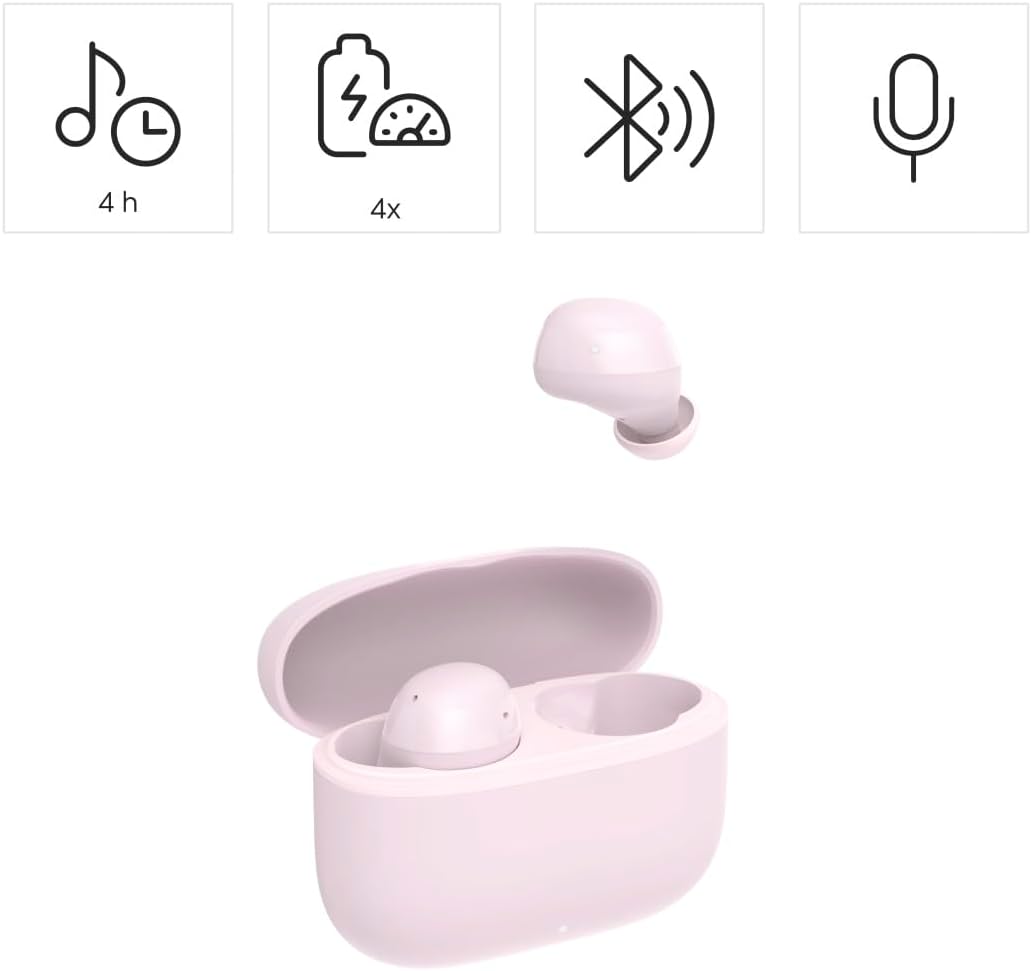
Image: The Hama Freedom Buddy II earbud displayed alongside icons representing key features: 4 hours of playback, 4 additional charges from the case (total 20 hours), Bluetooth connectivity, and a microphone for calls.

Сүрөт: жакын план view of the two Hama Freedom Buddy II earbuds, highlighting their ergonomic design and the small charging contacts at the bottom of each earbud.
Жайгашуу
1. Кулакчындарды кубаттоо жана заряддоо куту
Биринчи колдонуудан мурун, кулакчындар менен кубаттоочу кутучанын толук кубатталганын текшериңиз.
- Кулакчындарды кубаттоочу кутуга салыңыз. Алардын туура орнотулганын текшериңиз; магниттик контакттар аларды ордунда кармап турат.
- Connect a USB-C charging cable (not included) to the charging port on the case and to a suitable USB power source (e.g., USB wall adapter, computer USB port).
- The LED indicator on the charging case will show the charging status. A full charge typically takes approximately 2 hours for the case.
- The earbuds will charge automatically when placed in the powered case. Earbuds have an average battery life of 4 hours on a single charge. The charging case provides approximately 4 full charges for the earbuds, extending total playback time to 20 hours.
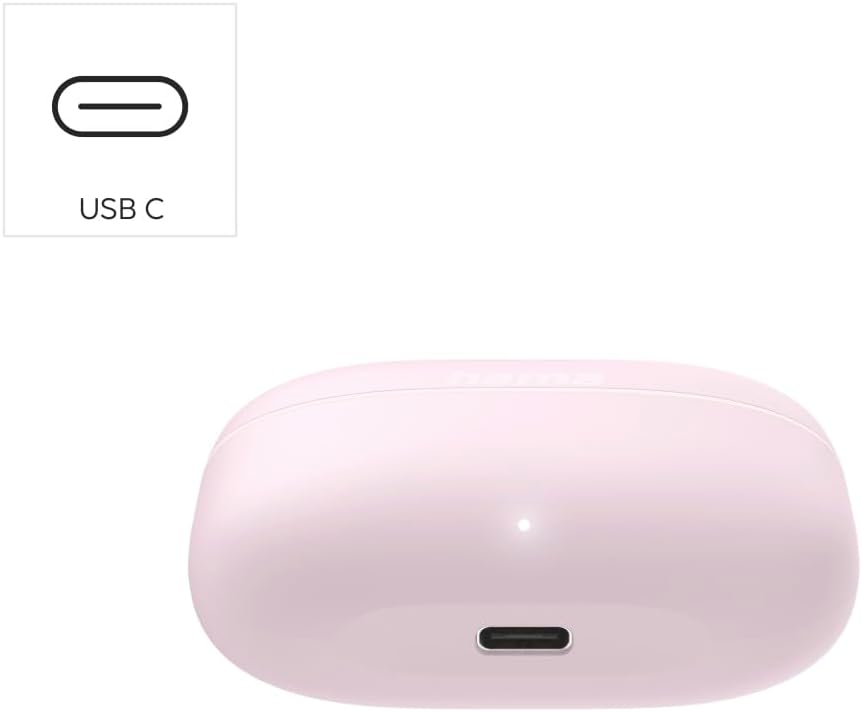
Image: A close-up of the Hama Freedom Buddy II charging case, showing the USB-C charging port located at the bottom front. An indicator light is visible above the port.
2. Bluetooth түзмөгү менен жупташуу
- Баштапкы жупташтыруу: Open the charging case. The earbuds will automatically enter pairing mode. The LED indicators on the earbuds will flash, indicating they are ready to pair.
- Bluetooth иштетилген түзмөгүңүздө (смартфон, планшет, ноутбук) Bluetooth жөндөөлөрүнө өтүңүз.
- Издөө available devices and select "Hama Freedom Buddy II" from the list.
- Туташтырылгандан кийин, кулакчындын LED жарыктары күйүп-өчүүсүн токтотот жана сиз үндүү ырастоону угасыз.
- Кайра туташуу: After initial pairing, the earbuds will automatically connect to the last paired device when removed from the charging case and the device's Bluetooth is active.
Кулакчындарды иштетүү
Кулакчын тагынуу
Choose the correct size of silicone ear pads for a comfortable and secure fit. Insert the earbuds into your ears and gently twist them until they feel snug. A proper fit is crucial for optimal sound quality and noise isolation.

Image: A woman wearing a Hama Freedom Buddy II earbud in her right ear, demonstrating how to interact with the touch-sensitive surface for control.
Сенсордук башкаруу функциялары
The Hama Freedom Buddy II earbuds feature intuitive touch controls on each earbud.
| Акция | Функция |
|---|---|
| Бир таптоо (Сол/Оң гарнитура) | Музыканы ойнотуу/тындыруу; Чалууга жооп берүү/аяктоо |
| Эки жолу таптаңыз (оң кулакчын) | Кийинки трек |
| Эки жолу таптаңыз (Сол кулакчын) | Мурунку трек |
| Үч жолу таптап (сол/оң кулакчын) | Үн Жардамчысын жандырыңыз (Siri, Google Жардамчы) |
| Узун басуу (Сол/Оң кулакчын) | Чакырууну четке кагуу |
Күйгүзүү/өчүрүү
- Күйгүзүү: Кулакчындар заряддоо кутусунан чыгарылганда автоматтык түрдө күйөт.
- Өчүрүү: The earbuds automatically power off when placed back into the charging case and the lid is closed.
- Кол менен өчүрүү: If not in the case, you can typically long-press the touch area for several seconds until an indicator light or voice prompt confirms power off.
Техникалык тейлөө
- Тазалоо: Кулакчындарды жана кубаттоочу кутуну тазалоо үчүн жумшак, кургак, түксүз чүпүрөктү колдонуңуз. Катуу химиялык заттарды же абразивдүү материалдарды колдонбоңуз.
- Кулак төшөктөрү: Remove the silicone ear pads periodically and clean them with water and mild soap. Ensure they are completely dry before reattaching.
- Сактагыч: When not in use, always store the earbuds in their charging case to protect them from dust and damage. Store in a cool, dry place.
- Суу каршылык: The earbuds are moisture resistant. Avoid submerging them in water or exposing them to heavy rain. Dry them thoroughly if they get wet.
Проблемаларды чечүү
| Көйгөй | Чечим |
|---|---|
| Кулакчындар күйбөйт. | Ensure the earbuds and charging case are fully charged. Place earbuds in the case and close the lid, then reopen. |
| Earbuds do not pair with my device. |
|
| Үн жок же үнү төмөн. |
|
| Бир кулакчын иштебей жатат. |
|
Техникалык шарттар
| Өзгөчөлүк | Деталь |
|---|---|
| Модель аты | Freedom Buddy II |
| Модель номери | 00221761 |
| Байланыш | Bluetooth |
| Наушниктин батареясынын иштөө мөөнөтү | Болжол менен 4 саат |
| Жалпы ойнотуу убактысы (кеп менен) | Болжол менен 20 саат |
| Заряддоо убактысы (капка) | Болжол менен 2 саат |
| Заряддоо интерфейси | USB түрү C |
| Башкаруу ыкмасы | тийүү |
| Noise Control | Экологиялык ызы -чууну жокко чыгаруу (ENC) |
| Импеданс | 32 Ом |
| Сезимталдуулук | 96 дБ |
| Frequency Response | 20 KHz |
| Сууга туруктуулук деңгээли | Нымга туруктуу |
| Элемент Салмагы | 65.14 грамм |
Кепилдик жана колдоо
Hama products are covered by a limited warranty. For detailed warranty information, please refer to the separate "Warning and Safety Instructions" document included in your package or visit the official Hama webсайт.
Should you encounter any issues or require technical assistance, please contact Hama customer support. Contact details can typically be found on the Hama webсайтында же камтылган документтерде.


