DrayTek VigorAP 905 жогорку өндүрүмдүү WiFi 6 мүмкүндүк алуу чекити колдонуучусунун колдонмосу
Model: VAP905-K
1. Продукт бүтүп калдыview
The DrayTek VigorAP 905 is a high-performance WiFi 6 Mesh Wireless Access Point designed for efficient network management in demanding environments. It delivers robust wireless connectivity and flexible wired options.
Негизги өзгөчөлүктөрү:
- Fast Wi-Fi 6 Access Point: Experience lightning-fast speeds with a combined speed of up to 3000Mbps, ideal for businesses requiring efficient networks for demanding applications.
- Strong WPA3 Connection Encryption: Ensures robust wireless security with the latest WPA3-Personal or 802.1x Enterprise. Supports mixed WPA3/WPA2 and different SSIDs with varying security levels.
- Easy to Configure and Manage: Effortlessly manage up to 8 compatible mesh VigorAPs and up to 20 APs using the Wireless Virtual Controller module. Features auto-provisioning and AP monitoring.
- Flexible 2.5 Gigabit Ethernet Uplink & 4 x GbE Connectivity: Connects to the network via its 2.5Gb Ethernet interface. Additional Gigabit Ethernet interfaces provide wired connectivity for devices like laptops or printers.
- High Density Performance: Capable of linking up to 256 clients with 802.11ax dual-band antennas and Wi-Fi 6 2x2 Multi-User MIMO technology, suitable for high-density environments.
- Wall/Desk Form Factor Design: A versatile design that complements both business and home interiors. LED indicators can be scheduled or disabled.

Сүрөт 1: Алдыңкы view of the DrayTek VigorAP 905 Access Point, showcasing its compact design and two external antennas.
2. Орнотуу
2.1 Пакеттин мазмуну
Баштоодон мурун, пакетте бардык буюмдар бар экенине ынаныңыз:
- DrayTek VigorAP 905 Access Point
2.2 Физикалык орнотуу
The VigorAP 905 can be mounted on a wall or placed on a desk.
- Жайгашкан жерди тандаңыз: Select a central location for optimal Wi-Fi coverage, away from obstructions and sources of interference.
- Кубат туташуу: Connect the power adapter to the AP's PWR port and plug it into an electrical outlet. Alternatively, if using Power over Ethernet (PoE), connect an Ethernet cable from a PoE-enabled switch or injector to the 2.5G Ethernet port (P1/PoE).
- Тармак туташуусу: Connect an Ethernet cable from your router or network switch to the 2.5G Ethernet port (P1/PoE) on the VigorAP 905.
- Optional Wired Devices: Use the additional Gigabit Ethernet ports (P2, P3, P4, P5) to connect wired devices such as computers or printers.

2-сүрөт: Каптал view of the VigorAP 905, illustrating the power input, reset button, WPS button, 2.5G Ethernet port (P1/PoE), and four Gigabit Ethernet ports (P2-P5).
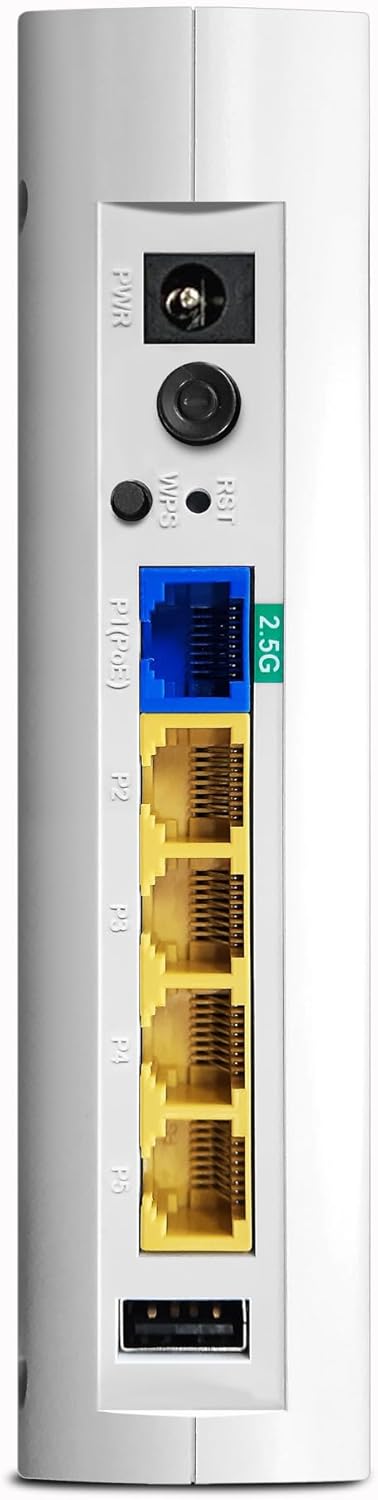
3-сүрөт: Детальдуу view of the VigorAP 905's rear panel, highlighting the power port, reset/WPS buttons, 2.5G Ethernet port, and four standard Gigabit Ethernet ports.
2.3 Баштапкы конфигурация
After physical installation, the VigorAP 905 requires initial configuration. Refer to the DrayTek official website or the included quick start guide for detailed instructions on accessing the web interface and setting up your Wi-Fi network (SSID, password, security settings).
- кирүү Web Интерфейс: Typically, you connect a computer directly to one of the AP's LAN ports or connect wirelessly to its default SSID (usually printed on the device). Then, open a web browser and enter the default IP address (e.g., 192.168.1.1).
- Кирүү Каттоо маалыматтары: Use the default username and password (also usually printed on the device or in the quick start guide) to log in.
- Устатты орнотуу: Follow the on-screen wizard to configure basic settings such as Wi-Fi name (SSID), password, and security type (WPA3 recommended).
3. Operating the VigorAP 905
3.1 LED көрсөткүчтөрү
The VigorAP 905 features LED indicators on its front panel to provide status information:
- Power LED: Аппараттын кубат абалын көрсөтөт.
- WLAN LEDs: Indicate Wi-Fi activity for 2.4GHz and 5GHz bands.
- LAN диоддору: Ethernet портторундагы активдүүлүктү көрсөтүңүз.
- Refer to the full user manual for a detailed explanation of each LED's behavior (e.g., solid, blinking, color).

4-сүрөт: Бурчтуу view of the VigorAP 905, highlighting the front panel with its array of LED indicators for various statuses.
3.2 Зымсыз байланыш
Once configured, devices can connect to the VigorAP 905 wirelessly using the configured SSIDs and passwords. The device supports Wi-Fi 6 (802.11ax) for enhanced performance and efficiency.
- Түзмөктөрдү туташтыруу: On your wireless device (smartphone, laptop, tablet), search for available Wi-Fi networks, select your configured SSID, and enter the password.
- Mesh Networking: If you have multiple compatible VigorAPs, you can set up a mesh network for seamless roaming and extended coverage. Consult the DrayTek documentation for mesh setup procedures.
3.3 Зымдуу байланыш
The VigorAP 905 provides five Ethernet ports for wired connections:
- P1 (2.5G Ethernet/PoE): Primary uplink to your network, supporting 2.5 Gigabit speeds and Power over Ethernet.
- P2-P5 (Gigabit Ethernet): Standard Gigabit Ethernet ports for connecting wired devices.
4. Техникалык тейлөө
Regular maintenance ensures optimal performance and longevity of your VigorAP 905.
- Программалык камсыздоонун жаңыртуулары: Periodically check the DrayTek website for new firmware versions. Updating firmware can provide new features, performance improvements, and security patches.
- Тазалоо: Түзмөктү таза жана чаңсыз кармаңыз. Жумшак, кургак чүпүрөктү колдонуңуз. Суюк тазалоочу каражаттарды колдонбоңуз.
- Вентиляция: Ensure the device has adequate ventilation to prevent overheating. Do not block ventilation holes.
- Камдык конфигурация: Regularly back up your device's configuration settings through the web interface. This allows for quick restoration in case of a reset or replacement.
5. Кыйынчылыктарды
This section addresses common issues you might encounter with your VigorAP 905.
5.1 No Power / LEDs Off
- кубат туташуу текшерүү: Ensure the power adapter is securely connected to the AP and the electrical outlet.
- Outlet текшерүү: Электр розеткасын башка аспап менен текшерип, анын иштеп жатканын ырастаңыз.
- PoE Check: If using PoE, ensure your PoE switch or injector is powered on and providing power.
5.2 Wi-Fi'га туташуу мүмкүн эмес
- Check SSID and Password: Verify that you are selecting the correct Wi-Fi network name (SSID) and entering the correct password. Passwords are case-sensitive.
- AP Status: Check the WLAN LEDs on the AP. If they are off, the Wi-Fi might be disabled or the AP is not functioning correctly.
- Reboot AP: Power cycle the VigorAP 905 by unplugging and re-plugging the power adapter.
- Distance/Interference: Move closer to the AP or check for sources of interference (e.g., microwaves, cordless phones).
5.3 Жай Wi-Fi ылдамдыгы
- Канал кийлигишүүсү: Use the AP's web interface to perform a site survey and select a less congested Wi-Fi channel.
- Сигнал күчү: Ensure your device has a strong Wi-Fi signal. Obstacles like walls can degrade performance.
- Түзмөктөрдүн саны: Too many devices connected to the AP can impact performance.
- Микропрограмма: Ensure the AP is running the latest firmware.
5.4 Кирүү мүмкүн эмес Web Интерфейс
- IP дареги: Confirm you are using the correct IP address for the AP. If the AP is connected to a router, it might have received a dynamic IP address.
- Тармак туташуусу: Ensure your computer is connected to the same network as the AP (either directly via Ethernet or wirelessly).
- Firewall/Антивирус: Компьютериңиздеги кирүүгө бөгөт коюп жаткан брандмауэрди же антивирустук программаны убактылуу өчүрүңүз.
- Заводдун баштапкы абалга келтирүү: As a last resort, perform a factory reset by pressing and holding the reset button for several seconds (refer to the full manual for exact duration). Note: This will erase all configurations.
6. Техникалык шарттар
| Өзгөчөлүк | Деталь |
|---|---|
| Бренд | DrayTek |
| Модель аты | VAP905 |
| Элемент моделинин номери | VAP905-K |
| Байланыш технологиясы | Wi-Fi |
| Зымсыз байланыш стандарты | 802.11ax (Wi-Fi 6) |
| Жыштык тилкесинин классы | Кош тилкелүү |
| Өзгөчөлүктөр | WPA3 Security, Easy Management, High Density Performance, Versatile Design |
| Шайкеш түзмөктөр | Laptop, Printer, Mobile Devices |
| Сунушталган Колдонуулар | Бизнес |
| Элемент Салмагы | 330 грамм |
| Пакеттин өлчөмдөрү | 15 x 6 x 4 см |
| Келип чыккан өлкө | Тайвань |
7. Кепилдик жана колдоо
7.1 Кепилдик маалыматы
DrayTek products typically come with a manufacturer's warranty. Please refer to the warranty card included with your product or visit the official DrayTek website for specific warranty terms and conditions applicable to the VigorAP 905.
7.2 Техникалык колдоо
For technical assistance, product registration, or to download the latest drivers and firmware, please visit the official DrayTek support website. You may also find helpful resources, FAQs, and community forums there.
DrayTek Official Webсайт: www.draytek.com


