1. Киришүү
This manual provides detailed instructions for the installation, operation, and maintenance of your Leadfan Android Car Stereo, specifically designed for Toyota Sienna models from 2011 to 2014 equipped with the original JBL sound system. Please read this manual thoroughly before installation and use to ensure proper function and safety.
2. Продукт бүтүп калдыview
The Leadfan Android Car Stereo is an advanced head unit featuring a 9-inch IPS touch screen, 4-core CPU, 2GB RAM, and 32GB ROM. It offers seamless integration with your vehicle's existing JBL system and provides a range of modern functionalities for enhanced driving experience.
Негизги өзгөчөлүктөрү:
- Зымсыз Apple CarPlay & Android Auto
- 9-inch IPS Touch Screen (1280*720 Resolution)
- Built-in GPS Navigation (Online/Offline Maps)
- Bluetooth 5.1 for Hands-Free Calling & Audio Streaming
- 5G WiFi Connectivity & Hotspot Support
- Бөлүнгөн экран функциясы
- iOS/Android түзмөктөрү үчүн Mirror Link
- FM/RDS радиосу
- Steering Wheel Control (SWC) Support
- Includes IP68 AHD Rear Camera
- Зымдарды сайып иштетүү
Кутуда эмне бар:
- 9-inch IPS Touchscreen Android Radio Headunit
- Radio Kit Frame for Toyota Sienna 2011-2014
- AHD Backup Camera + Reversing Camera Input Cable
- GPS антеннасы
- WiFi & Bluetooth Signal Booster Cable
- Plug and Play Power Harness
- CanBus декодери
- Тышкы микрофон
- USB кабелдери (x2)
- RCA кабели
- User Manual
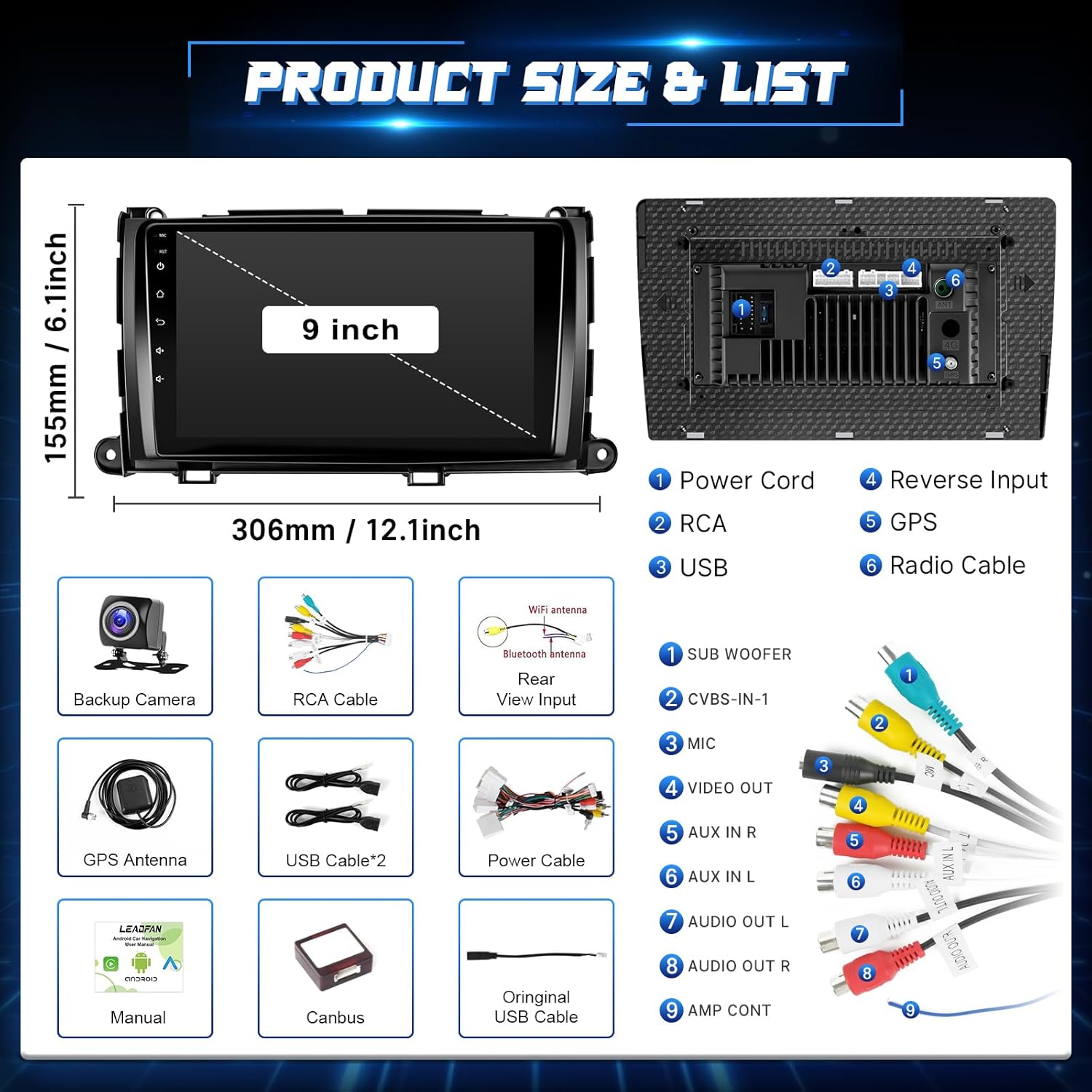
Image: Product dimensions and a detailed list of included components such as the head unit, backup camera, GPS antenna, USB cables, power cable, Canbus, and user manual.
3. Коопсуздук маалыматы
- Орнотуу же зымдарды туташтыруудан мурун ар дайым унаанын өчүрүлгөнүн жана аккумулятордун ажыратылганын текшериңиз.
- Improper installation can lead to vehicle damage or personal injury. If unsure, seek professional assistance.
- Аппаратты айдоодон алаксыта тургандай иштетпеңиз. Ар дайым жол коопсуздугун биринчи орунга коюу.
- Түзмөктү суудан жана ашыкча ысыктан алыс кармаңыз.
4. Орнотуу боюнча колдонмо
This head unit is designed for a plug-and-play installation for Toyota Sienna 2011-2014 models with the original JBL system. It includes a custom frame and wiring harness to simplify the process.
Орнотууга чейинки текшерүү:
- Verify your car model, year, and the shape of your vehicle's center console to ensure compatibility.
- Confirm your vehicle has the original JBL sound system.
Жалпы орнотуу кадамдары:
- Батареяны ажыратыңыз: For safety, disconnect the negative terminal of your car battery.
- Баштапкы баш блокту алып салуу: Заводдун радиосун бекитүүчү бурмаларды жана бурмаларды кылдаттык менен алып салыңыз.
- Зымдарды туташтыруу: Connect the provided plug-and-play wiring harness to your vehicle's existing connectors and to the new head unit. Ensure all connections are secure.
- GPS антеннасын орнотуу: GPS антеннасын ачык жерге орнотуңуз view асмандын, адатта аспаптар тактасында же алдыңкы айнектин астында.
- Install Rear Camera (Optional but Recommended): Route the camera cable from the rear of the vehicle to the head unit. Connect the camera's power to the reverse light circuit and the video signal to the 'Reverse Input' on the head unit.
- Mount New Head Unit: Secure the new head unit into the dashboard using the provided frame and screws.
- Батареяны кайра туташтыруу: Унаанын аккумуляторун кайра туташтырып, түзмөктү текшериңиз.

Image: Visual comparison showing the original Toyota Sienna dashboard radio and the new Leadfan Android Car Stereo installed, highlighting compatibility with JBL systems.

Image: Detailed wiring diagram for connecting the backup camera, including connections to the reverse trigger and power supply.
5. Баштапкы орнотуу
Upon first power-on, the system may guide you through initial setup steps such as language selection, time zone, and Wi-Fi connection. Follow the on-screen prompts.
- Wi-Fi туташуусу: Navigate to Settings > Network & Internet > Wi-Fi to connect to an available network. This is essential for online maps, app downloads, and certain CarPlay/Android Auto functionalities.
- Дата жана убакыт: Ensure the date and time are correctly set, either manually or by enabling network time synchronization.
6. Иштөө нускамалары
6.1. Зымсыз CarPlay жана Android Auto
Connect your iPhone or Android device wirelessly for a seamless in-car experience.
- Bluetooth жана Wi-Fi иштетүү: Смартфонуңузда Bluetooth жана Wi-Fi иштетилгенин текшериңиз.
- Түзмөктү жупташтыруу: On the car stereo, go to the CarPlay/Android Auto application. Follow the on-screen instructions to pair your phone via Bluetooth.
- Автоматтык туташуу: Once paired, the system will automatically connect via Wi-Fi for full CarPlay/Android Auto functionality.

Image: Displays the user interfaces for Apple CarPlay, Android Auto, and Mirror Link, illustrating their respective connection methods (USB/WiFi/Bluetooth).
6.2. Экранды чагылдыруу
Project your mobile phone's screen onto the head unit for a larger display of content.
- Access Mirror Link App: Унаа стереосундагы Mirror Link тиркемесин ачыңыз.
- Сунуштарды аткарыңыз: The app will provide instructions for connecting your iOS or Android device, typically involving Wi-Fi or a USB connection.

Image: Shows the Mirror Link feature, detailing connection options for Android (WiFi, USB) and Apple (WiFi, Bluetooth) devices, with a phone screen mirrored to the head unit.
6.3. GPS навигациясы
Түзмөк оффлайн жана онлайн навигацияны колдойт.
- Оффлайн карталары: North American offline maps are pre-installed. Access them via the Navigation app without an internet connection.
- Онлайн карталар: Connect to Wi-Fi (via hotspot or local network) to use online navigation apps like Google Maps, Waze, etc., which can be downloaded from the Application Store.

Image: Highlights GPS navigation with online and offline map options, Wi-Fi functionality, the Android 11 operating system, and the 4-core CPU architecture.
6.4. Bluetooth функциясы
Enjoy hands-free calling and wireless audio streaming.
- Жупташтыруу: Go to the Bluetooth app on the stereo, enable Bluetooth on your phone, and search for the head unit. Select it to pair.
- Hands Free Чалуулар: Once paired, you can make and receive calls directly from the stereo screen using the built-in microphone or the external microphone.
- Аудио агым: Унааңыздын динамиктери аркылуу телефонуңуздан музыка ойнотуңуз.
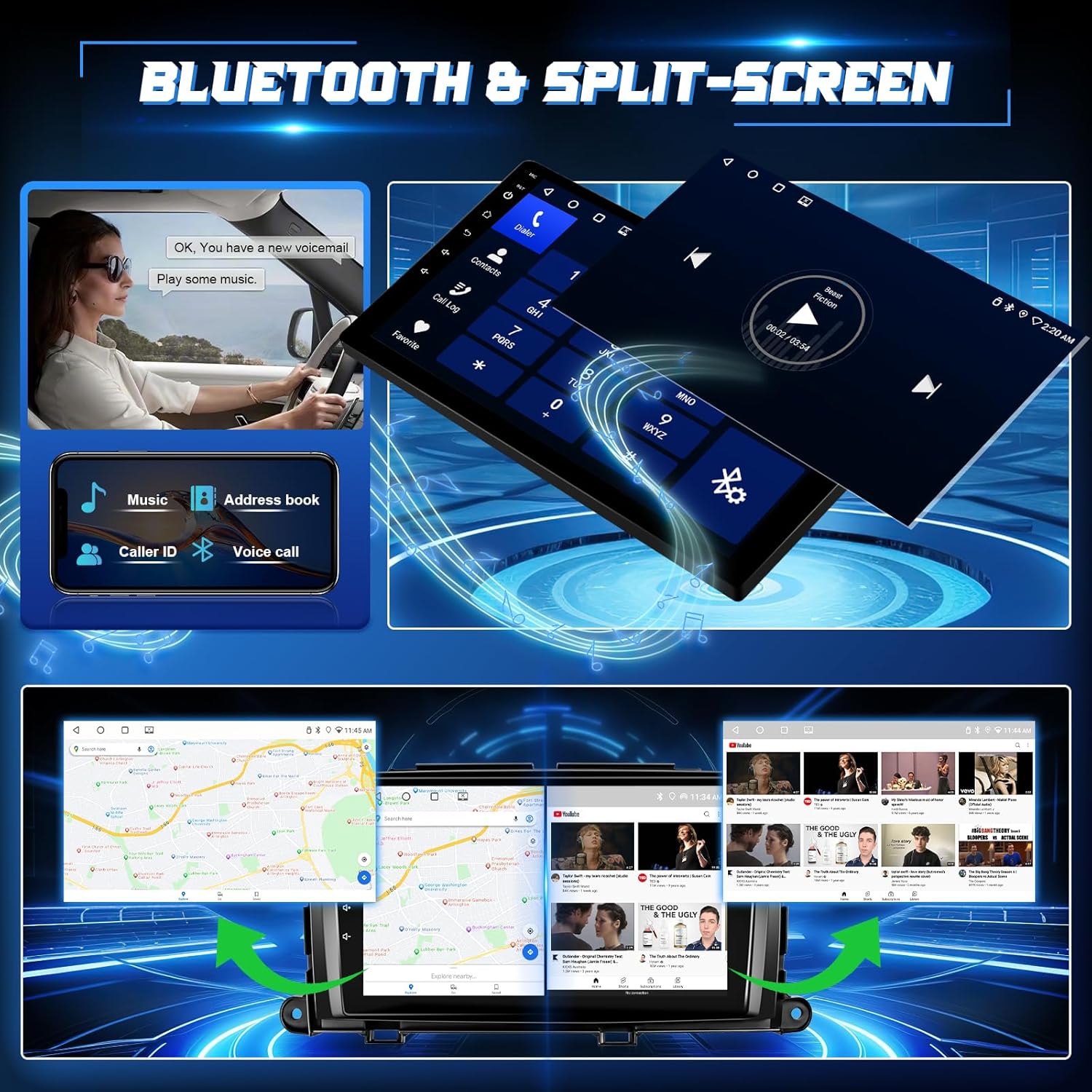
Image: Illustrates Bluetooth 5.1 features for hands-free calling and music playback, along with the split-screen capability showing two applications running simultaneously.
6.5. FM Radio & EQ Settings
Access your favorite radio stations and customize audio output.
- FM радиосу: Open the FM Radio app. You can manually search for stations or use the automatic scan function to find and save presets.
- EQ Орнотуулары: The unit features a 32-band equalizer. Access the EQ settings to adjust audio frequencies, balance, and fader to optimize sound quality.
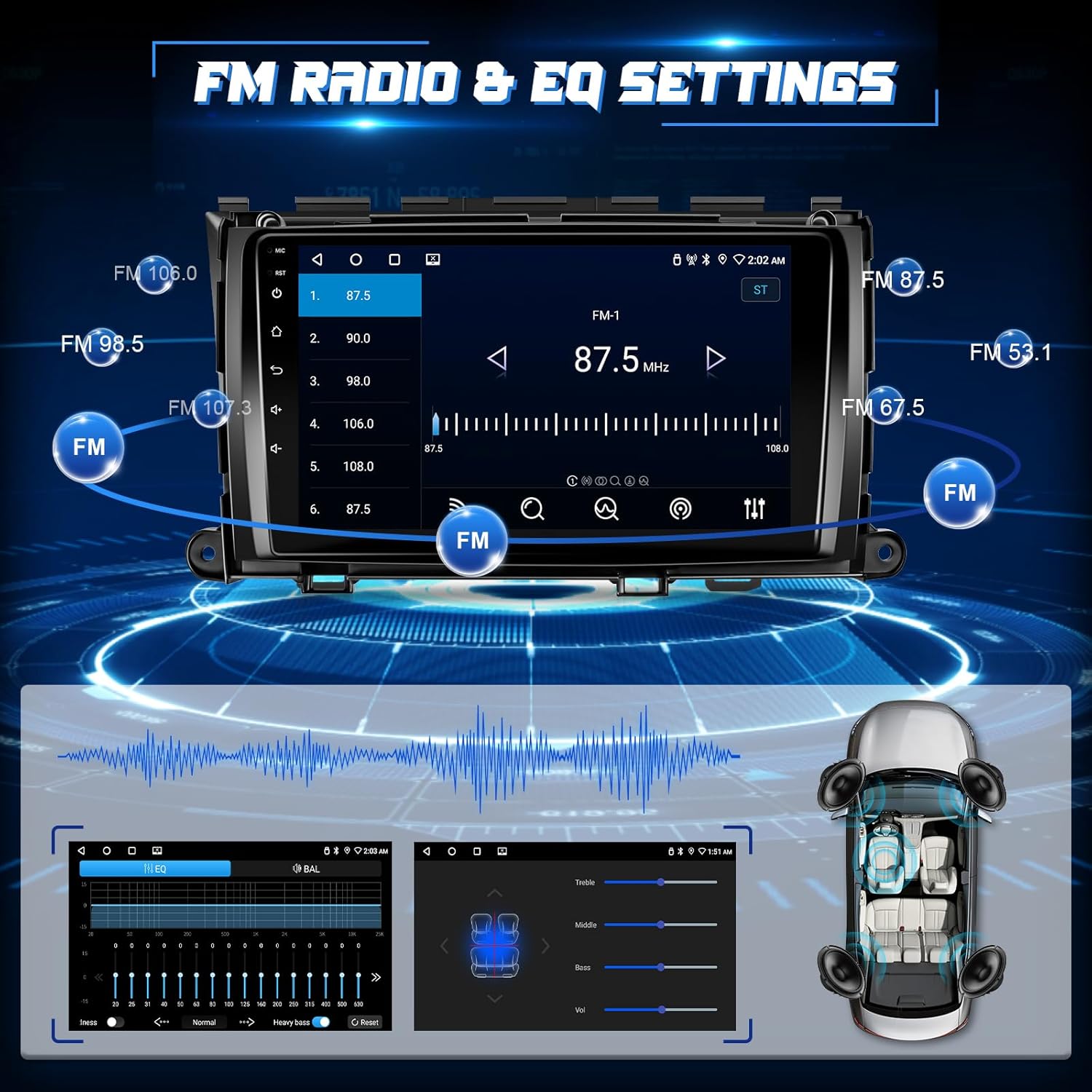
Image: Shows the FM radio interface with frequency display and preset options, alongside the audio equalizer settings for fine-tuning sound output.
6.6. Бөлүнгөн экран функциясы
Run two applications simultaneously on the 9-inch display.
- Activate Split-Screen: While an app is open, press and hold the recent apps button or drag an app to one side of the screen (method may vary slightly based on Android version).
- Select Second App: Choose another app from the recent apps list or app drawer to occupy the other half of the screen.

Image: Demonstrates the split-screen feature, displaying navigation on one side and a media player or phone interface on the other.
6.7. Reverse Image & Steering Wheel Control (SWC)
Бул интеграцияланган функциялар менен коопсуздукту жана ыңгайлуулукту жогорулатыңыз.
- Арткы камера: When the vehicle is shifted into reverse, the IP68 AHD rear camera automatically displays a 1280*720P image with a 170-degree ultra-wide angle on the touch screen.
- Руль башкаруусу: The unit supports your original car's steering wheel controls. Use the SWC harness to configure buttons for hands-free calling, music switching, and volume control. Access the SWC learning function in the settings to map your vehicle's buttons.

Image: Features the reverse camera display with parking guidelines and an interface for mapping steering wheel control buttons for various functions.
7. Техникалык тейлөө
- Тазалоо: Экранды жана аппаратты тазалоо үчүн жумшак, кургак чүпүрөктү колдонуңуз. Абразивдүү тазалагычтардан же эриткичтерден качыңыз.
- Программалык камсыздоо жаңыртуулары: Оптималдуу иштешин жана жаңы функцияларга жетүүнү камсыз кылуу үчүн системанын жөндөөлөрү аркылуу программалык камсыздоо жаңыртууларын мезгил-мезгили менен текшерип туруңуз (Wi-Fi туташуусун талап кылат).
- Маалыматтын камдык көчүрмөсү: If you store important data on the unit, consider backing it up regularly.
8. Кыйынчылыктарды
Эгер кандайдыр бир көйгөйгө туш болсоңуз, төмөнкү жалпы көйгөйлөрдү жана чечимдерди караңыз:
| Көйгөй | Мүмкүн чечим |
|---|---|
| Түзмөк күйбөйт | Check power connections and vehicle's fuse box. Ensure the car battery is properly connected. |
| Үн жок | Verify speaker wiring, volume settings, and ensure the unit is not muted. Check ampэгерде тиешелүү болсо, көтөргүч туташуулары. |
| GPS сигналы жоголду же так эмес | GPS антеннасынын туура орнотулганын жана ачык экенин текшериңиз view асмандын. Антенна байланышын текшериңиз. |
| Bluetooth/Wi-Fi connection issues | Restart both the head unit and your mobile device. Ensure Bluetooth/Wi-Fi is enabled on both. Re-pair devices if necessary. |
| Арткы камера көрүнбөйт | Check camera wiring, especially the reverse trigger connection. Ensure the camera is receiving power. |
| Руль башкаруу элементтери иштебей жатат | Ensure the SWC harness is correctly connected. Access the SWC learning function in settings to re-map buttons. |
For further technical or installation assistance, please contact Leadfan customer support. You can typically find their contact information by navigating to the seller's page on the platform where you purchased the product and clicking 'Ask a question'.

Image: Illustrates the steps to contact customer service by clicking on the seller's name and then 'Ask a question' on the product page.
9. Техникалык шарттар
| Өзгөчөлүк | Деталь |
|---|---|
| Модель номери | B0FC2L6R4B |
| Шайкеш унаалар | Toyota Sienna 2011, 2012, 2013, 2014 (with Original JBL & Large Screen) |
| Операция системасы | Android 11 (or similar Android version) |
| CPU | 4-CORE |
| RAM | 2 ГБ |
| ROM | 32 ГБ |
| Screen Size | 9 дюйм |
| Дисплей түрү | IPS сенсордук экраны |
| Резолюция | 1280*720 |
| Байланыш | Wireless CarPlay, Wireless Android Auto, Bluetooth 5.1, 5G WiFi, USB, RCA |
| Аудио чыгаруу режими | Стерео |
| Айлана үн каналы | 5.0 |
| Видеону коддоо | H.264, H.265/HEVC, MPEG-4 |
| Элемент Салмагы | 3.23 фунт |
| Пакеттин өлчөмдөрү | 14.76 x 11.06 x 4.41 дюйм |
10. Кепилдик жана колдоо
For warranty information and customer support, please refer to the documentation included with your product or contact the seller directly through the platform of purchase. The manufacturer, Leedfan, is committed to providing customer assistance for any technical or installation queries.


