1. Киришүү
This manual provides comprehensive instructions for the Teslong TTM120S Thermal Imaging Camera and the Teslong Thermal Monocular. These devices are designed for a variety of applications, including industrial maintenance, electrical inspections, building diagnostics, HVAC inspections, hunting, law enforcement, and search and rescue operations. Please read this manual thoroughly before operating the devices to ensure proper use and to maximize their performance and longevity.

Сүрөт 1.1: The Teslong TTM120S Thermal Imaging Camera (left) and the Teslong Thermal Monocular (right). These devices offer advanced thermal imaging capabilities for various professional and recreational uses.
2. Коопсуздук маалыматы
To ensure safe operation and prevent damage to the devices, please observe the following safety precautions:
- Do not expose the devices to extreme temperatures, direct sunlight for prolonged periods, or corrosive environments.
- Avoid dropping or subjecting the devices to severe impact.
- Do not attempt to disassemble or modify the devices. Repairs should only be performed by authorized service personnel.
- Keep the lenses clean and free from dust and debris. Use a soft, lint-free cloth for cleaning.
- Ensure the devices are fully charged before use, especially for critical applications.
- Батареяларды жергиликтүү эрежелерге ылайык жок кылыңыз.
3. Продукт бүтүп калдыview
3.1 Teslong TTM120S Thermal Imaging Camera
The TTM120S is a handheld thermal imaging camera featuring a 3.2-inch HD screen and a 120 x 90 IR resolution, enhanced to 240 x 180 using super-resolution technology. It provides clear and smooth images with a 25Hz frame refresh rate, making it suitable for detailed inspections.

Сүрөт 3.1: Алдыңкы жана арткы view of the Teslong TTM120S Thermal Imaging Camera. It features an ergonomic grip, a large display, and intuitive controls for easy operation.
Негизги өзгөчөлүктөрү:
- Enhanced Thermal Image: Super-resolution technology upgrades 120 x 90 IR resolution to 240 x 180.
- Жогорку кадр ылдамдыгы: 25Hz refresh rate for smooth thermal imaging.
- Температураны так өлчөө: Range of -4°F to 752°F (-20°C to 400°C) with ±2°C accuracy.
- Automatic Temperature Tracking: Displays highest, lowest, and center point temperatures.
- Temperature Exceedance Alarms: Alerts for temperatures outside a set range.
- Athermalized Fixed Focal Lens: 2.3mm, F1.1 lens for thermal stability and low-light performance.
- Түс палитралары: 8 color palettes (Iron, White Hot, Black Hot, Rainbow, Hottest, High Contrast, Green Hot, Lava) and 3 Thermal AGC modes (Smooth, Normal, High Contrast) for diverse visualization.

Сүрөт 3.2: The TTM120S displaying various thermal images using different color palettes and AGC settings. This allows users to optimize visualization for specific inspection needs.
3.2 Teslong Thermal Monocular
The Teslong Thermal Monocular is designed for clear thermal imaging in outdoor and low-light conditions, featuring a 256x192 thermal vision sensor and a 720x540 LCOS display. It is ideal for applications such as hunting, surveillance, and search and rescue.
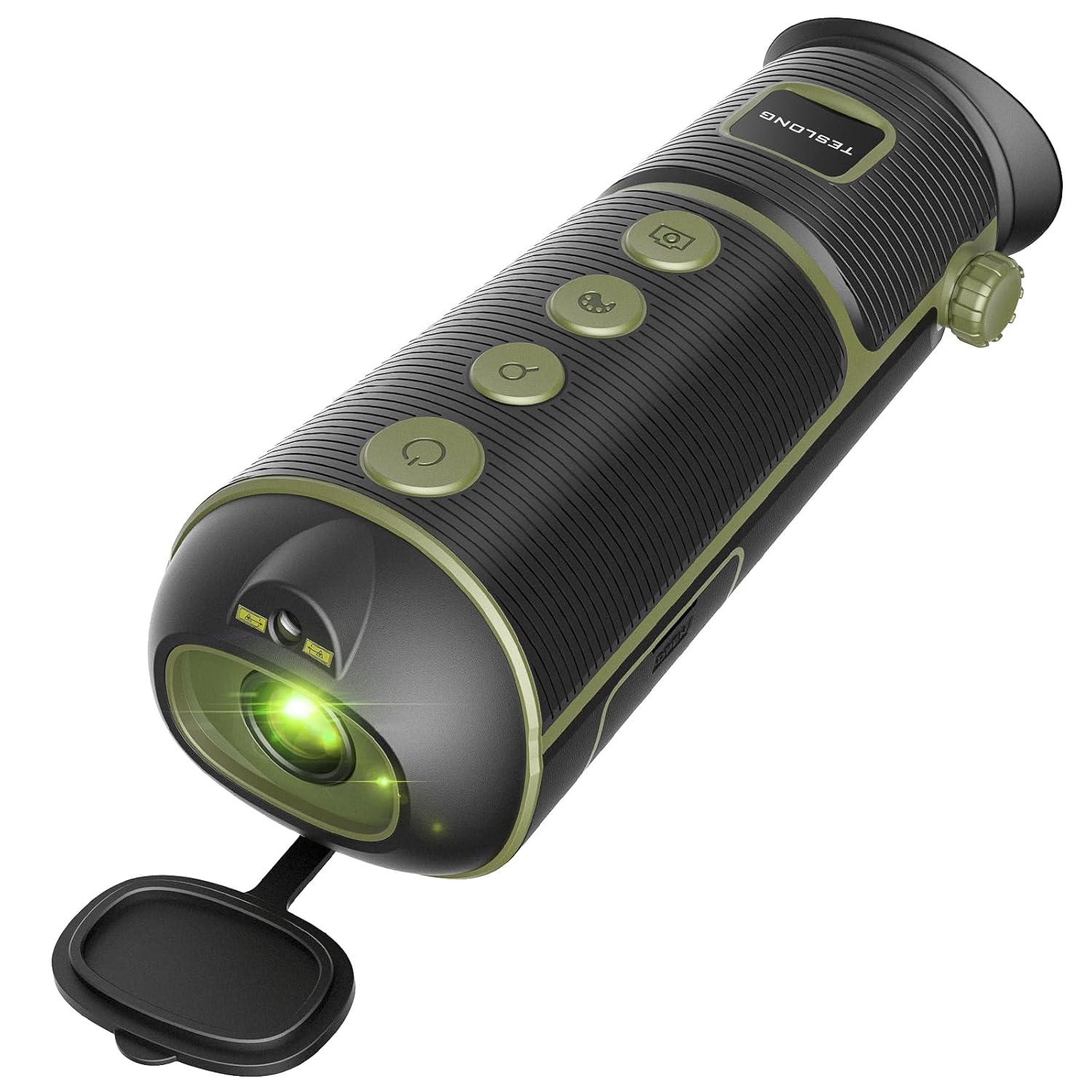
Сүрөт 3.3: The Teslong Thermal Monocular, a compact and portable device for thermal observation. It features a robust design suitable for outdoor use.
Негизги өзгөчөлүктөрү:
- Жогорку чечим сенсор: 256x192 thermal vision sensor for detailed imaging.
- Таза дисплей: 720x540 LCOS display for sharp viewing.
- Көп функциялуу: Equipped with hotspot marking to quickly identify targets.
- Диоптрияны тууралоо: Customizable diopter to match individual vision needs.
- Көрсөтүү режимдери: 5 color modes including White Hot, Black Hot, Red Hot, Green Hot, and Iron Oxide Hot for versatile scenarios.
- Digital Zoom: Up to 4x digital zoom for closer observation.
- Көчүрүү мүмкүнчүлүгү: Compact design with hand wrist lanyard and carry case, tripod mounting supported.
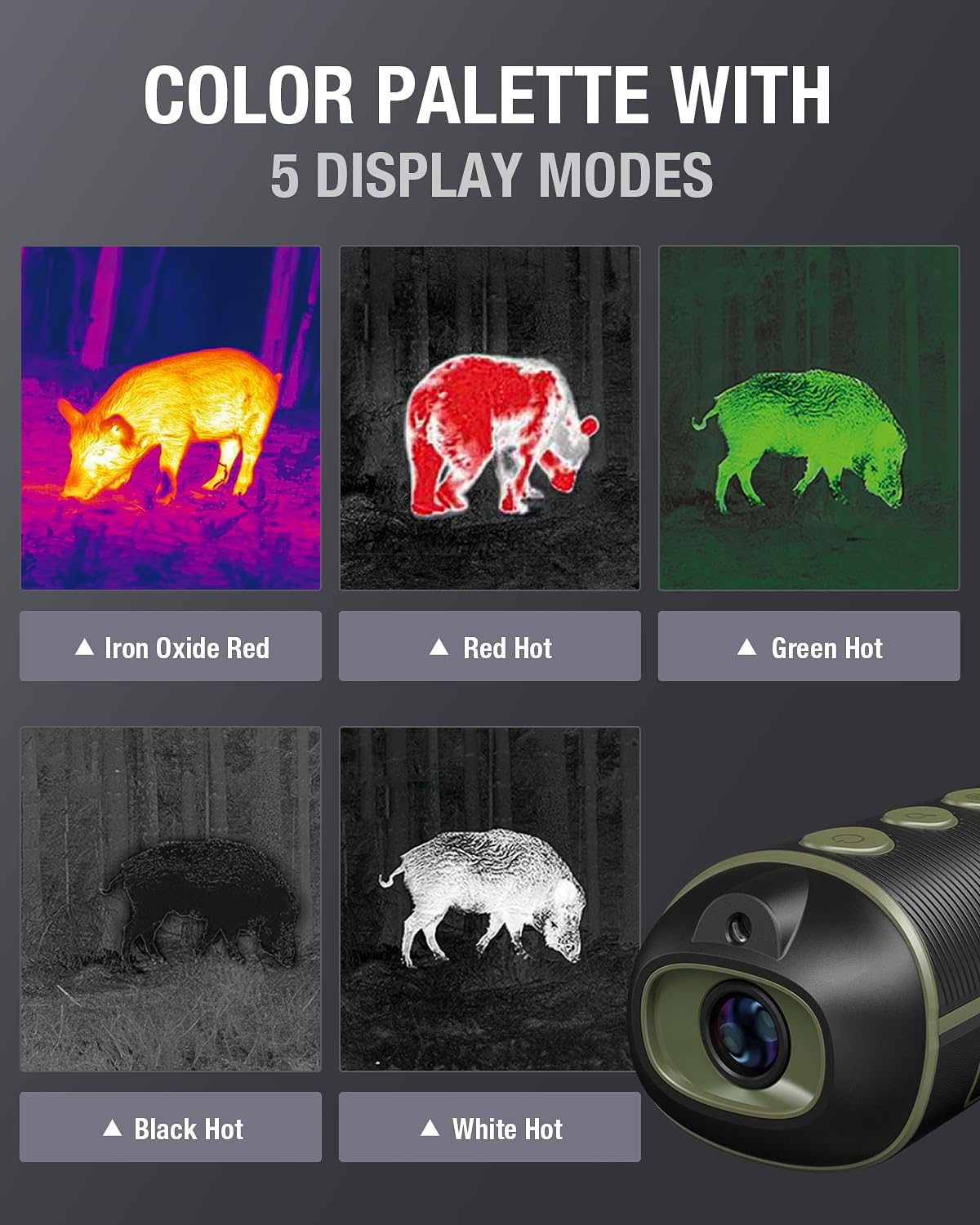
Сүрөт 3.4: The thermal monocular showcasing its five distinct display modes. These modes allow users to adapt the thermal view to different environments and target characteristics.
4. Орнотуу
4.1 Алгачкы заряддоо
Before first use, fully charge both the Teslong TTM120S Thermal Imaging Camera and the Thermal Monocular. Connect the provided USB charging cable to the device's charging port and to a standard USB power adapter (not included) or a computer USB port. The charging indicator will typically show the charging status and turn off or change color when fully charged.
4.2 Күйгүзүү/өчүрүү
- Күйгүзүү үчүн: Press and hold the power button (usually marked with a power symbol) for a few seconds until the screen or display illuminates.
- Өчүрүү үчүн: Түзмөк өчмөйүнчө кубат баскычын кайра басып, кармап туруңуз.
4.3 Basic Settings (TTM120S)
Upon first power-on, you may be prompted to set basic parameters such as language, time, and date. Navigate through the menu using the directional buttons and confirm selections with the OK button.
4.4 Diopter Adjustment (Thermal Monocular)
For the Thermal Monocular, adjust the diopter ring near the eyepiece to achieve a clear focus for your vision. This ensures the on-screen display and thermal image are sharp.
5. Иштөө нускамалары
5.1 Teslong TTM120S Thermal Imaging Camera Operation
- Температураны өлчөө: Point the camera at the target. The screen will automatically display the highest, lowest, and center point temperatures within the field of view.
- Палитра тандоосу: Use the menu or dedicated palette button to cycle through the 8 available color palettes (Iron, White Hot, Black Hot, Rainbow, Hottest, High Contrast, Green Hot, Lava) to best visualize temperature differences.
- Thermal AGC Modes: Adjust the Automatic Gain Control (AGC) settings (Smooth, Normal, High Contrast) to fine-tune the image contrast based on the thermal scene.
- Сүрөт тартуу: Press the capture button to save a thermal image to the device's internal memory.
5.2 Teslong Thermal Monocular Operation
- Viewing: Look through the eyepiece. The thermal image will be displayed on the LCOS screen.
- Дисплей режимин тандоо: Use the mode button to switch between the 5 display modes (White Hot, Black Hot, Red Hot, Green Hot, Iron Oxide Hot) to suit different observation conditions.
- Digital Zoom: Use the zoom buttons to magnify the image up to 4x.
- Hotspot Marking: Activate the hotspot marking feature to automatically highlight the hottest point in the field of view, aiding in quick target identification.

Сүрөт 5.1: A user demonstrating the 4x digital zoom capability of the Teslong Thermal Monocular. The images show the progression from 1x to 4x magnification, enhancing distant target visibility.
6. Техникалык тейлөө
- Тазалоочу линзалар: Use a soft, clean, lint-free cloth specifically designed for optical lenses. Gently wipe the lens surfaces to remove dust or smudges. Do not use abrasive materials or harsh chemicals.
- Тазалоочу орган: Түзмөктүн корпусун жумшак, d менен сүртүңүзamp кездеме. Нымдуулуктун тешиктерге же тешиктерге киришине жол бербеңиз.
- Сактагыч: Store the devices in a cool, dry place, away from direct sunlight and extreme temperatures. If storing for extended periods, ensure the battery is partially charged (around 50%) to prolong battery life.
- Батареяга кам көрүү: Батареяны тез-тез толук зарядсыздандырбаңыз. Зарылчылыкка жараша заряддаңыз.
7. Кыйынчылыктарды
If you encounter issues with your Teslong thermal devices, refer to the following common problems and solutions:
| Көйгөй | Мүмкүн себеп | Чечим |
|---|---|---|
| Түзмөк күйбөйт | Low battery; faulty power button | Charge the device fully. Ensure the power button is pressed correctly. |
| Image is blurry or out of focus (Monocular) | Diopter not adjusted; lens dirty | Adjust the diopter ring. Clean the lens. |
| Inaccurate temperature readings (TTM120S) | Incorrect emissivity setting; object too far | Adjust emissivity in settings if applicable. Ensure target is within optimal range. |
| Экран бош же катып калган | Программалык камсыздоодогу мүчүлүштүк; батареянын аздыгы | Perform a soft reset (power off/on). Charge the device. |
If the problem persists after attempting these solutions, please contact Teslong customer support for further assistance.
8. Техникалык шарттар
8.1 Teslong TTM120S Thermal Imaging Camera
- IR резолюциясы: 120 x 90 (enhanced to 240 x 180 with Super-Resolution)
- Кадр ылдамдыгы: 25Hz
- Жылуулук сезгичтиги: <60мк
- Температура диапазону: -4°F – 752°F (-20°C – 400°C)
- Өлчөөнүн тактыгы: ±2°C
- талаасы View: 50° x 38°
- Дисплей: 3.2 дюймдук HD экран
- Объектив: Athermalized Fixed Focal Lens 2.3mm, F1.1
- Түс палитралары: 8 (Iron, White Hot, Black Hot, Rainbow, Hottest, High Contrast, Green Hot, Lava)
- Thermal AGC Modes: 3 (Smooth, Normal, High Contrast)
8.2 Teslong Thermal Monocular
- Жылуулук сенсор: 256x192
- Дисплей: 720x540 LCOS
- Digital Zoom: 4x
- Көрсөтүү режимдери: 5 (White Hot, Black Hot, Red Hot, Green Hot, Iron Oxide Hot)
- Өзгөчөлүктөрү: Hotspot marking, Diopter adjustment, Tripod mounting support
9. Кепилдик жана колдоо
Teslong products are manufactured to high-quality standards. For warranty information, technical support, or service inquiries, please refer to the official Teslong webсайтка же кардарларды тейлөө бөлүмүнө кайрылыңыз. Сатып алуу квитанциясын кепилдик дооматтары үчүн сатып алуунун далили катары сактаңыз.


