Introduction
This manual provides detailed instructions for the setup, operation, and maintenance of your Hieasy 4MP 2.5K Dual-Band WiFi Window Dome Camera. Please read this manual thoroughly before using the product to ensure proper functionality and safety.

Image: Hieasy 4MP 2.5K Window Camera mounted on a window, displaying the mobile application interface with live monitoring and recording options, highlighting its dual-band WiFi capability and no monthly fees.
Кутуда эмне бар
Төмөндө тизмеленген нерселердин баары пакетиңизге камтылганын текшериңиз:
- Камера корпусу
- 6.6/Ft Charging Cable
- Instruction Manual
- Кубаттуу адаптер
- 32 ГБ микро SD карта

Image: All components included in the Hieasy 4MP 2.5K Window Camera package, including the camera body, power adapter, charging cable, instruction manual, and 32GB Micro SD card.
Жайгашуу
1. Орнотуу бетин даярдаңыз
Ensure the window surface where the camera will be mounted is clean and dry for optimal adhesion of the magnetic fixation system.
2. Attach the Mounting System
The camera features an innovative magnetic fixation system for quick installation. Peel off the protective film from the adhesive side of the mounting pad and firmly press it onto the desired spot on your window. Ensure the central opening aligns with your desired viewаймак.
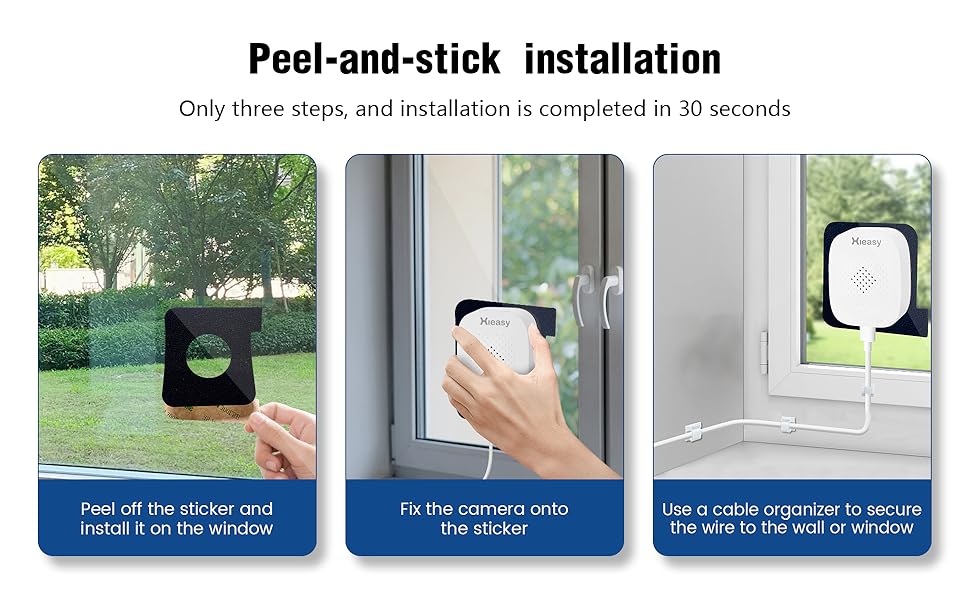
Image: Visual guide demonstrating the three simple steps for peel-and-stick installation of the Hieasy window camera onto glass.
3. Камераны орнотуңуз
Align the camera body with the magnetic mounting pad on the window. The camera will securely attach magnetically. The design allows for easy removal and reattachment without damaging the window frame.
4. Кубатка туташуу
Connect the provided 6.6/Ft Charging Cable to the camera and then to the Power Adapter. Plug the Power Adapter into a suitable electrical outlet. The camera requires continuous power to operate as it does not have a built-in battery.
5. Download and Install the HiEasy App
Scan the QR code provided in the Instruction Manual or search for
Тектеш документтер - X24
 |
AI акылдуу камеранын нускамасы - HiEasy HiEasy AI Smart Camera үчүн комплекстүү нускама колдонмосун жүктөп алуу, каттоо эсебин каттоо, камерага туташуу (WiFi жана 4G), түз view, бөлүшүү, жазуу сактоо, ойготкучту башкаруу жана түнкү көрүү режимдери. |
 |
Veneer World Farcelain Veneers: Architessa каталогу жана орнотуу боюнча колдонмо Architessa's Veneer World коллекциясын изилдеңиз, дубалдын жана полдун заманбап дизайны үчүн жогорку натыйжалуу фарфор шпондор. Функциялар өнүм тууралуу толук маалыматты, техникалык мүнөздөмөлөрдү жана турак жай жана коммерциялык колдонмолор үчүн комплекстүү орнотуу көрсөтмөлөрүн камтыйт. |
 |
Instrukcja Obsługi Monitora MSI MAG 245F X24 / MAG 245PF X24 Szczegółowy podręcznik użytkownika dla monitorów MSI MAG 245F X24 i MAG 245PF X24, zawierający informacje o instalacji, konfiguracji OSD, danych technicznych, rozwiązywaniu problemów i instrukcjach bezpieczeństwa. |
 |
Руководство пользователя ЖК-монитора MSI MAG 245F X24 / MAG 245PF X24 Подробное руководство пользователя для ЖК-мониторов MSI MAG 245F X24 и MAG 245PF X24, охватывающее установку, эксплуатацию, технические характеристики, устранение неполадок и информацию по безопасности. |
 |
MSI MAG 245F X24 / MAG 245PF X24 LCD Monitor User Guide User guide for MSI MAG 245F X24 and MAG 245PF X24 LCD monitors, covering setup, OSD settings, specifications, troubleshooting, and safety information. |
 |
Посібник користувача MSI MAG 245F X24 та MAG 245PF X24 Дізнайтеся, як налаштувати, використовувати та усунути несправності вашого монітора MSI MAG 245F X24 або MAG 245PF X24 за допомогою цього вичерпного посібника користувача. |