1. Киришүү
The ViewSonic LS950WU is a high-performance laser projector designed for large venues and professional applications. It combines powerful laser projection with flexible installation options and durable technology. With its impressive 7100 ANSI lumens brightness, native WUXGA (1920 x 1200) resolution, and advanced DLP technology, the LS950WU ensures sharp, vivid, and high-contrast images even in brightly lit environments.
This projector supports modern image formats, offers a wide range of professional installation features, and incorporates innovative control functions, making it an ideal choice for businesses, educational institutions, and creative installations.

1.1-сүрөт: ViewSonic LS950WU Laser Projector, showcasing its sleek design and front lens.
2. Маанилүү коопсуздук нускамалары
Please read all instructions carefully before operating the projector. Keep this manual for future reference.
- Кубат булагы: Only use the power cord supplied with the projector. Connect to a grounded power outlet.
- Вентиляция: Вентиляция тешиктерин жаап албаңыз. Ашыкча ысып кетүүнүн алдын алуу үчүн проектордун айланасында туура аба агымы үчүн жетиштүү мейкиндикти камсыз кылыңыз.
- Жылуулук: The projector generates heat during operation. Do not place it near heat sources or in direct sunlight.
- Нымдуулук: Do not expose the projector to rain, moisture, or excessive humidity. Do not place objects filled with liquids on or near the projector.
- Тазалоо: Тазалоодон мурун проекторду розеткадан сууруп алыңыз. Жумшак, кургак чүпүрөктү колдонуңуз. Суюк же аэрозоль тазалоочу каражаттарды колдонбоңуз.
- Лазердик коопсуздук: Do not look directly into the projector lens when the laser light source is active. Avoid direct eye exposure to the laser beam.
- Тейлөө: Бул продуктту өзүңүз тейлөөгө аракет кылбаңыз. Бардык тейлөөнү квалификациялуу тейлөө кызматкерлерине тапшырыңыз.

2.1-сүрөт: Каптал view of the projector highlighting the ventilation grilles, crucial for heat dissipation.
3. Пакеттин мазмуну
Carefully unpack the box and ensure all items listed below are present and undamaged. If any items are missing or damaged, contact your dealer immediately.
- ViewSonic LS950WU Laser Projector Unit
- Электр кабели
- Алыстан башкаруу
- Алыстан башкаруу пульту үчүн батареялар (эгер кошулган болсо)
- Quick Start Guide
- Warranty Card (region dependent)
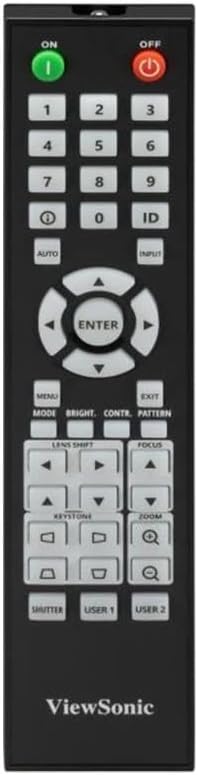
Figure 3.1: The included remote control for operating the projector.
4. Орнотуу
4.1 Проекторду жайгаштыруу
The LS950WU can be placed on a table, mounted on the ceiling, or used for rear projection. Ensure the projector is placed on a stable, level surface or securely mounted.
- Өлчөмдөрү: 43.3 см (W) x 48.6 см (D) x 18.6 см (H)
- Салмагы: 12.8 кг
- Maintain adequate clearance around the projector for ventilation (at least 30 cm from walls).
4.2 Кубатты туташтыруу
- Кубат шнурунун проектордун AC киришине туташтырыңыз.
- Электр шнурунун экинчи учун жерге туташтырылган электр розеткасына сайыңыз.
- Ensure the power switch on the projector (if present) is in the OFF position before connecting.
4.3 Видео булактарын туташтыруу
The LS950WU offers various input ports for connecting different video sources.

Figure 4.1: Rear panel of the projector displaying various input and output ports, including HDMI, VGA, and control ports.
- HDMI: Connect HDMI cables from your computer, Blu-ray player, or other HDMI-enabled devices to the HDMI input ports on the projector.
- VGA (Компьютерде): Use a VGA cable to connect your computer's VGA output to the projector's "COMPUTER IN" port.
- Аудио: Connect audio cables to the "AUDIO IN" ports if using analog audio sources.
- Башкаруу порттору: Utilize the LAN (RJ45) or RS232 ports for network control and integration into professional AV systems.
5. Проекторду иштетүү
5.1 Күйгүзүү/өчүрүү
- Күйгүзүү: басыңыз ON button on the remote control or the power button on the projector's control panel. The power indicator light will turn on.
- Өчүрүү: басыңыз ӨЧҮРҮҮ button on the remote control or the power button on the projector's control panel. Confirm shutdown if prompted.
5.2 Киргизүү булагын тандоо
To switch between connected devices, press the INPUT button on the remote control or the projector's control panel, then navigate to select the desired source (e.g., HDMI1, VGA).
5.3 Сүрөттү тууралоо
- Фокус: колдонуу ФОКУС сүрөттү тактоо үчүн пульттун баскычтары.
- Чоңойтуу: колдонуу ZOOM buttons to adjust the image size.
- Негизги ташты оңдоо: Сүрөт трапеция түрүндө болсо, колдонуңуз КЕЙСТОН buttons to correct it. The projector supports horizontal/vertical keystone and 4-corner adjustment.
- Линзаны жылдыруу: For precise image positioning without moving the projector, use the LENS SHIFT башкаруу элементтери.
- Аспект катышы: The projector supports 16:10 native aspect ratio and is compatible with 21:9, ideal for wide-screen content. Adjust this setting in the OSD menu.

Сүрөт 5.1: Алдыңкы view of the projector, showing the lens and control panel area.
6. Техникалык тейлөө
Regular maintenance helps ensure optimal performance and extends the lifespan of your projector.
6.1 Проекторду тазалоо
- Сырткы: Проекторду сүртүңүз casing with a soft, dry, lint-free cloth. Do not use abrasive cleaners, waxes, or solvents.
- Объектив: Линзаны линза тазалоочу чүпүрөк же линза кагазы менен акырын тазалаңыз. Линзага манжаларыңыз менен түздөн-түз тийүүдөн алыс болуңуз.
- Аба желдеткичтери: Periodically check and clean the air vents to prevent dust buildup, which can impede airflow and cause overheating. Use a soft brush or compressed air.
6.2 Light Source Life
The LS950WU utilizes a laser-phosphor light source (2nd generation) with an estimated lifespan of up to 30,000 hours in SuperEco mode, significantly reducing maintenance requirements compared to traditional lamp- негизделген проекторлор.
7. Кыйынчылыктарды
Эгерде сиз проекторуңуз менен көйгөйлөргө туш болсоңуз, төмөнкү кеңири таралган көйгөйлөрдү жана чечимдерди караңыз.
| Көйгөй | Мүмкүн себеп | Чечим |
|---|---|---|
| Экранда сүрөт жок |
|
|
| Сүрөт бүдөмүк |
|
|
| Сүрөт бурмаланган (трапеция) |
|
|
| Үн жок |
|
|
8. Техникалык шарттар
| Бренд | ViewSonic |
| Модель номери | LS950WU |
| Продукциянын өлчөмдөрү | 43.3 x 48.6 x 18.6 см |
| Продукт Салмагы | 12.8 кг |
| Native Resolution | WUXGA(1920x1200) |
| Жарыктык | 7100 ANSI Lumens (7300 central lumens) |
| Контраст катышы | 3,000,000:1 |
| Проекциянын өлчөмү | 300 дюймга чейин |
| Аспект катышы | 16:10 (compatible with 21:9) |
| Дисплей технологиясы | 0.67" DMD chip, DLP |
| Color Representation | 1.07 миллиард түстөр |
| Жарык булагы | Laser-Phosphor (2nd Generation) |
| Жарык булагы Life | Up to 30,000 hours (SuperEco mode) |
| Keystone Correction | Horizontal/Vertical, 4-Corner Adjustment |
| Проекциянын өзгөчөлүктөрү | 360° Rotatable, Vertical Mode (90°) |
| ASIN | B0FCFPNP5J |
9. Кепилдик жана колдоо
For detailed warranty information, please refer to the warranty card included in your product package or visit the official ViewSonic webсайт.
For technical support, product registration, or service inquiries, please contact ViewSonic customer support through their official channels.
Онлайн ресурстар:


