Introduction
Welcome to the DIERYA M1 Wireless Gaming Mouse user manual. This guide provides detailed instructions for setting up, operating, and maintaining your new mouse. Please read this manual thoroughly to ensure proper use and to maximize your gaming and productivity experience.
Пакеттин мазмуну
Пакетиңизде бардык буюмдар бар экенин текшериңиз:
- M1 зымсыз чычкан
- Nylon USB-A to C Cable
- User Manual
Продукт бүттүview
The DIERYA M1 mouse features a lightweight, ergonomic design with multiple programmable buttons and versatile connectivity options.

Сүрөттүн сүрөттөлүшү: Үстүбүздөгү чыгым view of the black DIERYA M1 wireless gaming mouse, showcasing its honeycomb shell design and RGB lighting. A small USB receiver is positioned to the right of the mouse.
Чычкан компоненттери

Сүрөттүн сүрөттөлүшү: An overhead and underside view of the DIERYA M1 mouse with various components labeled. These include the Left Button, Right Button, Mouse Wheel (Middle Button), DPI Adjustment Button (6 Adjustable DPI Levels), Forward Button, Back Button, Type-C Interface, Power & Light Switch, and 2.4G Receiver Storage Compartment. The mouse features a honeycomb shell design.
- Сол баскыч: Стандарттык сол чыкылдатуу функциясы.
- Оң баскыч: Стандарттык оң баскычты чыкылдатуу функциясы.
- Mouse Wheel (Middle Button): Scroll and middle-click function.
- DPI жөндөө баскычы: Алдын ала коюлган DPI деңгээлдери аркылуу айлануу.
- Алга баскычы: Алга карай жылдырат web браузерлер же тиркемелер.
- Артка баскычы: Артка карай багыт алат web браузерлер же тиркемелер.
- Type-C интерфейси: Зымдуу туташуу жана кубаттоо үчүн.
- Power & Light Switch: Controls power and RGB lighting.
- 2.4G Receiver Storage Compartment: Located on the underside for storing the USB dongle.
Жайгашуу
The DIERYA M1 mouse offers three connectivity modes: 2.4GHz Wireless, Bluetooth 5.2, and USB-C Wired.

Сүрөттүн сүрөттөлүшү: An illustration demonstrating the three connectivity modes of the M1 mouse: Bluetooth 5.2 pairing with a smartphone, 2.4GHz Wireless with a USB dongle connected to a laptop, and USB-C Wired connection to a laptop. Polling rates for each mode are indicated.
1. 2.4 ГГц зымсыз туташуу
- Locate the 2.4G USB receiver in the storage compartment on the underside of the mouse.
- USB ресиверди компьютериңиздеги жеткиликтүү USB-A портуна сайыңыз.
- Turn on the mouse using the Power & Light Switch.
- The mouse will automatically connect to the receiver. The polling rate in this mode is 1000Hz.
2. Bluetooth 5.2 туташуу
- Turn on the mouse using the Power & Light Switch.
- Press and hold the dedicated connectivity mode button (refer to the product's specific button combination if not a dedicated button) to switch to Bluetooth mode. The LED indicator will show the active connection.
- On your device (PC, Mac, Laptop, iPad), go to Bluetooth settings and search for "DIERYA M1".
- Select the mouse to pair. The polling rate in Bluetooth mode is 125Hz.
- The mouse supports dual-device pairing in Bluetooth mode. Refer to the software for managing multiple Bluetooth connections.
3. USB-C зымдуу туташуусу
- Connect the provided USB-A to C cable to the Type-C interface on the front of the mouse.
- Кабелдин USB-A учунун компьютериңиздеги жеткиликтүү USB портуна сайыңыз.
- The mouse will function immediately as a wired mouse. This mode also charges the mouse. The polling rate in wired mode is 1000Hz.
Иштөө нускамалары
DPI тууралоо
The mouse features a dedicated DPI adjustment button to cycle through six preset DPI levels: 400, 800, 1600, 3200, 4800, and 6400. The scroll wheel LED and RGB lighting strip provide instant color-coded feedback for the current DPI setting.
Сүрөттүн сүрөттөлүшү: An image illustrating the DPI range from 200 to 24,000 and the corresponding scroll wheel LED colors for preset DPI levels (400, 800, 1600, 3200, 4800, 6400). The image also shows a software interface for advanced DPI customization.
RGB жарыктандыруу
The DIERYA M1 mouse features 16.8 million color RGB lighting with 13 vibrant effects, including Breath, Static, Flow, and Starlight. These can be customized via the dedicated driver software.
Программалануучу баскычтар
All six buttons on the DIERYA M1 mouse are fully programmable. Use the dedicated driver software to assign macros, remap functions, and customize button actions.
Батарея башкаруу
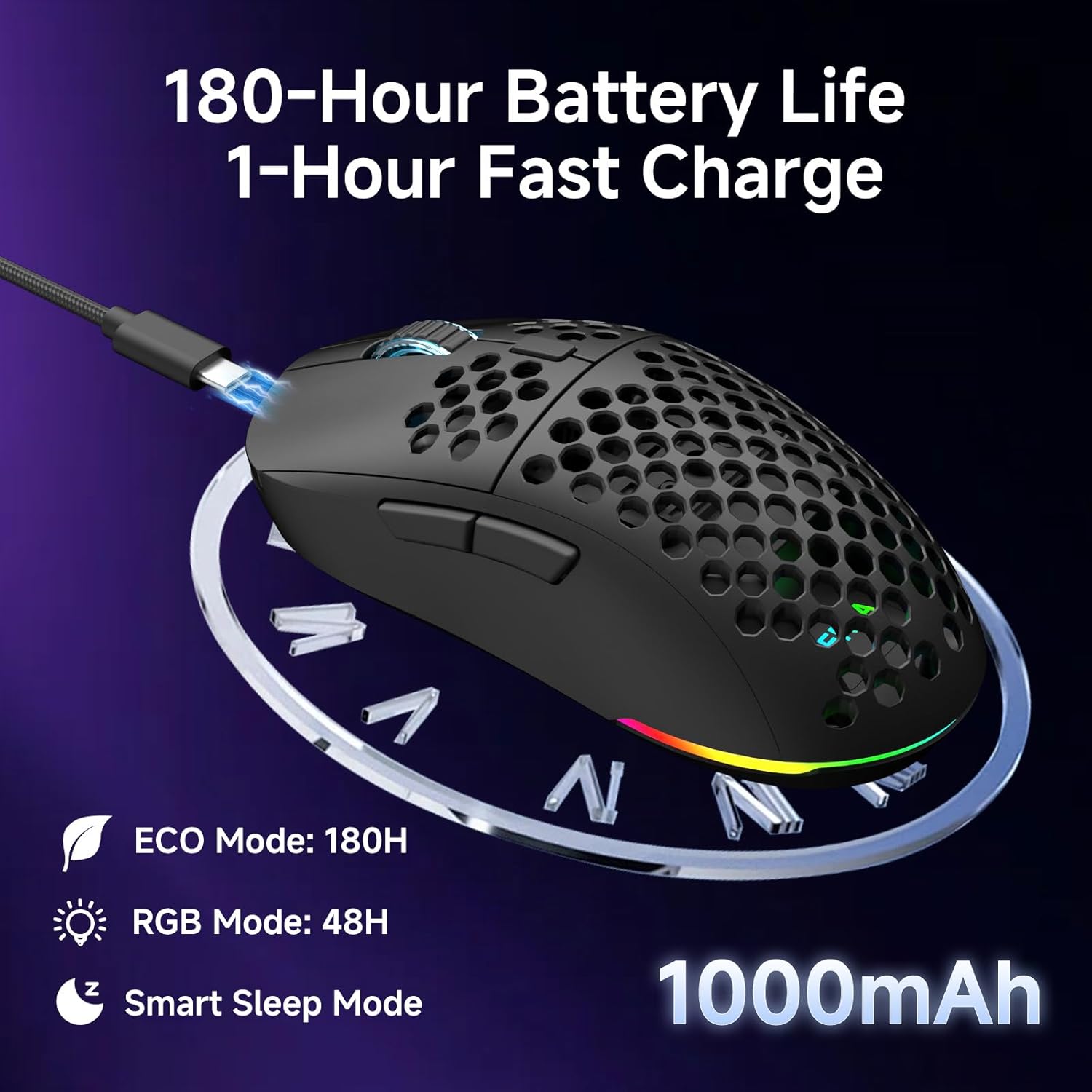
Чычкан 1000 мАч кубаттуулуктагы кайра заряддалуучу батарея менен жабдылган.
- Батареянын иштөө мөөнөтү: Up to 180 hours in ECO mode, or 48 hours with full RGB lighting.
- Заряддоо: Fast USB-C charging allows a full charge in approximately 1 hour.
- Smart Sleep Modes: The mouse enters intelligent sleep modes after 1 and 5 minutes of inactivity to conserve power. These timers can be customized via software.

Сүрөттүн сүрөттөлүшү: An image showing the DIERYA M1 mouse connected via USB-C for charging, highlighting its 1000mAh battery, 180-hour ECO mode battery life, 48-hour RGB mode battery life, and smart sleep mode feature.
Программалык камсыздоону жана драйверди орнотуу
Ыңгайлаштыруу программасы
To unlock the full potential of your DIERYA M1 mouse, including DPI customization (up to 24,000 DPI), report rate adjustment (125-1000Hz), button remapping, macro creation, RGB lighting effects, and sleep timer settings, download and install the dedicated driver software.
The software allows you to define every detail and save up to 4 device profiles.
Visit the official DIERYA website for the latest software download: www.dierya.com/support (Чыгampле шилтеме, чыныгы шилтеме ар кандай болушу мүмкүн).

Сүрөттүн сүрөттөлүшү: A screenshot of the DIERYA M1 mouse driver software interface, showing options for key assignment, DIY macros, customizable RGB lighting, DPI adjustment, report rate adjustment, and profile жүктөө.
Техникалык тейлөө
Тазалоо жана кам көрүү
- Regularly clean the mouse with a soft, dry cloth.
- өжөр кир үчүн, бир аз гampчүпүрөктү суу же жумшак тазалоо эритмеси менен жууп салыңыз. Катуу химиялык заттардан алыс болуңуз.
- Do not immerse the mouse in water or any liquids.
- Keep the PTFE feet clean to ensure smooth gliding.
Сактагыч
- When not in use, store the 2.4G USB receiver in its dedicated compartment on the underside of the mouse.
- Чычканды күн нурунан жана экстремалдык температурадан алыс салкын, кургак жерде сактаңыз.
Проблемаларды чечүү
Жалпы маселелер жана чечимдер
- Чычкан жооп бербей жатат:
- Чычкан күйгүзүлгөнүн текшериңиз.
- Батареянын деңгээлин текшерип, керек болсо заряддаңыз.
- For 2.4GHz wireless, ensure the USB receiver is securely plugged in.
- For Bluetooth, ensure the mouse is paired and selected in your device's Bluetooth settings.
- Try connecting via USB-C wired mode to confirm functionality.
- Компьютериңизди өчүрүп күйгүзүңүз.
- Артта калуу же туура эмес кыймыл:
- Ensure the mouse is within range of the receiver (for 2.4GHz) or your device (for Bluetooth).
- Башка зымсыз аппараттардын кийлигишүүсүн текшериңиз.
- Чычкандын астындагы оптикалык сенсорду тазалаңыз.
- Ensure the mouse is used on a suitable surface (not highly reflective or transparent).
- Update mouse drivers via the software.
- DPI өзгөрбөйт:
- Press the DPI adjustment button firmly.
- Ensure the mouse software is installed and running correctly if custom DPI settings are configured.
- RGB жарыктандыруу иштебейт:
- Check the Power & Light Switch position.
- Батареянын жетиштүү заряды бар экенин текшериңиз.
- Adjust lighting settings through the driver software.
Техникалык шарттар
Техникалык маалыматтар
| Өзгөчөлүк | Деталь |
|---|---|
| Модел | M1 |
| Байланыш | 2.4 ГГц зымсыз, Bluetooth 5.2, USB-C зымдуу |
| DPI диапазону | 200 - 24,000 DPI |
| Добуш берүү көрсөткүчү | 125-1000 Гц |
| Көз салуу ылдамдыгы | 300IPS |
| Ылдамдатуу | 35G |
| Батарея сыйымдуулугу | 1000mAh |
| Батареянын иштөө мөөнөтү | Up to 180 hours (ECO mode), 48 hours (RGB on) |
| Заряддоо убактысы | Болжол менен 1 саат |
| Салмагы | 90 грамм |
| Өлчөмдөр | 125 x 63 x 41 мм |
| Которгучтар | Huano Micro Switches (20 million clicks) |
| Фут | PTFE |
| RGB жарыктандыруу | 16.8 Million Colors, 13 Effects |
| Программалануучу баскычтар | 6 |
| Шайкештик | PC, Mac, Laptop, iPad, Chromebook |
Кепилдик жана колдоо
Продукт Кепилдиги
DIERYA products typically come with a limited warranty. Please refer to the warranty card included in your package or visit the official DIERYA webдеталдуу кепилдик шарттары жана шарттары үчүн сайт. Кепилдик дооматтар үчүн сатып алганыңыздын далилин сактаңыз.
Кардарларды колдоо
If you encounter any issues or have questions regarding your DIERYA M1 Wireless Gaming Mouse, please contact DIERYA customer support.
- Webсайт: www.dierya.com/support (Чыгampшилтеме, чыныгы шилтеме ар кандай болушу мүмкүн)
- Электрондук почта: Продукциянын таңгагын караңыз же website for support email address.
When contacting support, please provide your product model (M1) and a detailed description of the issue.


