1. Киришүү
This manual provides comprehensive instructions for the installation, operation, and maintenance of the Hanwha Vision ANO-L7012R 4MP IR Bullet Camera. Please read this manual thoroughly before using the product to ensure correct usage and optimal performance. Keep this manual for future reference.
The Hanwha Vision ANO-L7012R is a compact 4MP IR bullet camera designed for reliable outdoor surveillance. Featuring a 3mm fixed lens with a 98.3° horizontal field of view, this camera captures sharp video at 2560x1440 resolution and 30fps. It includes intelligent motion detection, defocus, tampering, and directional detection capabilities. With a 20-meter IR range, H.265 compression, and IP66 weatherproof protection, this camera is suitable for high-performance surveillance installations.
2. Коопсуздук маалыматы
- Кубат булагы: Use only the specified power adapter or Power over Ethernet (PoE) compliant devices. Incorrect power sources can damage the camera and void the warranty.
- Орнотуу: Installation should be performed by qualified personnel and comply with all local codes. Ensure the mounting surface can support the camera's weight.
- Суу жана ным: Although the camera is IP66-rated for outdoor use, avoid submerging it in water or exposing it to high-pressure water jets.
- Тазалоо: Суюк же аэрозоль тазалагычтарды колдонбоңуз. Тазалоо үчүн жумшак, кургак чүпүрөктү колдонуңуз.
- Иштөө температурасы: Operate the camera within the specified temperature range to prevent malfunction.
- Демонтаж: Камераны ажыратууга же өзгөртүүгө аракет кылбаңыз. Бул кепилдикти жокко чыгарат жана зыян келтириши мүмкүн.
3. Пакеттин мазмуну
Пакетте бардык компоненттер бар экенин текшериңиз:
- Hanwha Vision ANO-L7012R 4MP IR Bullet Camera
- Instruction Manual
- Mounting Screws and Anchors (may vary by region)
- Waterproof Cap for Ethernet Cable (if applicable)
4. Продукт бүтүп калдыview
The Hanwha Vision ANO-L7012R is a high-performance bullet-style network camera designed for robust surveillance applications.
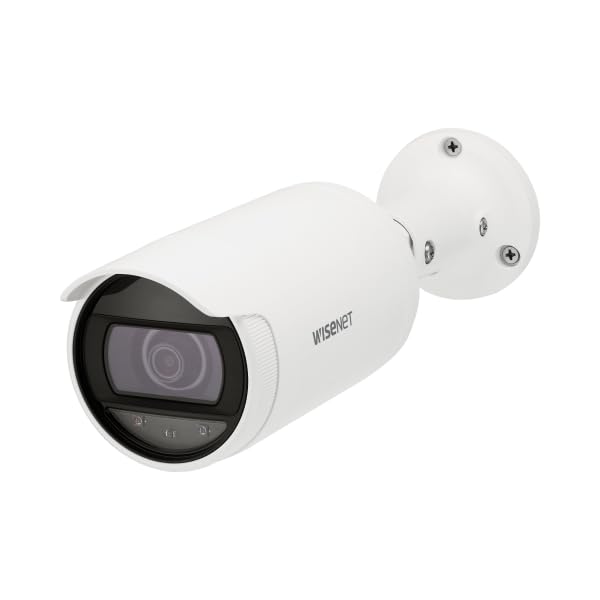
Figure 4.1: Hanwha Vision ANO-L7012R 4MP IR Bullet Camera. A white bullet-style security camera with a dark lens and a mounting base. The camera body has 'WISENET' printed on its side.
Негизги өзгөчөлүктөрү:
- 4MP чечилиши: Captures clear video at 2560x1440.
- Туруктуу линза: 3mm lens with a 98.3° Horizontal Field of View (HFoV).
- IR Түнкү Көрүнүшү: Up to 20 meters (65.6ft) in low-light conditions.
- Intelligent Analytics: Motion detection, directional detection, tampering, and defocus detection.
- Efficient Compression: Supports H.265/H.264/MJPEG with WiseStream II for optimized bandwidth and storage.
- Edge Storage: MicroSD slot (up to 128GB) with SD encryption.
- Аба ырайы: IP66-rated housing for outdoor durability.
- Ethernet аркылуу күч (PoE): Бир кабель аркылуу кубаттуулукту жана маалыматтарды берүү менен орнотууну жөнөкөйлөтөт.
5. Орнотуу жана орнотуу
5.1 Камераны орнотуу
- Жайгашкан жерди тандоо: Choose a suitable indoor or outdoor location, typically a ceiling or wall, ensuring a clear field of view and access to network cabling.
- Бетти даярдоо: Use the mounting template (if provided) to mark drill holes. Drill pilot holes for the mounting screws.
- Коопсуз база: Attach the camera's mounting base securely to the surface using the provided screws and anchors.
- Бурчту тууралоо: Loosen the adjustment screws on the camera body to position the camera for the desired viewing angle. Tighten screws once adjusted.
5.2 Зымдар жана тармактык туташуу
- Ethernet туташуусу: Connect a standard Ethernet cable from your PoE-enabled network switch or injector to the camera's RJ45 port. If not using PoE, connect a separate 12V DC power adapter (not included) to the camera's power input.
- Суу өткөрбөйт коргоо: For outdoor installations, ensure the Ethernet cable connection is protected using the provided waterproof cap or appropriate sealing methods to maintain the IP66 rating.
- Тармак конфигурациясы: Once powered, the camera will obtain an IP address via DHCP (if available). Use the Hanwha Vision Device Manager software (available on the manufacturer's website) to discover the camera, change its default IP address, and configure network settings.
- Баштапкы Кирүү: Камерага кирүү web колдонуу менен интерфейс web browser and its IP address. The default login credentials are typically provided in a separate quick start guide or on the camera itself. Change default passwords immediately for security.
6. Камераны иштетүү
6.1 Негизги операция
- Live View: Камерага кирүү web interface or a compatible Video Management System (VMS) to view түз видео агымдар.
- Жаздыруу: Жаздыруу жөндөөлөрүн төмөнкү аркылуу конфигурациялаңыз web interface. Options include continuous recording, scheduled recording, and event-triggered recording (e.g., motion detection). Recordings can be stored on a microSD card (if installed) or a Network Video Recorder (NVR).
- Түнкү көрүнүш: The camera automatically switches to IR night vision mode in low-light conditions, providing clear black and white video up to 20 meters.
6.2 Өркүндөтүлгөн функциялар
- Кыймылды аныктоо: Configure detection zones and sensitivity to trigger alarms or recordings when movement is detected.
- Багыттоону аныктоо: Set up rules to detect objects moving in specific directions across a virtual line.
- TampИштетүүлөрдү аныктоо: Receive alerts if the camera's view is obstructed or if the camera is tampменен жасалган.
- Фокусту дефокустоону аныктоо: Alerts if the image becomes out of focus, indicating a potential issue or tampring.
- WiseStream II: Enable this feature to dynamically control encoding, reducing bandwidth and storage requirements without compromising image quality.
- MicroSD картасы: Insert a microSD card (up to 128GB) for local storage. Ensure SD encryption is enabled for data security.
7. Техникалык тейлөө
- Тазалоо: Periodically clean the camera lens and housing with a soft, dry cloth to remove dust and dirt. Do not use abrasive cleaners or solvents.
- Программалык камсыздоонун жаңыртуулары: Regularly check the Hanwha Vision website for firmware updates. Keeping the firmware updated ensures optimal performance, security, and access to new features.
- Кабелдик текшерүү: Periodically inspect all cables for signs of wear or damage, especially in outdoor installations.
- Конфигурациянын камдык көчүрмөсү: Back up your camera's configuration settings regularly to easily restore them if needed.
8. Кыйынчылыктарды
| Көйгөй | Мүмкүн себеп | Чечим |
|---|---|---|
| Кубат жок/Камера күйбөй жатат | Incorrect power source; PoE not active; faulty cable. | Verify power connection and source. Ensure PoE switch/injector is active. Check Ethernet cable for damage. |
| Видео агымы жок | Network connectivity issue; incorrect IP address; firewall blocking. | Check network cable. Verify camera's IP address. Ensure no firewall is blocking ports. Restart camera and network devices. |
| Сүрөттүн сапаты начар | Dirty lens; improper focus; low light conditions; network bandwidth issues. | Clean the lens. Check camera settings for focus (if adjustable) and exposure. Ensure sufficient lighting or proper IR function. Check network bandwidth. |
| Кыймылды аныктоо иштебей жатат | Туура эмес сезгичтик жөндөөлөрү; аныктоо зоналары конфигурацияланган эмес; микропрограммалык камсыздоодо көйгөй бар. | Adjust motion detection sensitivity and configure detection zones in the web interface. Update firmware if available. |
9. Техникалык шарттар
| Өзгөчөлүк | Деталь |
|---|---|
| Модель аты | ANO-L7012R |
| Резолюция | 4 мегапикселдүү (2560x1440) |
| Сүрөт сенсору | 1/3" CMOS |
| Объектив | 3mm Fixed Linza |
| Горизонталдык талаа View (HFoV) | 98.3° |
| Түнкү көрүү диапазону | 20 meters (65.6ft) IR |
| Видеону кысуу | H.265, H.264, MJPEG (with WiseStream II) |
| Кең динамикалык диапазон (WDR) | 120дБ |
| Сактагыч | MicroSD slot (up to 128GB) with SD encryption |
| Кирүү коргоо (IP) рейтинги | IP66 (Аба ырайына чыдамдуу) |
| Power Source | PoE (Power over Ethernet) |
| Өлчөмдөрү (L x W x Y) | 3.07 x 10.31 x 10.31 дюйм |
| Салмагы | 0.86 фунт |
| Connectivity Protocol | RTSP |
| Сунушталган Колдонуулар | Ички коопсуздук, тышкы коопсуздук |
10. Кепилдик жана колдоо
For warranty information, please refer to the warranty card included with your product or visit the official Hanwha Vision webсайт.
For technical support, software downloads, and additional resources, please visit the Hanwha Vision support portal.
- Официалдуу Webсайт: www.hanwhavision.com (Чыгampшилтеме, чыныгы шилтеме ар кандай болушу мүмкүн)
- Колдоо: Продукциянын таңгагына же расмий маалыматка кайрылыңыз website for specific support contact details.


