1. Киришүү
This manual provides essential information for the proper use and maintenance of your TECLAST T65 Android 15 Tablet. Please read it thoroughly before using the device to ensure optimal performance and longevity.

2. Кутуда эмне бар
Пакетте бардык буюмдар бар экенин текшериңиз:
- Android 15 T65 tablet x 1
- Кубаттагыч x 1
- Заряддоо кабели x 1
- Колдонмо колдонмо x 1
- Ejection pin x 1
3. Продукциянын өзгөчөлүктөрү
3.1 Дисплей жана визуалдык көрүнүштөр
- 13.4 дюймдук IPS дисплей: Expansive viewing area with narrow bezels for an immersive experience.
- 1920x1200 HD Resolution: Delivers clear and detailed visuals.
- TDDI Technology: Reduces touch layers for brighter images and faster response.
- 120 Гц Жогорку жаңылануу ылдамдыгы: Ensures smooth animations and agile touch response.
- Widevine L1 колдоосу: Enables streaming of 1080P content from platforms like Netflix and YouTube.
- Көздү коргоо ыкмалары: Includes Reading Mode, Eye Protection Mode, and Dark Mode for comfortable viewing.

3.2 Аткаруу жана сактоо
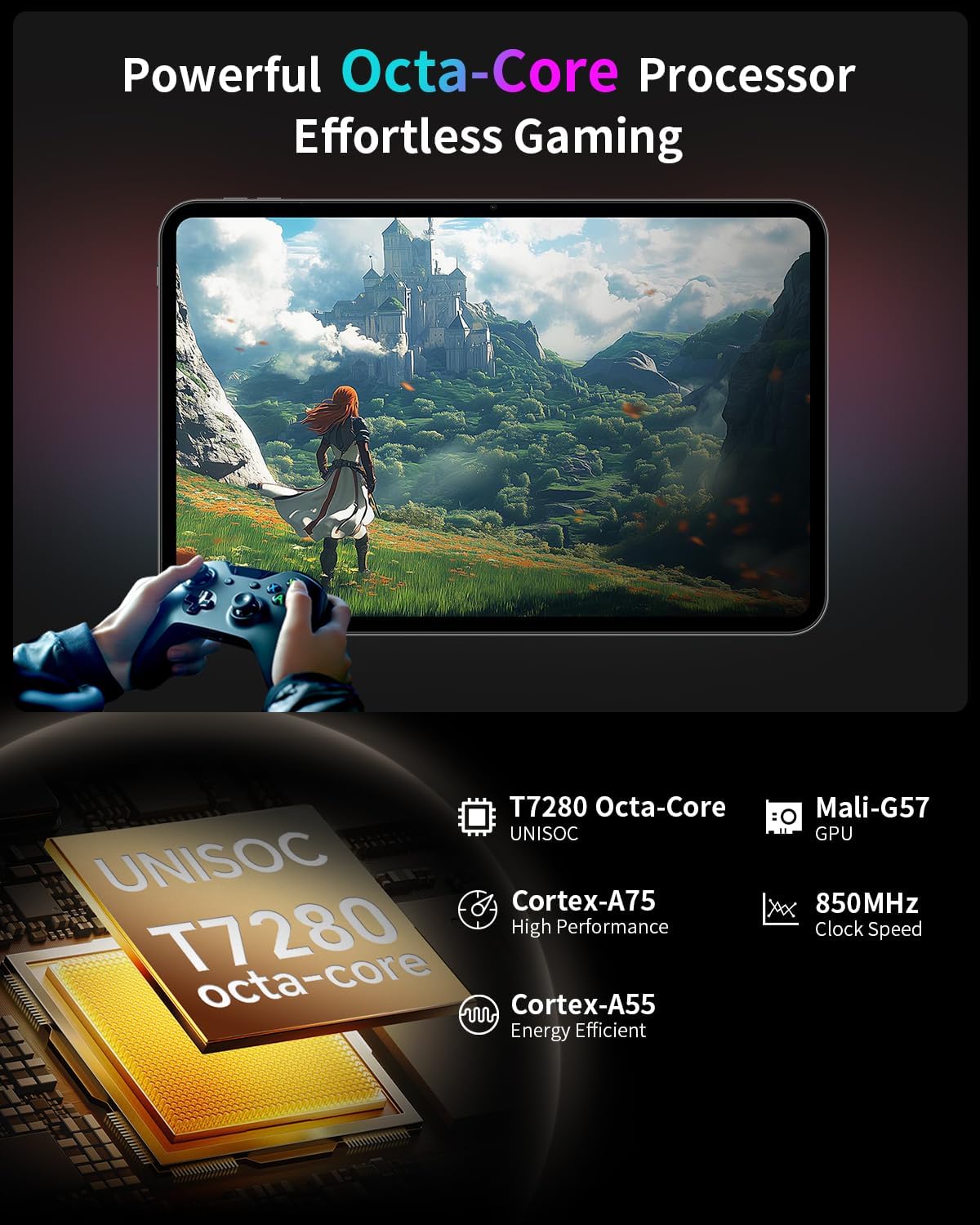
- Octa-Core Processor: Features a Unisoc T7280 CPU with A75 and A55 cores, clocking up to 2.2GHz for efficient performance.
- Mali-G57 GPU: Integrated graphics coprocessor for enhanced visual processing.
- 20GB (8GB+12GB Expansion) RAM: камсыз кылат ample memory for multitasking.
- 128 ГБ ички сактагыч: Sufficient space for applications and media.
- Кеңейтүүчү сактагыч: Supports up to 1TB via TF (microSD) card (sold separately).
3.3 Operating System and User Experience
- Android 15 (GMS Certified): Offers a smooth, fast, and secure operating experience with enhanced privacy features.
- AI Intelligent Optimization: Improves system efficiency.
- Өндүрүмдүүлүктүн өзгөчөлүктөрү: Includes split-screen function, Quick Sidebar for fast app launch, and Assistive Control for quick system navigation.
- Ата-энелик көзөмөл: Built-in Google Family Link for managing screen time, app usage, and device location for children.

3.4 Байланыш жана батарея
- 8000 мАч Батарея: Provides extended usage, up to 8 hours of video playback.
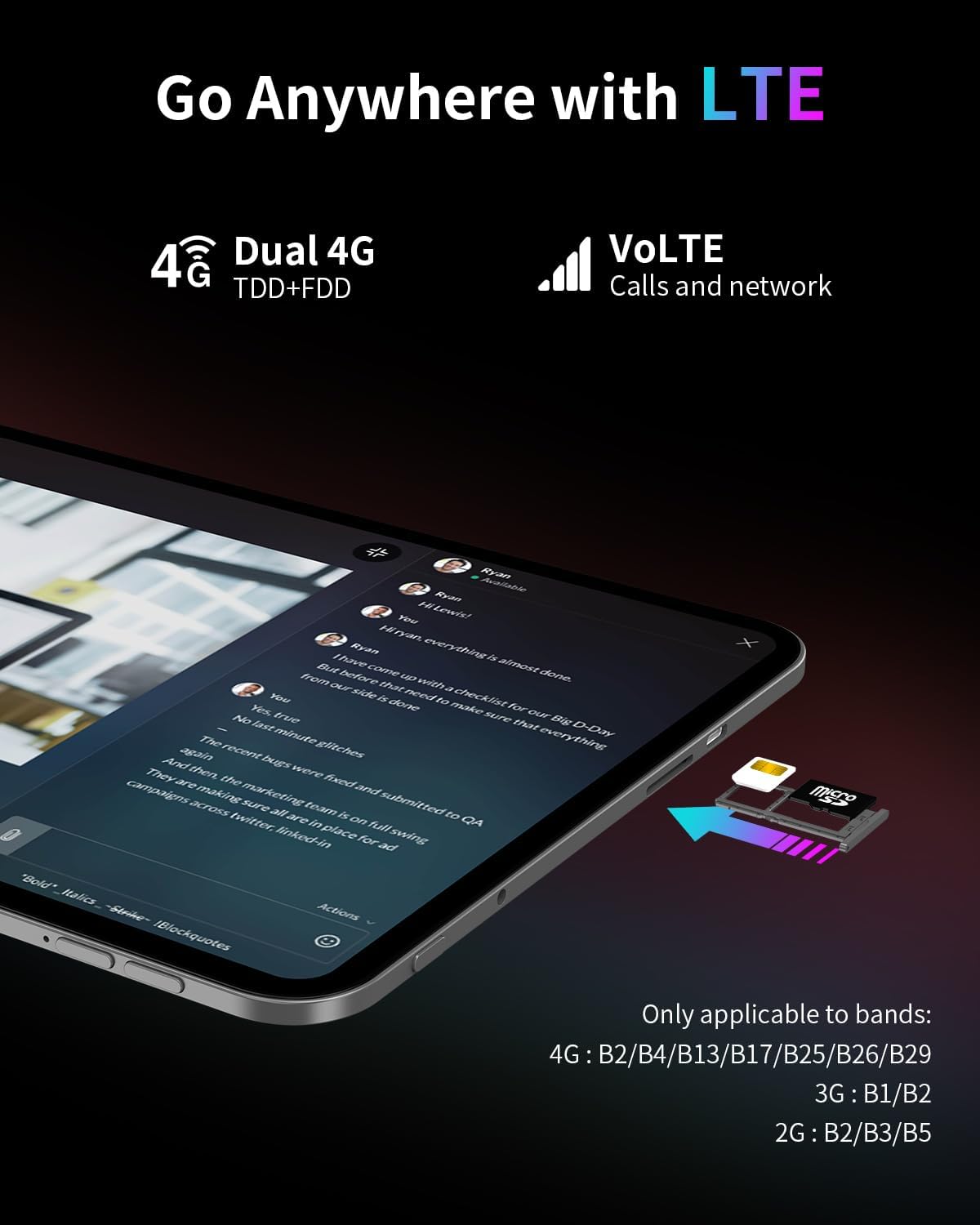
- 4G LTE байланышы: Supports mobile data for on-the-go internet access (bands: 4G: B2/B4/B13/B17/B25/B26/B29; 3G: B1/B2; 2G: B2/B3/B5).
- Dual-Band Wi-Fi (2.4GHz+5GHz): Supports 802.11a/b/g/n/ac for stable wireless internet.
- Bluetooth 5.0: Зымсыз аксессуарларды туташтыруу үчүн.
- GPS: Supports BeiDou, GPS, GLONASS, and GALILEO for accurate navigation.
- OTG функциялары: Allows connection of USB peripherals.
- USB Type-C: Заряддоо жана маалыматтарды өткөрүү үчүн.
3.5 аудио
- SWEET 4 Sound System: Enhanced audio output.
- Smart K Intelligent Ampкөтөргүч чип: Improves sound clarity.
- 3.5 мм гарнитура уячасы: Зымдуу аудио туташуулар үчүн.
4. Орнотуу
4.1 Баштапкы күйгүзүү
- Press and hold the power button located on the side of the tablet until the TECLAST logo appears.
- Тилиңизди тандоо, Wi-Fi тармагына туташуу жана Google аккаунтуңузду орнотуу үчүн экрандагы көрсөтмөлөрдү аткарыңыз.
4.2 SIM/TF картасын салуу
- Планшеттин капталындагы SIM/TF картасынын уячасын табыңыз.
- Use the provided ejection pin to gently press into the small hole next to the tray until it pops out.
- Place your Nano-SIM card(s) and/or TF card into the tray, ensuring correct orientation as indicated on the tray.
- Кылдаттык менен лотокту оюкка кайра салыңыз.
4.3 Планшетти заряддоо
- Connect the charging cable to the USB Type-C port on the tablet.
- Кабелдин экинчи учун берилген кубаттагычка, андан кийин розеткага сайыңыз.
- Экрандагы батареянын сөлөкөтү заряддоо абалын көрсөтөт.
5. Иштөө нускамалары
5.1 Негизги навигация
- Тийүү жаңсоолору: Тандоо үчүн таптаңыз, сыдыруу үчүн серпиңиз, чоңойтуу үчүн чымчыңыз.
- Башкы экран: Колдонмолорго, виджеттерге жана эскертмелерге кирүү.
- Quick Sidebar: Swipe inward from the edge of the screen to access frequently used apps and system controls.
- Assistive Control: A virtual button providing quick access to system functions.
5.2 Дисплей орнотуулары
- Жарыктыкты жөндөө: Drag the brightness slider in the quick settings panel or navigate to Settings > Display.
- Жаңыртуу ылдамдыгы: The tablet automatically adjusts to 120Hz for smoother visuals. This can be managed in Display settings.
- Көздү коргоо ыкмалары: Activate Reading Mode, Eye Protection Mode, or Dark Mode from quick settings or Display settings to reduce eye strain.
5.3 Байланыш
- Wi-Fi: Жеткиликтүү тармактарга туташуу үчүн Жөндөөлөр > Тармак жана интернет > Wi-Fi бөлүмүнө өтүңүз.
- Мобилдик маалыматтар: Ensure a SIM card is inserted and mobile data is enabled in Settings > Network & internet > Mobile network.
- Bluetooth: Орнотуулар > Туташкан түзмөктөр > Bluetooth аркылуу Bluetooth түзмөктөрү менен жупташуу.
- GPS: Жайгашкан жерди аныктоо кызматтарын Орнотуулар > Жайгашкан жер бөлүмүнөн башкарууга болот.
5.4 Ата-эненин көзөмөлү
To set up parental controls, navigate to Settings > Digital Wellbeing & parental controls. You can use Google Family Link to manage screen time, monitor app usage, and set content restrictions for children's profiles.
6. Техникалык тейлөө
6.1 Тазалоо
- Планшеттин экранын жана корпусун тазалоо үчүн жумшак, түксүз чүпүрөктү колдонуңуз.
- Катуу химиялык заттарды, абразивдүү тазалагычтарды же аэрозолдук спрейлерди колдонуудан алыс болуңуз.
- өжөр тактар үчүн, бир аз гampчүпүрөккө суу же экранды тазалоо эритмеси.
6.2 Батареяга кам көрүү
- Планшетти экстремалдык температурага тийгизүүдөн сактаңыз.
- Планшетті узак убакытка толук кубатталган же кубаты бүткөн бойдон калтырбаңыз.
- Аспап менен кошо берилген оригиналдуу заряддагычты жана кабелди гана колдонуңуз.
6.3 Программалык камсыздоо жаңыртуулары
Оптималдуу иштөөнү, коопсуздукту жана жаңы функцияларга жетүүнү камсыз кылуу үчүн программалык камсыздоонун жаңыртууларын үзгүлтүксүз текшерип жана орнотуп туруңуз. Орнотуулар > Система > Системаны жаңыртуу бөлүмүнө өтүңүз.
7. Кыйынчылыктарды
7.1 Жалпы маселелер жана чечимдер
- Tablet does not power on:
- Ensure the battery is charged. Connect the charger and wait a few minutes before attempting to power on again.
- Press and hold the power button for at least 10-15 seconds to perform a forced restart. - Экран жооп бербей жатат:
- Restart the tablet.
- Ensure the screen is clean and free of moisture or debris. - Wi-Fi туташуу көйгөйлөрү:
- Restart the tablet and your Wi-Fi router.
- Forget the network in Wi-Fi settings and reconnect.
- Ensure you are within range of the Wi-Fi signal. - Колдонмолор бузулуп же тоңуп калып жатат:
- Close and reopen the app.
- Clear the app's cache and data in Settings > Apps.
- Колдонмонун акыркы версиясына жаңыртылганын текшериңиз.
- Restart the tablet. - Батарея бат эле түгөнөт:
- Reduce screen brightness.
- Close unused apps running in the background.
- Disable Wi-Fi, Bluetooth, or GPS when not in use.
- Check for apps consuming excessive battery in Settings > Battery.
7.2 Заводдук абалга кайтаруу
Эскертүү: Заводдук жөндөөлөргө кайтаруу планшетиңиздеги бардык маалыматтарды өчүрөт. Улантуудан мурун маанилүү маалыматтардын камдык көчүрмөсүн сактап коюңуз.
Заводдук абалга кайтаруу үчүн, Орнотуулар > Система > Баштапкы абалга келтирүү параметрлери > Бардык дайындарды өчүрүү (заводдук абалга кайтаруу) бөлүмүнө өтүңүз.
8. Техникалык шарттар
| Өзгөчөлүк | Спецификация |
|---|---|
| Модель аты | T65 |
| Бренд | TECLAST |
| Операция системасы | Android 15 |
| Screen Size | 13.4 дюйм |
| Screen Resolution | 1920 x 1200 пиксел |
| Жаңыртуу ылдамдыгы | 120Hz |
| Процессор | Unisoc T7280 сегиз ядролуу (2.2 ГГц) |
| Графикалык сопроцессор | Мали-G57 |
| RAM | 20GB (8GB LPDDR4 + 12GB Expansion) |
| Flash эстутум өлчөмү | 128 ГБ |
| Кеңейтүүчү сактагыч | Up to 1TB TF Card (sold separately) |
| Зымсыз түрү | 802.11a/b/g/n/ac (Dual-Band Wi-Fi) |
| Bluetooth | Bluetooth 5.0 |
| Уюлдук байланыш | 4G LTE (B2/B4/B13/B17/B25/B26/B29), 3G (B1/B2), 2G (B2/B3/B5) |
| GPS | 4-Mode Satellite Positioning (BeiDou, GPS, GLONASS, GALILEO) |
| Батарея сыйымдуулугу | 8000mAh |
| Батареянын орточо иштөө мөөнөтү | 8 саат (видеону ойнотуу) |
| Арткы Webcam Resolution | 13 депутат |
| Элемент Салмагы | 1.59 фунт (болжол менен 720 г) |
| Продукциянын өлчөмдөрү | 12 x 7.9 x 0.33 дюйм (болжол менен 30.5 x 20.1 x 0.84 см) |
| Түс | Боз |
9. Кепилдик жана колдоо
9.1 Кепилдик маалыматы
Please refer to the warranty card included in your product packaging for detailed warranty terms and conditions. Keep your proof of purchase for warranty claims.
9.2 Кардарларды колдоо
For any questions, technical assistance, or issues with your TECLAST T65 tablet, please contact TECLAST customer support. Most inquiries are answered within 24 hours.
You can typically find contact information on the official TECLAST website or through the seller's platform where you purchased the product.


