Introduction
This user manual provides detailed instructions for the operation, setup, and maintenance of your Donner MAMP2 стерео аудио Amplifier. Please read this manual thoroughly before using the product to ensure proper functionality and safety.
The Donner MAMP2 is a versatile 600W peak 2-channel stereo audio amplifier receiver designed for a superior audio experience. It features a wide range of input options and customizable sound controls, making it suitable for various home audio, karaoke, and theater speaker setups.
Продукт бүттүview

The Donner MAMP2 amplifier, shown here with its multi-functional remote control, is a compact and powerful unit. The front panel features various controls and input ports, while the rear panel provides speaker terminals and additional input/output options. The included remote allows for convenient control of all amplifier functions from a distance.
Негизги өзгөчөлүктөрү:
- 600W Peak Power (60W x 2 RMS): Delivers robust audio output for an enhanced listening experience.
- 2-Channel Independent Control: Supports up to 2 groups of speakers (4 speakers, 4-8Ω) and one subwoofer.
- Multi-Input Modes: Includes Bluetooth 5.3, USB (up to 64G), RCA, 2 microphone inputs, AUX IN, FM radio, digital fiber, coaxial, and Phono input for turntables.
- Customizable EQ Control: Independent treble, midrange, and bass adjustments via both amplifier and remote. Settings are automatically saved.
- Dual Microphone Interface: Ideal for karaoke and public speaking with a talk-over function to lower background music.
- Upgraded FM Function: Allows quick selection of favorite FM frequencies by direct number input.
Жайгашуу
Пакеттин мазмуну:
- Доннер МAMP2 стерео аудио Ampөмүрлүү
- Көп функциялуу алыстан башкаруу пульту
- Электр кабели
- Колдонуучунун Колдонмосу (бул документ)
Кошумча баяндамачылар:
МAMP2 supports up to 4 passive speakers (4-8Ω) and one active subwoofer. Ensure correct polarity (+ to + and - to -) when connecting speaker wires to the ampкөтөргүчтүн динамик терминалдары.
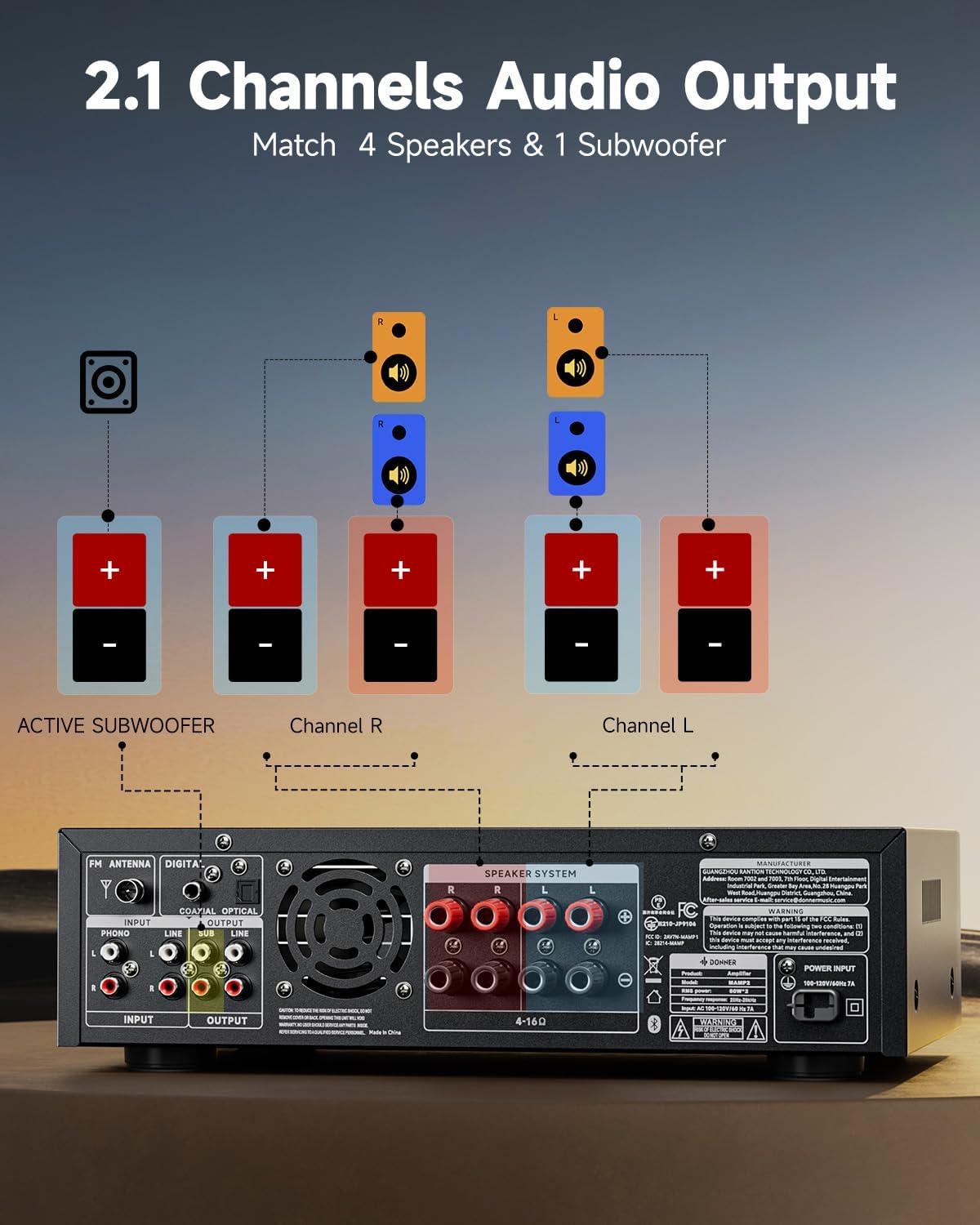
This diagram illustrates the connection of speakers and an active subwoofer to the Donner MAMP2 amplifier. Connect your main left and right speakers to the "Channel L" and "Channel R" terminals respectively. An active subwoofer can be connected to the dedicated "ACTIVE SUBWOOFER" output for enhanced bass.
Аудио булактарын туташтыруу:
МAMP2 offers a variety of input options. Choose the appropriate cable and port for your device.

The amplifier supports multiple input sources. For digital audio, use the Optical or Coaxial inputs, suitable for smart TVs. For analog devices, use the RCA or AUX IN ports. A dedicated Phono input is available for turntables. USB input supports media playback up to 64GB. Two 1/4'' microphone inputs are provided for vocal use. FM antenna connection is also available for radio reception.
- Bluetooth 5.3: For wireless connection from smartphones, tablets, or computers.
- USB: Insert a USB drive (up to 64GB) for direct audio playback.
- RCA/AUX IN: Connect traditional audio devices like CD players, DVD players, or other media players.
- Microphone Inputs (1/4''): Connect up to two microphones for karaoke or public address.
- FM радиосу: Радио кабыл алуу үчүн комплекттеги FM антеннасын туташтырыңыз.
- Digital Optical/Coaxial: Connect smart TVs or other digital audio sources for high-quality sound.
- Фоно киргизүү: Connect a turntable directly to this input.
Иштөө нускамалары
Күйгүзүү/өчүрүү:
басыңыз Күч button on the front panel or the remote control to turn the ampөмүрдү күйгүзүү же өчүрүү.
Киргизүүнү тандоо:
колдонуу РЕЖИМ button on the front panel or the remote to cycle through available input sources (Bluetooth, USB, RCA, AUX, FM, Optical, Coaxial, Phono).
Үндү көзөмөлдөө:
тууралаңыз Башкы том алдыңкы панелдеги баскычты колдонуңуз же VOL + / VOL- buttons on the remote control to set the overall sound level.
EQ жөндөө:
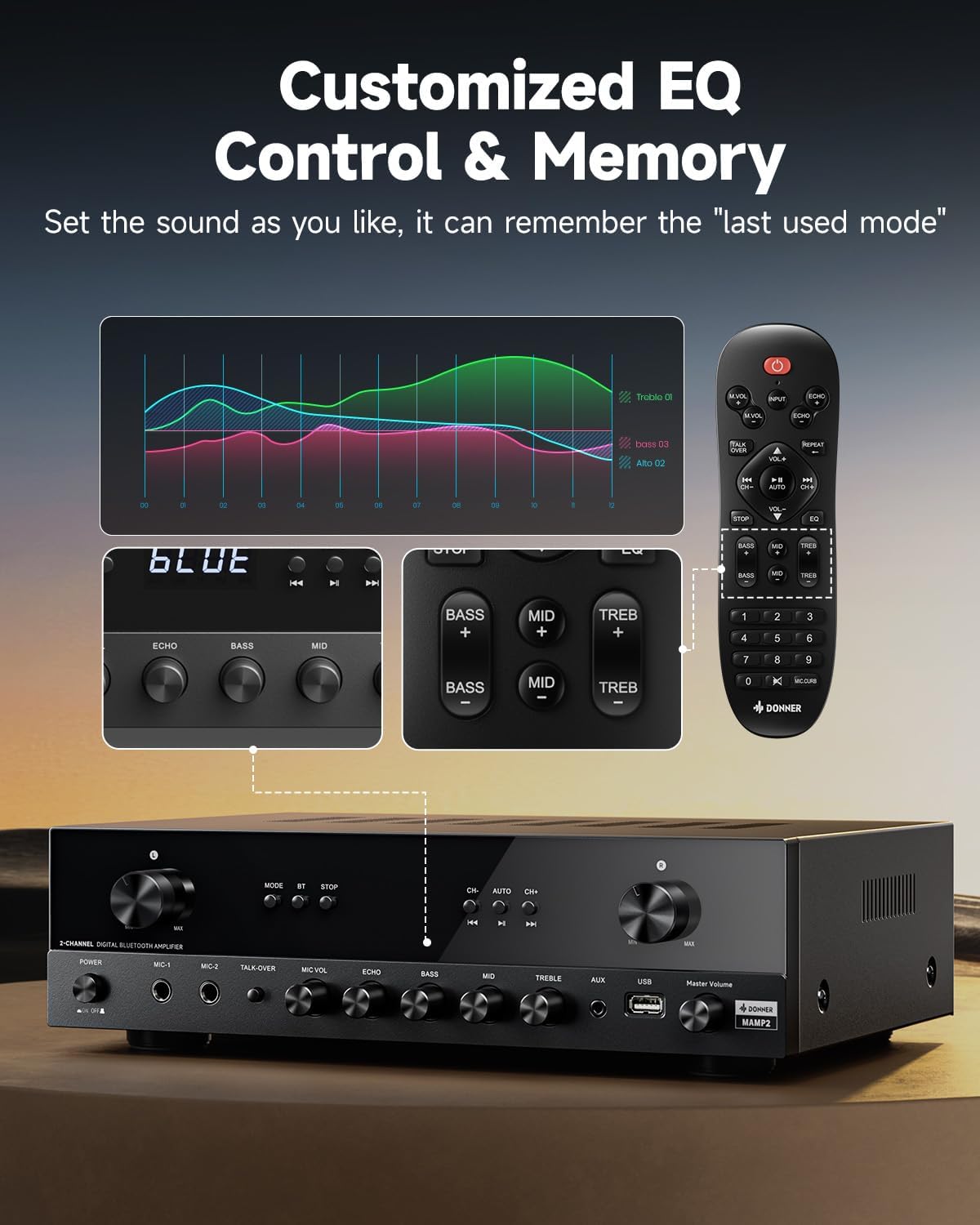
The Donner MAMP2 allows for precise sound customization. Use the dedicated knobs on the front panel or the EQ buttons on the remote control to adjust Бас, Орто аралык, жана Үч эсе levels. The amplifier automatically saves your preferred EQ settings for the next use.
Bluetooth операциясы:
- Тандоо Bluetooth mode using the MODE button. The display will show "BLUE".
- On your device (smartphone, tablet), enable Bluetooth and search for "Donner MAMP2".
- Select "Donner MAMP2" to pair. Once connected, the display will indicate a successful connection.
FM радиосу:
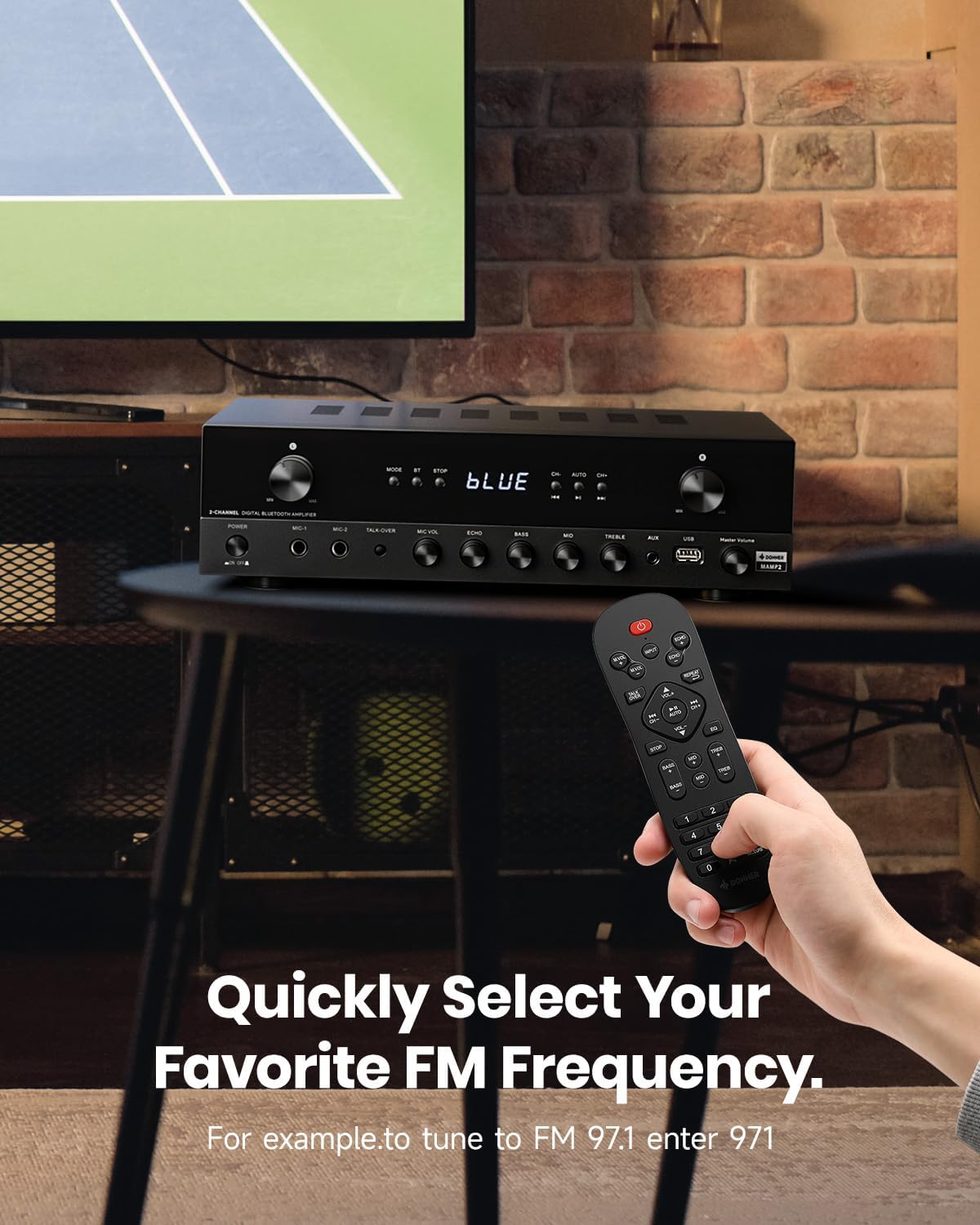
To tune into FM radio, select the FM mode. You can use the CH+ / CH- buttons to scan through stations or directly enter your desired frequency using the number pad on the remote control (e.g., for FM 97.1, enter 971).
Microphone and Karaoke Functions:
- Connect microphones to the 1/4'' MIC inputs on the front panel.
- Тууралоо MIC VOL жана ECHO levels using the respective knobs.
- жандырыңыз TALK-OVER function to automatically lower background music when speaking into the microphone.
Техникалык тейлөө
To ensure the longevity and optimal performance of your Donner MAMP2 amplifier, бул тейлөө көрсөтмөлөрүн аткарыңыз:
- Тазалоо: Сыртын сүртүү үчүн жумшак, кургак чүпүрөктү колдонуңуз ampкөтөргүч. Суюк тазалагычтарды же абразивдүү материалдарды колдонбоңуз, анткени алар финишке же ички тетиктерге зыян келтириши мүмкүн.
- Вентиляция: камсыз кылуу amplifier has adequate ventilation. Do not block the ventilation openings on the top or sides of the unit. Avoid placing it in enclosed spaces without airflow.
- Сактагыч: Узак мөөнөткө колдонулбаганда, сактаңыз ampтүз күндүн нурунан жана экстремалдык температурадан алыс салкын, кургак жерде liifier.
- Күч: Always disconnect the power cord from the wall outlet before cleaning or if the unit will be unused for a long time.
Проблемаларды чечүү
If you encounter issues with your Donner MAMP2 amplifier, төмөнкү жалпы көйгөйлөрдү жана чечимдерди карагыла:
| Көйгөй | Мүмкүн себеп | Чечим |
|---|---|---|
| Күч жок | Электр зымы туташкан эмес; розетка туура эмес | Ensure power cord is securely plugged in; Try a different power outlet. |
| Үн чыгышы жок | Incorrect input selected; Volume too low; Speaker wires loose or incorrectly connected; Muted | Select the correct input source; Increase volume; Check speaker wire connections and polarity; Ensure unit is not muted. |
| Bluetooth туташпай жатат | Amplifier not in Bluetooth mode; Device too far; Interference | Которуу amplifier to Bluetooth mode; Move device closer to ampкөтөргүч; Башка зымсыз түзмөктөрдөн келүүчү тоскоолдуктарды азайтыңыз. |
| Микрофон иштебей жатат | Microphone not plugged in correctly; MIC VOL too low; Microphone faulty | Ensure microphone is fully inserted into the MIC input; Increase MIC VOL; Test with another microphone if available. |
| Пульт иштебей жатат | Batteries drained; Obstruction between remote and amplifier; Remote sensor blocked | Replace batteries; Remove any obstructions; Ensure remote sensor on amplifier is clear. |
Бул чечимдерди колдонуп көргөндөн кийин көйгөй чечилбесе, кошумча жардам алуу үчүн Donner кардарларды тейлөө бөлүмүнө кайрылыңыз.
Техникалык шарттар
| Өзгөчөлүк | Деталь |
|---|---|
| Бренд | Доннер |
| Модель номери | MAMP2 |
| Чыгуу күчү | 600W Peak (60W x 2 RMS) |
| Каналдардын саны | 2 |
| Байланыш технологиясы | Bluetooth 5.3, USB, RCA, AUX, FM, Optical, Coaxial, Phono |
| Шайкеш түзмөктөр | Баяндамачылар |
| Микрофон кириштери | Dual 1/4'' |
| USB колдоо | 64 ГБ чейин |
| Продукциянын өлчөмдөрү | 35 x 24.8 x 9.8 см |
| Элемент Салмагы | 4.7 кг |
| Өзгөчө өзгөчөлүк | Compact Design, Customizable EQ, Talk-Over Function |
Кепилдик жана колдоо
Donner products come with a standard manufacturer's warranty. For specific warranty terms and conditions, please refer to the warranty card included with your product or visit the official Donner webсайт.
For technical support, troubleshooting assistance beyond this manual, or warranty claims, please contact Donner customer service:
- Webсайт: www.donnerdeal.com
- Электрондук почта: support@donnerdeal.com
- Телефон: Please check the Donner webаймактык байланыш номерлери үчүн сайт.
When contacting support, please have your product model number (MAMP2) and purchase information ready.


