Eonon UX6S

Eonon UX6S Car Stereo User Manual

Model: UX6S (Upgraded UA13) | Brand: Eonon

1. Киришүү

This manual provides detailed instructions for the installation, operation, and maintenance of your Eonon UX6S Android 13 Double Din Universal Car Stereo. Please read this manual thoroughly before using the product to ensure proper functionality and safety.

Eonon UX6S Car Stereo with included microphone and backup camera

Image: The Eonon UX6S car stereo unit, featuring a 7-inch screen, with an external microphone and a backup camera shown below it. This image illustrates the main components included with the product.

2. Орнотуу жана орнотуу

Унааңыздын стереосистемасынын оптималдуу иштеши үчүн туура орнотуу абдан маанилүү. Орнотууну квалификациялуу адис аткарышы сунушталат.

2.1. Кутуда эмне бар

Орнотууну баштоодон мурун бардык компоненттер бар экендигин текшериңиз:

  • Reverse camera (A0127) * 1
  • External microphone * 1
  • Электр зымы * 1
  • GPS антеннасы * 1
  • 4G antenna * 1
  • USB adapter cable * 2
  • Audio and video adapter cable * 2
  • Reverse video input cable * 1
  • 15A fuse * 1
  • SIM card holder * 1
  • Колдонмо колдонмо * 1
  • Бурама * 8
  • Small knob * 1
Contents of the Eonon UX6S package

Image: A visual representation of all items included in the Eonon UX6S package, such as cables, antennas, and accessories, laid out for identification.

2.2. Электр схемасы

Refer to the following diagram for correct wiring connections. Ensure all connections are secure to prevent malfunction.

Eonon UX6S wiring diagram

Image: A detailed wiring diagram for the Eonon UX6S car stereo, showing connections for GPS, 4G antenna, USB ports, backup camera, audio outputs, and other essential inputs and outputs.

Key to Wiring Diagram:

  1. GPS
  2. 4G Антенна
  3. USB порту
  4. USB порту
  5. USB Port for CarPlay
  6. Камдык камера киргизүү
  7. Brake Shift Control
  8. RX/TX Input
  9. Audio Output RL
  10. Audio Output RR
  11. AMP
  12. SIM карта уячасы
  13. Тышкы микрофон
  14. Audio Output FL
  15. Audio Output FR
  16. Аудио киргизүү L
  17. Аудио киргизүү R
  18. Видео киргизүү
  19. Алдыңкы камерага киргизүү
  20. Сабвуфердин чыгышы
  21. ISO порту
  22. Illumination Wire
  23. SWC Wire 2
  24. Reverse Trigger Wire
  25. SWC Wire 1
  26. WIFI Bluetooth Antenna
  27. Коаксиалдуу
  28. Оптикалык

2.3. Universal Fit and Installation Notes

The Eonon UX6S is designed for universal fit in double din openings. It is compatible with panel sizes ranging from 170×96mm to 178×100mm. The unit features a compact short-chassis design for easier setup.

Eonon UX6S applicable models and dimensions

Image: Diagrams illustrating the compatible panel dimensions (170-178mm length, 96-100mm height) for the Eonon UX6S, and a comparison showing that it is a double din unit and not suitable for single din openings.

If your car dashboard size does ЖОК fall within the range of 170-178 mm (length) and 96-100 mm (height), an additional installation kit (not included) may be required. Ensure your factory car radio's power cable has an ISO standard interface. If not, a compatible ISO wiring harness will need to be purchased separately.

Installation kit and ISO harness information

Image: Visual guidance on when an installation kit is needed for the Eonon UX6S, and an illustration of an ISO harness, emphasizing the importance of checking your vehicle's wiring compatibility.

3. Иштөө нускамалары

Familiarize yourself with the various features and functions of your Eonon UX6S car stereo.

3.1. User-Focused Panel Design

The UX6S features a practical physical volume knob for easy adjustment and power control. It also includes dedicated USB and AUX inputs for convenient connectivity.

  • Үн баскычы: Easily and intuitively adjust the volume, and turn the radio on/off.
  • USB: Charge your phone or transfer music, movies, etc.
  • AUX киргизүү: Тышкы аудио түзмөктөрдү туташтыруу.
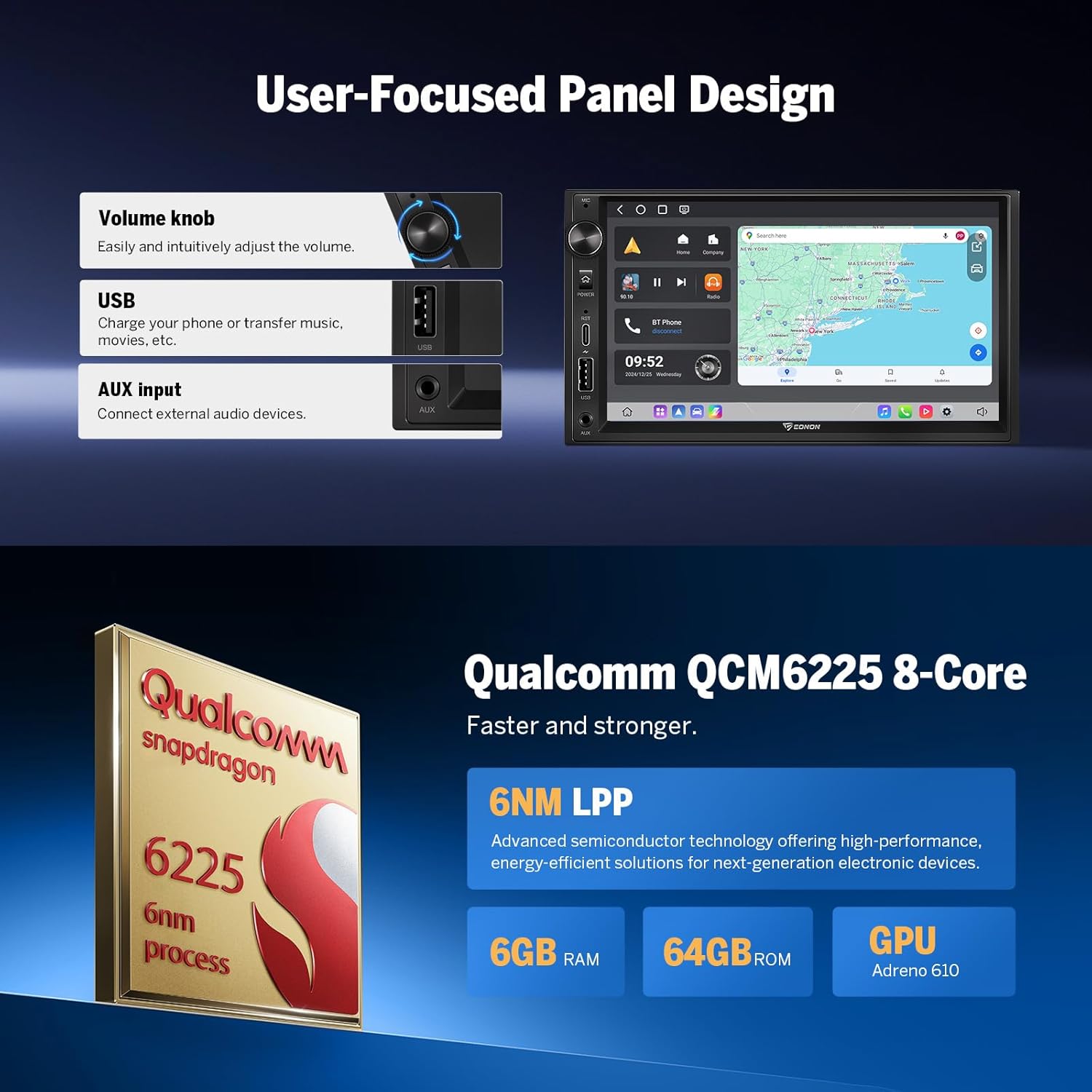
Eonon UX6S user-focused panel design

Сүрөт: жакын план view of the Eonon UX6S's front panel, highlighting the physical volume knob, USB port, and AUX input, along with a small screen showing the user interface.

3.2. Connectivity: CarPlay, Android Auto, and Screen Mirroring

The unit supports wireless and wired Apple CarPlay, Android Auto, and screen mirroring, providing seamless integration with your smartphone.
Apple CarPlay and Android Auto interface on Eonon UX6S

Image: The Eonon UX6S display showing the Apple CarPlay interface with navigation, music, and communication apps, indicating support for both wired and wireless connections.

Eonon UX6S screen mirroring feature

Image: The Eonon UX6S display mirroring content from a smartphone, demonstrating the screen mirroring capability for viewing phone content on the car stereo screen.

Stay connected with the built-in 4G module (SIM card not included) and Wi-Fi 6 ready technology for fast internet access. Bluetooth 5.1 ensures stable connections for your devices.

Eonon UX6S Bluetooth 5.1 and antenna

Image: An illustration highlighting the independent Bluetooth module and extra Bluetooth antenna of the Eonon UX6S, emphasizing Bluetooth 5.1 for quick, stable, and noise-reduced connections.

Eonon UX6S Wi-Fi and 4G module features

Image: Icons representing Wi-Fi 6 readiness, dual-band Wi-Fi (2.4/5 GHz), and a built-in 4G module with SIM card support (SIM card not included), detailing the wireless connectivity options of the Eonon UX6S.

3.3. Audio Features and DSP

Experience immersive audio with the RHOM 32107 DSP audio processing chip and a 48-band equalizer for precise sound customization. The ST TDA7851 amplifier delivers 4x48W surround sound output.

Eonon UX6S DSP and audio components

Image: A diagram highlighting the ST TDA7851 4x48W amplifier, multi-channel audio outputs (RCA, Subwoofer, Optical, Coaxial), RHOM 32107 DSP with 48-band equalizer, and optimized acoustics for the Eonon UX6S.

Optical and coaxial audio outputs support professional-grade audio setups. The ST TDA7708 radio module ensures clear radio reception.

Eonon UX6S optical and coaxial audio outputs

Сүрөт: жакын план view of the rear of the Eonon UX6S unit, specifically showing the optical and coaxial HD audio output ports, indicating support for high-quality audio connections.

3.4. Дисплей жана колдонуучу интерфейси

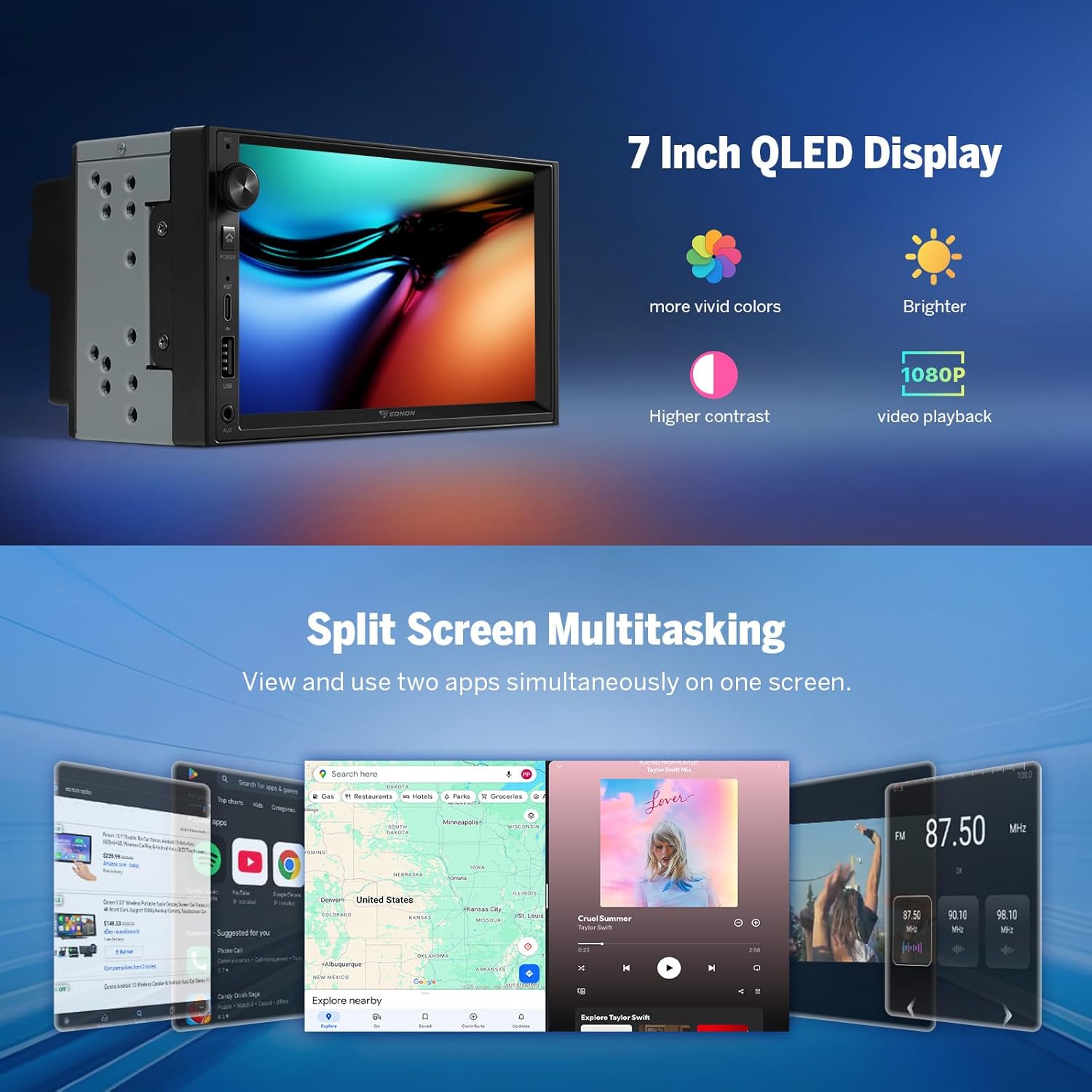
The 7-inch QLED HD display (1280x720 resolution) offers vibrant colors, higher contrast, and supports 1080P video playback.

Eonon UX6S 7-inch QLED display and split screen multitasking

Image: The Eonon UX6S unit showcasing its 7-inch QLED display with vivid colors and high contrast, alongside an example of split-screen multitasking running multiple applications simultaneously.

The unit features a brand new UI designed for in-car systems, offering 4 sets of UI themes for customization. Split-screen mode allows you to handle navigation, entertainment, and other tasks simultaneously.

Eonon UX6S customizable UI themes

Image: Four different user interface themes displayed on the Eonon UX6S screen, demonstrating the customizable UI designed for in-car systems.

Further customization options include adjustable button lights, boot logo selection, and wallpaper changes.

Eonon UX6S interior customization options

Image: A visual representation of the Eonon UX6S customization features, including adjustable button colors, selectable boot logos, changeable wallpapers, and draggable app icons on the home screen.

3.5. Рулду башкаруу элементтери

The unit supports analog SWC (Steering Wheel Control) signals, allowing you to control various functions directly from your steering wheel.

Eonon UX6S steering wheel control learning interface

Image: A car's steering wheel with controls, and the Eonon UX6S screen displaying a

Тектеш документтер - UX6S

Preview Eonon GPA13 унаа медиа ойноткучу колдонуучунун колдонмосу
Eonon GPA13 Car Media Player үчүн орнотууну, радио, CarPlay, Android Auto сыяктуу функцияларды, жөндөөлөрдү, мүнөздөмөлөрдү жана көйгөйлөрдү чечүүнү камтыган кеңири колдонуучу колдонмосу.
Preview Eonon VWA12S Колдонуучунун колдонмосу: Функциялар, Орнотуу жана Иштетүү колдонмосу
Eonon VWA12S унаа маалымат-зоок системасы үчүн комплекстүү колдонуучу колдонмо. Товарды каптап туратview, Wireless CarPlay жана Android Auto, GPS навигациясы, Bluetooth, жөндөөлөр жана Eonon VWA12S унаа стереоңуз үчүн бузулууларды аныктоо сыяктуу функциялар.
Preview BMW 3 сериясы E46 орнотуу боюнча колдонмо - Eonon Head Unit
1999-2004-жылдардагы BMW 3 сериясындагы (E46) Eonon баш блогун орнотуу боюнча этап-этабы менен көрсөтмө. Заводдук компоненттерди алып салуу жана жаңы блокту орнотууну камтыйт.
Preview Mazda 3 үчүн Eonon Q63Pro орнотуу боюнча колдонмо (2010-2013)
Mazda 3 унааларындагы (2010-2013) Eonon Q63Pro 9 дюймдук Android 10 унаа стерео баш блогун орнотуу боюнча кеңири көрсөтмө. GPS, CarPlay, Android Auto, DSP, Bluetooth жана башкаларды камтыйт.
Preview BMW 3 сериясы (E90/E91/E92/E93) 2005-2011 Eonon баш блогун орнотуу боюнча колдонмо
2005 жана 2011-жылдар аралыгында чыгарылган BMW 3 сериясындагы (E90, E91, E92, E93) Eonon унаа стерео баш блокторун орнотуу боюнча кеңири колдонмо. Бул колдонмо заводдук радио жана кондиционерди башкаруу элементтерин алып салуу, жаңы блокту зымдар менен туташтыруу жана аны башкаруу панелине орнотуу боюнча кеңири, этап-этабы менен көрсөтмөлөрдү берет. Анда консоль шайкештигин текшерүү, атайын шаймандарды колдонуу, жабдыктарды туташтыруу жана функцияларды сыноо сыяктуу маанилүү кадамдар камтылган.
Preview Eonon Car Мультимедиа Системасынын Колдонуучу Колдонмосу
Eonon унаа мультимедиа системасы үчүн кеңири колдонуучу колдонмосу, орнотуунун чоо-жайы, продукттун толук нускамасыview, CarPlay, Android Auto, Bluetooth телефон чалуулары жана музыка, USB/SD ойнотуу, экранды чагылдыруу, FM өткөрүү, жөндөөлөр, мүнөздөмөлөр жана көп берилүүчү суроолор сыяктуу функциялар.