1. Продукт бүтүп калдыview
The WAVLINK AX5400 WiFi 6E USB Adapter is designed to add or upgrade WiFi capabilities to your desktop or laptop computer. It supports the latest WiFi 6E standard, offering tri-band connectivity across 2.4GHz, 5GHz, and 6GHz frequencies for enhanced speed and performance. This adapter is compatible with Windows 10 and Windows 11 operating systems.
Маанилүү эскертүү: This device is a WiFi adapter for your computer and is not a WiFi booster, extender, or repeater. It cannot strengthen existing signals from your router.

Image: The WAVLINK AX5400 WiFi 6E USB Adapter, showcasing its design and included USB 3.0 cable.
2. Орнотуу нускамалары
2.1 Системалык талаптар
- Operating System: Windows 10 (Version 1909 or later) or Windows 11 (Version 21H2 or later).
- USB Port: USB 3.0 port recommended for optimal performance.
- To utilize WiFi 6E capabilities, your system requires Windows 11 (Version 21H2 or later) and a WiFi 6E compatible router.
2.2 Драйверди орнотуу
The WAVLINK AX5400 WiFi 6E USB Adapter features a built-in driver for Windows 10 and Windows 11, simplifying the installation process.
- Адаптерди туташтыруу: Insert the adapter's USB 3.0 cable into an available USB port on your desktop or laptop computer.
- Automatic Driver Activation: In most cases, the built-in driver will activate automatically upon connection. A pop-up window may appear in the lower right corner of the taskbar indicating driver installation.
- Manual Driver Installation (if needed): If the pop-up window does not appear, open "This PC" (or "My Computer"), locate the "CD Drive" labeled "WAVLINK_693X2F". Double-click this drive and follow the on-screen instructions to install the driver. If your computer already has the driver installed, the "CD Drive" will not be displayed.

Image: Visual guide for connecting the adapter and installing the driver from the virtual CD drive.

Image: Simplified three-step setup process for the WAVLINK AX5400 adapter.
3. Иштөө режимдери
The adapter supports two primary operating modes:
3.1 Wi-Fi Mode (Receive Signal)
In Wi-Fi Mode, the adapter connects your computer to an existing wireless network. It can receive signals from your router on the 2.4GHz, 5GHz, or 6GHz bands, providing high-speed internet access.
- After driver installation, click the network icon in your system tray.
- Тизмеден каалаган Wi-Fi тармагын тандаңыз.
- Эгер суралса, тармак сырсөзүн киргизип, "Туташуу" баскычын чыкылдатыңыз.
3.2 Soft AP Mode (Transmit Signal)
In Soft AP Mode, the adapter can transform your computer's wired internet connection into a Wi-Fi hotspot. This allows other wireless devices (smartphones, tablets, laptops) to connect to the internet through your computer.
- Ensure your computer has a wired internet connection.
- Access the adapter's utility software or Windows network settings to enable Soft AP mode.
- Хотспоттун атын (SSID) жана сырсөзүн конфигурациялаңыз.
- Other devices can then connect to this new Wi-Fi hotspot.

Image: The two operating modes: Receive Mode for connecting to WiFi and Launch Mode (Soft AP) for creating a hotspot.

Image: Detailed diagrams of Station Mode (receiving signal) and Soft AP Mode (transmitting signal).
4. Техникалык тейлөө
Proper maintenance ensures the longevity and optimal performance of your WAVLINK AX5400 WiFi 6E USB Adapter.
- Жайгашкан жери: Position the adapter in an open area, away from obstructions and other electronic devices that may cause interference. The included 1-meter USB 3.0 cable and magnetic base allow for flexible and stable placement on metal surfaces.
- Тазалоо: Адаптерди тазалоо үчүн жумшак, кургак чүпүрөктү колдонуңуз. Суюк тазалоочу каражаттарды же эриткичтерди колдонуудан алыс болуңуз.
- Температура: Түзмөктү көрсөтүлгөн температура диапазонунда иштетиңиз. Ашыкча ысыктан же сууктан алыс болуңуз.
- Программалык камсыздоонун жаңыртуулары: WAVLINK расмий өкүлүн мезгил-мезгили менен текшерип туруңуз webэң жакшы иштөөнү жана коопсуздукту камсыз кылуу үчүн жеткиликтүү болгон микропрограммалык камсыздоонун жаңыртуулары үчүн сайт.
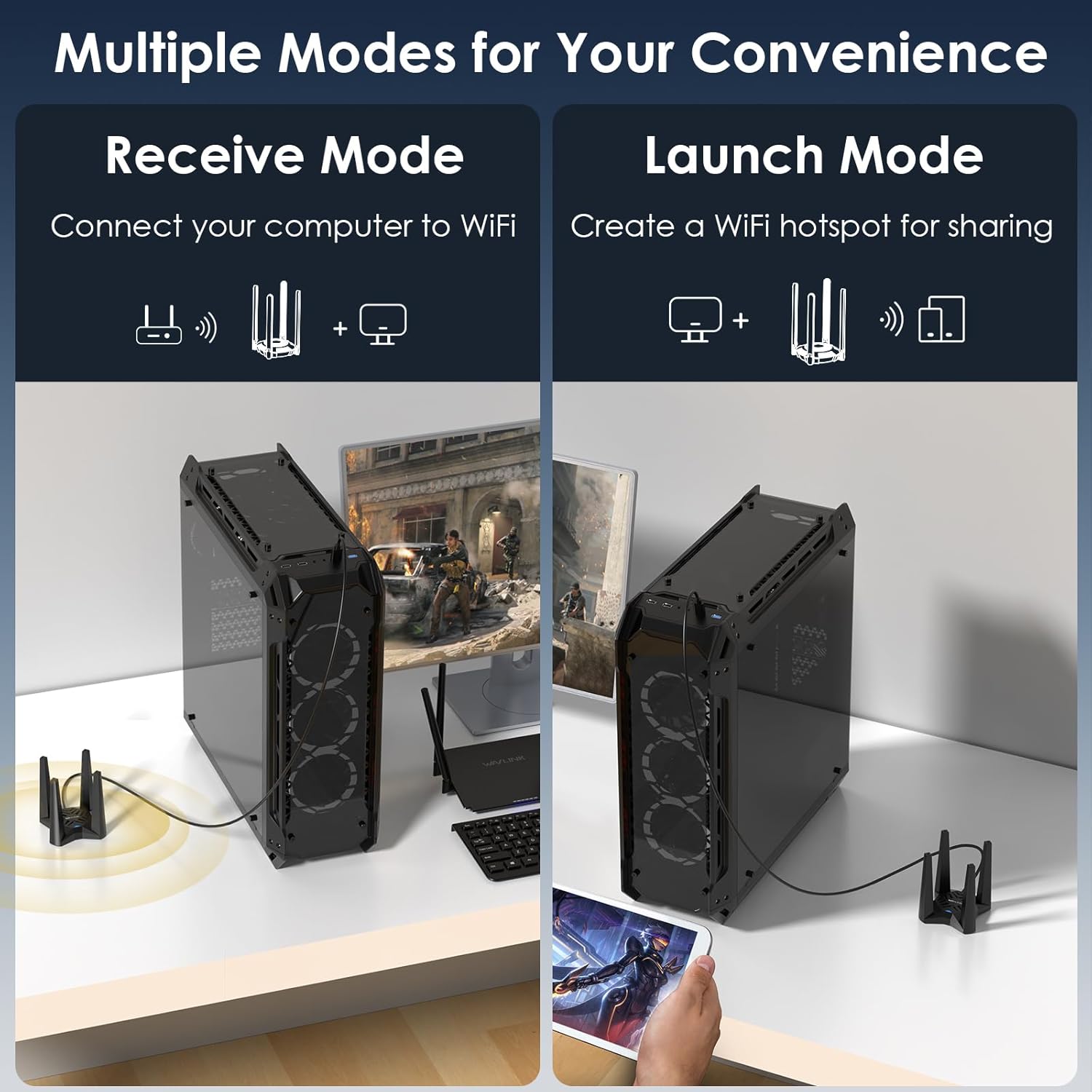
Image: Illustration of optimal placement for the adapter to maximize signal reception with its high-performance antennas.

Image: Representation of the adapter's ability to provide wide, deadzone-free WiFi coverage within a home environment.
5. Кыйынчылыктарды
If you encounter issues with your WAVLINK AX5400 WiFi 6E USB Adapter, refer to the following common solutions:
- Driver Not Installing/Recognized:
- Адаптердин USB портуна бекем сайылганын текшериңиз.
- Check "This PC" for the "CD Drive" and manually run the installer.
- If issues persist, download the latest driver from the official WAVLINK webсайт (www.wavlink.com) under the Support-Driver section, searching for model WL-WN693X2F.
- Frequent Disconnections or Unstable Connection:
- Verify the USB cable is not faulty. Try using a different USB 3.0 cable if available.
- Relocate the adapter to an area with better signal reception, away from obstacles or interference sources.
- Компьютериңиздин USB драйверлери жаңыртылганын текшериңиз.
- Slow Speeds or Limited Performance:
- Confirm the adapter is connected to a USB 3.0 port on your computer.
- For optimal WiFi 6E speeds, ensure you are connected to a WiFi 6E compatible router on the 6GHz band. Performance gains will be limited with standard WiFi 5/6 routers.
- Check for interference from other devices operating on similar frequencies.
- Soft AP Mode Not Working:
- Ensure your computer has an active wired internet connection.
- Verify that Soft AP mode is correctly configured in your system's network settings or the adapter's utility.
6. Техникалык шарттар
Detailed technical specifications for the WAVLINK AX5400 WiFi 6E USB Adapter.
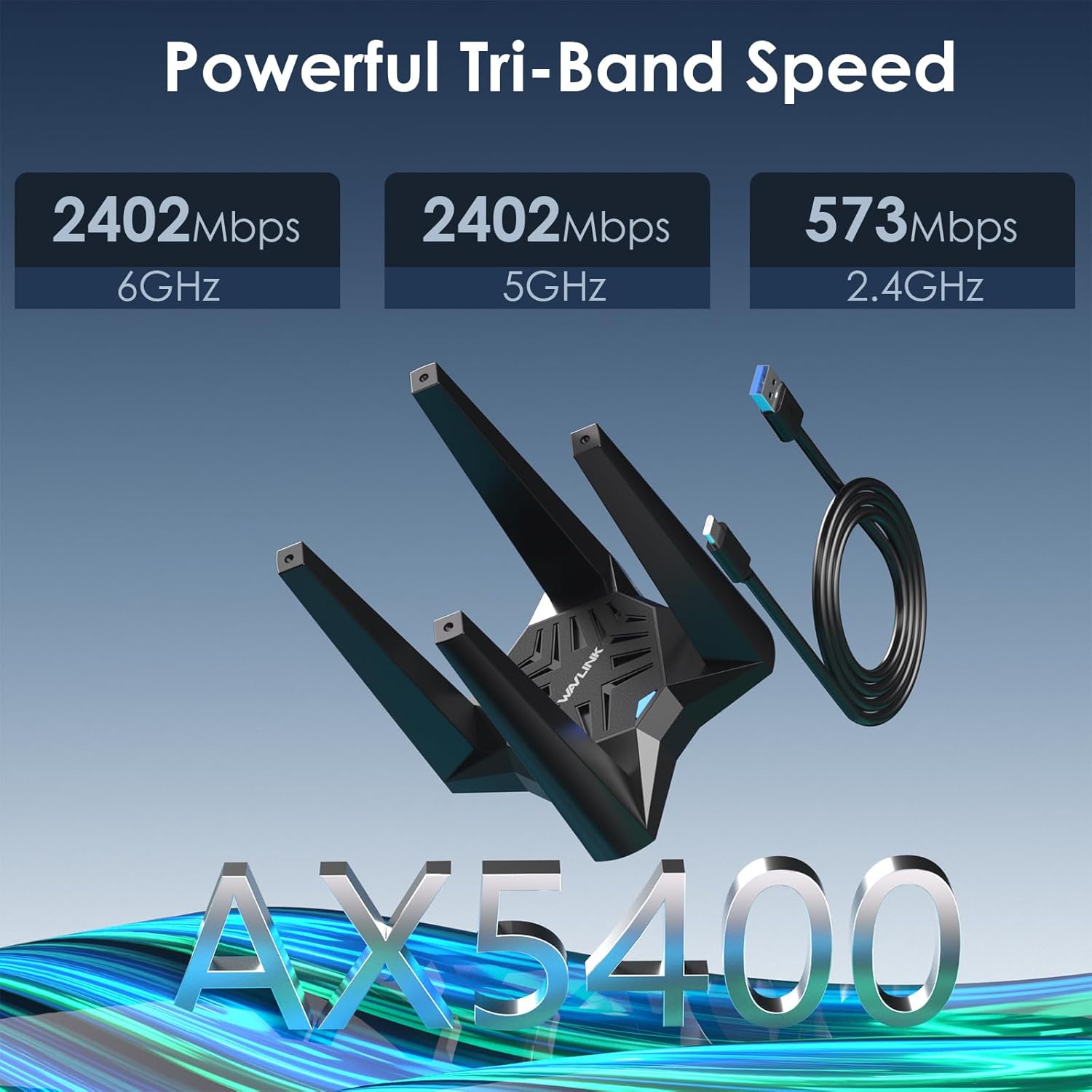
Сүрөт: бүттүview of the adapter's tri-band speed capabilities across 2.4GHz, 5GHz, and 6GHz frequencies.
| Өзгөчөлүк | Спецификация |
|---|---|
| Модель номери | 693X2F |
| Зымсыз стандарт | WiFi 6E (802.11ax) |
| Жыштык тилкелери | 2.4 ГГц, 5 ГГц, 6 ГГц (үч диапазондуу) |
| Max Data Rate (2.4GHz) | 573 Мбит/сек чейин |
| Max Data Rate (5GHz) | 2402 Мбит/сек чейин |
| Max Data Rate (6GHz) | 2402 Мбит/сек чейин |
| Total Aggregate Speed | AX5400 |
| Интерфейс | USB 3.0 |
| Антенналар | Quad High Gain Antennas |
| Зымсыз коопсуздук | WPA3, WPA2, WPA |
| Өзгөчөлүктөрү | MU-MIMO, OFDMA, Beamforming, Soft AP Mode |
| Шайкеш OS | Windows 10, Windows 11 (32/64-bit) |
| Продукциянын өлчөмдөрү | 4.72 x 4.72 x 3.54 дюйм (болжол менен 12 x 12 x 9 см) |
| Элемент Салмагы | 10.6 унция (болжол менен 0.3 кг) |
7. Кепилдик жана колдоо
WAVLINK provides customer support for its products. For any questions or assistance, please use the contact information below.
7.1 Байланыш маалыматы
- Телефондук колдоо: +1 8889730883 (UTC-5) Monday - Friday, 7 AM - 4 PM
- Электрондук почта колдоо: contact@wavlink.com
- Официалдуу Webсайт: For the latest drivers and support resources, visit www.wavlink.com. Издөө model WL-WN693X2F in the Support-Driver section.
- You may also contact us via Amazon messaging.
We aim to provide solutions within 24 hours.

Image: WAVLINK customer support information for assistance.
7.2 Кепилдик маалыматы
Please refer to the product packaging or the official WAVLINK website for specific warranty terms and conditions applicable to your region. Typically, products come with a manufacturer's warranty covering defects in materials and workmanship.


