1. Киришүү
This manual provides essential information for setting up, operating, maintaining, and troubleshooting your VIBOX IX-512 Gaming PC. Please read this manual thoroughly before using your new computer to ensure optimal performance and longevity.

Figure 1: VIBOX IX-512 Gaming PC Tower. This image shows the sleek black tower with vibrant RGB lighting visible through the side panel and front mesh.
2. Коопсуздук маалыматы
- Ensure the PC is placed on a stable, flat surface.
- Желдетүүчү тешиктерди жаппаңыз.
- Keep away from water and excessive humidity.
- Use only the power supply provided or approved by VIBOX.
- Тазалоодон же тейлөөдөн мурун электр кубатын ажыратыңыз.
3. Баштапкы орнотуу
3.1 Пакеттен чыгаруу
Carefully remove the PC and all accessories from the packaging. Retain the original packaging for future transport or servicing.
3.2 Перифериялык түзүлүштөрдү туташтыруу
Connect your monitor, keyboard, mouse, and other peripherals to the appropriate ports on the rear and top of the PC.

Figure 2: Top Panel Connectivity. This diagram illustrates the various ports available on the top panel of the PC, including USB 3.0, USB 2.0, headphone jack, RGB lighting control button, and the power button.
3.2.1 Монитор байланышы
Connect your monitor to the graphics card's HDMI or DisplayPort output. Ensure the cable is securely fastened.
3.2.2 USB түзмөктөрү
Баскычтопуңузду, чычканыңызды жана башка USB түзмөктөрүн жеткиликтүү USB 2.0 же USB 3.0 портторуна туташтырыңыз.
3.3 Кубат туташтыруу
Connect the power cable to the PC's power supply unit and then to a grounded electrical outlet.
4. Иштөө нускамалары
4.1 Күйгүзүү/өчүрүү
Press the power button located on the top panel to turn on the PC. To shut down, use the Windows 11 shutdown procedure (Start Menu > Power > Shut down).
4.2 Windows 11ди баштапкы орнотуу
Upon first boot, follow the on-screen instructions to complete the Windows 11 Home setup, including language, region, network connection, and user account creation.

Figure 3: Windows 11 Home. Your VIBOX PC comes pre-installed with Windows 11 Home, optimized for gaming and productivity.
4.3 Тармакка туташуу
4.3.1 Wi-Fi туташуусу
Your PC includes a 300 Mbps Wi-Fi adapter. To connect, click the Wi-Fi icon in the taskbar, select your network, enter the password, and click Connect.
4.3.2 Ethernet туташуусу
For a wired connection, plug an Ethernet cable into the LAN port on the rear of the PC and connect the other end to your router or modem.
4.4 RGB жарыкты башкаруу
Use the RGB change button on the top panel to cycle through various lighting effects and colors for the internal fans and components.
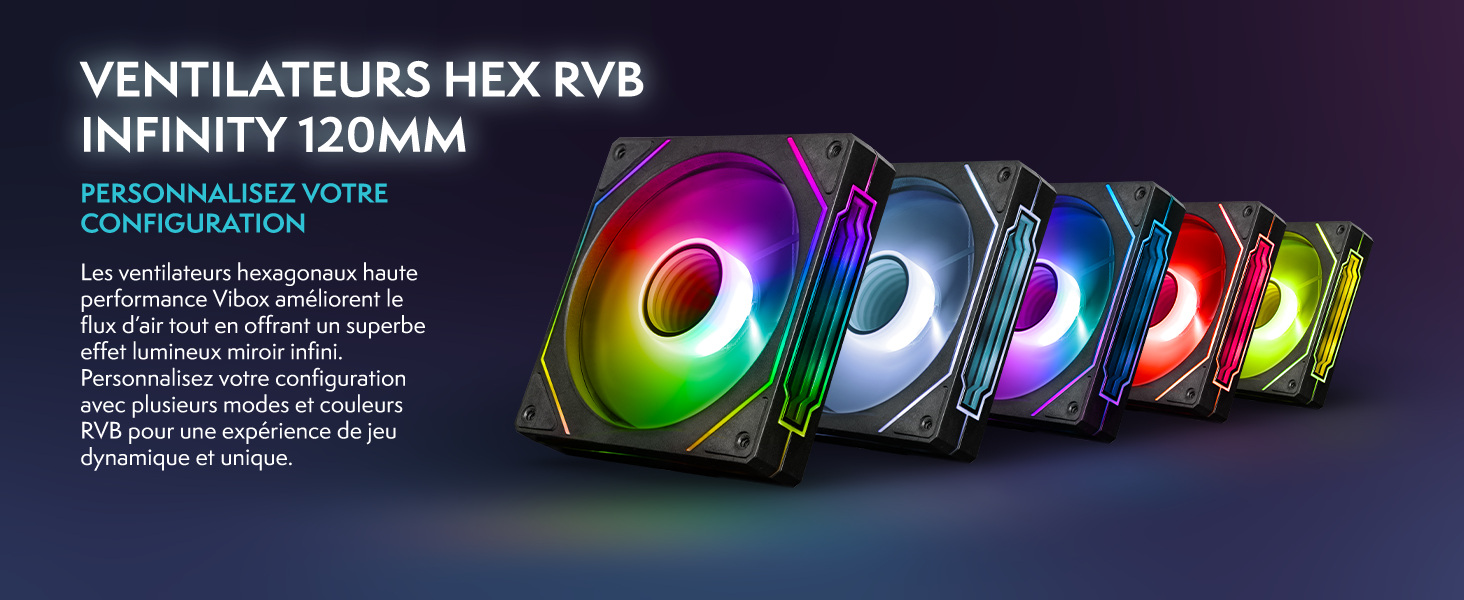
Figure 4: Customizable RGB Fans. The hexagonal fans provide vibrant lighting effects that can be personalized to your preference.
5. Техникалык тейлөө
5.1 Тазалоо
Regularly clean the exterior of the PC with a soft, dry cloth. Use compressed air to clear dust from ventilation grilles and internal components. Тазалоодон мурун ар дайым электр энергиясын ажыратыңыз.

Figure 5: Mesh Design and Access. The VTX-3 case features a mesh front for optimal airflow and a magnetic, hinged tempered glass side panel for easy access to internal components for cleaning and maintenance.
5.2 Программалык камсыздоо жаңыртуулары
Keep your Windows operating system, drivers (especially for AMD Radeon graphics), and other software up to date to ensure optimal performance and security. Windows Update can be accessed via Settings > Windows Update.
5.3 Component Overview
Your VIBOX IX-512 PC is equipped with high-performance components:
- Процессор: AMD Ryzen 7 9800X3D
- Графикалык карта: AMD Radeon RX 9070 XT
- RAM: 32 ГБ DDR5
- Сактагыч: 1 ТБ NVMe SSD
- Муздатуу: 120мм AIO суюк муздаткыч
- Күйөрмандар: 6 Hex 120mm Fans

Figure 6: Internal Components. This visual guide highlights the main components inside your VIBOX IX-512 PC, including the CPU, GPU, RAM, SSD, cooling system, and pre-installed software.
6. Кыйынчылыктарды
| Көйгөй | Мүмкүн себеп | Чечим |
|---|---|---|
| PC күйбөйт. | Power cable loose, power supply switch off, faulty outlet. | Check all power connections. Ensure power supply switch is ON. Try a different power outlet. |
| Монитордо дисплей жок. | Monitor cable loose, monitor off, incorrect input selected on monitor. | Ensure monitor cable is securely connected to both PC and monitor. Turn on monitor. Select correct input source on monitor. |
| Жай аткаруу. | Too many applications running, outdated drivers, insufficient storage. | Close unnecessary applications. Update drivers. Free up disk space. |
| Wi-Fi туташуу маселелери. | Incorrect password, router issues, Wi-Fi adapter driver issues. | Verify Wi-Fi password. Restart router. Update Wi-Fi adapter drivers. |
7. Техникалык шарттар
| Өзгөчөлүк | Спецификация |
|---|---|
| Модел | VIBOX IX-512 |
| Процессор | AMD Ryzen 7 9800X3D (8 Cores, up to 5.0 GHz) |
| Графикалык карта | AMD Radeon RX 9070 XT (16 ГБ GDDR6) |
| RAM | 32 ГБ DDR5 5600 МГц |
| Сактагыч | 1 ТБ NVMe SSD |
| Операция системасы | Windows 11 Home |
| Байланыш | Wi-Fi (300 Mbps), Ethernet |
| Порттар | 1x HDMI, 3x USB 2.0, 3x USB 3.0 |
| Өлчөмдөрү (L x W x Y) | 40 x 21 x 45 см |
| Муздатуу | 120mm AIO Liquid Cooling, 6x 120mm Hex RGB Fans |
8. Кепилдик жана колдоо
8.1 Өндүрүүчүнүн кепилдиги
Your VIBOX IX-512 PC comes with a manufacturer's warranty of бөлүктөрү үчүн 2 жыл жана lifetime for labor. Кепилдик дооматтары үчүн сатып алганыңыздын далилин сактап коюңуз.
8.2 Кардарларды колдоо
For technical assistance, troubleshooting beyond this manual, or warranty inquiries, please contact VIBOX customer support. Refer to the VIBOX official webБайланыш маалыматы үчүн сайтка же сатып алуу документтериңизге кайрылыңыз.
Сиз да зыярат кылсаңыз болот VIBOX Store on Amazon көбүрөөк маалымат жана ресурстар үчүн.


