1. Киришүү
Welcome to the user manual for your new FASTWD Android 15 Tablet 11-inch. This guide provides essential information for setting up, operating, and maintaining your device. Please read this manual thoroughly to ensure optimal performance and longevity of your tablet.
The FASTWD Android 15 Tablet features an 11-inch 2K QHD display, an Octa-Core T615 processor, 36GB RAM, 256GB ROM, and an 8000mAh battery. It supports 5G WiFi, 4G LTE, and includes AI-enhanced cameras, Gemini AI, and Widevine L1 for high-quality streaming.
2. Пакеттин мазмуну
Кутучаны ачканда, төмөндө көрсөтүлгөн бардык буюмдар таңгагыңызда бар экенин текшериңиз:
- FASTWD Android 15 Tablet (11-inch)
- Чычкан
- Баскычтоп
- Калемди басыңыз
- Тери корпус
- Заряддагыч
- Маалымат кабели (USB түрү-C)
- Планшет колдонуучу колдонмосу

2.1-сүрөт: Included accessories with the FASTWD Android 15 Tablet.
3. Түзмөк бүттүview
The FASTWD Android 15 Tablet features a sleek, lightweight metal body with a slim profile and straight edges. The display bezel measures 7.8mm, contributing to an immersive viewтажрыйбасы.
Физикалык өзгөчөлүктөрү
- Дисплей: 11-inch 2K QHD (2560x1440) In-cell Display with 90Hz refresh rate and Wide Viewбурч.
- Дене: Metal construction, weighing approximately 568g.
- Порттор: USB Type-C for charging and data transfer, SIM/MicroSD card slot.
- Камералар: Rear 13MP + 3MP with autofocus and Low Light LED Flash; Front 8MP with autofocus.
- Аудио: Төрт Amplitude Speakers with Artificial Intelligence Noise Cancellation technology.

3.1-сүрөт: Бүттүview планшеттин дизайны жана негизги өзгөчөлүктөрү.

3.2-сүрөт: Detail of the tablet's connectivity ports and speaker placement.
4. Орнотуу
4.1 Алгачкы заряддоо
Before first use, fully charge your tablet using the provided USB Type-C cable and charger. Connect the cable to the tablet's USB-C port and the charger to a power outlet. The battery indicator on the screen will show charging progress.
4.2 Күйгүзүү/өчүрүү
- Күйгүзүү үчүн: Press and hold the Power button until the FASTWD logo appears on the screen.
- Өчүрүү үчүн: Кубат баскычын басып, кармап туруңуз, андан кийин экранда пайда болгон параметрлерден "Өчүрүү" дегенди тандаңыз.
- Кайра баштоо үчүн: Кубат баскычын басып, кармап туруңуз, андан кийин параметрлерден "Кайра баштоо" тандаңыз.
4.3 Баштапкы орнотуу устасы
Upon first power-on, the tablet will guide you through an initial setup process. This includes selecting your language, connecting to a Wi-Fi network, setting up your Google account, and configuring basic security settings.
4.4 SIM жана MicroSD карталарын орнотуу
Locate the SIM/MicroSD card tray on the side of the tablet. Use the provided SIM ejector tool to open the tray. Insert your Nano-SIM card (for 4G LTE connectivity) and/or a MicroSD card (for expanded storage) into the designated slots, ensuring correct orientation. Gently push the tray back into the tablet.
4.5 Bluetooth түзмөктү жупташтыруу
To connect Bluetooth accessories like the included keyboard or mouse:
- барыңыз Орнотуулар > Туташкан түзмөктөр > Bluetooth.
- Bluetooth которуштуруу On.
- Bluetooth түзмөгүңүз жупташтыруу режиминде экенин текшериңиз.
- Select 'Pair new device' and choose your device from the list.
- Жупташтыруу үчүн экрандагы бардык көрсөтмөлөрдү аткарыңыз.

4.1-сүрөт: Bluetooth device connection interface.
4.6 Face Recognition Unlock
For convenient and secure unlocking, you can set up Face Recognition:
- барыңыз Орнотуулар > Коопсуздук жана купуялык > Түзмөктүн кулпусун ачуу > Жүзүнөн ачуу.
- Follow the on-screen instructions to register your face. Ensure you are in a well-lit environment.
4.2-сүрөт: Face Recognition Unlock setup.
5. Иштөө нускамалары
5.1 Негизги навигация
Планшет стандарттуу Android тийүү жаңсоолорун колдонот:
- таптаңыз: Бир нерсени тандаңыз же колдонмону ачыңыз.
- Серпүү: Барактарды же тизмелерди жылдырыңыз.
- Чымчып чоңойтуу: Сүрөттөрдү чоңойтуу же кичирейтүү жана web барактар.
- Узун басуу: Контексттик менюларга кириңиз же колдонмонун сүрөтчөлөрүн жылдырыңыз.
5.2 Wi-Fi and 4G LTE Connectivity
- Wi-Fi: барыңыз Орнотуулар > Тармак жана интернет > Интернет. Select your desired Wi-Fi network and enter the password if required. The tablet supports 2.4G/5G dual-band Wi-Fi.
- 4G LTE: If a SIM card is installed, go to Орнотуулар > Тармак жана интернет > SIM'тер to manage mobile data settings. The tablet supports 4G LTE TDD+FDD and VoLTE.

5.1-сүрөт: Connectivity features of the tablet.
5.3 Колдонмо башкаруу
To manage your applications:
- Колдонмолорду орнотуу: Жаңы тиркемелерди жүктөп алуу жана орнотуу үчүн Google Play Дүкөнүн колдонуңуз.
- Колдонмолорду чыгарып салуу: Long-press an app icon on the home screen or app drawer, then drag it to 'Uninstall' or select 'App info' and choose 'Uninstall'.
- Free Up Storage Space: барыңыз Орнотуулар > Колдонмолор > Бардык колдонмолорду көрүү. Select an app, then choose 'Storage & cache' to clear cache or data, or 'Force stop' to temporarily halt its operation.
5.2-сүрөт: App management options.
5.4 Ата-эненин көзөмөлү
Manage and monitor tablet usage for children using parental controls:
- барыңыз Орнотуулар > Санариптик бакубаттуулук жана ата-эненин көзөмөлү.
- Set up screen time limits, app restrictions, and content filters.
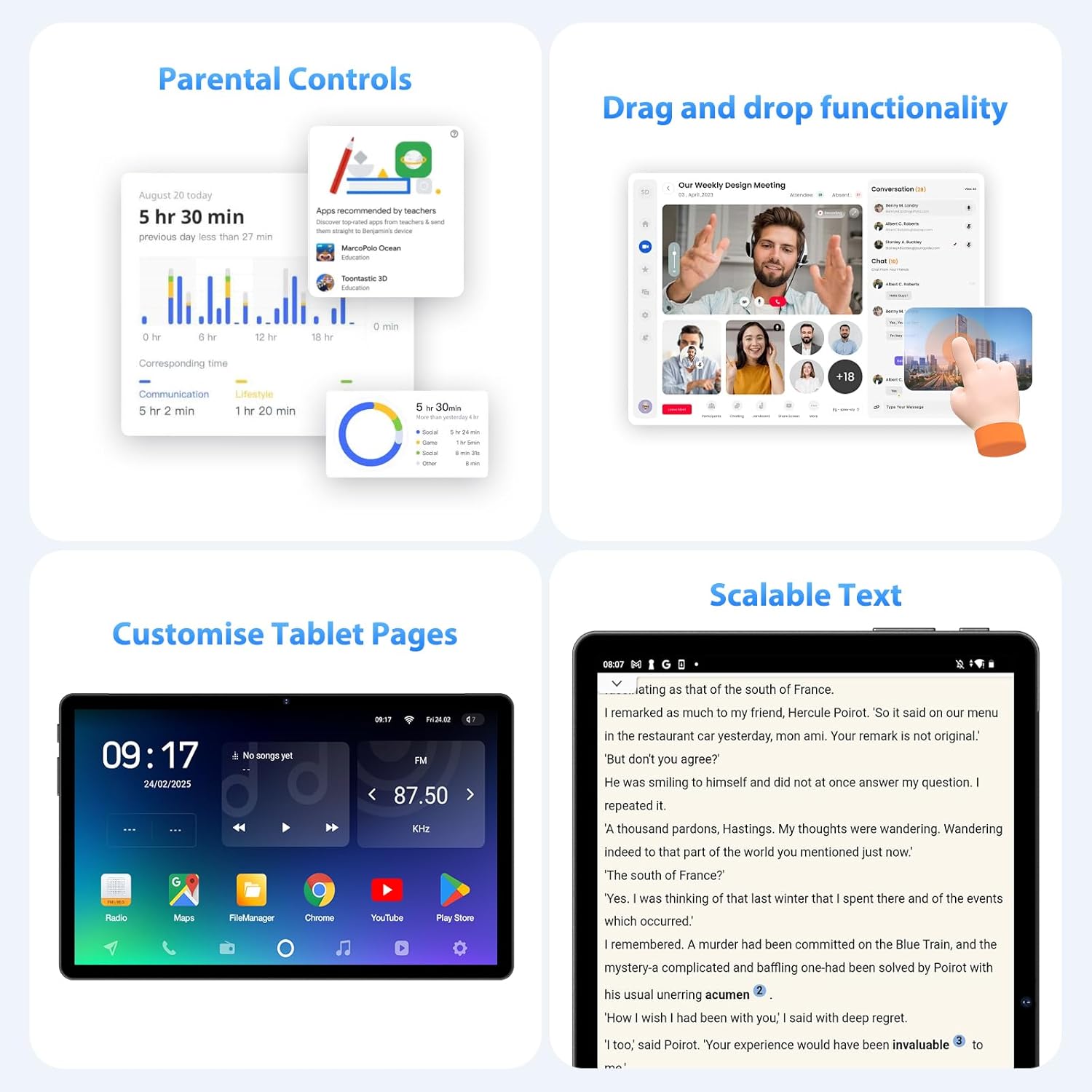
5.3-сүрөт: Parental control settings.
5.5 Double-tap to Wake
To quickly wake the screen without pressing the power button, simply double-tap the display. This feature can usually be enabled or disabled in Орнотуулар > Дисплей > Lock screen display.
5.4-сүрөт: Double-tap to wake functionality.
5.6 Customizing Tablet Pages
Personalize your tablet's home screens by long-pressing on an empty area to access wallpaper, widgets, and home screen settings. You can also rearrange app icons and create folders.
5.5-сүрөт: Example of a customized tablet page.
6. Өркүндөтүлгөн функциялар
6.1 Display and Multimedia
- 2K QHD 90Hz Display: Enjoy smooth visuals and vibrant colors on the 11-inch 2560x1440 resolution display. The 90Hz refresh rate enhances scrolling and gaming experiences.
- Widevine L1 DRM: Supports Widevine L1 Digital Rights Management, enabling high-definition (1080P) streaming from services like Netflix.
- DP HD Screen Throwing: Allows for high-definition screen mirroring or extension to compatible external displays.
- Scalable Text: Adjust text size for improved readability via display settings.
6.1-сүрөт: Scalable text feature for enhanced readability.
6.2 Performance and AI
- Octa-Core T615 Processor: Equipped with a powerful 12nm Octa-Core T615 processor (4x A73 + 4x A53) and Mali-G72 GPU for efficient multitasking and smooth application performance.
- Gemini AI Integration: Leverages Gemini AI for enhanced smart features and optimized user experience.
- AI Smart Detection: The tablet incorporates AI for various smart detection functionalities, improving user interaction and device efficiency.
6.2-сүрөт: Octa-core processor specifications.
6.3 Камеранын өзгөчөлүктөрү
The tablet is equipped with AI-enhanced cameras:
- Арткы камералар: 13MP + 3MP with HD Video Call support, autofocus, and Low Light LED Flash.
- Алдыңкы камера: 8MP with autofocus.
- Capture Unlock Face: Utilize the front camera for face recognition to unlock the device.
6.4 Аудио системасы
Experience clear audio with the tablet's advanced sound system:
- Төрт Amplitude Speakers: Delivers rich and immersive sound.
- Жасалма интеллект ызы-чууну жокко чыгаруу: Artificial Intelligence Noise Cancellation technology automatically filters out ambient noise for clearer audio output.
7. Техникалык тейлөө жана кам көрүү
7.1 Планшетти тазалоо
Use a soft, lint-free cloth to gently wipe the screen and body of the tablet. For stubborn smudges, slightly dampчүпүрөккө суу же экранды тазалоо эритмеси. Катуу химиялык заттарды же абразивдүү материалдарды колдонуудан алыс болуңуз.
7.2 Батареяга кам көрүү
The tablet is equipped with an 8000mAh battery, providing approximately 8 hours of usage. To prolong battery life:
- Ашыкча температурадан сактаныңыз.
- Батареянын бат-баттан түгөнүп калышына жол бербеңиз.
- Оптималдуу кубаттоо үчүн берилген кубаттагычты колдонуңуз.
- Reduce screen brightness and disable unnecessary features (Wi-Fi, Bluetooth, GPS) when not in use.
7.3 Программалык камсыздоо жаңыртуулары
Планшетиңизде эң акыркы функциялар, коопсуздук жаңыртуулары жана майнаптуулугу жакшыртылганын текшерүү үчүн программалык камсыздоо жаңыртууларын дайыма текшерип, орнотуп алыңыз. барыңыз Орнотуулар > Система > Системаны жаңыртуу жеткиликтүү жаңыртууларды текшерүү үчүн.
7.4 Сактагычты башкаруу
The tablet comes with 256GB of internal storage, expandable up to 1TB via MicroSD card. To manage storage:
- Дайыма керексиз жок кылуу fileлар жана колдонмолор.
- Чоң жылдырыңыз files (photos, videos) to the MicroSD card or cloud storage.
- Clear app cache periodically via Орнотуулар > Сактагыч.
8. Кыйынчылыктарды
Бул бөлүмдө планшетиңиз менен кездешиши мүмкүн болгон кеңири таралган көйгөйлөр каралат.
8.1 Планшет күйбөйт
- Ensure the battery is charged. Connect the tablet to the charger for at least 30 minutes.
- Мажбурлап өчүрүп күйгүзүү үчүн кубат баскычын 10-15 секунд басып туруңуз.
8.2 Wi-Fi туташуу маселелери
- Wi-Fi роутериңизди жана планшетиңизди өчүрүп күйгүзүңүз.
- Wi-Fi сигналынын чегинде экениңизди текшериңиз.
- Wi-Fi сырсөзүнүн туура экенин текшериңиз.
- Wi-Fi жөндөөлөрүнөн тармакты унутуп, кайра туташыңыз.
8.3 Жай аткаруу
- Фондо иштеп жаткан колдонулбаган колдонмолорду жабуу.
- Clear app caches and free up storage space.
- Планшетті мезгил-мезгили менен өчүрүп-күйгүзүңүз.
- Consider performing a factory reset if performance issues persist (Эскертүү: This will erase all data on the tablet. Back up important data first).
8.4 Экран жооп бербейт
- Күйгүзүү баскычын кармап туруу менен мажбурлап өчүрүп-күйгүзүңүз.
- Экрандын таза жана нымдуу же таштандысыз экенине ынаныңыз.
9. Техникалык шарттар
| Өзгөчөлүк | Спецификация |
|---|---|
| Бренд | FASTWD |
| Модель аты | FASTWD Android 15 Tablet 11-inch |
| Операция системасы | Android 15 |
| Процессор | Octa-Core T615 (4x A73, 4x A53, 12nm) |
| GPU | Мали-G72 |
| RAM | 36 ГБ (12 ГБ + 24 ГБ виртуалдык) |
| Ички сактагыч | 256 ГБ |
| Кеңейтүүчү сактагыч | 1 ТБ чейин MicroSD |
| Дисплей өлчөмү | 11 дюйм |
| Display Resolution | 2560x1440 (2K QHD) |
| Жаңыртуу ылдамдыгы | 90Hz |
| Батарея сыйымдуулугу | 8000 мАч |
| Батареянын иштөө мөөнөтү | Болжол менен 8 саат |
| Арткы камера | 13MP + 3MP with Autofocus and LED Flash |
| Алдыңкы камера | Автофокус менен 8 МП |
| Wi-Fi | 802.11ac (2.4G/5G Dual-band) |
| Уюлдук байланыш | 4G LTE (TDD+FDD), VoLTE |
| Bluetooth | Ооба |
| Порттар | USB Type-C |
| Өлчөмдөр (Продукт) | 26L x 16W x 0.8H см |
| Салмагы | Болжол менен 568 г |
| DRM колдоо | Widevine L1 |
| Башка өзгөчөлүктөр | Gemini AI, GPS, TÜV Certified (implied from product title) |
10. Кепилдик жана колдоо
For detailed warranty information, please refer to the warranty card included in your product packaging or contact your point of purchase. Warranty terms and conditions may vary by region and retailer.
If you encounter issues not covered in this manual or require further assistance, please contact FASTWD customer support through the contact information provided with your product or on the official FASTWD webсайт.


