VENTION 27000 mAh Laptop Power Bank User Manual
Model: FKGH0
1. Киришүү
Thank you for choosing the VENTION 27000 mAh Laptop Power Bank. This high-performance power bank is designed to provide reliable and fast charging for a wide range of devices, including laptops, smartphones, and other portable electronics. With its large capacity, multiple output ports, and smart TFT display, it is an ideal companion for business travel, commuting, and outdoor activities.
2. Коопсуздук маалыматы
Сураныч, бул продуктуну колдонуудан мурун бардык коопсуздук нускамаларын кылдат окуп чыгыңыз. Бул нускамаларды аткарбоо электр шокуна, өрткө же олуттуу жаракатка алып келиши мүмкүн.
- Электр кубаты банкын экстремалдык температурага (60°C/140°F жогору же 0°C/32°F төмөн) тийгизбеңиз.
- Аппаратты өзүңүз ажыратпаңыз, өзгөртпөңүз же оңдобоңуз.
- Суу, ным жана күйүүчү материалдардан алыс кармаңыз.
- Power банкты кулатпаңыз, сүзбөңүз же күчтүү термелүүгө дуушар кылбаңыз.
- Электр банкын жергиликтүү эрежелерге ылайык жок кылыңыз. Аны тиричилик таштандылары менен таштабаңыз.
- Балдар жетпеген жерде сактаңыз.
- Заряддоо жана разряддоо учурунда жакшы желдетүүнү камсыз кылыңыз.
3. Пакеттин мазмуну
Пакетиңизде бардык буюмдар бар экенин текшериңиз:
- VENTION 27000 mAh Laptop Power Bank (Model: FKGH0)
- USB-C to USB-C Charging Cable (external)
- User Manual
- Баркыт баштык
4. Продукт бүтүп калдыview
Familiarize yourself with the components of your VENTION Power Bank:

Figure 4.1: VENTION 27000 mAh Laptop Power Bank. Shows the main unit with its digital display, integrated USB-C cable, and an additional USB-C to USB-C cable.
- Интегралдык USB-C кабели: Supports up to 140W output/input. Designed for durability with over 10,000 bend tests, also functions as a lanyard.
- USB-C2 порту: Supports up to 100W output/input.
- USB-A порту: 60 Вт чейинки кубаттуулуктагы чыгарууну колдойт.
- Smart TFT Display: Real-time monitoring of battery level, voltage, current, temperature, and charging cycles. Features interactive emoji animations.
- Кубат баскычы: Дисплейди иштетип, кубаттоону баштайт.
5. Орнотуу
5.1 Power банктын алгачкы заряддоосу
Before first use, fully charge your VENTION Power Bank. For optimal charging speed, use a power adapter that supports 100W or higher power delivery.
- Connect the integrated USB-C cable or the provided USB-C to USB-C cable to the power bank's USB-C port.
- Connect the other end of the cable to a compatible wall charger.
- The TFT display will show the charging status, including estimated time to full charge. A full charge with a 100W adapter takes approximately 2 hours.

Figure 5.1: Power Bank charging a MacBook Pro. Illustrates the power bank connected to a laptop, demonstrating its high-speed charging capability of up to 140W via the USB-C1 port.
6. Иштөө нускамалары
6.1 Түзмөктөрдү заряддоо
The VENTION Power Bank supports charging up to three devices simultaneously.
- Бир түзмөктү кубаттоо:
- For maximum speed (up to 140W), use the integrated USB-C cable (USB-C1 port) to charge compatible laptops like MacBook Pro 16".
- The USB-C2 port provides up to 100W, suitable for laptops, tablets, and smartphones.
- The USB-A port provides up to 60W, ideal for smartphones and other USB-A compatible devices.
- Бир нече түзмөктү заряддоо:
- Two Devices:
- USB-C1 + USB-C2: Up to 100W + 100W (200W total). Ideal for charging two laptops simultaneously.
- USB-C1 + USB-A: Up to 100W + 60W.
- USB-C2 + USB-A: Up to 24W total.
- Three Devices:
- USB-C1 + (USB-C2 + USB-A): Up to 100W + 24W total.
- Two Devices:
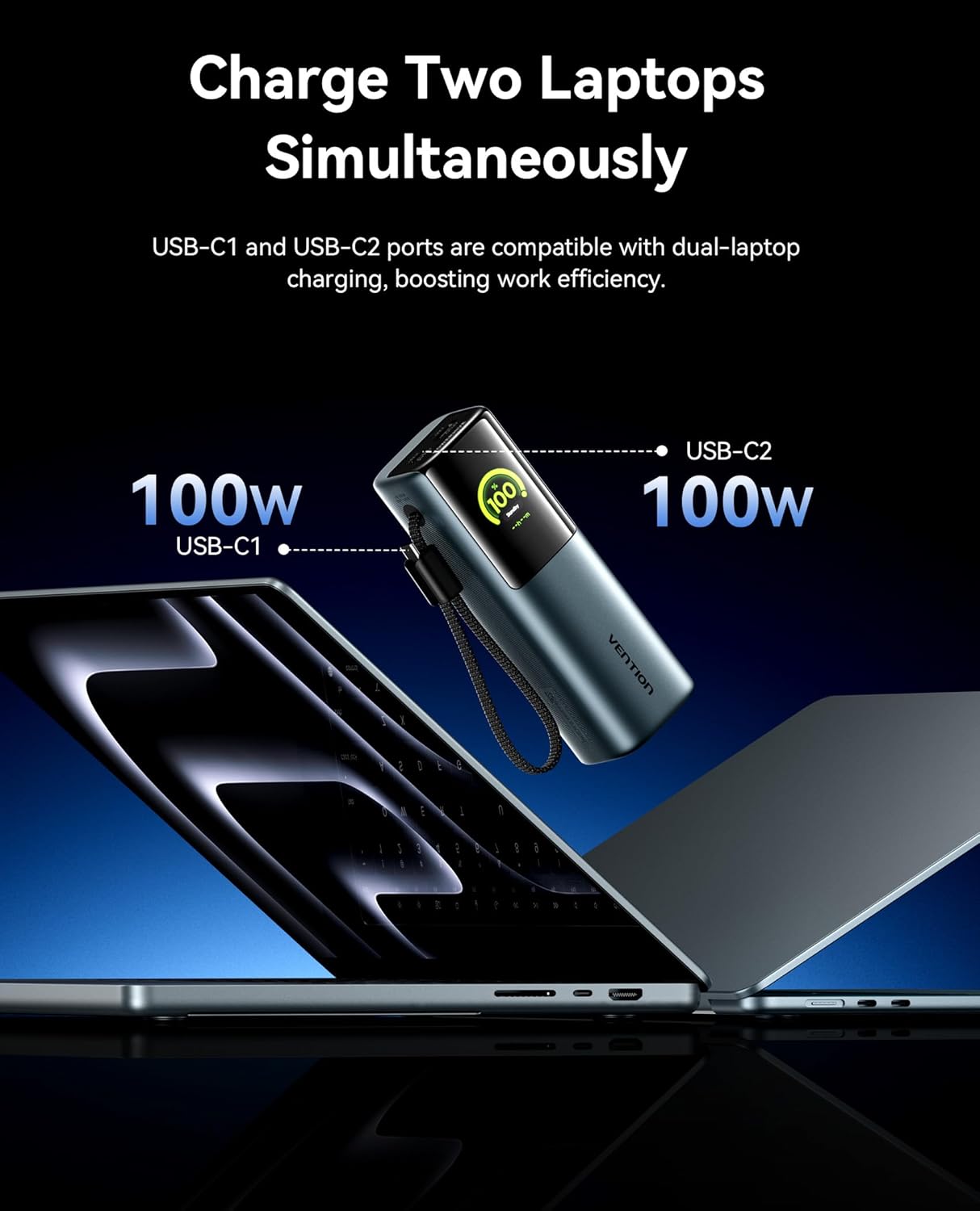
Figure 6.1: Charging two laptops simultaneously. This image demonstrates the power bank's capability to charge two laptops at 100W each using both USB-C ports, maximizing efficiency.

Figure 6.2: Charging three devices at once. The image shows the power bank connected to a laptop, a smartphone, and earbuds, illustrating its multi-device charging capability.
6.2 Smart TFT Display
The integrated TFT display provides comprehensive real-time information about the power bank's status.

Figure 6.3: Smart TFT Display. This image details the various data points shown on the display, including battery percentage, output power, estimated time to full charge, real-time power output, temperature monitoring, and battery cycle count.
- Батарея деңгээли: Калган батареянын пайызын көрсөтөтtage.
- Тtage & Ampкарылык: Shows the real-time output voltage жана ток.
- Температура: Monitors the internal temperature of the power bank.
- Заряддоо циклдери: Tracks the number of charge/discharge cycles, indicating battery health.
- Болжолдуу убакыт: Provides an estimate of the time remaining for charging or discharging.
6.3 Interactive Emoji Animations
The power bank features unique emoji animations that provide visual cues for different operational states.

Figure 6.4: Interactive Emoji Animations. This image illustrates various emoji expressions displayed on the power bank, corresponding to different battery levels (low, medium, high), standby mode, and high-power charging/discharging.
- Батарея деңгээлин көрсөтүү: Emojis change based on battery percentage (e.g., sad for low, happy for high).
- Sleep/Standby Mode: Indicates the device is in a low-power state.
- Батареяны коргоо режими: Alerts to potential issues like overheating or over-discharge.
- High-Power Charging/Discharging: Indicates when the power bank is operating at over 90W.
6.4 Integrated Cable and Lanyard Functionality
The built-in USB-C cable serves a dual purpose as a convenient charging cable and a durable lanyard for easy portability.

Figure 6.5: Integrated Cable as Lanyard. This image shows a person holding the power bank by its integrated USB-C cable, demonstrating its use as a convenient carry strap.
- Pull out the integrated cable for instant fast charging.
- Use the cable as a lanyard to comfortably carry the power bank.
- The high-density braided jacket ensures durability, tested for over 10,000 bends.
7. Техникалык тейлөө
To ensure the longevity and optimal performance of your VENTION Power Bank, follow these maintenance guidelines:
- Сыртын жумшак, кургак чүпүрөк менен тазалаңыз. Катуу химиялык заттарды же абразивдүү материалдарды колдонбоңуз.
- Power банкты күн тийбеген жана экстремалдык температурадан алыс, салкын, кургак жерде сактаңыз.
- If storing for extended periods, charge the power bank to approximately 50-70% capacity every 3 months to preserve battery health.
- Батареяны бат-баттан толук кубаттап коюудан качыңыз, анткени бул анын иштөө мөөнөтүн кыскартат.
- Порттарды чаңдан жана таштандылардан тазалаңыз.
8. Кыйынчылыктарды
If you encounter issues with your VENTION Power Bank, refer to the following common problems and solutions:
| Көйгөй | Мүмкүн себеп | Чечим |
|---|---|---|
| Power банк заряддалбай жатат | Charging cable faulty; Wall adapter insufficient; Power bank fully charged. | Try a different USB-C cable and wall adapter. Ensure the adapter meets power requirements. Check the display for charge status. |
| Түзмөк кубат банкынан кубатталбай жатат | Power bank low on battery; Cable faulty; Device incompatible; Power bank in protection mode. | Recharge the power bank. Try a different charging cable. Ensure your device is compatible with the power bank's output. Check the display for error emojis. |
| Жай кубаттоо ылдамдыгы | Cable not supporting fast charging; Device not supporting fast charging; Multiple devices connected. | Use the integrated USB-C cable or a high-quality PD-compatible cable. Ensure your device supports fast charging. Disconnect other devices for maximum speed to a single device. |
| Дисплей күйбөй жатат | Power bank fully discharged; Power button not pressed correctly. | Connect the power bank to a charger. Press the power button briefly to activate the display. |
| Powerbank колдонуу учурунда жылуу сезилет | Normal operation during high-power charging/discharging; Overheating. | Slight warmth is normal. If it becomes excessively hot or displays an overheating emoji, disconnect devices and allow it to cool down in a well-ventilated area. |
9. Техникалык шарттар
| Өзгөчөлүк | Деталь |
|---|---|
| Модель номери | FKGH0 |
| Батарея сыйымдуулугу | 27000 мАч |
| Батарея түрү | Литий-ион |
| Максималдуу чыгаруу күчү | 200 Вт (жалпы) |
| USB-C1 Output (Integrated Cable) | 140 Вт чейин |
| USB-C2 чыгышы | 100 Вт чейин |
| USB-A чыгаруу | 60 Вт чейин |
| Дисплей түрү | Smart TFT Display with Emoji Animation |
| Өлчөмдөрү (L x W x Y) | 21.8 x 6.2 x 11.2 см (болжол менен 8.58 x 2.44 x 4.41 дюйм) |
| Салмагы | 900 грамм (болжол менен 1.98 фунт) |
| Өзгөчөлүктөр | Fast Charging, Integrated USB-C Cable/Lanyard, Real-time Display, Emoji Animations |
10. Кепилдик жана колдоо
VENTION products are designed and manufactured to the highest quality standards. For information regarding warranty coverage, technical support, or service inquiries, please contact VENTION customer support through the retailer where you purchased the product or visit the official VENTION webсайт.
Кепилдик дооматтары үчүн сатып алганыңыздын далилин сактап коюңуз.