1. Продукт бүтүп калдыview
The NGTeco SL01-A730N is a WiFi-enabled fingerprint smart lock designed for enhanced home and office security. It offers multiple access methods including fingerprint, password, RFID card, mechanical key, and remote unlocking via the NGTeco Home App. This manual provides essential information for installation, setup, operation, and maintenance of your smart lock.

Сүрөт 1.1: Фронт view of the NGTeco SL01-A730N Smart Lock, showcasing the keypad and handle.
Негизги өзгөчөлүктөрү:
- Көп жолдуу мүмкүндүк алуу ыкмалары: Fingerprint, Password, RFID Card, Mechanical Key, Mobile App.
- Алыстан кулпуну ачуу: Control and manage your lock from anywhere using the NGTeco Home App.
- Wi-Fi туташуусу: Built-in Wi-Fi for seamless smart home integration without additional hubs.
- Өзгөчө кырдаалдардын күчү: USB Type-C port for temporary power in case of battery depletion.
- Үн нускамасы: Audio instructions for simplified setup and operation.
- Убактылуу мүмкүндүк: Generate time-limited access codes or app permissions for guests.
- Реверсивдүү тутка: Suitable for both right-hand and left-hand door installations.
- Коңгуроо функциясы: Integrated electronic doorbell.

Сүрөт 1.2: Visual representation of the smart lock's key features, including remote unlocking, Wi-Fi communication, capacitive fingerprint sensor, random passcode, audio instructions, temporary access, smart alerts, NFC, and emergency charging port.
2. Пакеттин мазмуну
Орнотууну улантуудан мурун, бардык компоненттердин пакетте бар экенин текшериңиз.
- Сырткы жыйын
- Ички ассамблея
- Latch Kit
- Mechanical Key (2x)
- IC Card (2x)
- Studs & Screws Kit
- Орнотуу шаблону
- Installation Guide & User Manual (this document)

Сүрөт 2.1: All components included in the NGTeco SL01-A730N smart lock package, laid out for verification.
3. Lock Overview жана Өлчөмдөр
Familiarize yourself with the different parts of the smart lock and its dimensions to ensure compatibility with your door.
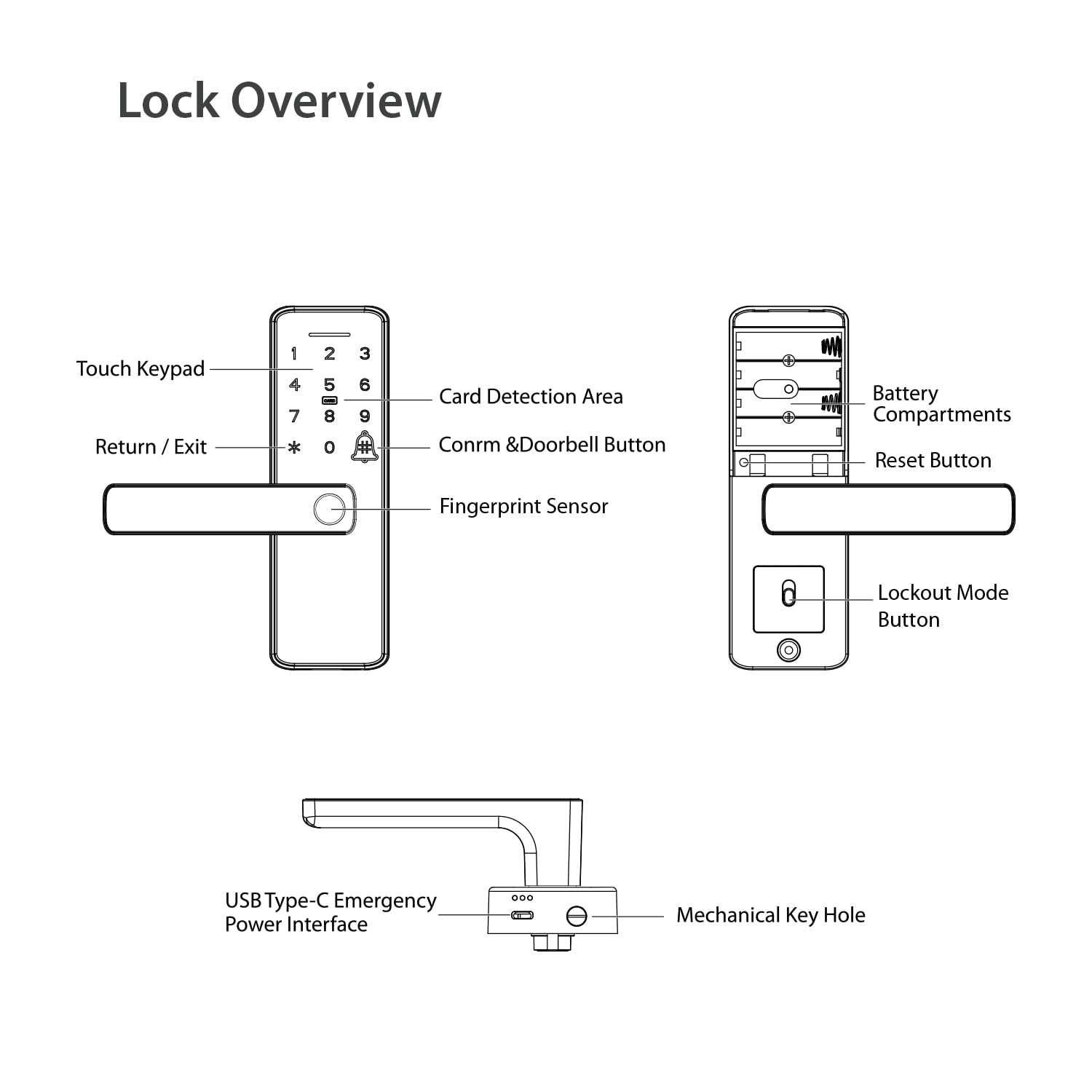
Сүрөт 3.1: Diagram illustrating the various components of the smart lock, including the touch keypad, card detection area, fingerprint sensor, battery compartments, reset button, USB Type-C emergency power interface, and mechanical keyhole.

Сүрөт 3.2: Detailed dimensions of the NGTeco SL01-A730N smart lock, indicating suitability for door thicknesses between 35-60 mm.
The lock is designed for doors with a thickness between 35 mm and 60 mm. Please refer to the detailed dimensions in Image 3.2 to confirm compatibility with your door.
4. Орнотуу
Бул бөлүмдө жалпы маалымат берилетview of the installation process. For detailed, step-by-step instructions, please refer to the dedicated Орнотуу боюнча колдонмо included in your package.
- эшикти даярдоо: Use the provided installation template to mark and drill necessary holes on your door. Ensure the door thickness is within the supported range (35-60 mm).
- Latch орнотуу: Insert the latch kit into the door edge and secure it with screws.
- Сырткы монтажды орнотуу: Mount the exterior part of the lock, ensuring the spindle passes through the latch.
- Ички монтаждоо: Connect the interior assembly to the exterior assembly using the provided screws and studs. Ensure all cables are properly connected and not pinched.
- Батареяларды салыңыз: Open the battery cover on the interior assembly and insert four AA alkaline batteries (not included).
- Сыноо операциясы: After installation, test the mechanical key and handle operation to ensure smooth movement before proceeding with smart features setup.
Эскертүү: The handle design is reversible. Adjust the handle direction according to your door's opening direction (left-hand or right-hand) during installation if necessary. Refer to the Installation Guide for specific instructions on handle reversal.
5. Баштапкы орнотуу жана конфигурация
After physical installation, configure your smart lock using the NGTeco Home App and register your access credentials.
5.1. NGTeco Home App Installation
The NGTeco Home App is essential for managing your smart lock's features, including remote unlocking, user management, and access logs.
- Download the NGTeco Home App from the Google Play Store or Apple App Store. You can scan the QR code below or visit the provided link.
- Жаңы аккаунтка катталыңыз же бар болгон аккаунт менен кириңиз.

Сүрөт 5.1: Instructions for downloading the NGTeco Home App and its interface for controlling the smart lock.
Download the NGTeco Home App: https://a.smart321.com/ngtecongtecohome
5.2. Connecting the Lock to Wi-Fi
Follow the in-app instructions to add your SL01-A730N smart lock and connect it to your home Wi-Fi network (2.4GHz only). The lock provides audio instructions to guide you through the process.
- Смартфонуңуз 2.4 ГГц Wi-Fi тармагына туташкандыгын текшериңиз.
- In the NGTeco Home App, select "Add Device" and follow the prompts for smart lock setup.
- The lock will provide voice guidance during the pairing process.
5.3. Registering Access Credentials
Register fingerprints, passwords, and RFID cards for convenient access.
- Администратор орнотуу: The first user registered (fingerprint or password) will typically be designated as the administrator.
- Манжа изин каттоо: On the lock's keypad, follow the voice prompts to place your finger on the sensor multiple times until registration is complete. You can also register fingerprints via the app.
- Password Registration: Enter your desired password on the keypad, followed by the '#' key. Confirm the password. Ensure your password is between 6-10 digits.
- RFID Card Registration: Present the IC card to the card detection area on the lock when prompted during registration.
- Adding Users via App: Use the NGTeco Home App to add and manage multiple users, assign specific fingerprints, passwords, or RFID cards, and set access schedules.
6. Operating the Smart Lock
Learn how to use the various methods to unlock and manage your NGTeco SL01-A730N smart lock.
6.1. Кулпуну ачуу ыкмалары
- Манжа изи: Place your registered finger on the fingerprint sensor. The lock will unlock upon successful verification.
- Купуя сөз: Enter your registered password on the touch keypad, then press '#'.
- RFID картасы: Present your registered IC card to the card detection area.
- Механикалык ачкыч: In case of emergency or battery failure, use the physical key to unlock the door.
- NGTeco Home App: Open the app, select your lock, and tap the unlock button.

Сүрөт 6.1: Visual guide to the various ways to unlock the NGTeco SL01-A730N smart lock: Fingerprint, Pass Code, Card, and Remote Control via app.
6.2. Remote Unlocking and Temporary Access
The NGTeco Home App allows for remote management and temporary access creation.
- Алыстан кулпуну ачуу: From the app, you can unlock your door from anywhere with an internet connection.
- Share Temporary Password: Generate time-sensitive passwords for guests or service providers. These passwords can be set to expire after a certain period or number of uses.
- Check Records: View a log of all lock and unlock events, including the method used and the user.
- Кулпуну орнотуу: Access advanced settings, manage users, and configure notifications directly from the app.

Сүрөт 6.2: Screenshots of the NGTeco Home App demonstrating features like App Control, Sharing Temporary Passwords, Checking Records, and Lock Setup.
6.3. Anti-Peeping Password
To prevent others from guessing your password, you can enter random digits before or after your actual password. For example, if your password is "123456", you can enter "987123456098#" and the lock will still recognize the correct sequence.
6.4. Коңгуроо функциясы
The lock includes a built-in electronic doorbell. Press the doorbell icon on the keypad to activate it.
7. Техникалык тейлөө
Туура тейлөө акылдуу кулпууңуздун узак мөөнөттүү жана оптималдуу иштешин камсыз кылат.
- Батареяны алмаштыруу: The lock operates on four AA alkaline batteries. Replace them when the low battery indicator appears or when voice prompts indicate low power.
- Шашылыш заряддоо: If batteries are completely drained, connect a power bank to the USB Type-C port on the exterior assembly for temporary power to unlock the door.
- Тазалоо: Кулпунун бетин жумшак, кургак чүпүрөк менен сүртүңүз. Абразивдүү тазалагычтарды же эриткичтерди колдонуудан алыс болуңуз, бул финишке же электрондук компоненттерге зыян келтирет.
- Манжа сенсор: Keep the fingerprint sensor clean and dry for accurate readings.
8. Кыйынчылыктарды
Сиз кабылышы мүмкүн болгон жалпы маселелерди чечүү үчүн бул бөлүмдү караңыз.
| Көйгөй | Мүмкүн себеп | Чечим |
|---|---|---|
| Кулпу жооп бербейт. | Өлгөн батареялар. | Replace batteries. Use USB Type-C for emergency power if needed. |
| Манжа изи таанылган жок. | Finger is wet/dirty, sensor is dirty, or fingerprint not registered correctly. | Ensure finger and sensor are clean and dry. Re-register fingerprint if issue persists. |
| Сырсөз иштебей жатат. | Incorrect password entered, or password not registered. | Verify the password. Ensure you are pressing '#' after the password. Re-register password if necessary. |
| Wi-Fi'га туташпай жатат. | Туура эмес Wi-Fi сырсөзү, 5 ГГц тармак же алсыз сигнал. | Ensure correct 2.4GHz Wi-Fi network and password. Move router closer or use a Wi-Fi extender. |
| Алыстан ачуу иштебей жатат. | No internet connection on lock or phone, or app not properly configured. | Check Wi-Fi connection of the lock and internet connection of your phone. Ensure the app is updated and logged in. |
9. Техникалык шарттар
| Өзгөчөлүк | Деталь |
|---|---|
| Бренд | NGTeco |
| Модель аты | SL01-A730N |
| Кулпу түрү | Mortise Lock |
| Материал | Алюминий |
| Түс | Кара |
| Элементтин өлчөмдөрү (L x W x Y) | 18.6 x 6 x 2 сантиметр |
| Элемент Салмагы | 1.25 килограмм |
| Connectivity Protocol | Wi-Fi (2.4 ГГц) |
| Башкаруу ыкмасы | App, Fingerprint, Password, RFID Card, Key |
| Өзгөчө өзгөчөлүк | Anti-Peeping Password, Emergency USB Type-C Charging |
| Сунушталган Колдонуулар | Homes, Offices |
| Эшиктин калыңдыгынын шайкештиги | 35 - 60 мм |
10. Кепилдик жана колдоо
The NGTeco SL01-A730N Smart Lock comes with a 1 жылдык кепилдик сатып алынган күндөн тартып.

Сүрөт 10.1: The NGTeco SL01-A730N Smart Lock prominently displaying a "1 Year Warranty" badge.
Кардарларды колдоо:
For any technical assistance, warranty claims, or product inquiries, please contact NGTeco customer support.
- Comprehensive Call Support: Assistance throughout your product journey, including pre-sales and after-sales support.
- Personalized Remote Assistance: Expert guidance for hardware and software configuration.
- Professional Training on Software: Unlock the full potential of software platforms with step-by-step training.
- Reliable Tech Support: Responsive technical team available on all working days.

Сүрөт 10.2: Information detailing the comprehensive customer care services provided by NGTeco.
Сүрөт 10.3: Contact information for NGTeco customer support, including phone numbers and email address.
Байланыш маалыматтары:
- Phone: 080-68281333/42, +91 80975 38492
- Электрондук почта: ecommerceindia@zkteco.in
- Support Hours: Mon-Sat 9:30 AM - 6:30 PM


