1. Коопсуздук боюнча маанилүү маалымат
Please read all instructions carefully before using this monitor. Keep this manual for future reference.
- Өрт же шок коркунучун болтурбоо үчүн мониторду жамгырга же нымдуулукка дуушар кылбаңыз.
- Мониторду ачпаңыз casinг. Ичинде колдонуучу тейлей турган бөлүктөр жок. Бардык тейлөөлөрдү квалификациялуу тейлөө кызматкерлерине тапшырыңыз.
- Монитор кулап калбаш үчүн аны туруктуу, тегиз бетке коюңуз.
- Монитордун айланасында туура желдетүүнү камсыз кылыңыз. Вентиляция тешиктерин жаап албаңыз.
- Монитор менен кошо берилген кубат адаптерин гана колдонуңуз.
- Монитор узак убакыт бою колдонулбай турган болсо, электр сайгычын розеткадан ажыратыңыз.
2. Пакеттин мазмуну
Пакетиңизде бардык буюмдар бар экенин текшериңиз:
- CRUA 34 дюймдук оюн монитору
- DP кабели
- Monitor Base and Support
- Колдонуучунун Колдонмосу (бул документ)
- Кубаттуу адаптер
3. Орнотуу нускамалары
3.1 Стендди чогултуу
- Мониторду таңгагынан этияттык менен алып чыгыңыз, аны жумшак бетке коюп коргоңуз.
- Attach the monitor support arm to the monitor panel.
- Secure the base to the support arm using the provided screws.
- Place the assembled monitor on a stable desk.
3.2 Мониторуңузду туташтыруу
Монитордо ар тараптуу туташуу үчүн бир нече киргизүү порттору бар.

Image: Rear panel connectivity options.
- HDMI туташуу: Connect one end of an HDMI cable (not included) to your computer's HDMI output and the other end to one of the monitor's HDMI 2.0 ports.
- DisplayPort (DP) туташуу: Connect one end of the supplied DP cable to your computer's DP output and the other end to one of the monitor's DP 1.4 ports.
- Аудио чыгаруу: For external speakers or headphones, connect a 3.5mm audio cable (not included) from your audio device to the monitor's 3.5mm Audio Out port. Note: This monitor does not have built-in speakers.
- Кубат туташуу: Connect the power adapter to the monitor's DC input port, then plug the adapter into a power outlet.
3.3 Дубалга орнотуу
This monitor supports VESA wall mounting (100mm x 100mm) for flexible installation.

Image: VESA mount compatibility.
- Монитордон стендди алып салыңыз.
- Attach a VESA-compatible wall mount bracket (not included) to the monitor using appropriate screws.
- Follow the instructions provided with your wall mount for secure installation.
4. Иштөө нускамалары
4.1 Күйгүзүү/өчүрүү
Аны күйгүзүү же өчүрүү үчүн монитордо жайгашкан кубат баскычын басыңыз. Монитор күйүп турганда кубат индикаторунун жарыгы күйөт.
4.2 Экрандагы дисплей (OSD) менюсу
Use the control buttons (typically located on the back or bottom of the monitor) to navigate and adjust settings in the OSD menu. Common settings include:
- Сүрөт жөндөөлөрү: Жарыктык, Контраст, Курчтук, Түс температурасы.
- Киргизүү булагы: Select between HDMI and DisplayPort inputs.
- Дисплейдин жөндөөлөрү: Aspect Ratio, Overdrive.
- Аудио жөндөөлөрү: Volume for the 3.5mm audio output.
- Оюн орнотуулары: FreeSync, Crosshair, Response Time.
4.3 Optimizing Display Performance
This monitor offers advanced features for an enhanced viewтажрыйбасы:
- 120Hz жаңыртуу ылдамдыгы: For smooth visuals, especially in fast-paced content. Ensure your graphics card and system settings are configured to output at 120Hz.
- AMD FreeSync: Activate FreeSync in the OSD menu and your graphics card control panel to synchronize the monitor's refresh rate with your GPU's frame rate, reducing screen tearing and stuttering.
- WQHD (3440x1440P) Resolution: Provides sharp detail and expanded workspace.
- IPS Panel with Wide Color Gamut: Enjoy accurate colors with 130% sRGB and 98% DCI-P3 coverage.
- Көк жарык чыпкасы: Enable this feature in the OSD menu to reduce eye strain during long viewсеанстар.

Image: Visual representation of 120Hz refresh rate and AMD FreeSync benefits.
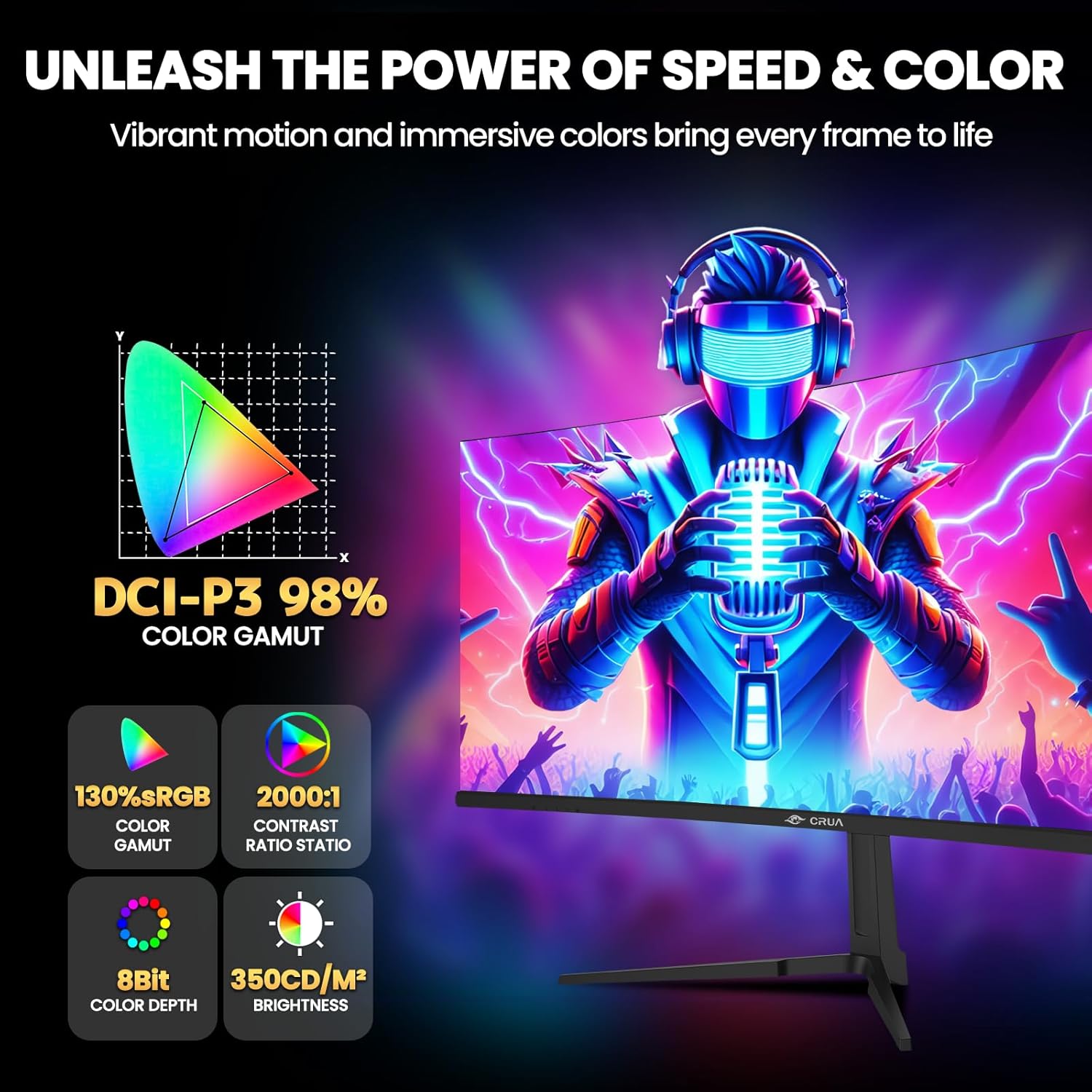
Image: Key display specifications for color and brightness.
5. Техникалык тейлөө
Туура тейлөө мониторуңуздун узак мөөнөттүү жана оптималдуу иштешин камсыз кылат.
- Экранды тазалоо: Экранды жумшак, түксүз чүпүрөк менен акырын сүртүңүз. өжөр белгилер үчүн, гampЧүпүрөктү суу же аммиаксыз, спиртсиз экран тазалагыч менен бир аз сүртүңүз. Тазалоочу каражатты түз экранга чачпаңыз.
- Тазалоо Casing: Мониторду сүртүү үчүн жумшак, кургак чүпүрөктү колдонуңуз casinг. Абразивдүү тазалагычтарды же эриткичтерди колдонуудан алыс болуңуз.
- Вентиляция: Ensure the ventilation openings on the monitor are clear of dust and obstructions to prevent overheating.
- Өчүрүү: Мониторду тазалоодон мурун же узак убакыт бою колдонбогондо, аны өчүрүп, розеткадан сууруп алыңыз.
6. Кыйынчылыктарды
Мониторуңузда көйгөйлөргө туш болсоңуз, төмөнкү жалпы чечимдерди караңыз:
| Көйгөй | Мүмкүн себеп | Чечим |
|---|---|---|
| Экранда сүрөт жок | No power; Incorrect input source; Loose video cable | Check power connection; Select correct input source via OSD; Ensure video cable is securely connected. |
| Сүрөт бүдөмүк же бурмаланган | туура эмес чечим; Графикалык драйвер маселеси | Set display resolution to 3440x1440P; Update graphics drivers. |
| Экрандын бүлбүлдөөсү | Refresh rate mismatch; Cable issue; FreeSync not enabled/compatible | Ensure 120Hz refresh rate is set; Try a different video cable; Enable AMD FreeSync if your GPU supports it. |
| No audio from 3.5mm port | External speakers/headphones not connected; Volume too low; Audio source issue | Check external audio device connection; Adjust volume in OSD and computer; Verify audio output from source device. |
7. Техникалык шарттар
Detailed technical specifications for the CRUA 34-inch Curved Gaming Monitor (CR340E):
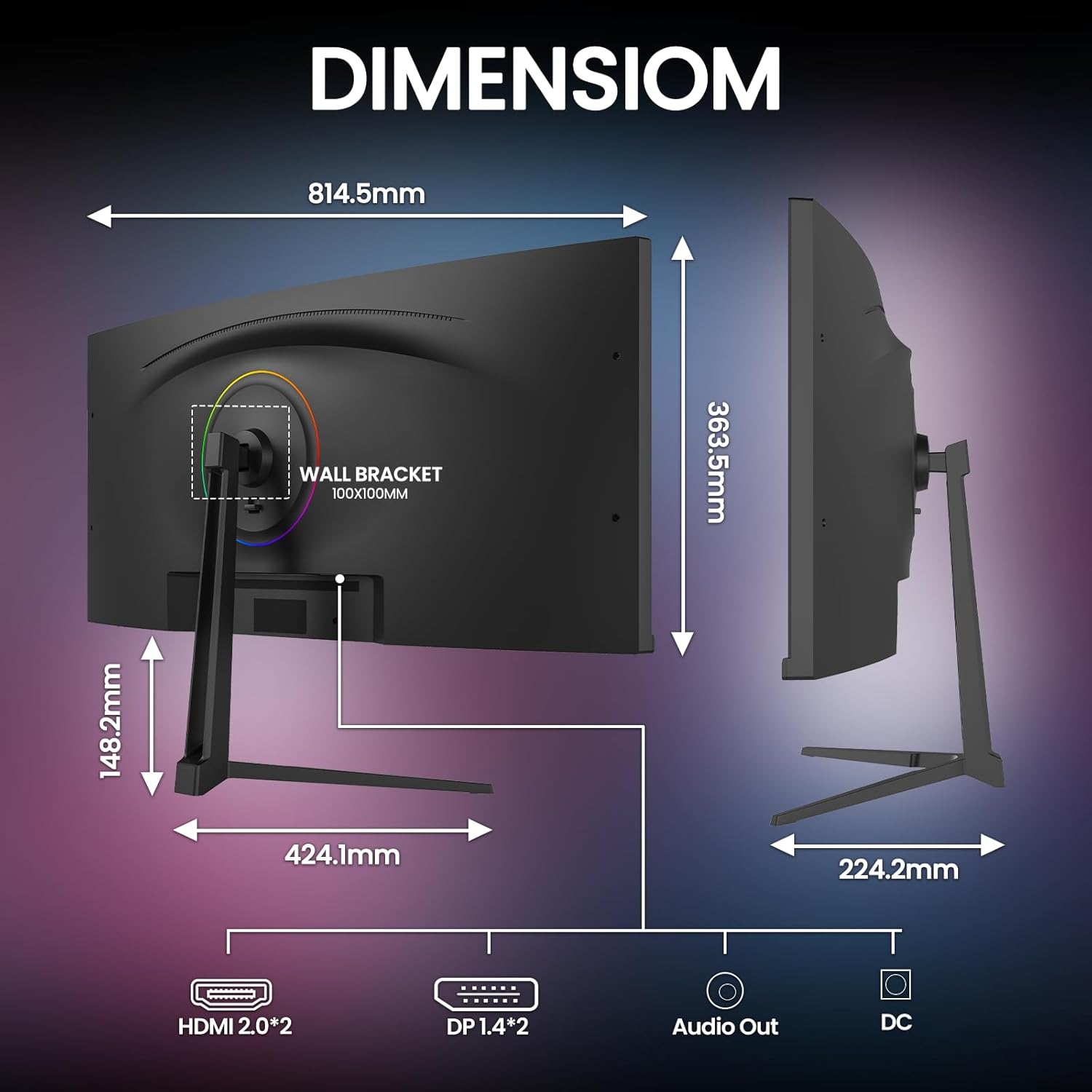
Image: Monitor dimensions.
- Модель номери: CR340E
- Экрандын өлчөмү: 34 дюйм
- Панелдин түрү: IPS
- Ийрилик: 1900R
- Чечим: 3440 x 1440 Pixels (WQHD Ultra Wide 1440p)
- Аспект катышы: 21:9
- Жаңыртуу ылдамдыгы: 120Hz
- Жарыктык: 350 кд/м²
- Контраст катышы: 2000:1
- Түс гаммасы: 130% sRGB, 98% DCI-P3
- Байланыш: 2 x HDMI 2.0, 2 x DisplayPort 1.4, 1 x 3.5mm Audio Out, 1 x DC Power Input
- Дубалга орнотуу шайкештиги: VESA 100мм x 100мм
- Продукциянын өлчөмдөрү (стенд менен): Approximately 1 x 32 x 14 inches (W x H x D)
- Элемент Салмагы: 18 фунт
8. Кепилдик жана колдоо
CRUA is committed to providing high-quality computer monitors and premium services.
- Кепилдик: This product is covered by a manufacturer's warranty. Please refer to the warranty card included in your package or contact CRUA customer service for specific details regarding warranty duration and terms.
- Кардарларды колдоо: If you have any questions, require technical assistance, or experience any issues with your CRUA monitor, please contact our customer support team. We are available to serve you and resolve your concerns.
- Байланыш маалыматы: For support, please visit the official CRUA webсайтына же продукт документациясында көрсөтүлгөн байланыш маалыматына кайрылыңыз.


