1. Киришүү
Welcome to the user manual for your new Vibox I-530 Gaming PC. This system is designed for casual gaming and general productivity, offering a balanced performance with its AMD Ryzen 3 3200G processor and integrated Radeon Vega 8 graphics. This manual provides essential information for setting up, operating, maintaining, and troubleshooting your computer.
Кутуда эмне бар
- Vibox I-530 Gaming PC Tower (VTX-8 Black)
- Электр кабели
- 300 Mbps Wi-Fi Adapter
- Документтер (бул колдонмо)
- RGB Lighting (integrated into the PC case)

Figure 1: The Vibox I-530 Gaming PC tower, showcasing its transparent side panel and vibrant RGB fans.
2. Орнотуу колдонмосу
Follow these steps to set up your Vibox I-530 Gaming PC for the first time.
2.1 Кутудан чыгаруу жана жайгаштыруу
- Компьютерди таңгагынан кылдаттык менен алып салыңыз.
- Place the PC tower on a stable, flat surface with adequate ventilation. Ensure there is enough space around the vents for proper airflow.
- Remove any protective films or packaging materials from the PC case.

Figure 2: Diagram illustrating the dimensions of the Vibox I-530 PC case, highlighting its tempered glass design and overall size (37.5cm height, 29.5cm depth, 22cm width, 8cm stand height).
2.2 Перифериялык түзүлүштөрдү туташтыруу
Connect your monitor, keyboard, mouse, and other peripherals to the appropriate ports on the back of the PC.
- Монитор: Connect your monitor using an HDMI or DisplayPort cable to the corresponding port on the motherboard (not a dedicated graphics card, as this model uses integrated graphics).
- Баскычтоп жана чычкан: Plug your keyboard and mouse into any available USB ports.
- Wi-Fi Adapter: Insert the provided 300 Mbps Wi-Fi adapter into an available USB port.
- Күч: Connect the power cable to the PC's power supply unit (PSU) and then to a wall outlet.
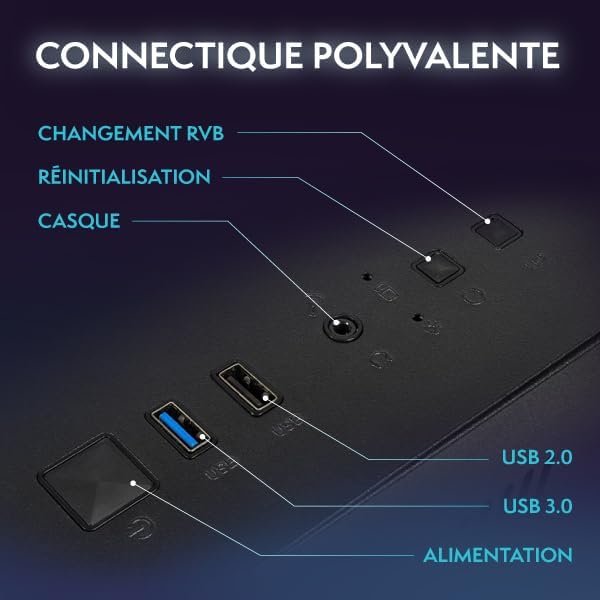
Figure 3: Close-up of the PC's front panel connectivity, showing the power button, RGB change button, reset button, headphone jack, USB 2.0 ports, and USB 3.0 ports.
2.3 Баштапкы күйгүзүү
- ЖКнын алдындагы кубат баскычын басыңыз.
- The system will boot into Windows 11. Follow the on-screen instructions to complete the initial Windows setup, including language, region, and user account creation.
- Once Windows is set up, ensure your Wi-Fi adapter is recognized and connect to your wireless network.
3. Иштөө нускамалары
This section covers basic operation and tips for using your Vibox I-530 PC.
3.1 Күйгүзүү/өчүрүү
- Күйгүзүү үчүн: ЖКнын алдындагы кубат баскычын басыңыз.
- Жабуу: Click the Start button in Windows, then select Power > Shut down. Avoid simply holding the power button to turn off the PC, as this can lead to data loss or system corruption.
- Кайра баштоо үчүн: Баштоо баскычын чыкылдатып, андан кийин Кубат > Кайра иштетүүнү тандаңыз.
3.2 Windows 11 Overview
Your PC comes pre-installed with Windows 11 Home, offering a modern interface and enhanced features for gaming and productivity.
- Faster Load Times: Benefit from DirectStorage for quicker game loading.
- Өркүндөтүлгөн графика: AutoHDR provides improved visuals for supported games.
- Xbox Game Pass Integration: Seamless access to Xbox Game Pass.
- Optimized CPU Performance: Experience better performance for your processor.

Figure 4: Key features of Windows 11 Home, highlighting benefits for gamers such as faster loading, AutoHDR, and Xbox Game Pass integration.
3.3 RGB жарыкты башкаруу
Your Vibox I-530 PC features customizable RGB lighting for its fans. You can change the colors and modes directly from the PC case.
- Locate the RGB change button on the front panel of your PC (refer to Figure 3).
- Press this button to cycle through various colors and lighting effects.
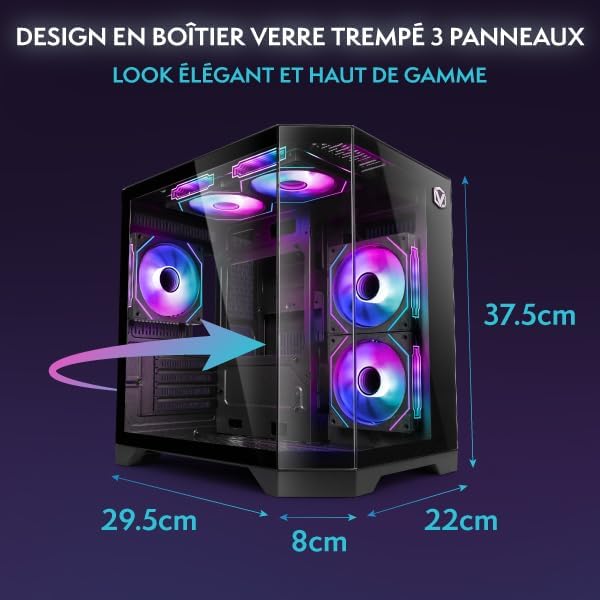
Figure 5: Hex RGB Infinity 120mm fans, illustrating the customizable colors and RGB modes available for personalization.
3.4 Оюн жана аткаруу
The AMD Ryzen 3 3200G with Radeon Vega 8 integrated graphics is suitable for indie games and less graphically demanding titles. For optimal performance:
- Keep your graphics drivers updated.
- Close unnecessary background applications while gaming.
- Adjust in-game graphics settings to match your system's capabilities for a smooth experience.

6-сүрөт: Ички view of the Vibox I-530 PC, showing the motherboard, CPU cooler, and RGB fans, illustrating the component layout.
4. Техникалык тейлөө
Үзгүлтүксүз техникалык тейлөө сиздин компьютериңиздин узак иштөөсүн жана оптималдуу иштешин камсыз кылууга жардам берет.
4.1 Тазалоо
- Сырткы: жумшак колдонуу, damp cloth to wipe down the exterior of the case. Avoid harsh chemicals.
- Чаң: Periodically use compressed air to clean dust from the internal components, especially the fans and heatsinks. Ensure the PC is powered off and unplugged before cleaning.
- Аба агымы: Ensure the PC's vents are not obstructed to maintain proper airflow and prevent overheating.

Figure 7: Diagram illustrating the inverted airflow design for new generation cooling in the Vibox I-530 PC, showing air intake and exhaust paths.
4.2 Программалык камсыздоо жаңыртуулары
- Windows жаңыртуулары: Regularly check for and install Windows updates to ensure security and performance improvements. Go to Settings > Windows Update.
- Драйвер жаңыртуулары: Keep your AMD graphics drivers and other component drivers updated. You can usually find these on the AMD website or through the device manager.
4.3 Сактагычты башкаруу
- SSD ден соолугу: While SSDs do not require defragmentation, ensure you don't fill them to full capacity, as this can impact performance.
- Дискти тазалоо: Use Windows' built-in Disk Cleanup tool to remove temporary files жана орун бошотуңуз.
5. Кыйынчылыктарды
This section addresses common issues you might encounter with your Vibox I-530 PC.
5.1 Күч жок
- Кубат кабели компьютерге да, розеткага да бекем туташып турганын текшериңиз.
- Check if the power switch on the back of the PSU (Power Supply Unit) is in the 'On' position.
- Башка розетканы же кубат кабелин колдонуп көрүңүз.
5.2 Монитордо дисплей жок
- Verify that the monitor is powered on and the video cable (HDMI/DisplayPort) is securely connected to both the PC's motherboard video output and the monitor.
- Мониторуңуз туура киргизүү булагына коюлганын текшериңиз.
- If possible, test with another monitor or cable.
5.3 Wi-Fi туташуу маселелери
- Ensure the USB Wi-Fi adapter is properly inserted into a USB port.
- Check Windows network settings to confirm Wi-Fi is enabled and you are attempting to connect to the correct network.
- Роутериңизди жана модемиңизди өчүрүп күйгүзүңүз.
- Update the Wi-Fi adapter drivers.
5.4 System Performance is Slow
- Ашыкча CPU, RAM же диск ресурстарын керектеген тиркемелер үчүн Task Manager (Ctrl+Shift+Esc) функциясын текшериңиз.
- Windows жана драйверлер жаңыртылганын текшериңиз.
- Дискти тазалап, зыяндуу программаларды текшериңиз.
- Ensure the PC has adequate ventilation and is not overheating.
6. Техникалык шарттар
Detailed technical specifications for the Vibox I-530 Gaming PC.
| Өзгөчөлүк | Деталь |
|---|---|
| Бренд | Vibox |
| Модель номери | I-530 |
| Сериялар | VTX-8 |
| Түс | VTX-8 Black |
| Өлчөмдөрү (L x W x Y) | 35 x 28 x 38 см |
| Салмагы | 10.6 кг |
| Процессор өндүрүүчүсү | AMD |
| Процессордун түрү | Ryzen 3 3200G |
| Процессордун ылдамдыгы | 3.6 ГГц (4.0 ГГц чейин күчөтүү) |
| Процессор розеткасы | Розетка AM4 |
| Процессор өзөктөрүнүн саны | 4 |
| RAM сыйымдуулугу | 16 ГБ |
| RAM технологиясы | DDR4 |
| RAM Speed | 3200 МГц |
| Max Supported RAM | 128 ГБ |
| Сактагыч түрү | SSD (катуу абалдагы диск) |
| Сактоо сыйымдуулугу | 480 ГБ |
| Графикалык сопроцессор | AMD Radeon Vega 8 |
| Графикалык картанын бренди | AMD |
| Графикалык картанын сүрөттөлүшү | Интеграцияланган |
| Graphics Memory Type | Бөлүшүлгөн |
| Байланыш түрү | Wi-Fi (802.11n) |
| USB 2.0 порттору | 3 |
| USB 3.0 порттору | 3 |
| HDMI порттору | 1 |
| Оптикалык диск түрү | Жок |
| Операция системасы | Windows 11 Home |
| Белгилүү продуктуларды колдонуу | Image Editing, Video Editing, Video Games |
7. Кепилдик жана колдоо
For warranty information and technical support, please refer to the documentation provided with your purchase or contact Vibox customer service directly.
You can visit the official Vibox website or the seller's page on Amazon for further assistance:
- Vibox Gaming Store: Visit Vibox Store on Amazon
- Сатуучуну колдоо: For issues related to your purchase, contact "Vibox Gaming" directly through your Amazon order history.


