Introduction
The 4DRC Robot Dog Toy is an advanced remote-controlled smart robot designed for interactive play. It features an 8-wheel drive system, gesture control, multi-function remote control, and an interactive touch sensor. This manual provides comprehensive instructions for setup, operation, and maintenance to ensure optimal performance and enjoyment.
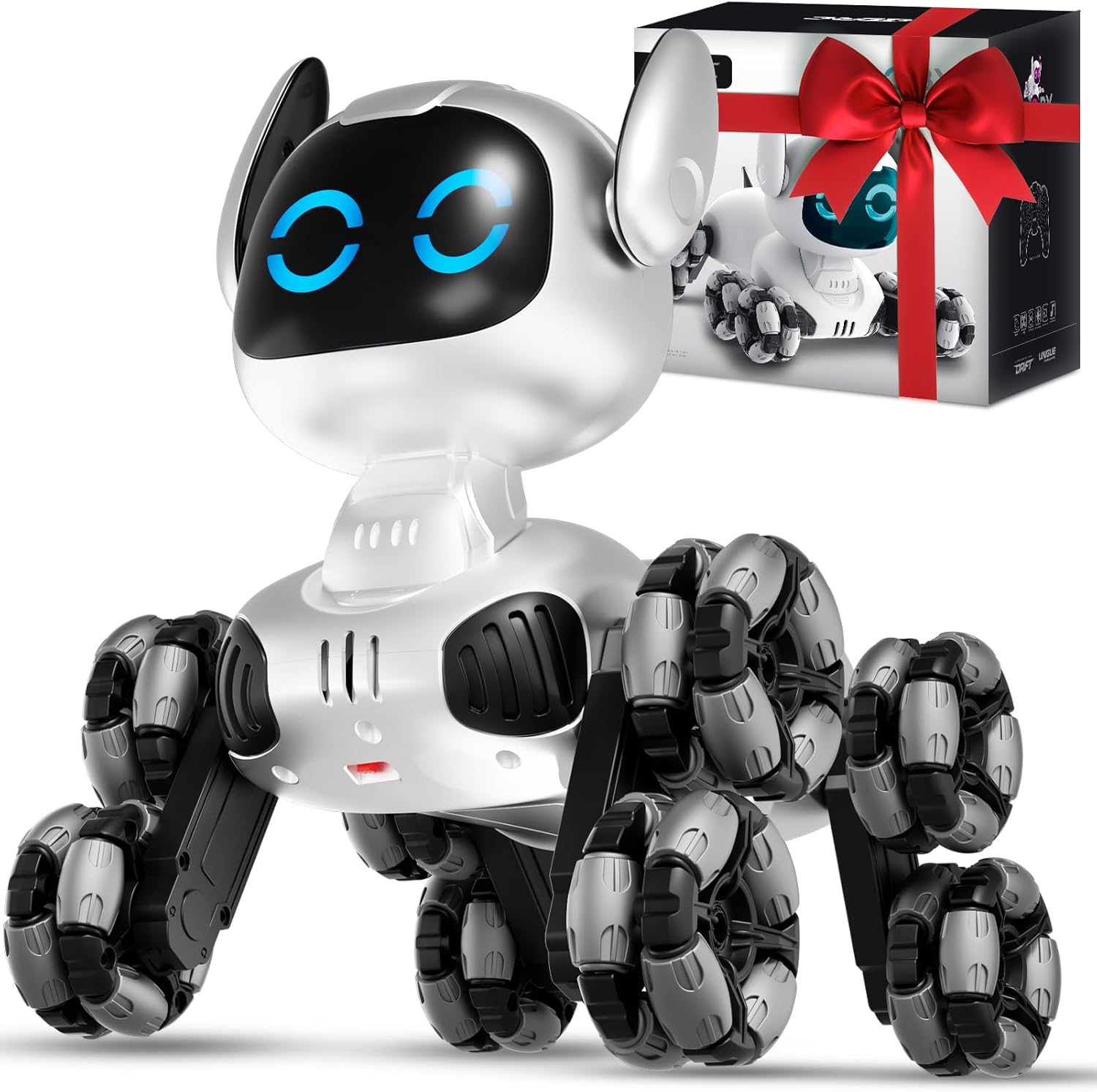
Image: The 4DRC Robot Dog Toy, a white robotic dog with eight multi-directional wheels, accompanied by its remote control and packaging.
Кутуда эмне бар
Кутудан чыгарууда бардык компоненттер бар экенин текшериңиз:
- 1 x Robot Dog
- 1 x Алыстан башкаруу
- 1 x Transmitter (Gesture Control Wristband)
- 1 x Screwdriver
- 1 x USB заряддоо кабели
- 2 x Batteries (Rechargeable)
- 1 x Instruction Manual

Image: A visual representation of all items included in the product package: the robot dog, a multi-function remote, a gesture control wristband, a screwdriver, a USB charging cable, two rechargeable batteries, and the instruction manual.
Жайгашуу
1. Батареяны орнотуу жана кубаттоо
- Робот ит батареясы: Locate the battery compartment on the underside of the robot dog. Use the provided screwdriver to open it. Insert one of the rechargeable batteries, ensuring correct polarity. Close the compartment securely.
- Заряддоо: Connect the rechargeable battery to the USB charging cable. Plug the USB end into a compatible USB power source (e.g., computer, wall adapter). The indicator light on the cable will show charging status.
- Алыстан башкаруу батареялары: The multi-function remote control requires AAA batteries (not included). Open the battery compartment on the back of the remote and insert the batteries, observing polarity.
- Gesture Control Wristband Battery: The gesture control wristband uses a rechargeable battery (included). Charge it using its dedicated charging port and cable if necessary.

Сүрөт: жарылган view of the robot dog's internal mechanics, highlighting the powerful motor, universal wheels, and posture adjustment mechanisms. This image also shows the location for battery insertion.
2. Pairing the Remote Controls
- Ensure both the robot dog and the remote controls have sufficient power.
- Turn on the robot dog using the power switch. Its eyes will blink rapidly, indicating it is searching for a signal.
- Turn on your preferred remote control (either multi-function or gesture control). The indicator light on the remote will blink.
- Once paired, the robot dog's eyes and the remote's indicator light will blink slowly or remain solid, confirming a successful connection. If pairing fails, turn off all devices and repeat the process.
Иштөө нускамалары
1. Multi-Function Remote Control
Use the joysticks and buttons for precise control:
- Movement Joysticks: Control forward, backward, left, and right movements.
- Stunt Buttons: Activate various pre-programmed stunts (e.g., 360° spins, push-ups, sitting).
- Музыка баскычы: Play different musical tunes.
- Жарык баскычы: Toggle the robot's eye lights on/off or change expressions.
- Auto-Demonstration Button: Press the central play button to initiate an automatic sequence of movements and stunts.
2. Gesture Control Wristband
Wear the wristband and use hand movements to control the robot dog:
- Алдыга артка: Tilt your hand forward or backward.
- Сол оң: Tilt your hand left or right.
- Stunt Activation: Press and hold the thumb button on the wristband while performing specific hand gestures to trigger stunts.

Image: The 4DRC Robot Dog Toy in action, showcasing both the traditional multi-function remote control and the innovative gesture control wristband being used simultaneously.
3. Interactive Touch Sensor
The robot dog responds to touch on its head:
- Бир жолу таптоо: Tap its head once to change its eye expressions, accompanied by lights and music.
- Эки жолу таптоо: Tap its head twice to activate the automatic demonstration mode, where it performs a series of spins, drifts, and tricks.

Image: A hand gently touching the head of the 4DRC Robot Dog Toy, illustrating its interactive touch sensor feature with flickering eyes and musical notes indicating a response.

Image: A close-up of the 4DRC Robot Dog Toy's head, showing a display of various eye expressions that change with interaction.
4. Movement Forms & Stunts
The 8-wheel drive system allows for diverse movements and stunts:
- 8 дөңгөлөктүү жетек: Glides effortlessly across various surfaces including floors, grass, and carpet.
- 360° айлануу: Perform full rotations left or right.
- Альпинизм: Front-wheel climbs over small obstacles; rear-wheel climbs up toy ramps.
- Lateral Drifts: Execute cool sideways movements.
- Pre-programmed Movements: Includes actions like Push-up, Sit down, Twist waist, Dance, Wiggle butt, Attention, Tumbling, and Crawl.

Image: A visual guide illustrating eight different forms of movement and stunts the robot dog can perform, including push-up, sit down, twist waist, dance, wiggle butt, attention, tumbling, and crawl.

Image: The 4DRC Robot Dog Toy demonstrating its versatility across multiple scenarios and terrains, including grass, carpet, and a simulated highway, highlighting its adaptability.
5. Parent-Child Interaction
The robot dog is designed to foster interaction:
- Encourage children to use both remote controls and the touch sensor to engage with the robot.
- Set up obstacle courses or create scenarios for the robot to perform, enhancing imaginative play.

Image: A collage showing various parent-child interactions with the robot dog, including remote control play, touch sensing, and watch sensing, emphasizing its interactive nature.
6. Расмий продукт Video
Video: An official product video from 4DRC demonstrating the Remote Control Robot Dog's features and capabilities.
Техникалык тейлөө
- Тазалоо: Use a soft, dry cloth to wipe down the robot dog. Avoid using water or harsh chemicals.
- Сактагыч: Store the robot dog and its accessories in a cool, dry place away from direct sunlight when not in use.
- Батареяга кам көрүү: Remove batteries from the remote control if storing for extended periods. Fully charge rechargeable batteries before storage and periodically to maintain battery health.
Проблемаларды чечүү
- Робот жооп бербей жатат:
- Ensure batteries are fully charged and correctly installed in both the robot and remote.
- Verify that the remote control is properly paired with the robot dog.
- Check for any obstructions in the robot's wheels or joints.
- Батарейканын кыска мөөнөтү:
- Ар бир колдонуудан мурун батарейкалардын толук заряддалганын текшериңиз.
- Reduce continuous high-intensity play to extend battery duration.
- Үзгүлтүксүз башкаруу:
- Ensure there are no strong interference sources nearby (e.g., other RC devices, Wi-Fi routers).
- Maintain a clear line of sight between the remote and the robot.
Техникалык шарттар
| Өзгөчөлүк | Деталь |
|---|---|
| Продукциянын өлчөмдөрү | 8.27 x 8.66 x 6.89 дюйм |
| Элемент Салмагы | 2.2 фунт |
| Элемент моделинин номери | Y9-white |
| Өндүрүүчүнүн сунуш кылган курагы | 8 жаш жана андан жогору |
| Батареялар | 2 C batteries required (included) for robot; AAA batteries for remote (not included). |
| Өндүрүүчү | 4DRC |
Кепилдик жана колдоо
For warranty information, technical support, or customer service inquiries, please refer to the contact details provided in the product packaging or visit the official 4DRC webсайт.
Webсайт: 4DRC Official Store
Тектеш документтер - Y9-white
 |
4DRC 4D-FIO квадрокоптер колдонуучусунун колдонмосу жана колдонуу боюнча нускамалар Бул колдонуучу колдонмосунда 4DRC 4D-FIO квадрокоптери үчүн кеңири колдонуу боюнча нускамалар камтылган. 14 жаштан жогорку курактагылар үчүн ылайыктуу, GPS менен жабдылган бул дрондун орнотуусу, учууну башкаруу элементтери, колдонмонун функциялары, коопсуздук көрсөтмөлөрү жана бузулууларды оңдоо жөнүндө билип алыңыз. |
 |
4DRC 4D-M3 Quadcopter иштетүү боюнча нускамалар жана колдонмо 4DRC 4D-M3 Quadcopter үчүн комплекстүү эксплуатациялоо нускамалары жана жол көрсөткүчү, орнотууларды, учууларды башкарууну, колдонмону колдонууну жана көйгөйлөрдү аныктоону камтыйт. |
 |
4DRC 4D-F12 Quadcopter иштетүү нускамалары 4DRC 4D-F12 Quadcopter үчүн комплекстүү эксплуатациялоо нускамалары жана колдонуучу нускамасы, орнотууларды, учуу операцияларын, колдонмону башкарууну жана коопсуздук эрежелерин камтыйт. |
 |
4DRC 4D-V4 квадрокоптер колдонуучусунун колдонмосу жана колдонуу боюнча нускамалар 4DRC 4D-V4 квадрокоптери үчүн кеңири колдонуучу колдонмосу, анда дрон учкучтары үчүн деталдуу эксплуатациялык көрсөтмөлөр, орнотуу боюнча көрсөтмөлөр, учууну башкаруу элементтери, коопсуздук эскертүүлөрү жана мүчүлүштүктөрдү оңдоо боюнча кеңештер камтылган. |
 |
4DRC 4D-V14 WiFi Version Quadcopter иштетүү нускамалары 4DRC 4D-V14 WiFi Version Quadcopter үчүн комплекстүү иштетүү нускамалары, орнотууларды, учуу операцияларын, алыстан башкаруу функцияларын жана APP колдонууну камтыйт. |
 |
4DRC 4D-V4 Quadcopter иштетүү нускамалары 4DRC 4D-V4 Quadcopter үчүн комплекстүү иштетүү нускамалары, анын ичинде орнотуу, алыстан башкаруу, APP башкаруу жана коопсуздук көрсөтмөлөрү. |