Introduction
This manual provides detailed instructions for the setup, operation, maintenance, and troubleshooting of your Greadio Boombox CD Player Alarm Clock. Please read this manual thoroughly before using the product to ensure proper function and longevity.

Image: The Greadio Boombox CD Player Alarm Clock, showcasinанын компакттуу дизайны жана интеграцияланган функциялары.
The Greadio Boombox is a versatile 12-in-1 digital clock CD boombox featuring CD playback, alarm clock functions, Bluetooth connectivity, white noise generation, remote control, FM radio, AUX input, TF card slot, USB playback, and a dimmable large LCD screen. It is powered by either AC or a built-in 5000mAh rechargeable battery.

Image: An illustration highlighting the 12-in-1 features of the Greadio Boombox, including CD Player, Bluetooth 5.1, Stereo Sound, Alarm Clock, Remote Control, White Noise, Rechargeable 5000mAh battery, FM Radio, USB, TF Card, AUX-In, and Dimmer.
Жайгашуу
Аппаратты кубаттандыруу
The Greadio Boombox offers two power options: AC power for indoor use and battery power for portability.
- AC кубаттуулугу: Connect the provided AC adapter to the DC IN port on the unit and plug the other end into a standard wall outlet.
- Батарея кубаттуулугу: The unit has a built-in 5000mAh rechargeable lithium-ion battery. For extended outdoor use, six C-size batteries (not included) can also be inserted into the battery compartment. Ensure correct polarity when inserting C batteries.

Image: Two options for power supply are shown: the boombox connected to an AC outlet for indoor use, and the boombox with six C-size batteries for portable outdoor use.
Setting the Clock and Alarms
The boombox features a large dimmable LCD clock display and dual independent alarms.
- Орнотуу убактысы: Refer to the specific buttons on the unit (usually 'Time Set' or 'Clock') and use the navigation buttons to adjust hours and minutes.
- Ойготкучтарды орнотуу: The unit supports two independent alarms (Alarm 1 and Alarm 2). Press the 'Alarm' button to select an alarm, then use navigation buttons to set the desired wake-up time.
- Ойготкучтун рингтондору: Customize alarm ringtones with 5 modes: FM radio, white noise, CD, USB, or any song from a TF card. Select your preferred source during alarm setup.
- Чырым Function: A 9-minute snooze function is available. Press the 'Snooze' button when the alarm sounds to temporarily silence it.
- Дисплейдин күңүрткүсү: Adjust the brightness of the LCD display using the 'Dimmer' function to suit your preference, especially for nighttime viewing.
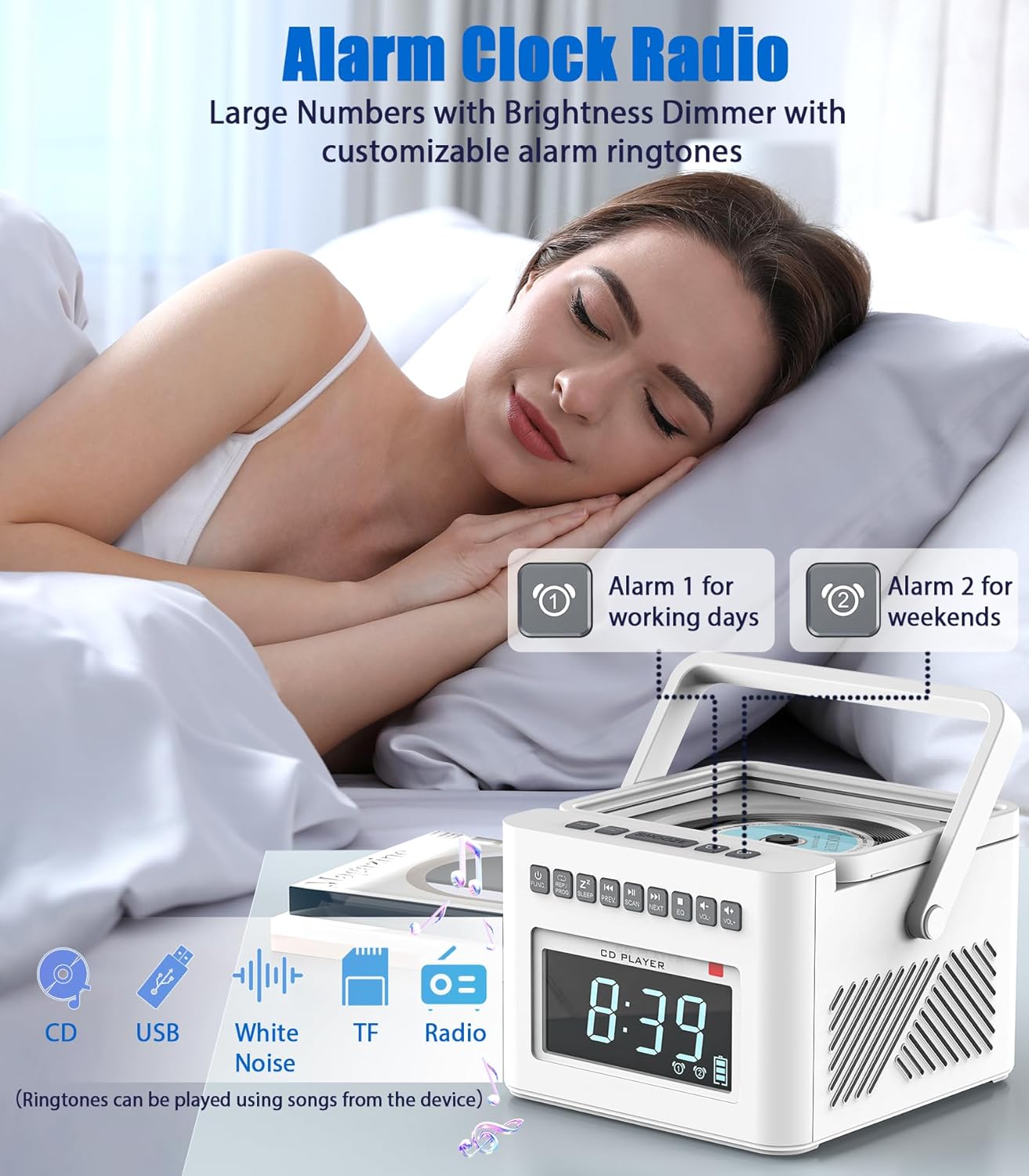
Image: A person sleeping peacefully with the Greadio Boombox on a nightstand, illustrating the alarm clock features including dual alarms (for working days and weekends) and customizable ringtones from CD, USB, White Noise, TF, or Radio.
Иштөө нускамалары
CD ойноткучтун иштеши
Boombox CD, CD-R жана CD-RW форматтарын колдойт.
- CD бөлүктүн капкагын ачыңыз.
- CDди этикеткасы жогору каратып кой.
- CD бөлүктүн капкагын жабыңыз.
- Press the 'MODE' or 'FUNC' button to select CD mode.
- Press the 'PLAY/PAUSE' button to start playback.
- Use the 'NEXT' and 'PREV' buttons to skip tracks.
- Press the 'STOP' button to stop playback.
- Utilize 'REPEAT' or 'PROG' buttons for normal, single cycle, full cycle, or random play functions.
Bluetooth байланышы
The unit functions as both a Bluetooth transmitter and receiver (Bluetooth 5.1).
- Bluetooth алуучу режими: Press the 'MODE' or 'FUNC' button to select Bluetooth mode. The display will show 'BLUE'. On your phone, tablet, or computer, search for 'Greadio Boombox' and pair. You can now stream audio from your device to the boombox.
- Bluetooth өткөргүч режими: In CD, USB, TF, or FM mode, activate the Bluetooth transmission function (refer to specific button, usually a dedicated Bluetooth TX button or long-press of a mode button). The boombox can then stream its audio to wireless headphones, earphones, or Bluetooth speakers.
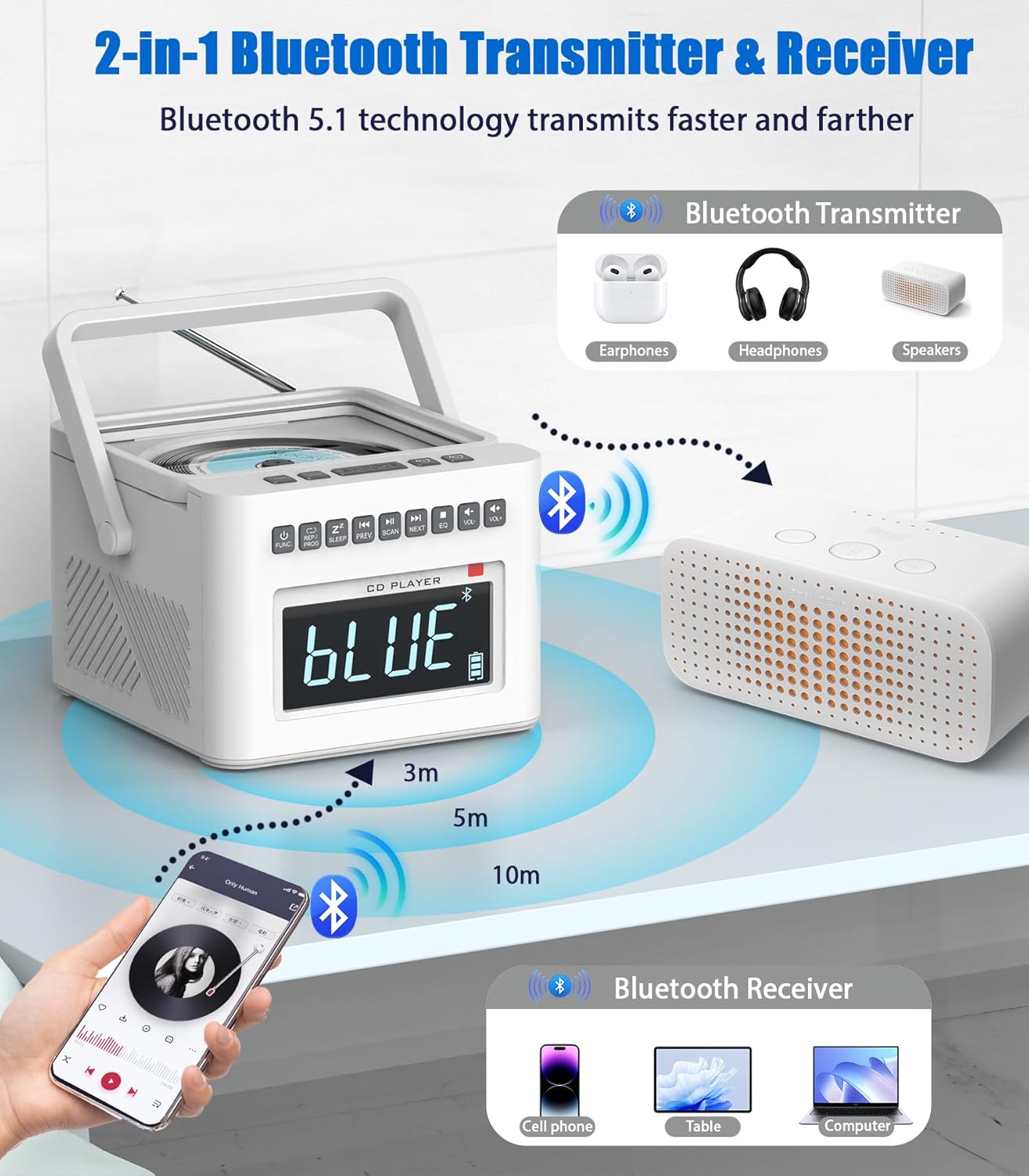
Image: A diagram illustrating the Bluetooth 5.1 capabilities, showing the boombox receiving audio from a smartphone (Bluetooth Receiver) and transmitting audio to headphones or speakers (Bluetooth Transmitter).
FM радиосунун иштеши
The boombox includes an FM radio tuner.
- Жакшыраак кабыл алуу үчүн телескоптук антеннаны узартыңыз.
- Press the 'MODE' or 'FUNC' button to select FM Radio mode.
- Press the 'SCAN' button to automatically scan and save available FM stations.
- Use the 'NEXT' and 'PREV' buttons to manually tune or select saved stations.
USB жана TF карталарын ойнотуу
The unit supports playback from USB drives and TF (MicroSD) cards.
- USB портуна USB дискти же TF картанын уячасына TF картасын салыңыз.
- Press the 'MODE' or 'FUNC' button to select USB or TF mode.
- Түзмөк автоматтык түрдө шайкеш келген аудиону ойнотууну баштайт fileс (MP3/WMA).
- Use the 'NEXT', 'PREV', 'PLAY/PAUSE', and 'STOP' buttons for control.
AUX киргизүү
Connect external audio devices using the AUX input.
- 3.5 мм аудио кабелдин бир учун (кошулмага кирбейт) бумбокстогу AUX IN портуна туташтырыңыз.
- Connect the other end to the headphone jack or audio output of your external device (e.g., smartphone, MP3 player).
- Press the 'MODE' or 'FUNC' button to select AUX mode.
- Тышкы түзмөгүңүздөн ойнотууну көзөмөлдөө.

Image: A collage demonstrating the various playback modes: FM Radio, USB, TF Card, and AUX-In, showing users enjoying music through different sources.
Ак ызы-чуу машина
The boombox includes 8 digitally recorded relaxing sound effects.
- Press the 'White Noise' button (or cycle through modes until 'White Noise' is selected).
- Use the 'NEXT'/'PREV' buttons to cycle through the 8 available sounds: white noise, thunder, birds chirping, rain, summer nights, streams, and lullabies (3 variations).
- Автоматтык өчүрүү таймери: Set a sleep timer (10-90 minutes) to automatically turn off the white noise or other audio playback. This is typically done by pressing a 'Sleep' or 'Timer' button repeatedly to cycle through time options.

Image: An illustration highlighting the 8 white noise sounds (Lullabies, Water Stream, Cricket, Thunder Rain, Rainstorm, Brook Bird) and the 5000mAh battery capacity, suggesting improved sleep quality.
Алыстан башкаруу
The included remote control allows for convenient operation from a distance. Functions typically include Power On/Off, Mode selection, Play/Pause, Skip/Scan, Volume Up/Down, Alarm settings, and Sleep Timer.
Наушник уясы
For private listening, plug 3.5mm headphones into the headphone jack on the unit. The built-in speakers will automatically mute.
Техникалык тейлөө
Тазалоо
- Тазалоодон мурун ар дайым аппаратты кубат булагынан сууруп алыңыз.
- Сырткы беттерди сүртүү үчүн жумшак, кургак чүпүрөктү колдонуңуз.
- өжөр белгилери үчүн, жеңил гampкездемени суу же жумшак, абразивдүү эмес тазалоочу каражат менен сүртүңүз. Катуу химиялык заттарды же абразивдүү материалдарды колдонбоңуз.
- Keep the CD lens clean using a specialized CD lens cleaner disc.
Батареяга кам көрүү
- To maximize the lifespan of the built-in 5000mAh lithium-ion battery, avoid fully discharging it frequently.
- If storing the unit for an extended period, charge the battery to approximately 50% before storage and recharge every few months.
- Remove C-size batteries if the unit will not be used for a long time to prevent leakage.
Проблемаларды чечүү
| Көйгөй | Мүмкүн себеп | Чечим |
|---|---|---|
| Күч жок | AC adapter not connected; Battery depleted; C batteries inserted incorrectly or depleted. | Ensure AC adapter is securely connected. Charge the built-in battery. Check C battery polarity and replace if necessary. |
| CD ойнобой жатат | CD inserted incorrectly; CD scratched/dirty; Unit not in CD mode. | Ensure CD is label side up. Clean or replace CD. Select CD mode using 'MODE' or 'FUNC' button. |
| Bluetooth туташпай жатат | Unit not in Bluetooth mode; Device too far; Pairing failed. | Select Bluetooth mode. Ensure device is within 32ft range. Delete previous pairing and re-pair. |
| FM радиосун кабыл алуу начар | Антенна узартылган эмес; Алсыз сигнал. | Телескопиялык антеннаны толугу менен сунуңуз. Түзмөктүн ордун башка жакка буруп көрүңүз. |
| Сигнал чыкпай жатат | Alarm not set; Volume too low; Alarm turned off. | Verify alarm time and activation. Increase volume. Ensure alarm is enabled. |
Техникалык шарттар
- Модел: B0FDGC47XX
- Бренд: Greadio
- Электр камсыздоо: AC adapter (included) or 6 x C batteries (not included)
- Ички батарея: 5000 мАч кайра заряддалуучу литий-иондук
- Playback Time (Internal Battery): Bluetooth: up to 11 hours; TF/USB: up to 10 hours; CD: up to 5 hours; FM: up to 4.5 hours
- CD шайкештиги: CD, CD-R, CD-RW
- Bluetooth версиясы: 5.1 (Transmitter & Receiver)
- Bluetooth диапазону: 32 фут (10 метр) чейин
- Аудио киргизүү каражаттары: AUX-In (3.5mm), USB, TF Card
- Аудио чыгаруу: Наушник уячасы (3.5 мм)
- Баяндамачылар: Built-in Dual Speakers (2W*2)
- Ойготкучтун өзгөчөлүктөрү: Dual Alarms, 9-minute Snooze, 5 customizable ringtone sources
- Ак ызы-чуу үндөр: 8 digitally recorded sounds (white noise, thunder, birds chirping, rain, summer nights, streams, 3 lullabies)
- Уйку таймери: 10-90 мүнөт
- Дисплей: Large Dimmable LCD
Кепилдик жана колдоо
For product support, troubleshooting beyond this manual, or warranty inquiries, please contact Greadio customer service. You can typically find contact information on the Greadio official website or through the retailer where the product was purchased. Please retain your proof of purchase for any warranty claims.
While a specific warranty period is not detailed in this manual, standard return policies (e.g., 30-day return window) may apply through your retailer. Always refer to the terms and conditions provided at the time of purchase.
зыярат кылыңыз Amazonдагы Greadio дүкөнү көбүрөөк маалымат жана продукт жаңыртуу үчүн.


