1. Киришүү
This manual provides detailed instructions for the proper use and maintenance of your OnePlus Buds 4 Wireless Earbuds. Please read this manual thoroughly before using the product to ensure optimal performance and longevity.
Пакеттин мазмуну
Пакетте бардык буюмдар бар экенин текшериңиз:
- OnePlus Buds 4 Earbuds (Left and Right)
- Заряддоо кутусу
- USB-C заряддоо кабели
- Multiple Ear Tip Sizes (S, M, L)
- Колдонуучунун Колдонмосу (бул документ)

Image: Contents of the OnePlus Buds 4 retail package, showing the earbuds, charging case, USB-C cable, and various ear tip sizes.
2. Орнотуу
2.1 Алгачкы заряддоо
Before first use, fully charge the OnePlus Buds 4 and their charging case. Connect the provided USB-C charging cable to the charging port on the case and a power source. The indicator light on the case will show charging status.
- A full charge provides extended playback time.
- Заряддоо корпусунда 530 мАч батарейканын сыйымдуулугу бар.

Image: OnePlus Buds 4 earbuds in their open charging case, highlighting the extended battery life capability.
2.2 Түзмөк менен жупташтыруу
- Кулакчындардын заряддоо кутучасында жана капкагы ачык экенин текшериңиз.
- Press and hold the function button on the charging case until the indicator light flashes white, indicating pairing mode.
- On your device (smartphone, tablet, etc.), go to Bluetooth settings and select "OnePlus Buds 4" from the list of available devices.
- Once connected, the indicator light will turn solid white or off.
The OnePlus Buds 4 utilize Bluetooth 5.4 for stable connectivity and support Fast Pair for quick setup with compatible Android devices.

Image: OnePlus Buds 4 earbuds and charging case with a Bluetooth signal icon, illustrating stable connectivity via Bluetooth 5.4.
2.3 Кулакчындарды тагынуу
Choose the ear tips that provide the best seal and comfort for your ears. A proper fit is crucial for optimal sound quality and effective Active Noise Cancellation.
- Кулакчындарды кулак каналыңызга акырын киргизиңиз.
- Алар өздөрүн коопсуз жана ыңгайлуу сезгенге чейин аларды бир аз айландырыңыз.
3. Иштөө нускамалары
3.1 Сенсордук башкаруу
The OnePlus Buds 4 feature intuitive touch controls on the stem of each earbud.
| Акция | Функция |
|---|---|
| Single Tap | Музыканы ойнотуу/тындыруу, Чалууга жооп берүү/Аяктоо |
| Эки жолу таптаңыз | Кийинки трек, Чакырууну четке кагуу |
| Үч жолу таптаңыз | Мурунку трек |
| Басып кармап туруңуз (Сол/Оң) | Switch Noise Control Mode (ANC/Transparency) |
| Swipe Up/Down (Stem) | Үндү тууралоо |

Image: Close-up of OnePlus Buds 4 earbuds showing the area for volume swipe control on the stem.
3.2 Активдүү ызы-чууну жокко чыгаруу (ANC) жана ачыктык режими
The earbuds feature advanced Active Noise Cancellation to reduce ambient noise and a Transparency Mode to allow you to hear your surroundings.
- Активдүү ызы-чууну жокко чыгаруу: Reduces external sounds for an immersive listening experience.
- Ачыктык режими: Amplifies ambient sounds, allowing you to stay aware of your environment without removing the earbuds.
- Адаптивдүү режим: Intelligently switches between ANC and Transparency modes based on your environment.
Switch between these modes by pressing and holding the touch area on either earbud.

Image: A person wearing OnePlus Buds 4 earbuds outdoors, illustrating the effect of Active Noise Cancellation.
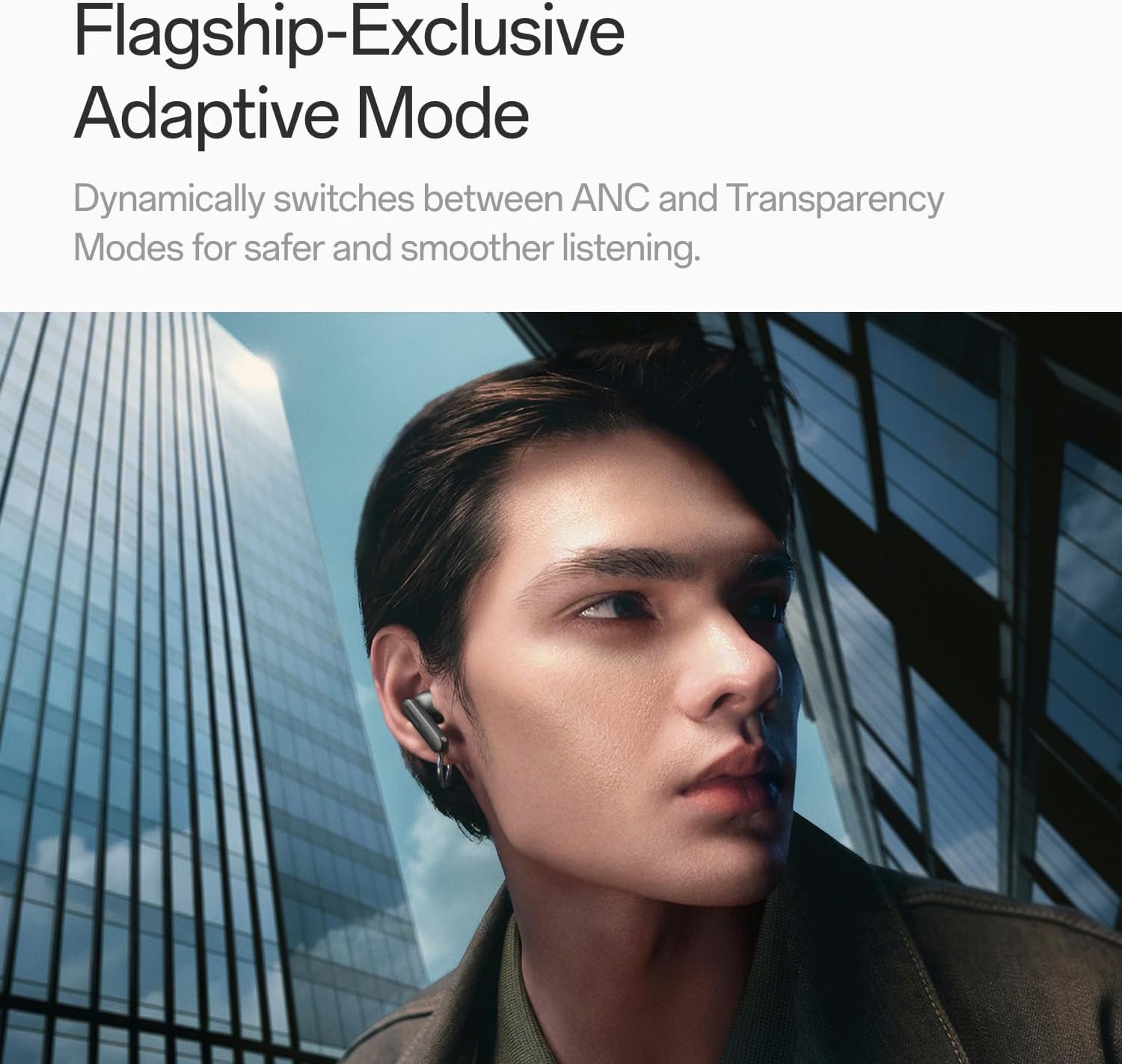
Image: A person wearing OnePlus Buds 4 earbuds in a city setting, highlighting the Adaptive Mode feature.
3.3 Аудио өзгөчөлүктөрү
The OnePlus Buds 4 deliver high-quality audio with advanced technologies.
- 11 мм аудио драйверлери: Provide balanced, true-to-life acoustics.
- Hi-Res Audio & LHDC 5.0: For detailed, studio-grade sound reproduction.
- Immersive 3D Spatial Audio: Creates a richer, surrounding sound experience.

Image: OnePlus Buds 4 earbuds with Hi-Res Audio and LHDC 5.0 branding, emphasizing advanced audio capabilities.

Image: OnePlus Buds 4 earbuds depicted with a visual effect suggesting immersive 3D Spatial Audio.

Сүрөт: жарылган view diagram of a OnePlus Buds 4 earbud, highlighting its internal sound components and drivers.
3.4 Чалуу өзгөчөлүктөрү
The earbuds are equipped with features to enhance call clarity.
- 3-mic AI Call Noise Cancellation: Filters out noise and wind for clear calls in various environments.
- 3x Voice Cancellation: Reduces vocal distractions in noisy settings like cafes or trains.

Image: A person lying down with OnePlus Buds 4 earbuds, representing the effect of voice cancellation for undisturbed listening.
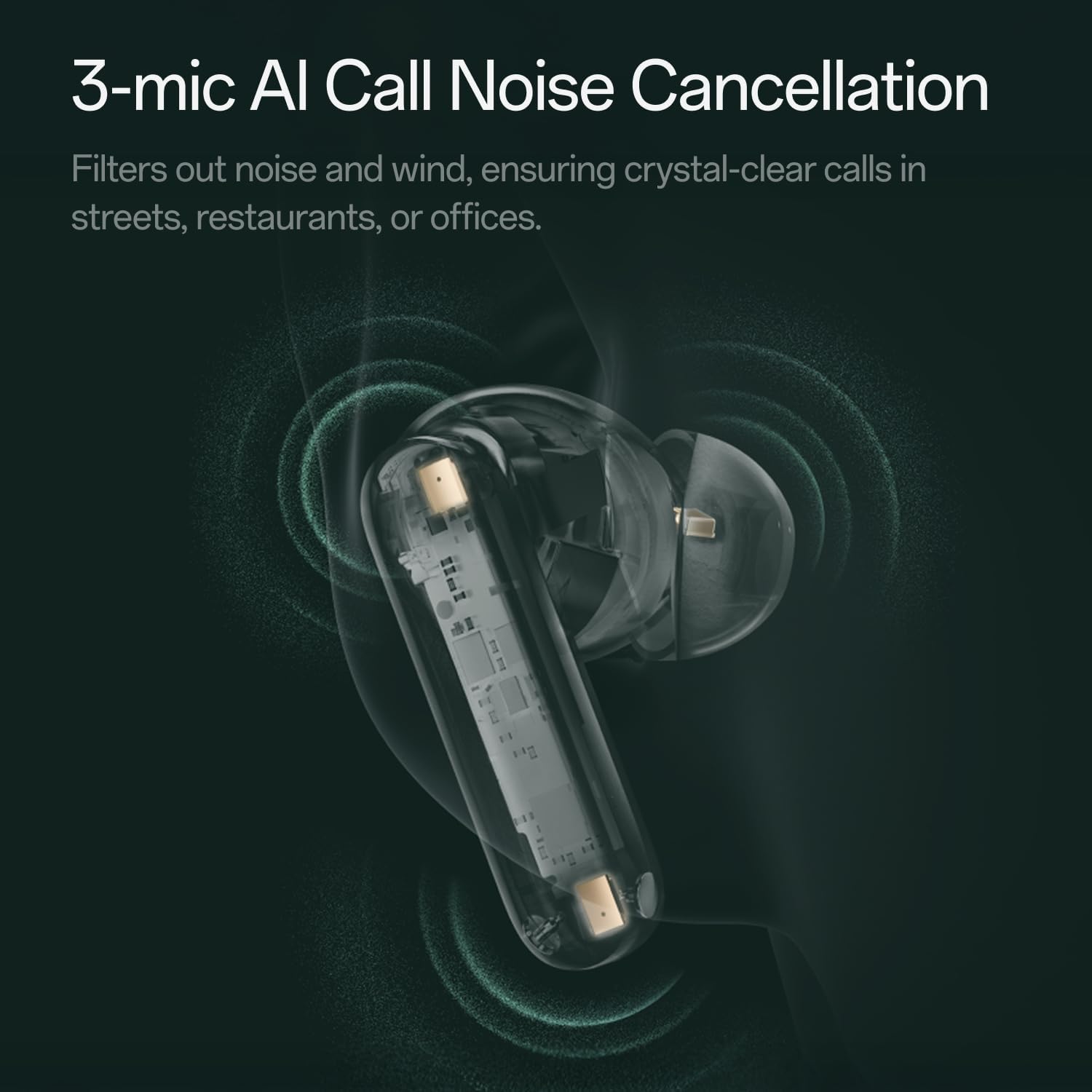
Сүрөт: Ачык view of a OnePlus Buds 4 earbud, highlighting the 3-mic system for AI Call Noise Cancellation.
3.5 Жасалма интеллекттин котормосу
With a compatible OnePlus phone, the earbuds can facilitate real-time conversations in multiple languages.

Image: OnePlus Buds 4 earbuds alongside a smartphone screen demonstrating AI translation functionality.
4. Техникалык тейлөө
4.1 Тазалоо
- Кулакчындарды жана заряддоо кутусун жумшак, кургак, түксүз чүпүрөк менен дайыма тазалап туруңуз.
- Кулак учтарын алып салыңыз жана керек болсо, аларды суу жана жумшак самын менен тазалап, кайра кийерден мурун алардын толук кургап калганын текшериңиз.
- Абразивдүү материалдарды же катуу химиялык заттарды колдонбоңуз.
4.2 Сууга туруктуулук
The OnePlus Buds 4 are water resistant. This means they can withstand splashes and sweat, making them suitable for workouts. However, they are not waterproof and should not be submerged in water.
4.3 Сактоо
Колдонулбаганда, кулакчындарды коргоо жана кубатталган бойдон калуу үчүн аларды кубаттоо кутучасына сактап коюңуз.
5. Кыйынчылыктарды
If you encounter issues with your OnePlus Buds 4, refer to the following common solutions:
5.1 Жупташтыруу маселелери
- Ensure the earbuds are charged and in pairing mode (flashing white light).
- Түзмөгүңүздөгү Bluetooth'ду өчүрүп, күйгүзүңүз.
- Bluetooth жөндөөлөрүндө түзмөктү унутуп, кайра жупташтырууга аракет кылыңыз.
- Кулакчындарды баштапкы абалга келтирип көрүңүз (кайра орнотуу боюнча конкреттүү көрсөтмөлөрдү толук колдонуучу колдонмосунан караңыз).
5.2 Үн маселелери
- Check the earbud fit and try different ear tip sizes.
- Clean the ear tips and speaker meshes to remove any debris.
- Ensure the volume on both your device and earbuds is adjusted correctly.
5.3 Заряддоо маселелери
- Кубаттоочу кабелдин корпуска жана кубат булагына бекем туташтырылганын текшериңиз.
- Кулакчындардагы жана корпустун ичиндеги заряддоо контакттары таза жана тоскоолдуксуз экенин текшериңиз.
- Башка USB-C кабелин же кубат адаптерин колдонуп көрүңүз.
6. Техникалык шарттар
| Өзгөчөлүк | Деталь |
|---|---|
| Модель аты | OnePlus Buds 4 |
| Модель номери | E513A |
| Бренд | OnePlus |
| Түс | Zen Green |
| Кулак жайгаштыруу | Кулакта |
| Форма фактору | Кулакта |
| Noise Control | Активдүү ызы-чууну жокко чыгаруу |
| Аудио драйверинин өлчөмү | 11 миллиметр |
| Аудио драйвер түрү | Динамикалык драйвер |
| Frequency Response | 40 Гц |
| Сезимталдуулук | 100 дБ |
| Импеданс | 18 Ом |
| Байланыш технологиясы | Bluetooth |
| Зымсыз байланыш технологиясы | Bluetooth |
| Bluetooth версиясы | 5.4 |
| Bluetooth диапазону | 33 Фут |
| Башкаруу ыкмасы | тийүү |
| Controller Type | Touch Controls |
| Заряддоо кутусунун кубаттуулугу | 530mAh |
| Сууга туруктуулук деңгээли | Сууга чыдамдуу |
| Элемент Салмагы | 0.15 килограмм (5.3 унция) |
| Камтылган компоненттер | Cable, Charging Case, Eartip, User Manual |
7. Кепилдик жана колдоо
7.1 Өндүрүүчүнүн кепилдиги
The OnePlus Buds 4 are backed by a one-year manufacturer warranty. This warranty covers defects in materials and workmanship under normal use. For specific terms and conditions, please refer to the warranty card included in your product packaging or visit the official OnePlus support webсайт.
7.2 Кардарларды колдоо
For further assistance, technical support, or warranty claims, please contact OnePlus customer service through their official webсайт же продукт документациясында көрсөтүлгөн байланыш маалыматы.
Official OnePlus Store: OnePlus Store on Amazon


