1. Киришүү
This manual provides detailed instructions for the operation and maintenance of your KEPLUG MX9 Sunrise Alarm Clock. This device combines a digital alarm clock, a sunrise simulation wake-up light, a dimmable bedside night light, and a white noise machine with 30 soothing sounds. Please read this manual thoroughly before use to ensure proper functionality and safety.
2. Коопсуздук маалыматы
- Аппараттын туруктуу, жалпак бетке коюлганын текшериңиз.
- Аппаратты сууга же ашыкча нымдуулукка дуушар кылбаңыз.
- Берилген кубат адаптерин жана кабелин гана колдонуңуз.
- Балдар жана үй жаныбарлары жетпеген жерде сактаңыз.
- Аппаратты өз алдынча бөлүүгө же оңдоого аракет кылбаңыз. Тейлөө үчүн квалификациялуу кызматкерлерге кайрылыңыз.
- Аппаратты чагылгандуу бороондордо же узак убакыт бою колдонбогондо электр розеткасынан ажыратыңыз.
3. Пакеттин мазмуну
Пакетте бардык буюмдар бар экенин текшериңиз:
- KEPLUG MX9 Күн чыгыш ойготкуч сааты
- Кубаттуу адаптер
- Электр кабели
- Колдонуучунун Колдонмосу (бул документ)
4. Продукт бүтүп калдыview
Familiarize yourself with the main components and control buttons of your KEPLUG MX9 Sunrise Alarm Clock.

Сүрөт 1: Алдыңкы view of the KEPLUG MX9 Sunrise Alarm Clock, showing the main light dome, digital time display, and control buttons at the base.
The device features a large light dome, a digital time display, and several touch-sensitive buttons for control:
- Ойготкуч баскычы: Used to set and activate alarms.
- Убакыт баскычы: Used to set the current time and 12/24-hour format.
- Тындырма/Жарык баскычы: Activates snooze during an alarm, or turns on/off and adjusts the night light.
- Plus (+) баскычы: Increases values (time, volume, brightness) or navigates options.
- Минус (-) баскычы: Decreases values (time, volume, brightness) or navigates options.
- Музыкалык нота баскычы: Selects soothing sounds or white noise.
5. Орнотуу
5.1 Кубат туташтыруу
- Connect the power cable to the DC input port on the back of the alarm clock.
- Кубат адаптерин стандарттуу электр розеткасына сайыңыз.
- The digital display will illuminate, indicating the device is powered on.
5.2 Учурдагы убакытты орнотуу
- басып, кармап туруңуз Убакыт баскычы for 3 seconds to enter time setting mode. The hour digits will flash.
- колдонуу Плюс (+) or Minus (-) Buttons саатты тууралоо үчүн.
- басыңыз Убакыт баскычы Саатты ырастоо жана мүнөт коюуга өтүү үчүн кайрадан басыңыз. Мүнөт сандары күйүп-өчүп турат.
- колдонуу Плюс (+) or Minus (-) Buttons мүнөттү тууралоо үчүн.
- басыңыз Убакыт баскычы a third time to confirm the minutes and select 12-hour or 24-hour format.
- колдонуу Плюс (+) or Minus (-) Buttons каалаган убакыт форматын тандоо үчүн.
- басыңыз Убакыт баскычы убакытты орнотуу режиминен чыгуу үчүн акыркы жолу.
6. Иштөө нускамалары
6.1 Setting an Alarm (Sunrise Simulation & Sound)
The KEPLUG MX9 allows you to set multiple alarms with customizable sunrise simulation and sound options.

Image 2: Illustration of the sunrise simulation feature, where the light gradually brightens over a set period, mimicking a natural sunrise.
- басыңыз Ойготкуч баскычы to select an alarm slot (e.g., Alarm 1, Alarm 2).
- басып, кармап туруңуз Ойготкуч баскычы for 3 seconds to enter alarm setting mode. The alarm hour digits will flash.
- колдонуу Плюс (+) or Minus (-) Buttons каалаган ойготкуч саатын коюуга.
- басыңыз Ойготкуч баскычы to confirm the hour and set the minutes.
- колдонуу Плюс (+) or Minus (-) Buttons каалаган ойготкуч мүнөттү коюуга.
- басыңыз Ойготкуч баскычы to confirm minutes and set the sunrise duration (15-120 minutes). This is the time before the alarm sound when the light will gradually brighten.
- колдонуу Плюс (+) or Minus (-) Buttons to select the sunrise duration.
- басыңыз Ойготкуч баскычы to confirm duration and select the wake-up sound.
- колдонуу Плюс (+) or Minus (-) Buttons to cycle through the available wake-up sounds (e.g., nature sounds, melodies).
- басыңыз Ойготкуч баскычы to confirm the sound and set the alarm volume.
- колдонуу Плюс (+) or Minus (-) Buttons to adjust the alarm volume (7 levels).
- басыңыз Ойготкуч баскычы one last time to save the alarm settings and activate the alarm. An alarm icon will appear on the display.
6.2 Тындыруу функциясы
Ойготкуч чыкканда, басыңыз Тындырма/Жарык баскычы to activate the snooze function. The alarm will pause for 9 minutes and then sound again. You can snooze multiple times.
6.3 Turning Off an Alarm
To turn off a sounding alarm, press any button other than the Тындырма/Жарык баскычы. To deactivate an alarm completely, press the Ойготкуч баскычы until the alarm icon disappears from the display.
6.4 Night Light / Bedside Lamp Функция
The device can function as a dimmable night light with various colors.

Image 3: The alarm clock used as a bedside lamp, displaying various solid colors and mood lighting options.
- басыңыз Тындырма/Жарык баскычы once to turn on the light.
- басыңыз Тындырма/Жарык баскычы repeatedly to cycle through different solid colors (8 options) and RGB mood lights (4 options).
- To adjust the brightness of the selected light, press and hold the Тындырма/Жарык баскычы, андан кийин колдонуңуз Плюс (+) or Minus (-) Buttons to increase or decrease brightness. Release the Тындырма/Жарык баскычы бүткөндө.
- басып, кармап туруңуз Тындырма/Жарык баскычы жарыкты өчүрүү үчүн дагы.
6.5 White Noise Machine & Soothing Sounds
The device offers 30 soothing sounds for relaxation or sleep aid.

Image 4: Visual representation of the 30 smooth sounds for sleep, including white noise, nature sounds, and lullabies.
- басыңыз Музыкалык нота баскычы to turn on the sound machine. It will start playing the last selected sound.
- басыңыз Музыкалык нота баскычы repeatedly to cycle through the 30 available sounds.
- колдонуу Плюс (+) or Minus (-) Buttons үнүнүн көлөмүн тууралоо.
- To set a timer for the sound playback, press and hold the Музыкалык нота баскычы. The timer options (e.g., 15 min, 30 min, 60 min, continuous) will appear. Use the Плюс (+) or Minus (-) Buttons to select a duration. The sound will automatically turn off after the selected time.
- басып, кармап туруңуз Музыкалык нота баскычы үн аппаратты өчүрүү үчүн дагы.
6.6 Sunset Simulation (Sleep Aid)
The sunset simulation feature gradually dims the light and can play soothing sounds to help you fall asleep.
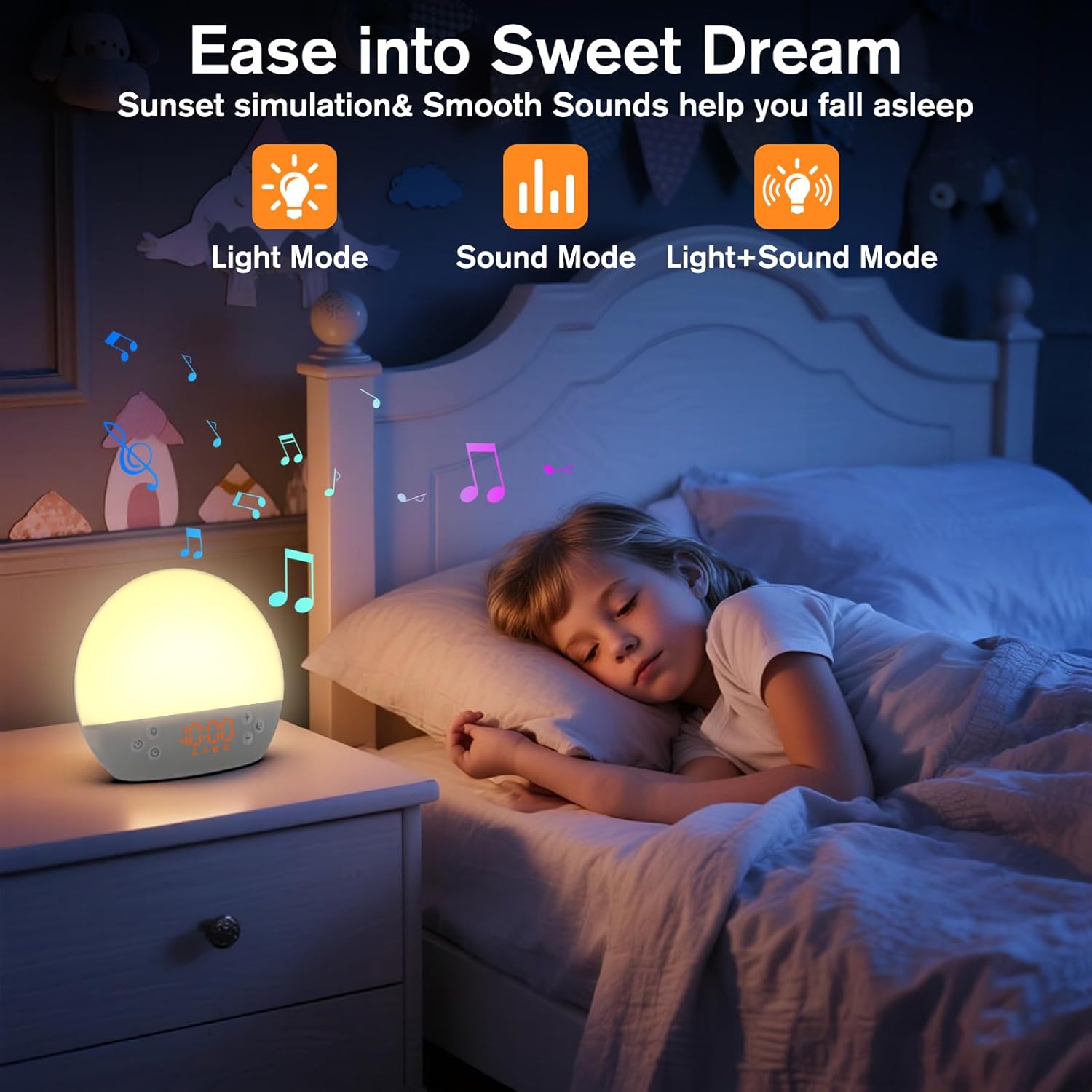
Image 5: The alarm clock in sunset simulation mode, providing a calming light and sound environment to aid sleep.
- To activate sunset simulation, press and hold the Убакыт баскычы until the sunset icon appears.
- колдонуу Плюс (+) or Minus (-) Buttons to set the duration of the sunset simulation (e.g., 15, 30, 60 minutes).
- басыңыз Убакыт баскычы to confirm the duration. You can then choose to have light only, sound only, or both light and sound.
- колдонуу Плюс (+) or Minus (-) Buttons to select the desired mode (Light Mode, Sound Mode, Light+Sound Mode).
- If Light+Sound Mode is selected, you can choose a specific soothing sound and adjust its volume.
- басыңыз Убакыт баскычы again to start the sunset simulation. The light will gradually dim, and sounds will fade out over the set duration.
6.7 Дисплейдин жарыктыгын жөндөө
The brightness of the digital time display can be adjusted to your preference.
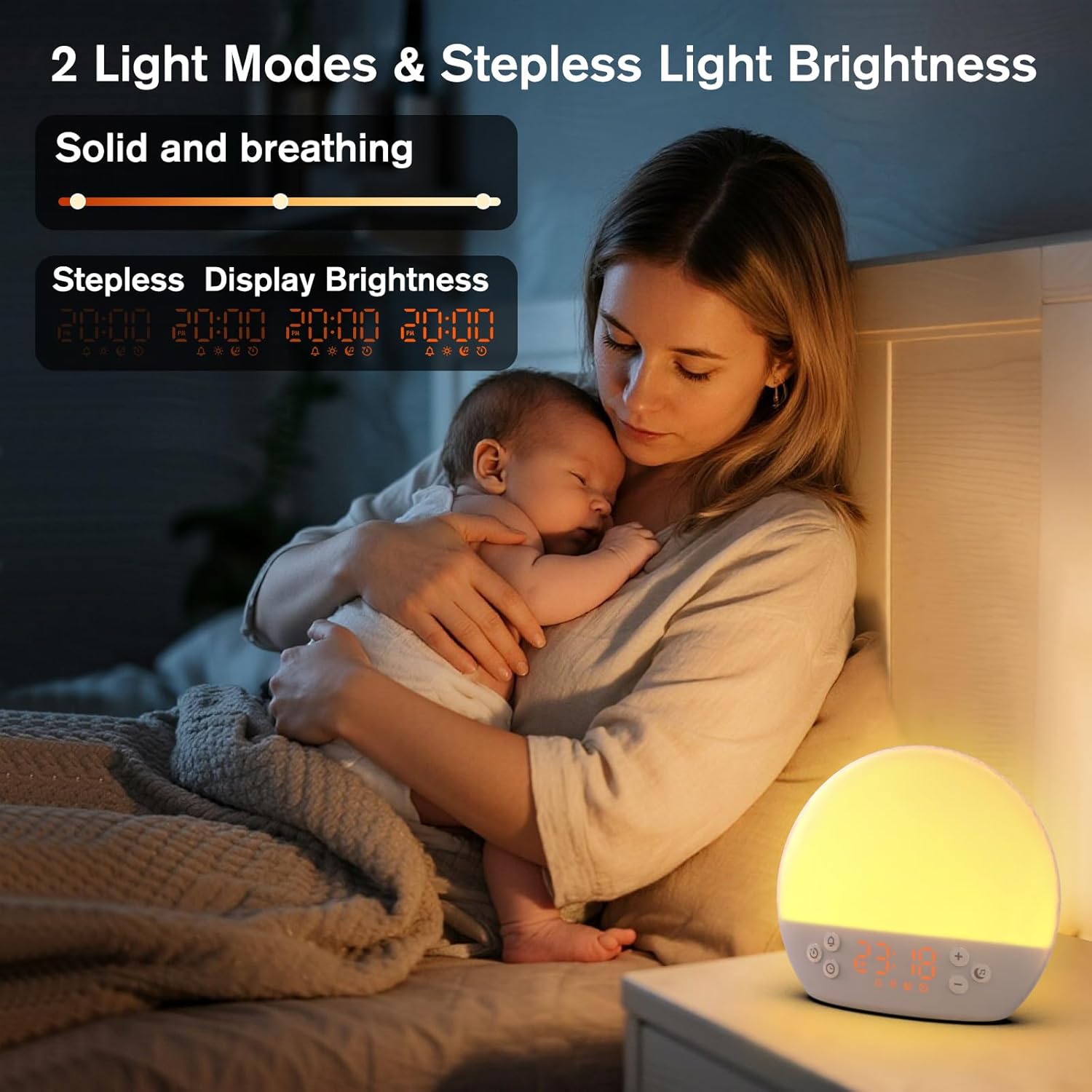
Image 6: The alarm clock demonstrating stepless display brightness adjustment, from very dim to bright.
Дисплей жарыктыгын тууралоо үчүн, баскычын кыска басыңыз Убакыт баскычы (do not hold). Each press will cycle through different brightness levels (e.g., bright, medium, dim, off). Select the level that suits your environment.
7. Техникалык тейлөө
- Тазалоо: Тазалоодон мурун түзмөктү электр кубатынан сууруп коюңуз. Бетин жумшак, кургак чүпүрөк менен сүртүңүз. Абразивдүү тазалоочу каражаттарды же эриткичтерди колдонбоңуз.
- Сактагыч: Узак мөөнөткө колдонулбаса, аппаратты розеткадан сууруп, салкын, кургак жерде сактаңыз.
8. Кыйынчылыктарды
| Көйгөй | Мүмкүн себеп | Чечим |
|---|---|---|
| Түзмөк күйбөйт. | Электр кабели туура эмес туташтырылган же розетка туура эмес. | Электр кабелинин туташуусун текшериңиз. Башка розетканы колдонуп көрүңүз. |
| Ойготкуч угулбайт. | Alarm not activated or volume is too low. | Ensure the alarm icon is visible on the display. Increase alarm volume during setup. |
| Жарык күйбөйт. | Жарык функциясы өчүрүлгөн же жарыктык минималдуу деңгээлге коюлган. | басыңыз Тындырма/Жарык баскычы to turn on. Adjust brightness using Плюс (+) or Minus (-) Buttons while holding the Тындырма/Жарык баскычы. |
| Sounds are not playing. | Sound machine is off or volume is too low. | басыңыз Музыкалык нота баскычы to turn on. Increase volume using Плюс (+) баскыч. |
| Time display is too bright/dim. | Дисплейдин жарыктыгын тууралоо керек. | баскычын кыскача басыңыз Убакыт баскычы to cycle through display brightness levels. |
9. Техникалык шарттар
| Өзгөчөлүк | Деталь |
|---|---|
| Модель аты | MX9 |
| Бренд | KEPLUG |
| Материал | Пластик |
| Түс | Ак |
| Power Source | Электр зымдары |
| Элемент Салмагы | 258 грамм (9.1 унция) |
| Продукциянын өлчөмдөрү | 2.36 x 5.59 x 6.3 дюйм (6 x 14.2 x 16 см) |
| Жарык булактарынын саны | 2 |
| Өзгөчө өзгөчөлүк | Жөндөлүүчү үн |
| Күн чыгышын симуляциялоонун узактыгы | 15-120 мүнөт |
| Тынчтандыруучу үндөр | 30 вариант |
| Сигнализациянын үн деңгээли | 7 деңгээл |
10. Кепилдик жана колдоо
Your KEPLUG MX9 Sunrise Alarm Clock is covered by a standard manufacturer's warranty. For specific warranty details, please refer to the product packaging or contact KEPLUG customer support. If you encounter any issues not covered in the troubleshooting section, or require further assistance, please reach out to our customer service team through the retailer where you purchased the product or visit the official KEPLUG webколдоо байланыш маалыматы үчүн сайт.


