Introduction
Thank you for choosing the Mistral 42" DC Blade Free Fan. This user manual provides essential information for the safe operation, maintenance, and troubleshooting of your new fan. Please read this manual thoroughly before use and retain it for future reference.
Маанилүү коопсуздук нускамалары
Өрт, электр тогуна урунуу жана адамдардын жаракат алуу коркунучун азайтуу үчүн электр шаймандарын колдонууда ар дайым негизги коопсуздук чараларын сактаңыз.
- Бул шайманды колдонуудан мурун бардык нускамаларды окуп чыгыңыз.
- электр менен жабдууну камсыз кылуу voltage шаймандагы рейтинг белгисине дал келет.
- Зымы же сайы бузулган желдеткичти иштетпеңиз.
- Do not place the fan near heat sources or in direct sunlight.
- Иштеп жатканда балдарды жана үй жаныбарларын желдеткичтен алыс кармаңыз.
- Unplug the fan from the power outlet when not in use or before cleaning.
- Желдеткичтин кандайдыр бир тешиктерине манжаларды же бөтөн нерселерди киргизбеңиз.
- Бул шайман тиричиликте гана колдонуу үчүн.
Пакеттин мазмуну
Пакетиңиздин мазмунун текшериңиз. Эгерде кандайдыр бир нерселер жок болсо же бузулса, кардарларды колдоо менен байланышыңыз.
- Mistral 42" DC Blade Free Fan Unit
- Алыстан башкаруу
- AC адаптер
- Колдонуучунун Колдонмосу (бул документ)
Жайгашуу
1. Ассамблея
The Mistral 42" DC Blade Free Fan requires simple assembly.
- Бардык компоненттерди таңгактан кылдаттык менен алып салыңыз.
- Вентилятор базасын туруктуу, тегиз бетке коюңуз.
- Ensure the main fan body is securely seated onto the base.
- Connect the AC adapter to the power input port on the fan, then plug it into a standard electrical outlet.

Сүрөт 1: Алдыңкы view of the Mistral 42" DC Blade Free Fan.
2. Wi-Fi Setup (Mayer Home App)
To utilize the Wi-Fi features and voice control, download the "Mayer Home App" on your smartphone.
- Download the "Mayer Home App" from your device's app store (iOS or Android).
- Register or log in to your Mayer Home account.
- Follow the in-app instructions to add your Mistral fan. This typically involves putting the fan into pairing mode (refer to the app or fan's display for specific instructions) and connecting it to your home Wi-Fi network.
Иштөө нускамалары
Башкаруу панели жана алыстан башкаруу
The fan can be operated using the full touch screen control panel on the unit or the included remote control.

Figure 2: Mistral Fan with Remote Control.
Негизги функциялар:
- Күйгүзүү/өчүрүү: Башкаруу панелиндеги же пульттагы кубат баскычын басыңыз.
- желдеткич ылдамдыгы: Adjust through 12 fan speeds using the '+' and '-' buttons.
- Режимдер: Cycle through 5 modes: Fresh, Nature, Sleep, Baby, and Smart. Each mode adjusts airflow patterns for different comfort levels.
- Термелүү: Activate left-right oscillation with options for 30, 60, or 120 degrees.
- Таймер: Set a pre-set on/off timer for up to 12 hours.
Акылдуу башкаруу (Wi-Fi жана үн)
Once connected to the Mayer Home App, you can control your fan remotely and integrate with voice assistants.
- Mayer Home App: Control all fan functions from your smartphone, including power, speed, modes, oscillation, and timer settings.
- Үн менен башкаруу: The fan works with Google Home and Amazon Alexa. Link your Mayer Home account to your voice assistant app and use voice commands to operate the fan (e.g., "Hey Google, turn on the fan," "Alexa, set fan speed to 5").
Техникалык тейлөө
Үзгүлтүксүз тазалоо жана тейлөө желдеткичиңиздин оптималдуу иштешин жана узак иштөөсүн камсыз кылат.
Желдеткичти тазалоо
- Тазалоодон мурун ар дайым желдеткичти розеткадан сууруп алыңыз.
- жумшак колдонуу, damp вентилятордун сырткы беттерин сүртүүчү чүпүрөк. Абразивдүү тазалагычтарды же эриткичтерди колдонбоңуз.
- For the Hepa 13 filter located at the sides, gently remove it and clean according to the instructions provided with the filter or by gently vacuuming. Do not wash the filter with water.
- Желдеткичти кайра кошуудан мурун, бардык бөлүктөрү толугу менен кургак экенин текшериңиз.
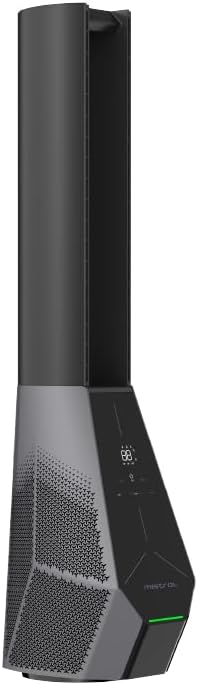
3-сүрөт: Каптал view showing the filter location.
Проблемаларды чечүү
Эгерде сиз желдеткичиңиз менен көйгөйлөргө туш болсоңуз, төмөнкү кеңири таралган көйгөйлөрдү жана чечимдерди караңыз.
| Көйгөй | Мүмкүн себеп | Чечим |
|---|---|---|
| Желдеткич күйбөйт. | Электр энергиясы жок; Кубат баскычы басылган жок. | Check if the power cord is securely plugged in. Press the power button on the unit or remote. |
| Пульт иштебей жатат. | Батареялар өлүп калган же туура эмес салынган; Пульт менен желдеткичтин ортосундагы тоскоолдук. | Replace batteries. Ensure there is a clear line of sight to the fan's receiver. |
| Wi-Fi туташуусу ишке ашпай калды. | Incorrect Wi-Fi password; Fan too far from router; Router issues. | Double-check Wi-Fi password. Move fan closer to router. Restart your Wi-Fi router. Ensure you are connecting to a 2.4GHz network. |
| Желдетүүчү адаттан тыш үн чыгарат. | Obstruction in air intake/outlet; Fan not on a stable surface. | Unplug and check for any foreign objects. Place the fan on a flat, stable surface. |
Техникалык шарттар
| Өзгөчөлүк | Деталь |
|---|---|
| Модел | MBFAP4236DRW |
| Тtage | 100-240V~ 50/60Hz |
| Ватtage | 36 Вт |
| Аба көлөмү | 35 м³ / мин |
| Макс аба агымы | 15 м/с |
| Продукциянын өлчөмдөрү (L*W*H) | 237.5 * 300 * 1067 мм |
| Таза Салмак | 5.4 сом |
| Мотор түрү | DC Brushless мотору |
| Control | Full Touch Screen Control Panel, Remote, Wi-Fi (Mayer Home App), Voice Control (Google Home & Amazon Alexa) |
| Чыпка түрү | Hepa 13 Filter |
| Термелүү | 30/60/120 Degree Left-Right |
| Таймер | 12 Hours Pre-set On/Off |
Кепилдик маалымат
The Mistral 42" DC Blade Free Fan (Model: MBFAP4236DRW) comes with a comprehensive warranty:
- 1 жыл general warranty on the appliance.
- Кошумча 3 жыл warranty specifically for the motor only.
Please retain your proof of purchase for warranty claims. The warranty covers manufacturing defects and malfunctions under normal use. It does not cover damage caused by misuse, accidents, unauthorized repairs, or normal wear and tear.
Кардарларды колдоо
For any inquiries, technical assistance, or warranty claims, please contact Mistral customer support.
Webсайт: www.mistral.com.sg
Электрондук почта: support@mistral.com.sg
When contacting support, please have your product model number (MBFAP4236DRW) and proof of purchase ready.


