Introduction
The Nobsound TUBE-T4C Mini HiFi Tube Preamp is designed to enhance your audio experience by adding warmth and depth to your music. This Class A vacuum tube preamplifier features precise bass and treble controls, allowing you to fine-tune your sound to personal preferences. Its compact and durable design makes it suitable for various home audio and desktop setups. The device supports swappable tubes for sound customization and offers broad compatibility with standard RCA input and output connections.

Figure 1: Nobsound TUBE-T4C Mini HiFi Tube Preamp in a typical home audio setup, showcasing its compact size and glowing tubes.
Кутуда эмне бар
- 1x TUBE-T4C Preamp
- 2x 6J5 Tubes
- 1x DC 5V кубат адаптери
- 1x Колдонуучунун колдонмосу

Figure 2: All items included in the Nobsound TUBE-T4C package: the preamp unit, two 6J5 tubes, a power adapter, and the user manual.
Продукт бүттүview
Алдыңкы панелдин башкаруу элементтери
- TRE (Treble Knob): Жогорку жыштыктарды тууралайт.
- BASS (Bass Knob): Төмөн жыштыктарды тууралайт.
- /VOL (Power Switch / Volume Knob): Turns the unit on/off and controls the overall volume.
Арткы панелдик байланыштар
- DC 5V IN (>=2A): DC 5V адаптер үчүн кубат киргизүү.
- RCA IN (Right/Left): Standard stereo RCA input for audio sources.
- RCA OUT (Right/Left): Standard stereo RCA output to power ampкөтөргүчтөр же активдүү спикерлер.
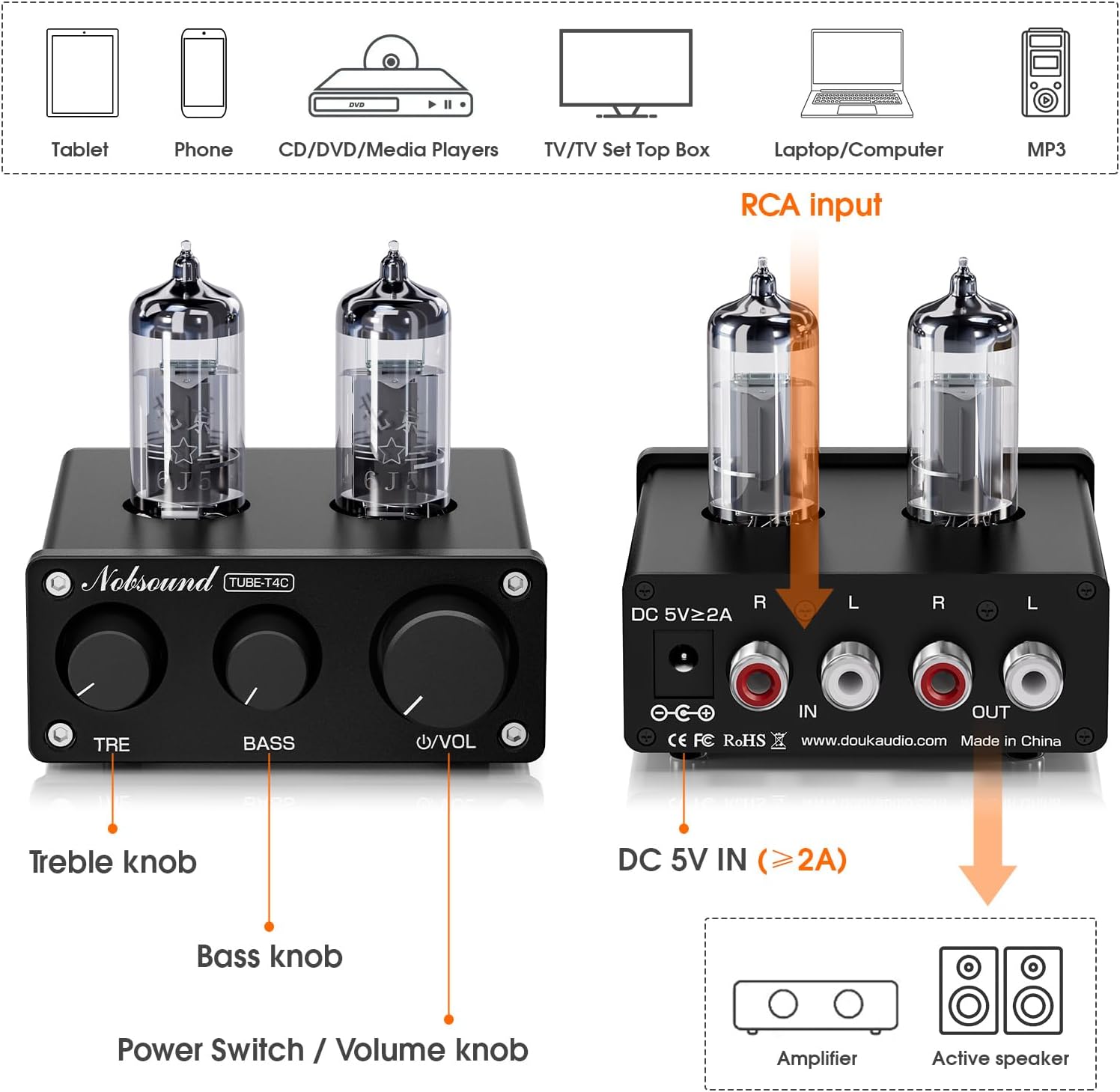
Figure 3: Detailed diagram of the Nobsound TUBE-T4C's front panel controls (Treble, Bass, Volume/Power) and rear panel connections (DC In, RCA In, RCA Out).
Жайгашуу
- Түтүктөрдү орнотуу: Carefully insert the two 6J5 tubes into their respective sockets on the top of the preamp. Ensure the pins align correctly and push gently until seated.
- Аудио булагын туташтыруу: Connect your audio source (PC, phone, tablet, CD player, streamer) to the RCA IN ports on the rear panel of the TUBE-T4C using an RCA cable.
- туташуу Ampкөтөргүч/Спикерлер: Connect the RCA OUT ports on the rear panel of the TUBE-T4C to your power amplifier or active (powered) speakers using an RCA cable.
- Кубат туташуу: Connect the DC 5V power adapter to the DC 5V IN port on the rear panel, then plug the adapter into a power outlet.
- Күйгүзүү: Long-press the Volume knob to turn on the unit. Allow the tubes to warm up for about 15 seconds for optimal performance.

Figure 4: Close-up of the rear panel showing the DC 5V power input and RCA input/output connections.
Иштөө нускамалары
- Үндү көзөмөлдөө: Rotate the Volume knob to adjust the audio output level.
- Басс тууралоо: Use the BASS knob to increase or decrease low frequencies according to your preference.
- Үч ырды жөндөө: Use the TRE knob to increase or decrease high frequencies according to your preference.

Figure 5: The front panel of the TUBE-T4C, highlighting the Treble, Bass, and Volume controls for easy audio adjustment.
Tube Replacement/Customization
The TUBE-T4C features pluggable 7-pin tube sockets, allowing you to customize your sound signature by swapping out the default 6J5 tubes with compatible alternatives. Supported tubes include 6J1, 5654, 6AK5, EF95, and others. Ensure the unit is powered off and unplugged before attempting to replace tubes. Carefully pull out the existing tubes and gently insert the new ones, aligning the pins correctly.

Сүрөт 6: Жакын пландан view of the pluggable tube sockets, demonstrating how tubes can be easily swapped for sound customization.
Проблемаларды чечүү
- Үн жок:
- Кубат адаптери бекем туташтырылганын жана түзмөк күйүп турганын текшериңиз.
- Verify that audio input and output cables are correctly connected.
- Ensure the volume is not set to minimum on the TUBE-T4C or your connected ampкөтөргүч/спикерлер.
- Confirm that the audio source is playing and its volume is adequate.
- Бурмаланган үн:
- Reduce the volume on the TUBE-T4C and/or your audio source.
- Кабелдик туташуулардын боштугун текшериңиз.
- Ensure the tubes are properly seated in their sockets.
- Humming/Noise:
- Бардык кабелдер туура корголгон жана электр кабелдеринен алыс экенин текшериңиз.
- Башка электр розеткасын колдонуп көрүңүз.
- Check for ground loop issues in your audio setup.
Техникалык шарттар
| Элемент Салмагы | 0.634 унция |
| Продукциянын өлчөмдөрү | 3.23 x 3.07 x 1.26 дюйм |
| Элемент моделинин номери | XZ-TUBE-T4C |
| Шайкеш түзмөктөр | активдүү спикер, Amplifier, CD Player, PC, Phone |
| Туташтыргыч түрү | RCA |
| Материалдын түрү | Металл |
| Power Source | Электр зымдары |
| Түс | Кара |
Медиа ресурстары
Продукциянын демонстрациялары
Fosi Audio MC331 Түтүк Интеграцияланган Amplifier with DAC Unboxing
Video 1: This video demonstrates the unboxing and initial setup of the Fosi Audio MC331, a similar tube integrated amplifier. While not the exact TUBE-T4C model, it provides a general idea of the unboxing experience and connectivity for tube amplifiers from a seller.
Fosi Audio P3 Preamp first impression
Video 2: This video offers a first impression of the Fosi Audio P3 Preamp. Although a different model, it showcases the general features and operation of a preamp, which can be helpful for understanding the TUBE-T4C's function.
AIYIMA T1 PRO Tube Preamplifier with RCA/Bluetooth Input B
Video 3: This video demonstrates the AIYIMA T1 PRO Tube Preamplifier, which shares similar functionality and connectivity (RCA/Bluetooth) with the Nobsound TUBE-T4C. It can provide insights into setting up and using a tube preamp.
Кепилдик жана колдоо
For warranty information and technical support, please refer to the contact details provided in the included user manual or visit the Nobsound official webсайт. Кепилдик дооматтары үчүн сатып алуу дүмүрчөгүңүздү сактаңыз.