1. Киришүү
The Quntis 32.5" Architect Desk Lamp (Model HT8885) is designed to provide versatile and eye-friendly illumination for various workspaces. Featuring a 3-stage adjustable light bar, ambient backlight, radar sensing technology, and dual control options, this lamp enhances productivity and visual comfort for tasks such as working, drafting, reading, and video conferencing.

Image: The Quntis 32.5" Architect Desk Lamp providing wide illumination over a multi-monitor workstation.
2. Кутуда эмне бар
- Үстөл Л.amp
- Алыстан башкаруу
- User Manual
- Адаптер
- Иш столунун стенди
3. Орнотуу жана орнотуу
Follow these steps to set up your Quntis Architect Desk Lamp:
- Cl тиркеңизamp: Securely attach the desk clamp to your desk. The clamp is compatible with desks up to 2.8 inches thick.
- L туташтырууamp Пост: l киргизиңизamp клamp. Ensure it is firmly seated.
- Assemble the Light Bar: Connect the adjustable light bar sections to the lamp post. The modular design allows for flexible positioning.
- Туташуу кубаты: Plug the supplied AC adapter into the lamp's power port, then plug the adapter into a power socket.
- Алыскы батареяларды салыңыз: Open the remote control's battery compartment and insert the provided AAA batteries.
- Позицияны тууралоо: Adjust the light bars and pivot points to your desired angle and height for optimal illumination.

Image: Step-by-step visual guide for clamping the desk lamp бетине.
Video: A demonstration of the Quntis Desk Lamp's wide front and back lighting capabilities, highlighting its adjustable features for relaxed vision.
4. Иштөө нускамалары
The Quntis Architect Desk Lamp offers both touch controls on the lamp itself and a wireless remote for convenient operation.
4.1. Touch Panel Controls (on lamp)
- ON/OFF & 2H Timer: Press briefly to turn the light on/off. Long press for 3 seconds to activate the 2-hour auto-off timer.
- Sectional Lighting Switch: Press to cycle through lighting modes: all sections on, both end sections on, or middle section on.
- Жарык баскычы: Short press to cycle through 5 brightness levels (5%, 15%, 40%, 70%, 100%). Long press for continuous dimming.
- Түс температурасы баскычы: Short press to switch between preset color temperatures (3000K/4000K/5000K/6500K). Long press to adjust smoothly.
- Арткы жарыкты которуштуруу: Short press to turn the ambient backlight on/off. Long press to continuously adjust backlight brightness.
- Radar Indicator: A blue indicator light shows when the radar sensing function is active.
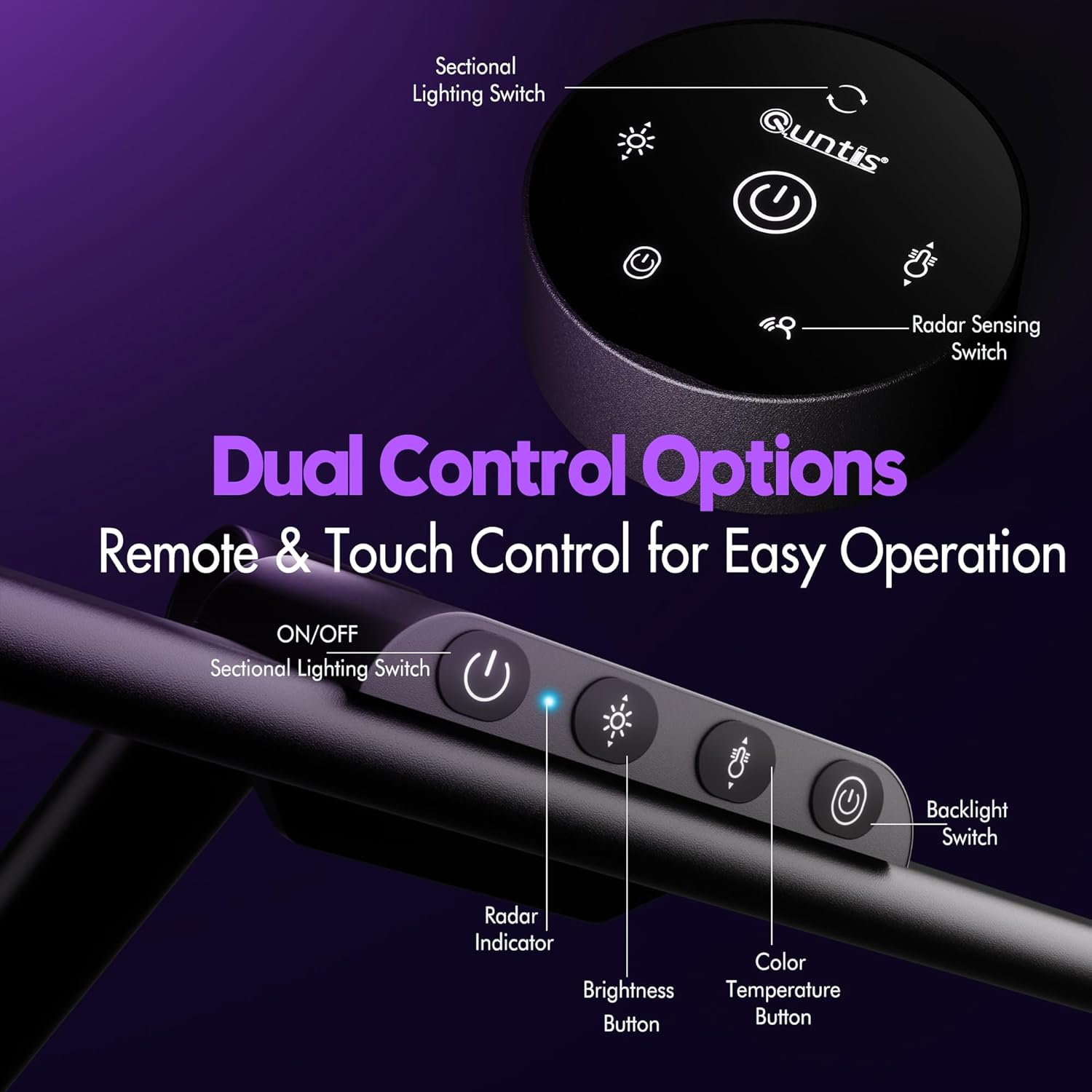
Сүрөт: деталдуу view of the touch control panel located on the lamp's main bar.
4.2. Алыстан башкаруу
The wireless remote control provides all the functionalities of the touch panel from a distance.
- Кубат баскычы: l буратamp on/off. Long press for 2-hour auto-off timer.
- Жарыктыкты көзөмөлдөө: Adjusts the front light brightness.
- Түс температурасын көзөмөлдөө: Changes the color temperature of the front light.
- Жарыкты башкаруу: Turns the ambient backlight on/off and adjusts its brightness.
- Sectional Lighting: Cycles through different lighting configurations (all, ends, middle).
- Radar Sensing Switch: Activates or deactivates the radar motion sensor.

Image: The wireless remote control for the Quntis desk lamp, showing buttons for brightness, color temperature, and other functions.
Video: A full demonstration of the Quntis Desk Lamp's features and controls in action, including brightness, color temperature, and adjustability.
4.3. Radar Sensing Function
The sensitive radar sensor detects motion within 29.5 ± 3.9 inches. The lamp automatically turns on when you sit down and turns off after 5 minutes of no detected motion, promoting energy efficiency.

Image: Visual representation of the radar sensing feature, showing automatic light activation upon user presence and deactivation after absence.
Video: An in-depth look at the radar sensor functionality of the Quntis Desk Lamp, demonstrating its automatic on/off capabilities.
5. Негизги өзгөчөлүктөрү
- Versatile Precision Lighting: 3-сtage adjustable light bar with five pivot points for vertical and horizontal rotation. Dual side bars extend to 32.5" for uniform lighting of large workspaces (39.37" × 70.87") or pivot inward for concentrated 1100 LM task lighting.
- Айланадагы арткы жарык: Wide, dimmable ambient backlight reduces screen-to-surroundings contrast, enhancing visual comfort and reducing eye strain.
- Smart Radar Sensing: Automatically turns the light on when motion is detected within 29.5 ± 3.9 inches and off after 5 minutes of inactivity.
- Кош башкаруу параметрлери: Intuitive touch panel on the lamp and a wireless remote control for adjusting brightness, color temperature (3000K–6500K), and lighting modes.
- Eye-Care, Glare-Free Front Light: 182 precision LEDs with a 45° anti-glare design and PC diffusion cover deliver soft, shadow-free light without screen reflection or direct eye glare. High CRI of 95 ensures accurate color rendering.
- 2 сааттык таймер: A built-in timer gently reminds users to rest their eyes.
- Мейкиндикти үнөмдөөчү дизайн: Clamps to most desks up to 2.8 inches thick, freeing up valuable desk space.

Image: The Quntis desk lamp demonstrating its 3-way foldable design, allowing for adjustable angles to direct light precisely where needed.
Видео: Кайраview of the Quntis 32.5" Desk Lamp, highlighting its backlight feature and overall design.
6. Техникалык шарттар
| Өзгөчөлүк | Спецификация |
|---|---|
| Модель номери | HT8885 |
| Бренд | Quntis |
| Продукциянын өлчөмдөрү | 32.5"D x 1.1"W x 30.7"H |
| Ватtage | 24 ватт |
| Жарык булагы түрү | LED (182 sources) |
| Жарыктык | 1100 LM (Max) |
| Түс температурасы | 3000K–6500K (Adjustable) |
| Башкаруу ыкмасы | Touch, Remote Control, Radar Sensor |
| Монтаж түрү | Clip On (up to 2.8" thick desks) |
| Материалдын түрү | Акрилонитрил бутадиен стирол, алюминий |
| Аяктоо түрү | Жылтырак |
| Бөлмө түрү | Office Home, Workspace, Dorm Room, Study Room, Bedroom, Dim Room, Living Room |
| Сунушталган Колдонуулар | Working, Drafting, Reading, Video Calls, Streaming, Gaming, Movie, Programming, Studying, Drawing, Painting |
7. Техникалык тейлөө
To ensure the longevity and optimal performance of your Quntis Desk Lamp, бул тейлөө көрсөтмөлөрүн аткарыңыз:
- Тазалоо: л сүртүү үчүн жумшак, кургак чүпүрөктү колдонуңузampбетине зыян келтириши мүмкүн болгон абразивдүү тазалоочу каражаттардан же эриткичтерден алыс болуңуз.
- Чаңды тазалоо: Regularly dust the light bars and control panel to prevent accumulation that could affect performance.
- Электр кабели: Электр шнурунун бузулуу белгилерин мезгил-мезгили менен текшерип туруңуз. Эгерде бузулган болсо, колдонууну токтотуп, кардарларды колдоо кызматына кайрылыңыз.
- Сактагыч: Эгерде лamp узак убакыт бою таза, кургак жана бузулуп калбашы үчүн коопсуз жерде сакталганын текшериңиз.
8. Кыйынчылыктарды
If you encounter any issues with your Quntis Desk Lamp, төмөнкү жалпы көйгөйлөрдү чечүү кадамдарын караңыз:
- Жарык күйбөйт:
- Кубат адаптери l экөөнө тең бекем сайылганын текшериңизamp жана иштеген электр розеткасы.
- Башка аспапка туташтыруу менен электр розеткасынын иштешин текшериңиз.
- Алыстан башкаруу пультунун батареялары туура салынганын жана түгөнүп калбаганын текшериңиз.
- Алыстан башкаруу жооп бербейт:
- Пульттун батарейкаларын алмаштырыңыз.
- Пульт менен l ортосунда эч кандай тоскоолдуктар жок экендигин текшериңизampсенсор.
- Radar Sensor Malfunction:
- Ensure the radar sensing function is activated via the remote or touch panel.
- Clear any obstructions around the sensor area on the lamp.
- Жаркылдаган жарык:
- Электр туташуусунун туруктуулугун текшериңиз.
- Эгерде жылтылдап кете берсе, кардарларды колдоо кызматына кайрылыңыз.
Көбүрөөк жардам алуу үчүн, кепилдик жана колдоо маалыматын караңыз.
9. Кепилдик жана колдоо
The Quntis 32.5" Architect Desk Lamp is covered by a manufacturer's warranty. Please refer to the warranty card included in your packaging for specific terms and conditions.
For technical support, product inquiries, or warranty claims, please contact Quntis customer service through their official webсайт же продукт документациясында көрсөтүлгөн байланыш маалыматы.
Сураныч, кепилдикке тиешелүү кызматтар үчүн сатып алганыңыздын далилин сактап коюңуз.


